

1. Introduction
Thank you for choosing the Belaco 12L/Day Dehumidifier. This manual provides essential information for the safe and efficient operation, maintenance, and troubleshooting of your new appliance. Please read it thoroughly before first use and keep it for future reference.
This dehumidifier is designed to effectively remove excess moisture from your indoor environment, helping to prevent mold growth, reduce dampness, and improve air quality. Its key features include:
- 12 Litres/Day Extraction: Capable of removing up to 12 litres of water per day.
- 3.5 Litre Water Tank: Large capacity tank with automatic shut-off when full.
- 24-Hour Timer: Program the unit to turn on or off automatically.
- Quiet Operation: Operates at low noise levels (42dBA/44dBA) for minimal disturbance.
- Digital Display: Provides clear control and humidity readings.
- Continuous Drainage Option: Allows for extended operation without manual tank emptying.
- Portable Design: Lightweight with universal wheels for easy movement.
2. Important Safety Instructions
To reduce the risk of fire, electric shock, or injury, always follow these basic safety precautions:
- Read all instructions before using the appliance.
- Ensure the power supply voltage matches the rating label on the unit.
- Do not operate the dehumidifier with a damaged cord or plug.
- Always unplug the unit before cleaning, servicing, or moving it.
- Do not touch the power plug with wet hands.
- Keep the appliance out of reach of children and pets.
- Ensure proper ventilation around the unit; do not block air inlets or outlets.
- Do not use the dehumidifier in areas where flammable liquids or gases are stored.
- Place the unit on a stable, level surface to prevent tipping.
- Only qualified personnel should perform repairs. Improper repairs may cause hazards.
3. Parts Overview
Familiarize yourself with the components of your Belaco Dehumidifier:

Figure 3.1: Front view of the Belaco 12L/Day Dehumidifier.

Figure 3.2: Front and Back Parts Names and Functions.
- Control Panel: Digital display and buttons for operation.
- Air Intakes: Located on the back, where air is drawn into the unit.
- Water Tank: Removable tank for collecting condensed water.
- Continuous Draining Hole: Port for connecting a drainage hose for continuous operation.
- Universal Wheels: Four wheels at the base for easy mobility.

Figure 3.3: Key components including wheels, drainage, tank, and display.
4. Setup
4.1 Unpacking
Carefully remove the dehumidifier from its packaging. Retain the packaging materials for future storage or transport. Inspect the unit for any signs of damage. If damaged, do not operate and contact customer service.
4.2 Placement
For optimal performance, place the dehumidifier on a firm, level surface in the area where dehumidification is needed. Ensure there is at least 20-30 cm (8-12 inches) of space around all sides of the unit to allow for proper airflow.

Figure 4.1: Example of proper dehumidifier placement in a room.
Avoid placing the unit near heat sources, in direct sunlight, or in areas with excessive dust or vibrations. The dehumidifier is suitable for various rooms including bedrooms, bathrooms, living rooms, kitchens, garages, and basements.

Figure 4.2: Dehumidification solutions for various home areas.
4.3 Power Connection
Plug the power cord into a grounded electrical outlet. Ensure the outlet meets the power requirements of the dehumidifier.
5. Operating Instructions
5.1 Control Panel
The digital control panel provides easy access to all functions:

Figure 5.1: Digital Control Panel Layout.
- TEMPERATURE Key: Press to display the current room temperature.
- HUMIDITY Switch: Press to set your desired humidity level.
- WIND SPEED Switch: Press to select the fan speed (e.g., low, medium, high).
- TIME Switch: Press to set the 24-hour timer for automatic start or stop.
- POWER Button: Press to turn the unit ON or OFF.
5.2 Setting Humidity Level
Press the "HUMIDITY" button repeatedly to cycle through desired humidity levels. The unit will automatically operate to maintain the set humidity.
5.3 Timer Function
The 24-hour timer allows you to schedule the dehumidifier's operation. Press the "TIME" button to set the desired duration for the unit to run before automatically turning off, or to set a delay for it to turn on.
5.4 Child Lock Function
To prevent accidental changes to settings, the dehumidifier features a child lock:

Figure 5.2: Activating the Child Lock.
To lock or unlock the dehumidifier's control panel, press and hold the "HUMIDITY" and "TEMPERATURE" buttons simultaneously for a few seconds until the lock indicator appears/disappears on the display.
5.5 Dehumidification Modes and Benefits
The dehumidifier works to maintain healthy and optimal air humidity, reducing levels up to 80% RH. This helps eliminate musty smells, dry wet walls, prevent black mold, and assist in drying clothes.

Figure 5.3: Benefits of maintaining optimal air humidity.
The unit's ultra-efficient compressor ensures quiet operation, making it suitable for use in bedrooms, offices, or other areas where noise is a concern.

Figure 5.4: Noise level comparison, demonstrating the dehumidifier's quiet performance.
With its 24-hour on/off timer and auto shut-off features, the dehumidifier is energy efficient, helping you manage energy consumption.

Figure 5.5: The dehumidifier's energy-efficient features.
6. Maintenance and Care
6.1 Emptying the Water Tank
When the 3.5L water tank is full, the unit will automatically shut off and an indicator light will illuminate. Carefully remove the tank from the unit and empty the collected water. Reinsert the tank firmly until it clicks into place.
6.2 Continuous Drainage
For continuous operation without manual emptying, you can connect the included drainage hose to the continuous draining hole on the back of the unit. Ensure the hose is sloped downwards to allow water to drain by gravity into a suitable drain or container.
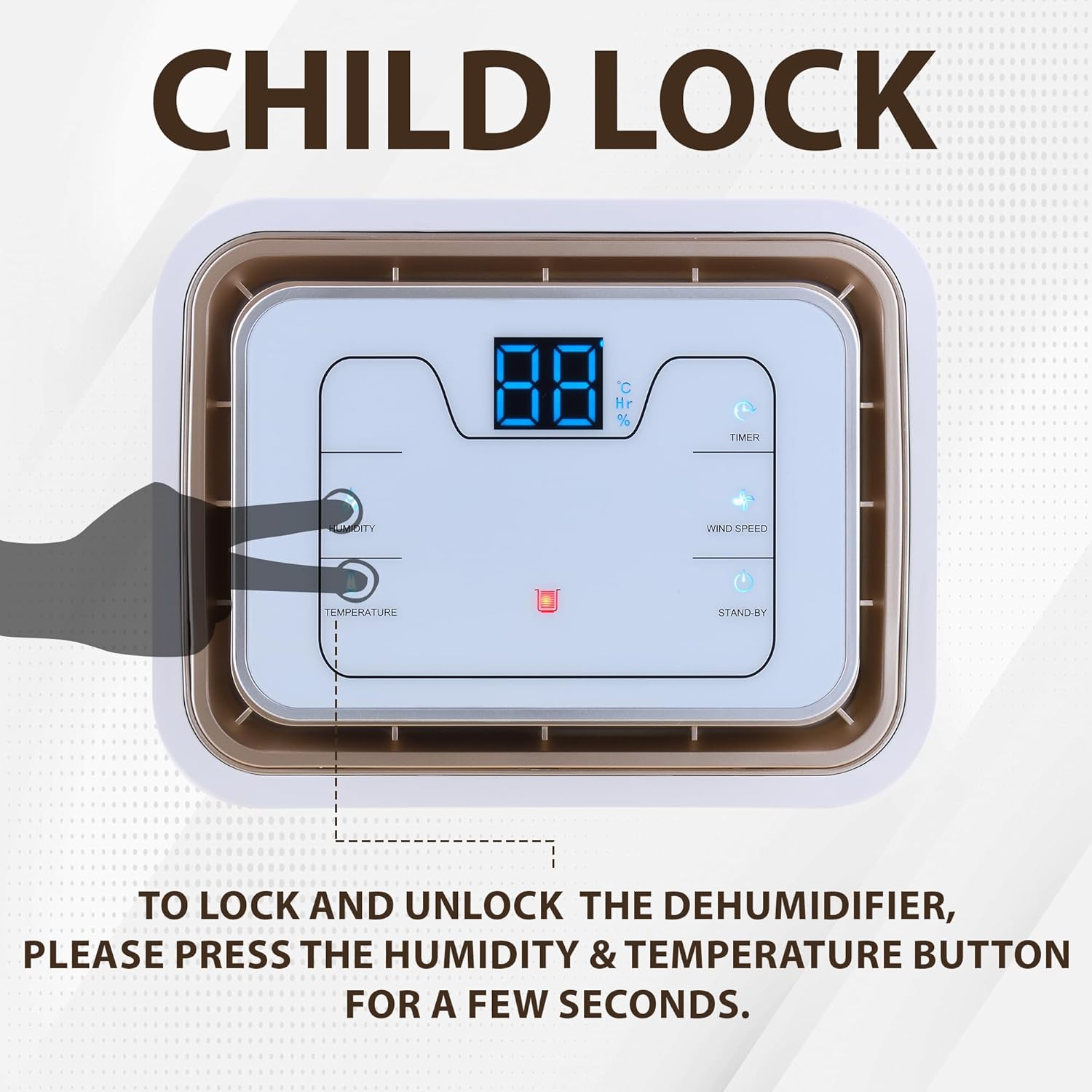
Figure 6.1: Two-way draining method: Auto (hose) and Manual (tank).
6.3 Cleaning the Air Filter
Regularly clean the air filter to maintain optimal performance and air quality. We recommend cleaning the air filter at least once a month, or more frequently if the unit is used in a dusty environment. Refer to the parts overview for the filter location. Gently remove the filter and clean it with a vacuum cleaner or mild soapy water. Ensure it is completely dry before reinserting.
6.4 Cleaning the Condensate Bucket
We recommend cleaning the condensate bucket every month to prevent mold and mildew buildup. Remove the water tank and wipe the interior with a damp cloth and mild detergent. Rinse thoroughly and dry before reinserting.
6.5 Storage
If the dehumidifier will not be used for an extended period, unplug it, empty the water tank, clean the filter, and store it in a cool, dry place, preferably in its original packaging.
7. Troubleshooting Guide
Before contacting customer service, please refer to the following common issues and solutions:
| Problem | Possible Cause | Solution |
|---|---|---|
| Dehumidifier does not turn on. | No power supply; Power cord not plugged in; Water tank full or not properly inserted. | Check power outlet; Ensure power cord is securely plugged in; Empty water tank and reinsert correctly. |
| No water collected or low collection. | Room humidity too low; Temperature too low; Air filter clogged; Unit size too small for area; Doors/windows open. | Dehumidifier may not collect water if humidity is already low; Ensure room temperature is above 5°C (41°F); Clean air filter; Ensure unit is appropriately sized for the room; Close all doors and windows. |
| Unit is noisy. | Unit not on a level surface; Air filter clogged; Obstruction in fan. | Place unit on a flat, stable surface; Clean air filter; Check for and remove any obstructions. |
| Humidity not decreasing. | Air filter clogged; Room size too large; Excessive moisture source; Incorrect humidity setting. | Clean air filter; Consider using multiple units for larger spaces; Identify and address major moisture sources; Adjust desired humidity setting lower. |
8. Product Specifications
| Feature | Specification |
|---|---|
| Brand | Belaco |
| Model Number | BDD012L |
| Product Dimensions | 23.4 x 30.4 x 49 cm |
| Item Weight | 10.67 kg |
| Colour | White |
| Capacity (Extraction) | 12 litres/day |
| Tank Volume | 3.5 Litres |
| Number of Speeds | 4 |
| Material | Plastic, Metal |
| Finish Types | Hand Painted |
| Care Instructions | Clean the air filter; Clean condensate bucket monthly. |
| Assembly Required | Yes |
| Number of Pieces | 1 |
| Batteries Required | No |
| Included Components | Drain Hose, Manual Instruction |
| Recommended Uses | Home, Office, Bathroom, Caravan, Living Room, Garage, Laundry Room |
| First Available Date | 12 Oct. 2023 |
9. Warranty and Support
This Belaco dehumidifier comes with a standard manufacturer's warranty. Please refer to your purchase documentation or contact your retailer for specific warranty terms and conditions.
For technical support, troubleshooting assistance beyond this manual, or service inquiries, please contact Belaco customer service. Contact details can typically be found on the product packaging or the official Belaco website.

