
Product Overview
The LGIDTECH E3-RF Miboxer 3-in-1 LED Strip Light Controller is designed for versatile control of various LED strip light types, including RGB, RGBW, and RGB+CCT. This controller features tool-free wiring for easy installation and supports control via a smartphone application and voice commands when paired with a compatible gateway (sold separately). It operates on a DC 12-24V input and provides a maximum total output of 12A, making it suitable for a wide range of LED lighting setups.
Key Features
- Tool-free Instant Wiring: Simplifies installation by eliminating the need for a screwdriver, allowing for quick and easy wire connections.
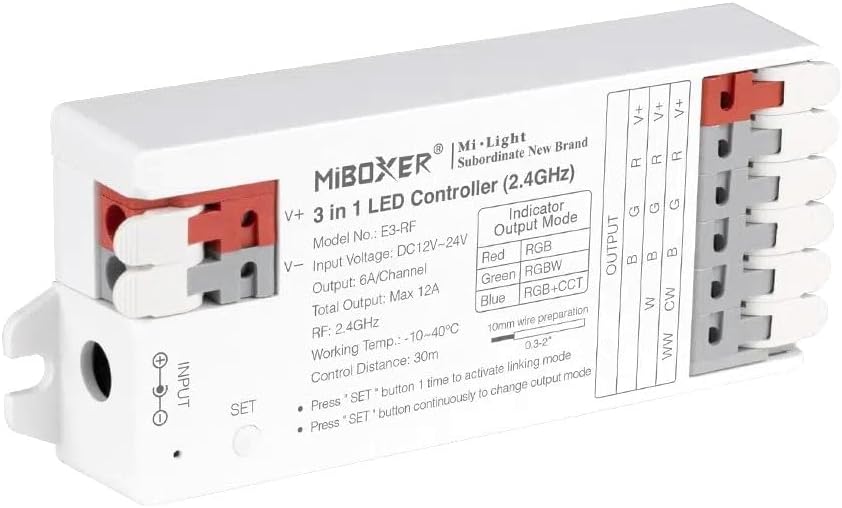
- 3-in-1 Compatibility: Supports three different types of LED strip lights: RGB (4 wires), RGBW (5 wires), and RGB+CCT (6 wires).
- SET Button for Output Mode Switching: Easily switch between the three output modes (RGB, RGBW, RGB+CCT) by pressing the dedicated SET button.
- High Load Capacity: Provides a maximum output current of 12A, supporting up to 144 Watts with DC 12V LED strip lights or 288 Watts with DC 24V LED strip lights.
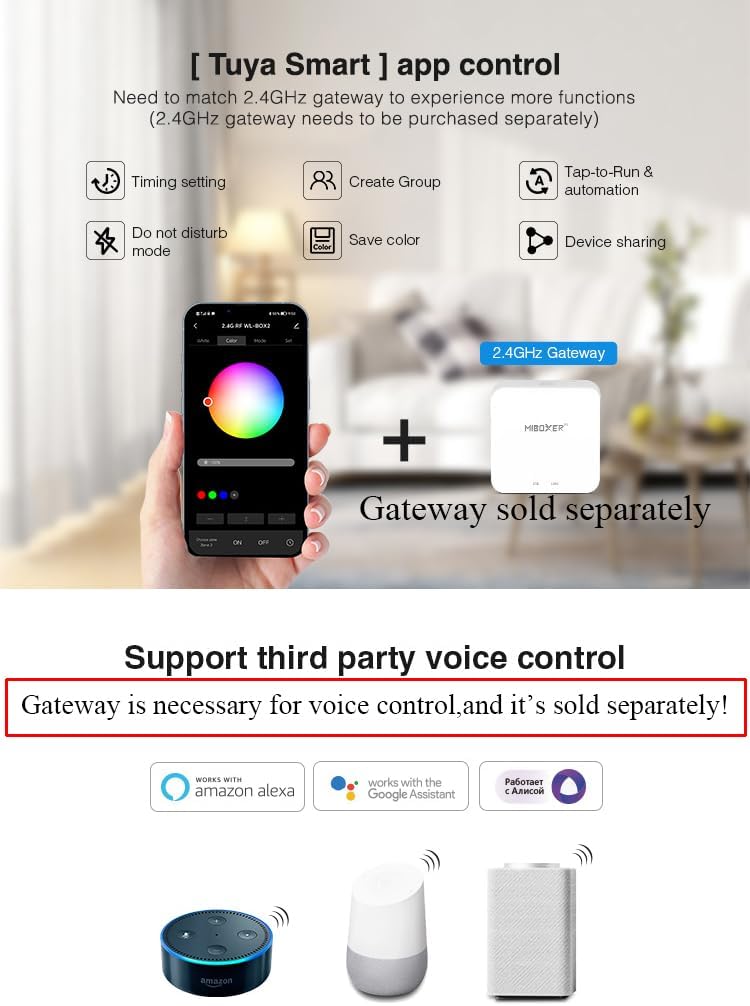
- Smartphone Control via Gateway: Enables control through a smartphone application when connected to a WL-Box2 gateway (sold separately).
- Voice Control Compatibility: Compatible with Amazon Alexa and Google Home for voice control, requiring the WL-Box2 gateway (sold separately).

Setup Guide
Wiring Instructions
The E3-RF controller features tool-free wiring terminals for quick and secure connections. Simply press down on the orange tabs to open the terminal, insert the stripped wire, and release the tab to secure the connection. Ensure correct polarity (V+ and V-) for input power and match the output wires (R, G, B, W, CW, WW) to your LED strip light type (RGB, RGBW, or RGB+CCT).

Output Mode Configuration
The E3-RF controller supports three output modes: RGB, RGBW, and RGB+CCT. You can switch between these modes using the 'SET' button located on the controller. Press the 'SET' button continuously to cycle through the modes. The indicator light on the controller will change color to confirm the active output mode. If no operation is performed within 3 seconds after pressing the button, the controller will log out of the setting operation.
| Indicator Color | Output |
|---|---|
| Red Light | RGB |
| Green Light | RGBW |
| Blue Light | RGB+CCT |
Operating Instructions
Remote Control Linking Instructions
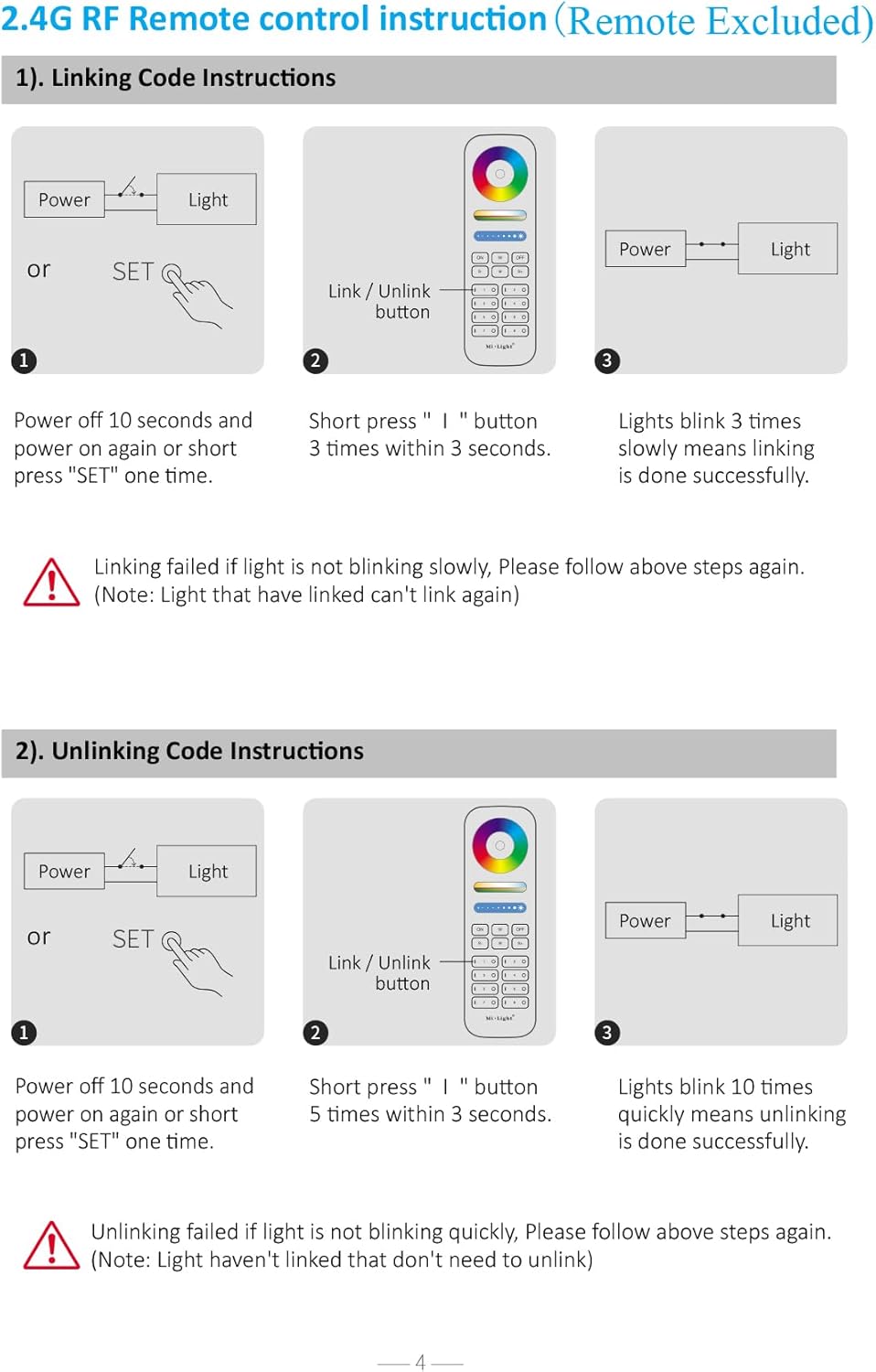
To link the E3-RF controller with a compatible 2.4G RF remote control (sold separately), follow these steps:
- Ensure the controller is powered off.
- Power on the controller.
- Within 3 seconds of powering on, short press the 'I' (Link/Unlink) button on your remote control 3 times.
- The connected LED strip lights will blink 3 times slowly, indicating successful linking.
Note: If linking fails (lights do not blink slowly), please repeat the steps. A light that has already been linked cannot be linked again.
Remote Control Unlinking Instructions
To unlink the E3-RF controller from a previously linked 2.4G RF remote control (sold separately), follow these steps:
- Ensure the controller is powered off.
- Power on the controller.
- Within 3 seconds of powering on, short press the 'I' (Link/Unlink) button on your remote control 5 times.
- The connected LED strip lights will blink 10 times quickly, indicating successful unlinking.
Note: If unlinking fails (lights do not blink quickly), please repeat the steps. A light that has not been linked cannot be unlinked.
Smartphone App and Voice Control
The E3-RF controller can be controlled via a smartphone application (e.g., Tuya Smart app) and voice commands through platforms like Amazon Alexa and Google Home. Please note that direct control is not possible. A WL-Box2 Gateway is required to enable these functionalities. The gateway acts as a bridge between your controller and your smart home system and is sold separately.

Signal Transmitting and Modes Synchronization
The E3-RF controller features signal transmitting capabilities, allowing one LED controller to transmit signals from the remote control to another LED controller within a 30-meter range, provided there is another controller within that distance. This enables an extended control range. Additionally, different LED controllers can work synchronously even if they are started at different times. When controlled by the same remote, they can maintain the same dynamic mode and synchronization within a 30-meter distance.

Maintenance
To ensure the longevity and optimal performance of your LGIDTECH E3-RF controller, follow these maintenance guidelines:
- Cleaning: Use a soft, dry cloth to clean the surface of the controller. Avoid using abrasive cleaners, solvents, or harsh chemicals, as these can damage the casing or internal components.
- Environment: Operate the controller within its specified working temperature range of -10~40°C (14~104°F). Avoid exposing the device to extreme temperatures, high humidity, or direct sunlight.
- Ventilation: Ensure the controller has adequate ventilation and is not covered, to prevent overheating.
- Connections: Periodically check all wiring connections to ensure they are secure and free from corrosion.
Troubleshooting
If you encounter issues with your LGIDTECH E3-RF controller, refer to the following common problems and their solutions:
- Light not responding to remote control:
- Ensure the remote control is within the 30-meter control distance.
- Verify that the controller is properly linked to the remote control. If not, follow the linking instructions.
- Check for any obstacles that might be blocking the signal between the remote and the controller.
- Smartphone App or Voice Control not working:
- Confirm that the WL-Box2 Gateway is properly connected to power and your home network.
- Ensure the gateway is correctly paired with the E3-RF controller and configured within the smartphone app.
- Check your internet connection and the status of the app/voice assistant service.
- LED strip lights flickering or dim:
- Verify that the input voltage (DC12-24V) matches the requirements of your LED strip lights and power supply.
- Check the total load of your LED strip lights. Ensure it does not exceed the controller's maximum output of 12A.
- Inspect all wiring connections for looseness or corrosion.
- Incorrect color output or mode:
- Press the 'SET' button on the controller to cycle through the output modes (RGB, RGBW, RGB+CCT) and ensure the correct mode is selected based on your LED strip light type. Observe the indicator light color.
- Verify that the output wires from the controller are correctly connected to the corresponding inputs on your LED strip light.
Technical Specifications
| Specification | Detail |
|---|---|
| Product Name | 3 in 1 LED Controller (2.4GHz) |
| Model Number | E3-RF |
| Brand | LGIDTECH |
| Input Voltage | DC12~24V |
| Output | 6A/Channel |
| Total Output | Max 12A |
| Max Load (12V) | 144 Watts |
| Max Load (24V) | 288 Watts |
| Control Distance | 30 meters (98 feet) |
| Working Temperature | -10~40°C (14~104°F) |
| Output Connection | Common anode |
| Control Method | App, Voice (via Gateway), Remote Control (sold separately) |
| Item Weight | 1.76 ounces |
| Package Dimensions | 4.06 x 1.65 x 0.94 inches |
| Manufacturer | Miboxer |
| Type of Bulb | LED |
Warranty Information
Specific warranty details for the LGIDTECH E3-RF Miboxer 3-in-1 LED Strip Light Controller are not provided in this manual. For information regarding product warranty, including terms, conditions, and duration, please refer to the product packaging, the seller's website, or contact LGIDTECH directly.
Customer Support
For technical assistance, troubleshooting, or any inquiries regarding your LGIDTECH E3-RF controller, please contact LGIDTECH customer service. You may find contact information on the product packaging or by visiting the official LGIDTECH store on Amazon: LGIDTECH Amazon Store.