
Product Overview
The GoolRC 2105A is a 1:14 scale, 4WD brushless remote control monster truck designed for high-speed off-road performance. It features a powerful brushless motor, independent suspension, and a 2.4GHz remote control system for precise handling across various terrains.
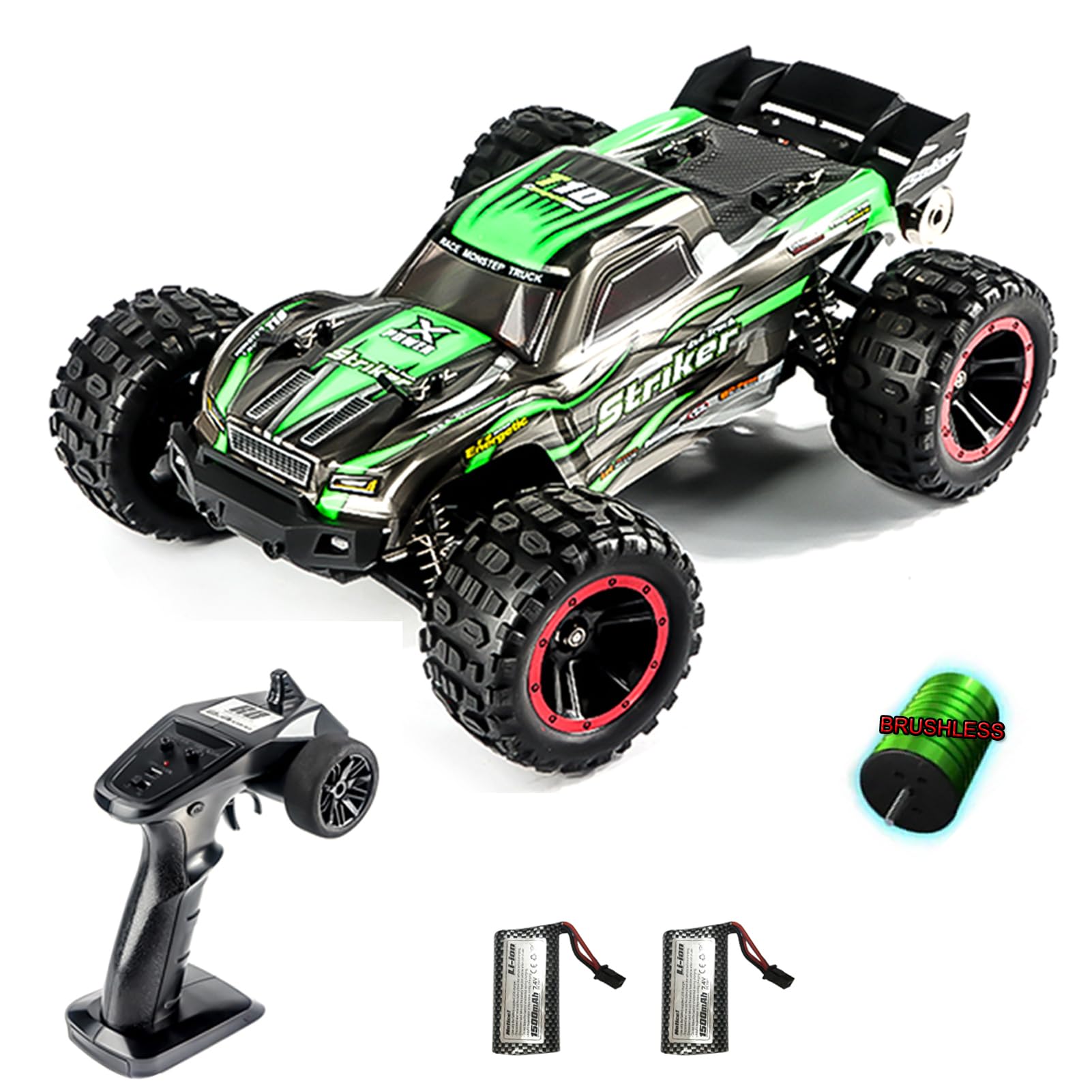
Image: The GoolRC 2105A Brushless RC Truck, highlighting its design and features.
What's in the Box
Verify that all components are present before proceeding with setup.
- 1x RC Truck
- 1x Remote Controller
- 2x Car Battery
- 1x USB Charger
- 1x Manual
Key Features
- High Speed Performance: Equipped with a 2840 brushless motor, capable of reaching speeds up to 75 km/h. Features four-wheel independent suspension, metal gears, drive shafts, and adjustable shock absorbers.
- Easy Control: 2.4G remote control frequency provides precise and responsive handling.
- Enhanced Features: Includes metal auxiliary wheels for stunt actions and LED headlights for visibility in low-light conditions.
- Extended Playtime: Comes with a 7.4V 1500mAh Li-ion battery for longer operation. Features off-road tires with strong grip and full ball bearings throughout the vehicle.
- Safety Protections: Incorporates charging protection, motor anti-lock protection, high-temperature protection, and low-voltage power-off functions.

Image: Professional-level chassis with brushless motor, waterproof ESC, metal transmission parts, and digital servo.
Setup Instructions
1. Battery Charging
- Connect the provided USB charger to a compatible USB power source (e.g., computer, USB wall adapter).
- Connect the 7.4V 1500mAh Li-ion car battery to the USB charger.
- Allow the battery to charge fully. The indicator light on the charger will change (refer to charger specific instructions if available) when charging is complete.
- Caution: Do not overcharge the battery. Always supervise charging.
2. Installing Car Battery
- Remove the body shell of the RC truck.
- Place the fully charged battery into the battery compartment.
- Secure the battery to prevent movement during operation.
- Connect the battery connector to the truck's power connector.
- Reattach the body shell.
3. Remote Controller Setup
- Install 3x AA batteries (not included) into the remote controller, observing polarity.
- Turn on the RC truck first, then turn on the remote controller.
- The remote controller and truck should automatically pair. The indicator light on the remote will confirm successful pairing.

Image: Remote control function description, showing throttle limit, fine adjustment, power light, power switch, direction control wheel, and trigger.
Operating Instructions
Basic Controls
- Throttle Trigger: Pull to accelerate forward, push to brake/reverse.
- Steering Wheel: Turn left or right to steer the truck.
- Throttle Limit Switch: Adjusts the maximum speed for beginners or different terrains.
- Steering Trim: Fine-tunes the steering to ensure the truck drives straight when the steering wheel is centered.
Driving Tips
- Start with a low throttle limit until you are familiar with the controls.
- Avoid driving in deep water or extremely muddy conditions, despite the waterproof ESC, to prolong the lifespan of components.
- The metal auxiliary wheel assists with wheelies and stunts; practice in open areas.
- The LED headlights are useful for night driving, but ensure clear visibility of the truck.
Video: GoolRC 2105A Brushless RC Truck in action, demonstrating its speed and off-road capabilities. This video shows the truck performing various maneuvers on different terrains.
Maintenance
- Cleaning: After each use, especially in dusty or muddy conditions, clean the truck with a soft brush or compressed air. Avoid using water directly on electronic components.
- Lubrication: Periodically check and lubricate moving parts such as gears and bearings with RC-specific lubricant.
- Inspection: Regularly inspect all screws, nuts, and bolts for tightness. Check tires for wear and tear, and ensure shock absorbers are functioning correctly.
- Battery Care: Store batteries in a cool, dry place. Do not store fully charged or completely discharged for extended periods.
Troubleshooting
| Problem | Possible Cause | Solution |
|---|---|---|
| Truck does not respond to remote. | Low battery in truck or remote; not paired; interference. | Charge/replace batteries; re-pair remote and truck; move to an area with less interference. |
| Truck runs slowly or lacks power. | Low battery; motor/ESC overheating; damaged motor. | Charge battery; allow components to cool; inspect motor for damage. |
| Steering is erratic or unresponsive. | Steering trim incorrect; damaged servo; loose steering components. | Adjust steering trim; inspect servo and steering linkages. |
| Truck makes unusual noises. | Debris in gears; worn gears; loose components. | Clean gears; inspect for worn parts and tighten loose screws. |
Specifications
- Model: 2105A
- Scale: 1:14
- Drive System: 4WD
- Motor: 2840 Brushless Motor
- Max Speed: Up to 75 KM/H
- Remote Control Frequency: 2.4GHz
- Battery: 7.4V 1500mAh Li-ion
- Item Weight: 4.25 pounds
- Package Dimensions: 12.99 x 10.24 x 6.69 inches
- Recommended Age: 14 years and up
Warranty and Support
For warranty information and customer support, please refer to the official GoolRC website or contact your retailer. Keep your purchase receipt as proof of purchase.
You can visit the official GoolRC store for more products and support: GoolRC Store