1. Product Overview
The Topcony Smart Floodlight 2K Solar Security Camera is a wireless outdoor surveillance solution designed for enhanced home security. It features a 2K resolution camera, motion-activated LED floodlights, and color night vision for clear monitoring in various lighting conditions. Powered by a solar panel and a 12000mAh rechargeable battery, it offers continuous operation. Advanced AI human detection reduces false alarms, while two-way audio allows for real-time communication. Multiple storage options, including SD card and cloud storage, ensure your footage is securely saved. The camera is built with an IP66 weatherproof rating, making it suitable for diverse outdoor environments.

Image: The Topcony Smart Floodlight 2K Solar Security Camera, showcasing its integrated floodlight and solar panel connection, mounted on a wall.
2. What's in the Box
Verify that all components are present in the package before proceeding with installation.
- Topcony Smart Floodlight 2K Solar Security Camera
- Solar Panel with 3M Power Cable
- Wall Mount Bracket
- Mounting Screws and Wall Plugs
- USB Charging Cable
- User Manual

Image: All components included in the product package, laid out for inspection, including the camera, solar panel, mounting hardware, and cables.
3. Setup Guide
3.1 Initial Charging
Before first use, ensure the camera's built-in 12000mAh battery is fully charged. This can be done via the included USB cable or by exposing the solar panel to direct sunlight. A full charge ensures optimal performance and longevity.

Image: Demonstrates two charging methods: directly via a power adapter indoors and continuously via the solar panel when mounted outdoors.
3.2 Mounting the Camera
Select a suitable outdoor location for mounting, ensuring a clear view of the area you wish to monitor and sufficient sunlight exposure for the solar panel. Use the provided wall mount bracket, screws, and wall plugs to securely attach the camera to a wall or other stable surface. Ensure the camera is within range of your 2.4GHz Wi-Fi network.
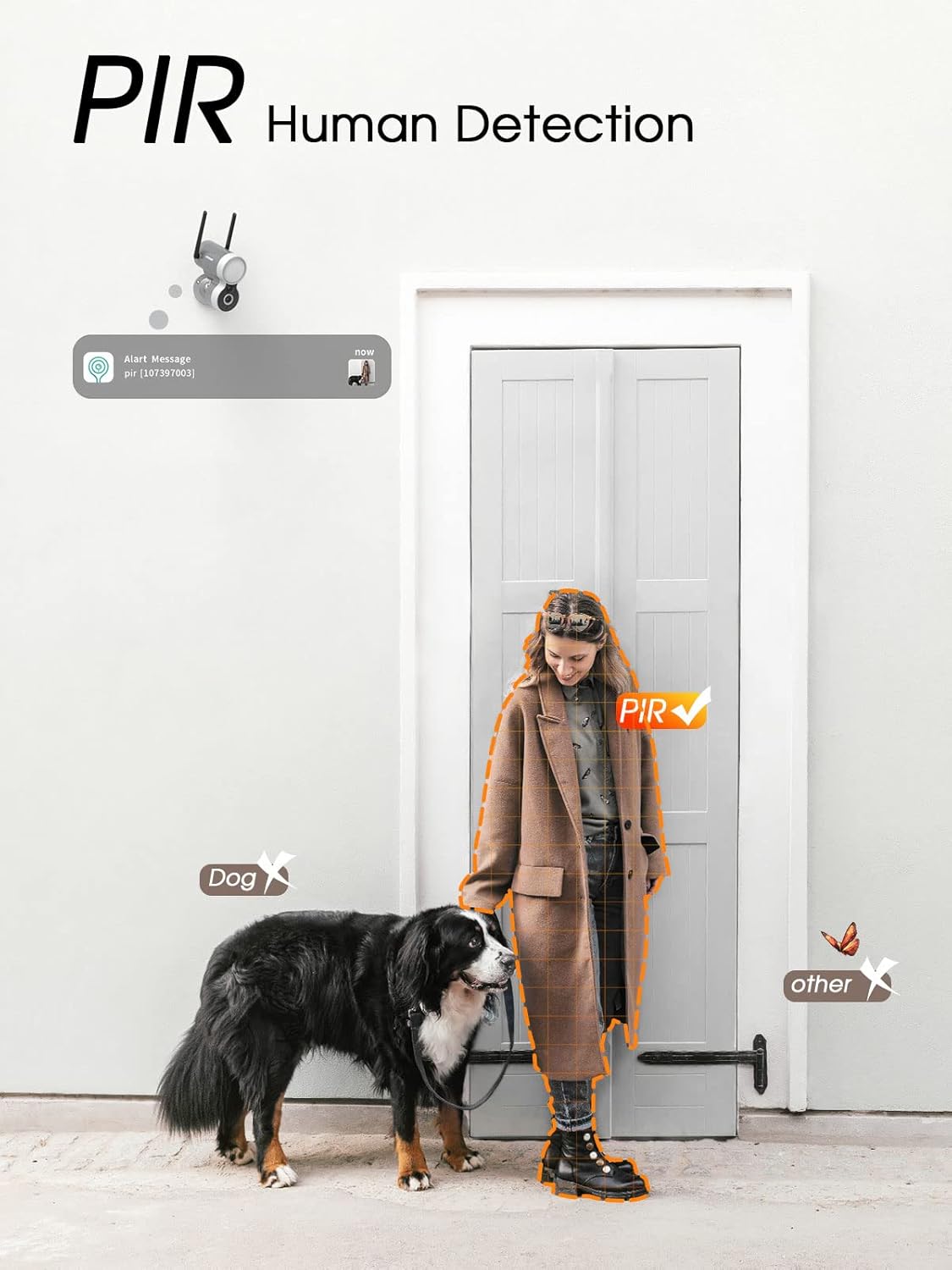
Image: The Topcony security camera securely mounted on an exterior wall, demonstrating its outdoor installation.
3.3 App Installation and Connection
- Download the "Topcony Cam" app from your smartphone's app store (iOS or Android).
- Register for a new account or log in if you already have one.
- Follow the in-app instructions to add your new camera. This typically involves scanning a QR code on the camera or manually entering its ID.
- Connect the camera to your 2.4GHz Wi-Fi network as prompted by the app.

Image: The Topcony app interface displayed on a smartphone, tablet, and laptop, illustrating multi-device compatibility for monitoring.
4. Operating Instructions
4.1 Night Vision and Floodlight Operation
The camera features 4 built-in infrared lights for standard black and white night vision and motion-activated LED floodlights for full-color night vision. The floodlights can illuminate an area up to 15 meters (50 feet) and activate upon motion detection, enhancing visibility and deterring intruders.

Image: The Topcony camera's floodlight actively illuminating a dark pathway, demonstrating its effective night lighting capability.

Image: A split view demonstrating the clarity of 2K FHD color night vision compared to traditional infrared night vision, showing a person in a dark environment.
4.2 AI Human Detection and Alarm Functions
The camera utilizes a 130° PIR motion sensor and AI human detection to accurately identify human movement, minimizing false alarms from pets or other non-human objects. You can customize alarm sounds, detection sensitivity, and define specific alarm areas within the app to focus monitoring on critical zones.

Image: Illustrates the PIR human detection feature, highlighting how the camera distinguishes between humans, dogs, and other objects to reduce false alerts.

Image: A visual representation of the sound and light alarm system activating to deter an individual approaching a property at night.

Image: An aerial view of a property with a grid overlay, demonstrating how users can define specific motion detection zones to customize alarm areas.
4.3 Two-Way Audio Communication
The integrated two-way audio feature allows you to communicate with visitors or deter unwanted individuals directly through the Topcony Cam app on your smartphone or tablet. This provides an interactive layer of security and convenience.

Image: Illustrates the two-way audio feature, showing a user communicating with a delivery person at their door via the camera.
4.4 Storage and Playback
The camera supports local storage via an SD card (16GB to 128GB, not included) and offers cloud storage with a 7-day free trial. Recorded footage can be accessed and played back through the app, with options for up to 4x speed playback. Event recording duration is adjustable from 10 to 30 seconds.

Image: A close-up view of the Topcony camera's top, showing the accessible SD card slot and power button for local storage.

Image: Illustrates the camera's storage capabilities, including support for up to 128GB SD cards, a 7-day free cloud storage trial, and AES256 data encryption for security.
4.5 App Features and Settings
The Topcony Cam app provides comprehensive control over your camera. You can monitor battery status, view power consumption statistics, adjust detection sensitivity levels (1-10), and set custom event recording times and alert plans to optimize power usage and surveillance effectiveness.

Image: A smartphone screen displaying the detection sensitivity slider within the Topcony app, allowing users to adjust motion detection levels.

Image: A smartphone screen showing electricity usage statistics and Wi-Fi signal strength within the Topcony app, providing insights into camera performance.
5. Maintenance
5.1 Cleaning the Camera and Solar Panel
Regularly clean the camera lens and the surface of the solar panel to ensure optimal performance. Use a soft, damp cloth to gently wipe away dust, dirt, or debris. Avoid using harsh chemicals or abrasive materials that could scratch the surfaces.
5.2 Battery Care
While the camera is designed for year-round operation with solar power, ensure the solar panel receives adequate direct sunlight. In prolonged periods of low light or heavy usage, the battery level can be monitored via the app. If the battery level drops significantly, consider temporarily charging the camera via USB to maintain continuous operation.
6. Troubleshooting
6.1 Camera Offline / No Power
- Check battery level in the app. If low, ensure solar panel is receiving direct sunlight or charge via USB.
- Verify Wi-Fi connection. Ensure the camera is within range of your 2.4GHz Wi-Fi network and the signal is strong.
- Restart the camera by pressing the reset button (refer to product diagram for location).
6.2 Excessive False Alarms
- Adjust the detection sensitivity in the app to a lower setting.
- Define or refine custom alarm areas to exclude areas with frequent non-human motion (e.g., swaying trees, passing cars if not relevant).
- Ensure the camera lens is clean and free from obstructions.
6.3 Poor Night Vision Quality
- Ensure the camera lens and floodlight are clean.
- Check for any obstructions blocking the floodlight or infrared sensors.
- Verify that the floodlight is enabled in the app settings for color night vision.
6.4 Weather Resistance
The camera boasts an IP66 weatherproof rating, designed to withstand various outdoor conditions including wind, sand, rain, snow, and extreme temperatures (-4°F to 122°F / -20°C to 50°C). If issues arise after severe weather, ensure all connections are secure and the camera is not physically damaged.

Image: The Topcony camera shown with water droplets, emphasizing its IP66 weatherproof rating and ability to withstand outdoor elements.
7. Specifications
| Feature | Specification |
|---|---|
| Model Number | DK401 |
| Video Capture Resolution | 3 MP (2K) |
| Battery Capacity | 12000mAh |
| Power Source | Solar Powered |
| Connectivity Protocol | Wi-Fi (2.4GHz) |
| Viewing Angle | 130 Degrees |
| Night Vision Range | 15 Meters (50 feet) |
| Weatherproof Rating | IP66 |
| Operating Temperature | -4°F to 122°F (-20°C to 50°C) |
| Storage Options | SD Card (16GB-128GB), Cloud Storage |
| Dimensions (L x W x H) | 4.72 x 3.94 x 2.36 inches |
| Item Weight | 1.9 pounds |
8. Warranty and Support
Topcony offers a 12-month guarantee for this product. If you encounter any issues or have questions regarding the setup, operation, or maintenance of your Smart Floodlight 2K Solar Security Camera, please do not hesitate to reach out to Topcony customer support. Contact information can typically be found on the product packaging or the official Topcony website.


