
1. Product Overview
This manual provides detailed instructions for the XTRONS Car Stereo, an advanced infotainment system designed to enhance your driving experience. Featuring an Android 14 operating system, a powerful Qualcomm Octa-core processor, and a vibrant 9-inch QLED IPS touch screen, this head unit offers seamless navigation, multimedia playback, and smart connectivity for your Mercedes Benz ML W164 or X164.

Image 1.1: Front view of the XTRONS Car Stereo highlighting its core specifications like Octa-core CPU, 8GB RAM, 256GB ROM, Android 14, QLED display, and Qualcomm Snapdragon 665.
2. Applicable Models & Compatibility
This XTRONS Car Stereo is specifically designed for the following Mercedes Benz models:
- Mercedes Benz ML-Class W164 (ML300 / ML350 / ML450 / ML500) (2005-2011)
- Mercedes Benz GL-Class X164 (G320 / G350 / G420 / GL450 / GL500) (2006-2012)
Important Compatibility Notes:
- The 4G function DOES NOT work in the Americas area (US, Canada, etc.) despite having a SIM slot.
- The original CD changer will NOT function after installing this unit.
- This unit does NOT support your vehicle's air conditioning information display.
- If your vehicle has COMAND APS NTG 2 system or COMAND APS NTG 2.5 system, an extra optical decoder box (XTRONS FOBB02 compatible) may be required to retain your car's original COMAND system.

Image 2.1: Visual guide for applicable Mercedes-Benz models and important compatibility notes regarding the CD changer, AC information, and the need for an optical decoder box for certain COMAND systems.
3. Key Features
- 9-inch QLED IPS Screen: 1280x800 high-definition QLED display with a capacitive touchscreen, offering 178° wide viewing angles and ultra-smooth 4K entertainment.
- High Performance CPU: Powered by Android 14 with Qualcomm Snapdragon 665 Octa-core processor, 8GB LPDDR4 RAM, 256GB Solid State ROM, and Adreno 610 GPU for responsive performance.
- Built-in Wireless CarPlay & Android Auto: Seamlessly integrate your iPhone (iOS 8+) or Android phone (Android 4.3+) wirelessly for GPS, calls, music, and voice assistants.
- Ultimate Sound Experience: Features Digital Amplifier Processing (TDA7808) and DTS Digital Sound (Si47925) for high-fidelity, lossless audio output.
- Built-in HDMI Port: Transmit high-fidelity content to external monitors for backseat passengers.
- Bluetooth 5.0: For hands-free calling and audio streaming with most Bluetooth devices.
- Optimized CANbus Decoding: Perfect integration with Mercedes Benz systems, displaying car information like ACC control, reversing control, door status, and more.
- Dual Band Wi-Fi: Supports 2.4GHz and 5GHz bands for faster and more stable internet connectivity.
- GPS Navigation: Compatible with Google Maps, Sygic, Waze, and other Android-compatible navigation software.
- XTRONS Exclusive UI: Optimized menus and intuitive icons for safe driving.
- Built-in Cooling Fan: For high performance and heat dissipation.

Image 3.1: The QLED IPS screen offers a new level of clarity with brilliant details and colors, featuring a 178° wide viewing angle and responsive capacitive touch.

Image 3.2: The DTS Digital Sound feature provides studio-quality audio with advanced equalizer, delay, volume, and frequency controls for a personalized listening experience.
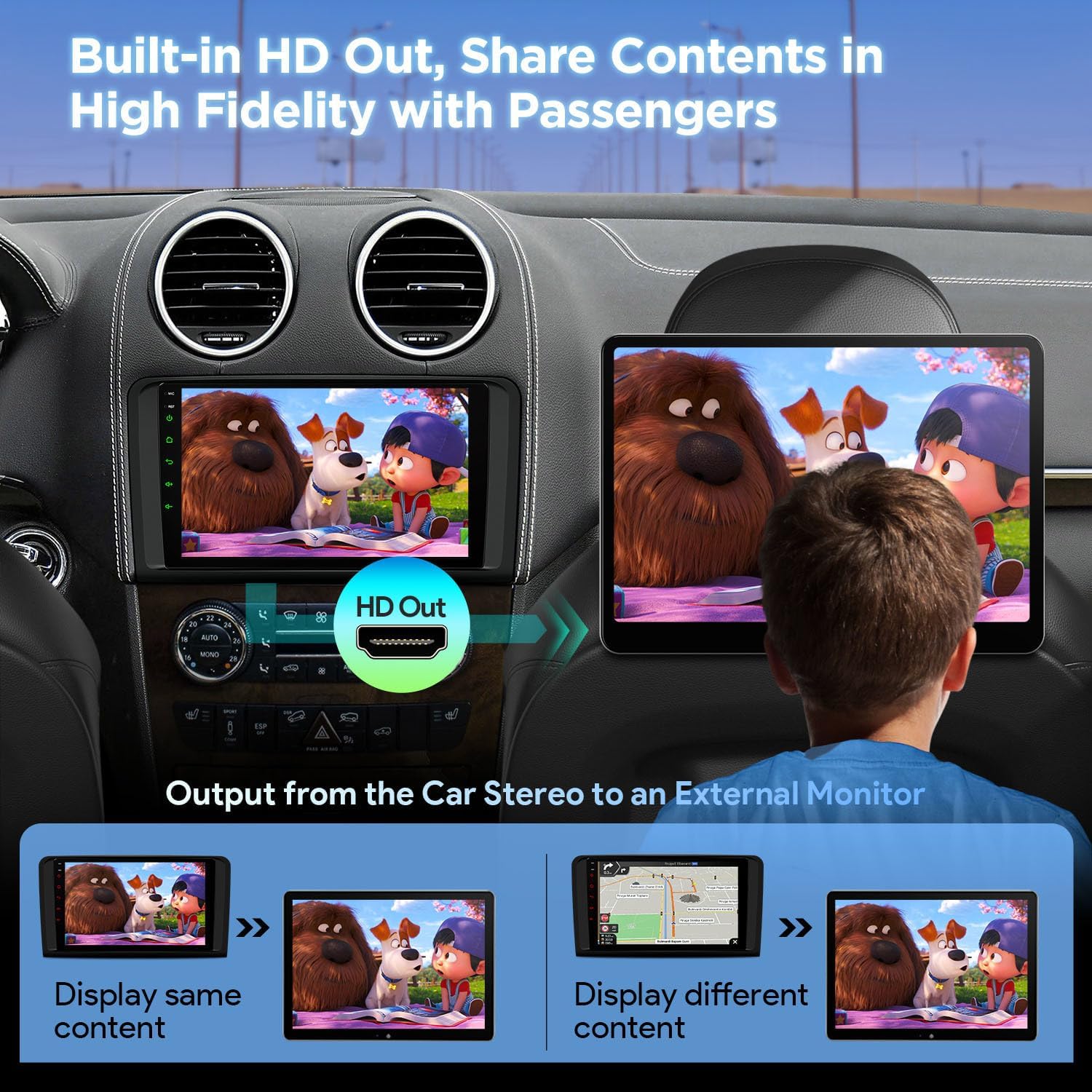
Image 3.3: Built-in HDMI output allows sharing high-fidelity content from the car stereo to an external monitor, enabling passengers to enjoy the same or different content.

Image 3.4: Optimized CANbus decoding supports original vehicle functions and displays information such as door status, ACC control, radio frequency, reversing control, Bluetooth status, light control, GPS status, and handbrake control.
4. Setup & Installation
4.1 Package Contents:
Before installation, please verify that all items listed below are included in your package:
- 1 × Main Unit
- 1 × ISO Wiring Harness
- 1 × RCA Cable
- 2 × USB Cable
- 1 × 4G+ Antenna
- 1 × 4G- Antenna
- 1 × CANbus Box
- 1 × Camera Cable
- 1 × GPS Antenna
- 1 × CANbus Cable
- 1 × Radio Antenna Adapter
- 1 × Radio Antenna Cable
- 2 × User Manual (English/German)

Image 4.1: Dimensions of the head unit and a visual representation of all included accessories for installation.
4.2 General Installation Guidelines:
Installation should ideally be performed by a qualified professional. Ensure the vehicle's battery is disconnected before beginning installation. Refer to the included user manual (English/German) for detailed wiring diagrams and specific installation steps for your vehicle model.
5. Operating Instructions
5.1 User Interface (UI) Navigation:
The XTRONS Exclusive UI provides an intuitive and smart interface with Day/Night mode. You can easily access music sources, navigation, car speed display, and quick access bars for your favorite apps. Volume control is also easily accessible.

Image 5.1: The smart and intuitive UI features Day/Night mode, music source shortcuts, car model selections, quick display options, and customizable favorite apps.
5.2 Wireless CarPlay & Android Auto:
Connect your smartphone wirelessly via Bluetooth to access CarPlay or Android Auto. This allows you to use navigation, make calls, send messages, and play music directly from your phone's interface on the car stereo screen. Voice commands via Google Assistant or Siri are supported.

Image 5.2: Seamless integration with Wireless CarPlay and Android Auto allows access to phone functions, navigation, and media. Screen mirroring and Bluetooth connectivity are also shown.
5.3 Media Playback & Sound:
Enjoy ultra-smooth 4K video playback and studio-quality audio with the professional-grade DSP chipset. The unit supports various audio formats and offers extensive sound customization options including equalizer, delay, volume, and frequency adjustments.
5.4 GPS Navigation:
The built-in GPS module supports various Android navigation software. Ensure you have a compatible navigation app installed for turn-by-turn directions and real-time traffic updates.
5.5 Connectivity:
- Dual Band Wi-Fi: Connect to available Wi-Fi networks for internet access.
- 4G Module: Insert a SIM card (not functional in Americas) for 4G network access.
- Bluetooth 5.0: For hands-free calls and audio streaming.
5.6 AHD Camera Input:
The unit supports AHD camera input for clear rear-view display, assisting with parking and reversing maneuvers.
5.7 Split View:
Utilize the split-screen feature to run two applications simultaneously, such as navigation and music playback.
5.8 UI Theme Customization:
You can refresh and customize the user interface themes of your XTRONS ID series unit. Connect to Wi-Fi, open the App Store, navigate to 'Themes', and install/apply your preferred theme.
Video 5.3: Demonstration on how to refresh themes on XTRONS ID series units, showcasing the process of selecting and applying new UI styles.
6. Maintenance
- Screen Cleaning: Use a soft, lint-free cloth to clean the screen. Avoid harsh chemicals.
- Software Updates: Periodically check for software updates via the system settings to ensure optimal performance and access to new features.
- Temperature: Avoid exposing the unit to extreme temperatures.
7. Troubleshooting
- No Power: Check all power connections and vehicle fuses. Ensure the ignition is on.
- No Sound: Verify speaker connections, volume levels, and audio output settings.
- GPS Signal Loss: Ensure the GPS antenna is properly installed and has a clear view of the sky.
- Touchscreen Unresponsive: Try restarting the unit. If the issue persists, a factory reset might be necessary (refer to the system settings).
- Bluetooth Disconnection: Ensure your phone's Bluetooth is on and paired correctly. Try re-pairing the device.
8. Specifications
- Display Size: 9 Inches
- Resolution: 1280 x 800
- Operating System: Android 14
- CPU: Qualcomm Snapdragon 665 Octa-core
- RAM: 8GB LPDDR4
- ROM: 256GB Solid State
- GPU: Adreno 610
- Connectivity: Bluetooth 5.0, Dual Band Wi-Fi (2.4GHz/5GHz), 4G (region-dependent)
- Audio Output Mode: Stereo
- Mounting Type: Dashboard Mount
- Special Features: Touchscreen, Voice Command (Microphone), Built-in Wireless CarPlay & Android Auto, DSP, DTS Digital Sound, HDMI Port, CANbus Decoding, AHD Camera Input.
9. Warranty & Support
The XTRONS Car Stereo comes with a 1-year warranty from the manufacturer. For technical support, troubleshooting assistance, or warranty claims, please visit the official XTRONS Store or contact their customer service directly. You can find more information and support resources on the XTRONS Store on Amazon.


