
1. Introduction
This manual provides detailed instructions for the safe and effective use of your Milky House DT9205P-S Digital Multimeter Tester. Please read this manual thoroughly before operation and retain it for future reference. This device is designed for measuring AC/DC voltage, AC/DC current, resistance, capacitance, diode, continuity, and triode parameters.

Image 1.1: The Milky House DT9205P-S Digital Multimeter, including the main unit, test leads, and a 9V battery.
2. Safety Information
Always observe safety precautions when using any electrical testing equipment. Failure to do so may result in injury or damage to the meter or equipment under test.
- Do not exceed the maximum input values specified for each measurement range.
- Ensure the test leads are properly connected and the function switch is set to the correct range before making measurements.
- Do not use the meter if it or the test leads appear damaged.
- Exercise extreme caution when working with voltages above 30V AC RMS, 42V peak, or 60V DC. These voltages pose a shock hazard.
- Always disconnect power to the circuit and discharge all high-voltage capacitors before measuring resistance, continuity, diodes, or capacitance.
- Replace the battery when the low battery indicator appears to ensure accurate readings.
- The meter is equipped with internal fuses for protection. Do not attempt to bypass or replace them with incorrect types.
3. Package Contents
Verify that all items are present and undamaged upon opening the package:
- Milky House DT9205P-S Digital Multimeter Tester
- One pair of Test Leads (Red and Black) with protective caps
- 9V Battery
- Instruction Manual

Image 3.1: Visual representation of the items included in the Milky House Digital Multimeter package.
4. Product Features and Components
The Milky House DT9205P-S Digital Multimeter is equipped with several features for versatile and safe electrical measurements:
- HD Backlight LCD Display: Provides clear readings, even in low-light conditions.
- Data Hold Function: Freezes the displayed reading for convenient recording.
- Auto Power Off: Conserves battery life by automatically shutting down after a period of inactivity.
- Protective Silicone Sleeve: Enhances durability and protects against accidental drops.
- Built-in Kickstand: Allows for hands-free operation and easy viewing.
- Measurement Functions: AC/DC Voltage, AC/DC Current, Resistance, Capacitance, Diode, Continuity, Triode (hFE).
- Safety Fuses: Built-in fuses protect the meter from overload.

Image 4.1: Detailed diagram illustrating the various components and functions of the DT9205P-S Multimeter.
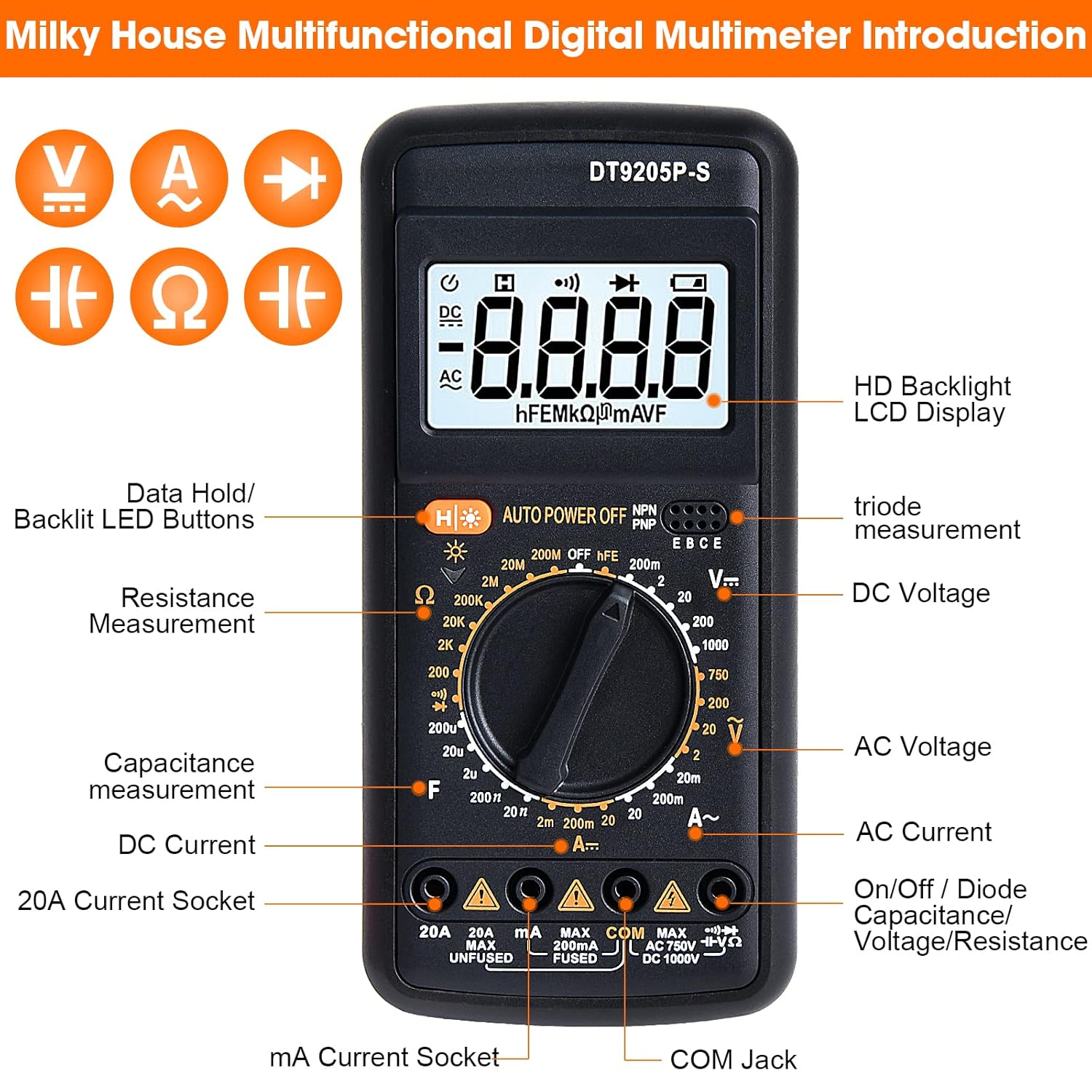
Image 4.2: Visual overview of the multimeter's dimensions and the integrated kickstand for convenient positioning.
5. Setup
5.1 Battery Installation
- Ensure the multimeter is turned off.
- Locate the battery compartment cover on the back of the unit.
- Use a screwdriver to remove the screw securing the cover.
- Insert the 9V battery, observing the correct polarity (+ and -).
- Replace the battery compartment cover and secure it with the screw.
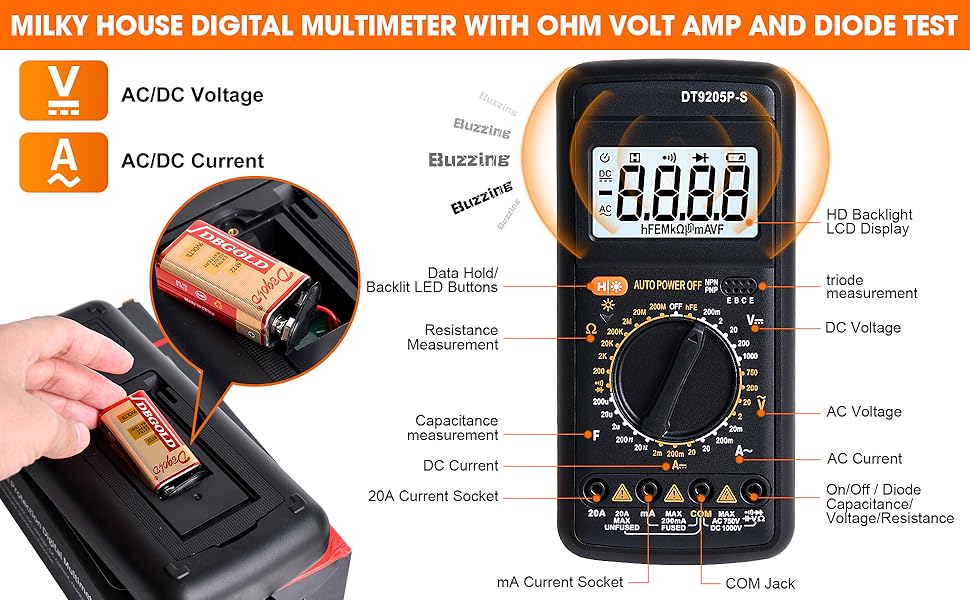
Image 5.1: Step-by-step visual guide for installing the 9V battery into the multimeter's battery compartment.
5.2 Connecting Test Leads
- The black test lead should always be connected to the "COM" (Common) input jack.
- For most voltage, resistance, and diode measurements, connect the red test lead to the "VΩmA" input jack.
- For current measurements up to 200mA, connect the red test lead to the "mA" input jack.
- For current measurements up to 20A, connect the red test lead to the "20A" input jack.
6. Operating Instructions
Before taking any measurement, ensure the test leads are correctly connected and the function switch is set to the appropriate range.
6.1 Measuring AC/DC Voltage (V)
- Connect the black lead to "COM" and the red lead to "VΩmA".
- Set the function switch to the desired ACV (V~) or DCV (V=) range. Select a range higher than the expected voltage.
- Touch the test probes to the circuit points where voltage is to be measured (in parallel with the load).
- Read the voltage value on the LCD.
6.2 Measuring AC/DC Current (A)
- Safety Warning: Always connect the meter in series with the circuit. Never connect it in parallel with a voltage source when measuring current, as this can blow the fuse or damage the meter.
- Connect the black lead to "COM". Connect the red lead to "mA" for currents up to 200mA, or to "20A" for currents up to 20A.
- Set the function switch to the desired ACA (A~) or DCA (A=) range.
- Open the circuit where current is to be measured and insert the meter in series.
- Read the current value on the LCD.
6.3 Measuring Resistance (Ω)
- Safety Warning: Ensure the circuit is de-energized and all capacitors are discharged before measuring resistance.
- Connect the black lead to "COM" and the red lead to "VΩmA".
- Set the function switch to the desired Ω (Ohm) range.
- Touch the test probes across the component to be measured.
- Read the resistance value on the LCD.
6.4 Continuity Test
- Safety Warning: Ensure the circuit is de-energized.
- Connect the black lead to "COM" and the red lead to "VΩmA".
- Set the function switch to the continuity (buzzer) position.
- Touch the test probes across the circuit or component. If continuity exists (resistance below approximately 50Ω), the buzzer will sound.
6.5 Diode Test
- Safety Warning: Ensure the circuit is de-energized.
- Connect the black lead to "COM" and the red lead to "VΩmA".
- Set the function switch to the diode symbol position.
- Connect the red probe to the anode and the black probe to the cathode of the diode. The display will show the forward voltage drop.
- Reverse the probes. The display should show "OL" (Open Loop) for a good diode.
6.6 Capacitance Measurement (F)
- Safety Warning: Ensure the capacitor is fully discharged before measurement.
- Connect the black lead to "COM" and the red lead to "VΩmA".
- Set the function switch to the F (Farad) range.
- Touch the test probes across the capacitor terminals.
- Read the capacitance value on the LCD.
6.7 Triode (hFE) Test
- Set the function switch to the hFE position.
- Insert the transistor leads (Emitter, Base, Collector) into the corresponding sockets in the hFE test slot, ensuring correct NPN or PNP type.
- Read the hFE value on the LCD.

Image 6.1: Examples of various measurement applications including voltage, current, resistance, and continuity/diode tests.

Image 6.2: Demonstrates the clear LCD display, backlight feature, use of the folding kickstand, and the data hold function.
7. Maintenance
7.1 Cleaning
Wipe the meter with a damp cloth and mild detergent. Do not use abrasives or solvents. Keep the input terminals free from dirt and moisture.
7.2 Battery Replacement
When the low battery indicator appears on the display, replace the 9V battery as described in Section 5.1. A weak battery can lead to inaccurate readings.
7.3 Fuse Replacement
If the current measurement function stops working, the fuse may have blown. To replace the fuse:
- Ensure the multimeter is turned off and test leads are disconnected.
- Open the battery compartment cover (Section 5.1).
- Carefully remove the old fuse.
- Replace with a fuse of the same type and rating (e.g., F200mA/250V for mA range, F20A/250V for 20A range). Refer to the markings near the input jacks for specific fuse ratings.
- Replace the battery and compartment cover.
7.4 Storage
If the meter is not used for an extended period, remove the battery to prevent leakage and damage. Store the meter in a cool, dry place away from direct sunlight.
8. Troubleshooting
| Problem | Possible Cause | Solution |
|---|---|---|
| No display or dim display | Dead or weak battery; incorrect battery installation. | Replace battery; check battery polarity. |
| "OL" (Overload) displayed | Input value exceeds selected range; open circuit (for resistance/continuity). | Select a higher range; check for proper circuit connection. |
| Inaccurate readings | Weak battery; incorrect range selected; external interference. | Replace battery; select appropriate range; move away from strong electromagnetic fields. |
| Current measurement not working | Blown fuse. | Replace the appropriate fuse (refer to Section 7.3). |
| No continuity buzzer sound | Open circuit; resistance too high. | Check circuit for breaks; ensure resistance is below ~50Ω. |
9. Specifications
| Parameter | Value |
|---|---|
| Model | DT9205P-S |
| Dimensions (L x W x H) | Approximately 7.28 x 3.35 x 1.18 inches (18.5 x 8.5 x 3 cm) |
| Weight | Approximately 10.58 ounces (300 grams) |
| Power Source | 9V Battery |
| Display | LCD with Backlight |
| Safety Rating | CAT II 1000V, CAT III 600V (typical for similar devices) |
| DC Voltage Range | 200mV / 2V / 20V / 200V / 1000V |
| AC Voltage Range | 2V / 20V / 200V / 750V |
| DC Current Range | 2mA / 20mA / 200mA / 20A |
| AC Current Range | 2mA / 20mA / 200mA / 20A |
| Resistance Range | 200Ω / 2KΩ / 20KΩ / 200KΩ / 2MΩ / 20MΩ / 200MΩ |
| Capacitance Range | 2nF / 20nF / 200nF / 2µF / 20µF / 200µF |
| Diode Test | Yes |
| Continuity Buzzer | Yes |
| Triode (hFE) Test | Yes |
Note: Specific accuracy and resolution values are typically found in the full product manual. The ranges listed are derived from the product images.
10. Warranty and Support
10.1 Warranty Information
The Milky House DT9205P-S Digital Multimeter Tester comes with a 30-day warranty from the date of purchase. This warranty covers manufacturing defects and malfunctions under normal use. It does not cover damage caused by misuse, accidents, unauthorized modifications, or improper maintenance.
10.2 Customer Support
For any questions, technical assistance, or warranty claims, please contact Milky House customer support. Refer to your purchase documentation or the official Milky House website for the most current contact information.
We recommend keeping your purchase receipt as proof of purchase for warranty purposes.