
Nerf F4186
Nerf Elite 2.0 Ranger PD-5 Blaster User Manual
Model: F4186
Introduction
Welcome to the official user manual for your Nerf Elite 2.0 Ranger PD-5 Blaster. This manual provides essential information for the safe and effective use of your new blaster. Please read it thoroughly before operation.
The Nerf Elite 2.0 Ranger PD-5 blaster features 5 front-loading barrels, pump-action firing, and onboard dart storage, designed for engaging dart-blasting action.
What's in the Box
- Nerf Elite 2.0 Ranger PD-5 Blaster
- 10 Nerf Elite Darts
Important Safety Information
Ages 8 and up
TO AVOID EYE INJURY: WARNING: Do not aim at eyes or face. Use of eyewear recommended for players and people within range. Use only official Nerf darts. Other darts may not meet safety standards. Do not modify darts or blaster.
WARNING: CHOKING HAZARD - Small parts may be generated. Not for children under 3 years.
Setup
1. Unboxing and Inspection
Carefully remove all components from the packaging. Inspect the blaster and darts for any signs of damage. If any parts are damaged or missing, do not proceed with assembly or use, and contact customer support.
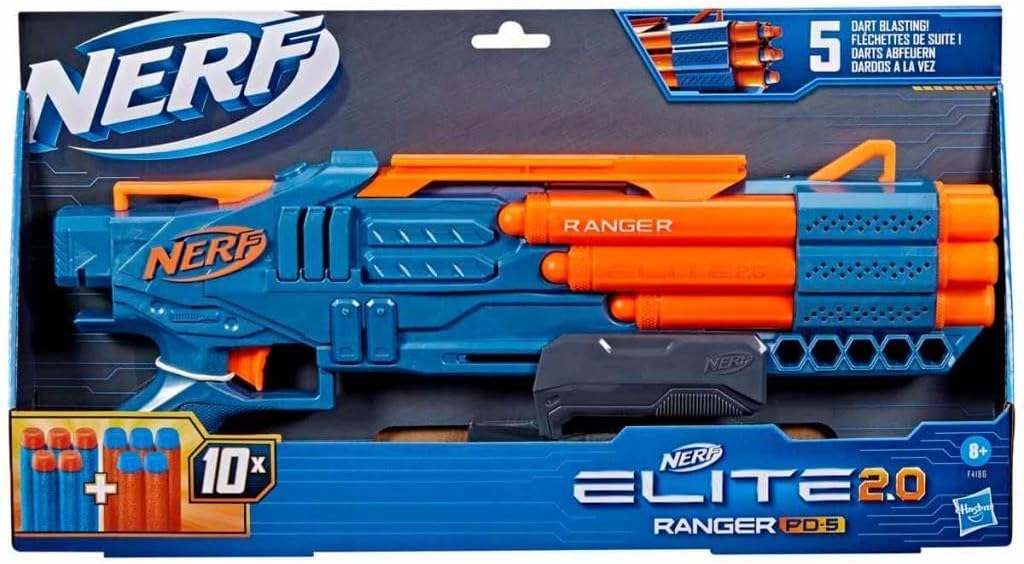
Image: The Nerf Elite 2.0 Ranger PD-5 Blaster as it appears in its retail packaging, showing the blaster and the included 10 darts.
2. Dart Loading
The Ranger PD-5 blaster has 5 front-loading barrels. To load, insert one Nerf Elite dart into each of the 5 barrels until it is seated firmly. The blaster comes with 10 darts, allowing you to load 5 and store 5 additional darts on the blaster for quick reloads.

Image: The Nerf Elite 2.0 Ranger PD-5 Blaster displayed with its 10 accompanying Nerf Elite darts, ready for loading.
Operating Instructions
1. Priming the Blaster
Once darts are loaded into the barrels, grasp the priming slide located on the top of the blaster. Pull the priming slide backward completely, then push it forward completely until it clicks into place. This action primes the blaster for firing.
2. Firing Darts
After priming, aim the blaster at your target (ensuring no eyes or faces are in the line of fire). Pull the trigger to launch one dart. To fire subsequent darts, you must prime the blaster again for each shot.
3. Onboard Dart Storage
The blaster features onboard storage for 5 additional darts. These can be stored in the designated slots on the side of the blaster, allowing for quick and convenient reloads during play.
4. Customization (Upgrade-Ready)
The Ranger PD-5 blaster is equipped with a tactical rail and a stock attachment point. These features allow for customization with compatible Nerf Elite 2.0 accessories (sold separately) to enhance your game strategy and tactical performance.
Maintenance
1. Cleaning
To clean your blaster, wipe it with a soft, dry cloth. Do not use water or cleaning solutions, as this may damage the internal mechanisms. Ensure darts are clean and free of debris before loading to prevent jamming.
2. Storage
Store the blaster and darts in a cool, dry place away from direct sunlight and extreme temperatures. Keep darts organized to prevent damage or loss.
Troubleshooting
| Problem | Possible Cause | Solution |
|---|---|---|
| Dart does not fire or fires weakly. | Blaster not fully primed. Damaged or non-official dart. Dart not fully inserted. | Ensure priming slide is pulled back and pushed forward completely until it clicks. Use only official Nerf Elite darts. Replace damaged darts. Push dart fully into the barrel. |
| Priming slide is stuck. | Dart jammed in barrel. Internal mechanism obstruction. | Check barrels for jammed darts and carefully remove them. Do not force the slide. If problem persists, contact customer support. |
Specifications
- Model Number: F4186
- Brand: Nerf
- Product Dimensions: 20.75 x 10.24 x 16.93 inches
- Item Weight: 1.26 pounds
- Manufacturer Recommended Age: 8 - 8 years
- Release Date: January 1, 2023
- Language: English
- Manufacturer: Hasbro
Support & Warranty
Customer Support
For further assistance, questions, or to report issues, please visit the official Nerf website or contact Hasbro customer service. Refer to the product packaging for specific contact details or visit the Nerf Store on Amazon.
Warranty Information
Please retain your proof of purchase. Warranty details are typically provided with the product packaging or can be found on the manufacturer's official website. This product is subject to the manufacturer's standard warranty terms.
Product Videos
Watch these official product videos for visual guides and demonstrations.
No official seller videos are available for this product at this time.
Related documentsF4186


Ask a question about this manual
Ask about setup, troubleshooting, compatibility, parts, safety, or missing instructions. Manuals+ will review the question and use this page’s manual context to help answer it.