
Denon AVRS770HBKE2AU
Denon AVR-S770H 7.2 Channel AV Receiver User Manual
Model: AVRS770HBKE2AU
Introduction
This manual provides essential information for setting up, operating, and maintaining your Denon AVR-S770H 7.2 Channel AV Receiver. The AVR-S770H is designed to deliver an immersive audio-visual experience with support for 8K video and spectacular 3D sound formats like Dolby Atmos and DTS:X. It also features HEOS Built-in for wireless multi-room music streaming.
Product Overview

Figure 1: Front view of the Denon AVR-S770H AV Receiver, accompanied by its remote control and the Audyssey setup microphone. This image showcases the main unit's sleek black finish and the included accessories for initial setup and control.
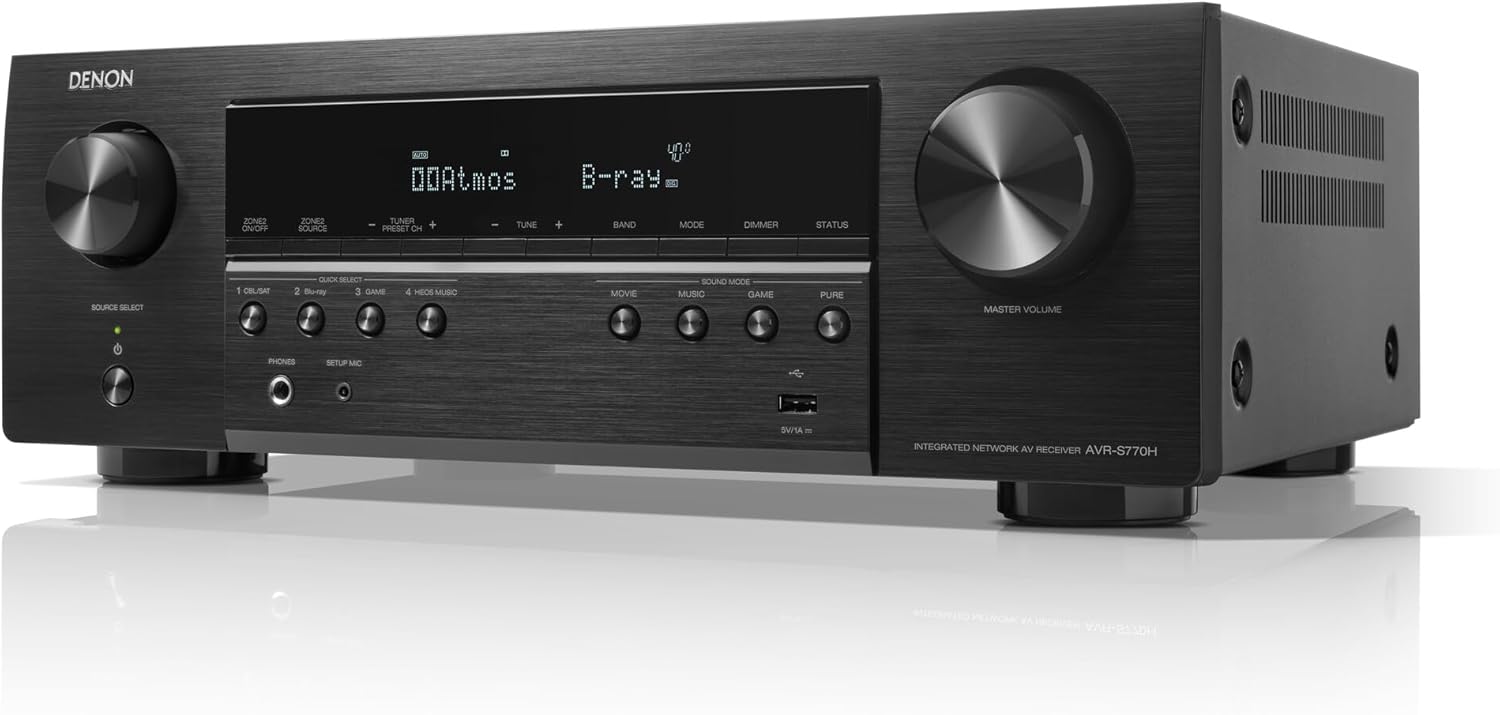
Figure 2: An angled front view of the Denon AVR-S770H AV Receiver, highlighting its front panel controls, display, and overall design. The image provides a clear perspective of the unit's aesthetic and accessible features.
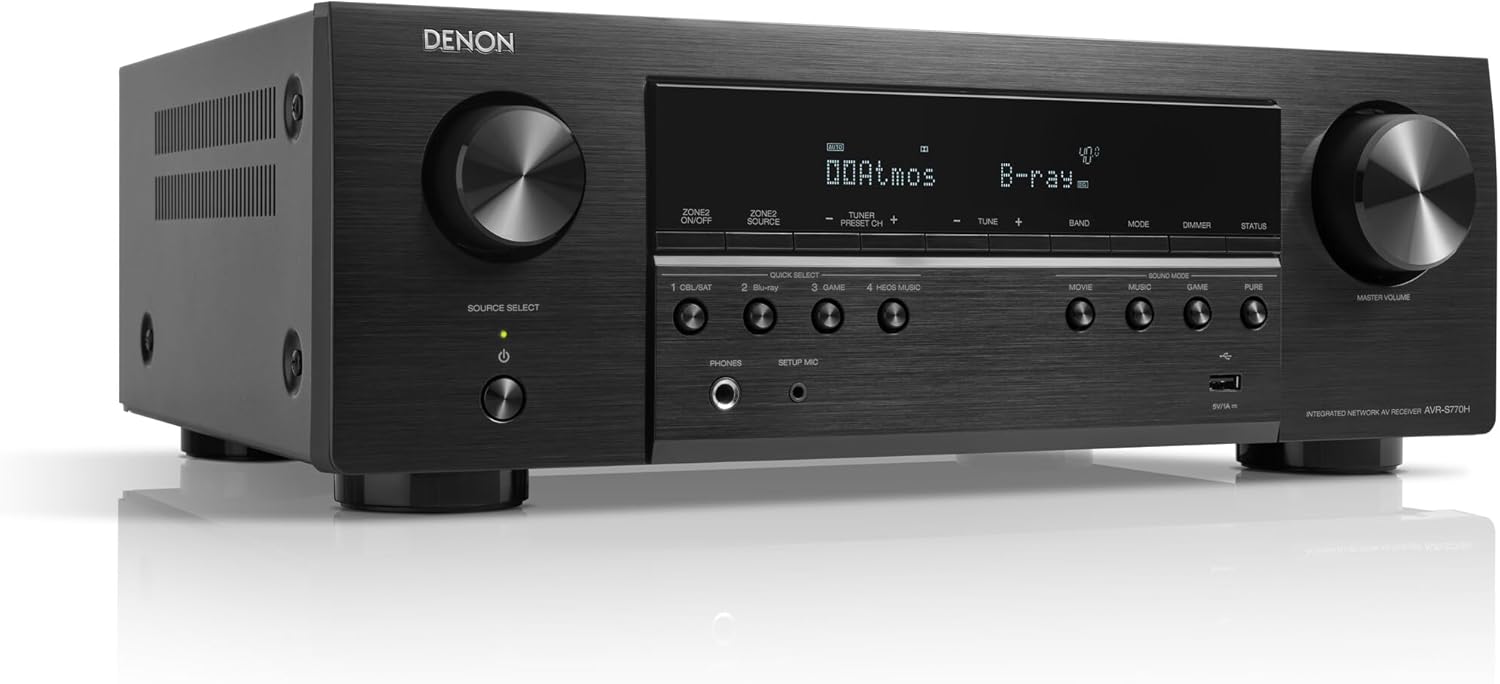
Figure 3: A side view of the Denon AVR-S770H AV Receiver, showing its depth and ventilation grilles. This perspective emphasizes the robust build and design considerations for heat dissipation.
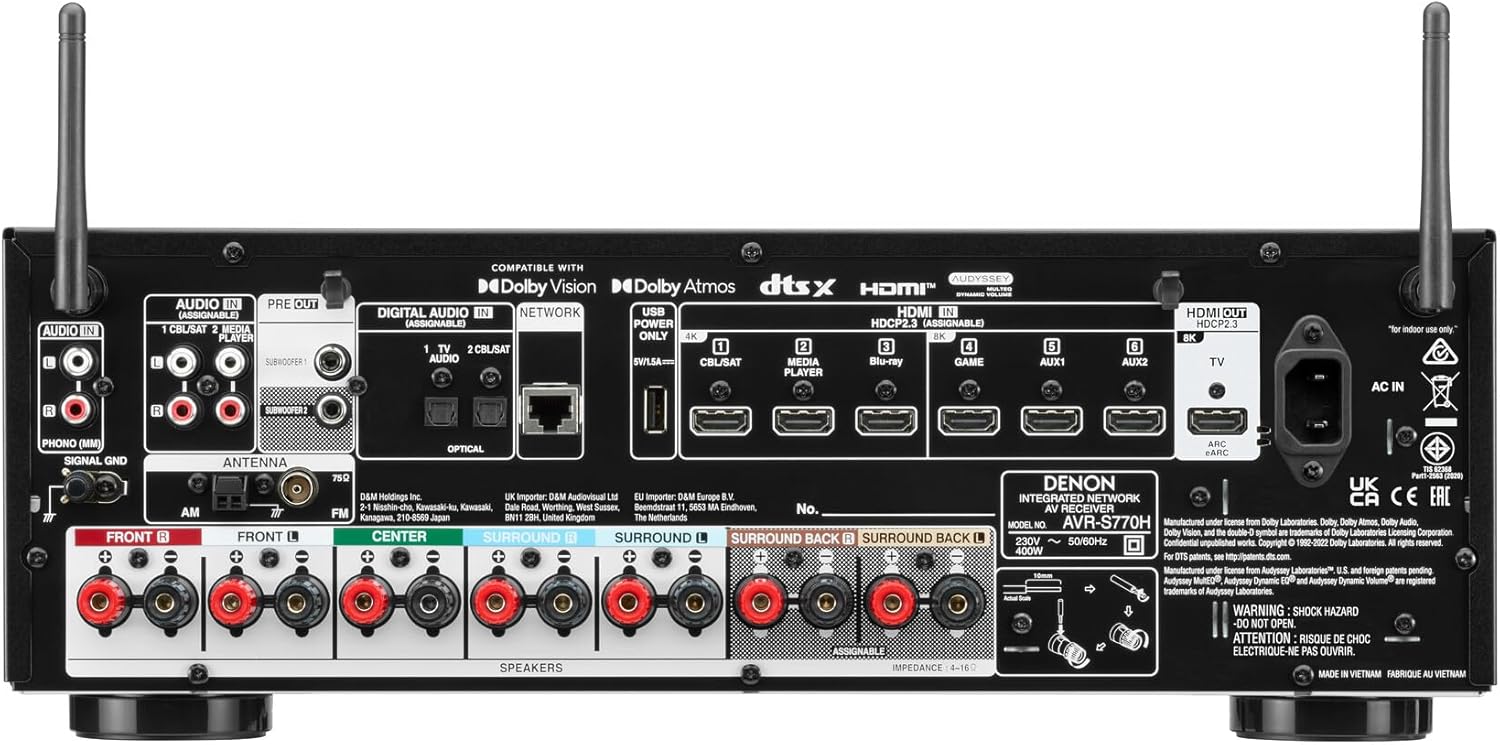
Figure 4: The rear panel of the Denon AVR-S770H AV Receiver, displaying all input and output connections, including HDMI, audio, and speaker terminals. This detailed view is crucial for understanding connectivity options.
Key Features
- Denon Sound Quality: Fills small to medium-sized rooms with dynamic Denon sound.
- Spectacular 3D Sound: Immerse yourself in the action with Dolby Atmos and DTS:X.
- Whole-Home Music Streaming: HEOS Built-in allows for wireless music streaming and distribution to HEOS-compatible speakers in other rooms.
- Powerful 7-Channel Discrete Amplifier: High-current discrete amplifiers on all channels provide up to 140 watts of power per channel, suitable for most medium-sized speakers.
- Easy Setup and Audyssey Room Correction: Award-winning setup assistant provides clear step-by-step instructions. Precise sound calibration software Audyssey MultEQ ensures optimal listening experience in your room.
- Over 110 Years of Innovation: Denon's commitment to quality, innovation, and audio performance since 1910.
Setup Guide
1. Unpacking and Placement
- Carefully remove the receiver and all accessories from the packaging.
- Place the receiver on a stable, flat surface with adequate ventilation around it. Ensure there is at least 10 cm (4 inches) of clear space above and on the sides for proper airflow.
- Avoid placing the unit in direct sunlight or near heat sources.
2. Connecting Speakers
Connect your speakers to the corresponding terminals on the rear panel (refer to Figure 4). Ensure correct polarity (+ to + and - to -) for each speaker.
- Front L/R: Connect your main left and right speakers.
- Center: Connect your center channel speaker.
- Surround L/R: Connect your surround left and right speakers.
- Surround Back L/R (Assignable): Connect rear surround speakers for a 7.1/7.2 setup, or use for height/Dolby Atmos speakers if configured.
- Subwoofer PRE OUT 1/2: Connect one or two powered subwoofers using RCA cables.
3. Connecting Video Devices (HDMI)
The AVR-S770H features 6 HDMI inputs and 1 HDMI output (8K compatible). Use high-quality HDMI cables for optimal performance.
- Connect your source devices (e.g., Blu-ray player, game console, streaming device) to the HDMI INPUT ports (e.g., HDMI 1, HDMI 2, etc.).
- Connect the HDMI OUT (MONITOR) port to your TV or projector's HDMI input. Ensure to use the HDMI port on your TV that supports eARC/ARC if you wish to use that feature for TV audio return.
4. Network Connection
For network features like HEOS, firmware updates, and internet radio, connect the receiver to your home network.
- Wired Connection: Connect an Ethernet cable from your router to the NETWORK port on the receiver's rear panel.
- Wireless Connection (Wi-Fi): Attach the included Wi-Fi antennas to the rear panel. The setup assistant will guide you through connecting to your wireless network.
5. Initial Setup Assistant and Audyssey Calibration
After connecting all components and powering on the receiver for the first time, the Setup Assistant will appear on your TV screen. Follow the on-screen instructions to configure your system, including speaker setup, network settings, and input assignments.
The Setup Assistant will guide you through the Audyssey MultEQ XT calibration process. This process uses the included setup microphone to measure your room's acoustics and optimize the sound settings for your specific listening environment. Place the microphone at various listening positions as prompted for accurate calibration.
Operating Instructions
1. Basic Operation
- Power On/Off: Press the POWER button on the front panel or remote control.
- Source Selection: Use the SOURCE SELECT knob on the front panel or the dedicated input buttons on the remote control (e.g., Blu-ray, Game, TV Audio) to switch between connected devices.
- Volume Control: Adjust the MASTER VOLUME knob on the front panel or the VOLUME +/- buttons on the remote control.
- Sound Mode: Press the SOUND MODE buttons (Movie, Music, Game, Pure) on the front panel or remote to select different audio processing modes.
2. Network Features (HEOS, Wi-Fi, Bluetooth, AirPlay 2)
- HEOS Built-in: Download the HEOS app on your smartphone or tablet. Use the app to stream music from online services, network-attached storage, or USB drives. You can also group HEOS-compatible devices for multi-room audio.
- Bluetooth: Enable Bluetooth on your mobile device and select "Denon AVR-S770H" from the list of available devices to stream audio wirelessly.
- AirPlay 2: For Apple devices, select the AVR-S770H from the AirPlay menu in your audio app to stream music.
- Wi-Fi: Once connected to your home Wi-Fi network during setup, the receiver can access internet radio and other online services.
3. Voice Control (Alexa Compatible)
The Denon AVR-S770H is compatible with Amazon Alexa. To enable voice control:
- Ensure your receiver is connected to the internet.
- Open the Amazon Alexa app on your mobile device.
- Enable the "HEOS Home Entertainment" skill.
- Follow the instructions in the Alexa app to link your Denon receiver.
- You can now use voice commands to control playback, volume, and input selection (e.g., "Alexa, turn up the volume on the receiver," "Alexa, switch to Blu-ray on the receiver").
Maintenance
- Cleaning: Use a soft, dry cloth to wipe the exterior of the receiver. Do not use abrasive cleaners, waxes, or solvents.
- Ventilation: Ensure that the ventilation openings on the top and sides of the receiver are not blocked. Proper airflow is crucial to prevent overheating.
- Firmware Updates: Periodically check for firmware updates via the receiver's network connection. Updates can improve performance and add new features. Refer to the on-screen menu for update options.
- Power Cord: Disconnect the power cord from the wall outlet if the unit will not be used for an extended period.
Troubleshooting
If you encounter issues with your Denon AVR-S770H, refer to the following common troubleshooting steps:
| Problem | Possible Cause | Solution |
|---|---|---|
| No power | Power cord disconnected; power outage; protection circuit activated. | Check power cord connection; check household circuit breaker; unplug unit for 30 minutes and try again. |
| No sound | Incorrect input selected; speaker wires disconnected; volume too low; mute activated. | Select correct input; check speaker connections and polarity; increase volume; deactivate mute. |
| No picture | Incorrect HDMI input/output; faulty HDMI cable; TV input not selected correctly. | Ensure HDMI cables are securely connected to correct ports; select correct HDMI input on TV. |
| Network connection issues | Wi-Fi signal weak; incorrect network settings; router issue. | Relocate receiver closer to router or use wired connection; re-run network setup; restart router. |
For more detailed troubleshooting, please refer to the comprehensive online support resources or contact Denon customer support.
Specifications
| Feature | Detail |
|---|---|
| Brand | Denon |
| Model Number | AVRS770HBKE2AU |
| Color | Black |
| Connectivity Technology | Bluetooth, Ethernet, HDMI, USB, Wi-Fi |
| Controller Type | Amazon Alexa |
| Special Features | Auto Calibration, Multi-room, Music Streaming, Built-in Wi-Fi, eARC |
| Compatible Devices | Speaker |
| Total HDMI Ports | 8 (6 In, 1 Out with eARC) |
| Audio Output Mode | Stereo |
| Surround Sound Channel Configuration | 7.2 channels |
| Video Encoding | H.264, H.265/HEVC (8K compatible) |
| Manufacturer | Denon |
| Average Customer Review | 4.6 out of 5 stars (based on 48 ratings) |
Warranty and Support
For warranty information, please refer to the warranty card included with your product or visit the official Denon website for your region. Denon provides customer support and resources to assist with product inquiries, technical issues, and service requests.
While specific details on spare parts availability and software updates are not readily available, Denon is committed to providing ongoing support for its products.
Online Resources: Visit the Denon support website for FAQs, firmware downloads, and additional user guides.
Customer Service: Contact Denon customer service for personalized assistance. Contact details can typically be found on the official Denon website.
Related documentsAVRS770HBKE2AU


Ask a question about this manual
Ask about setup, troubleshooting, compatibility, parts, safety, or missing instructions. Manuals+ will review the question and use this page’s manual context to help answer it.