1. Introduction
The Yealink W56H is a high-performance wireless DECT handset designed for business communication. It offers robust hardware, HD audio quality, and extended battery life, making it suitable for environments with heavy call loads. This manual provides essential information for setting up, operating, and maintaining your W56H handset.
2. Package Contents
Ensure all items listed below are present in your package:
- Yealink Wireless DECT Handset W56H
- Rechargeable Lithium Battery
- Belt Clip
- Power Adapter
- USB Charger Cradle

Image 2.1: The Yealink W56H handset placed in its USB charger cradle, connected to the power adapter.
3. Setup
3.1. Battery Installation
- Locate the battery compartment cover on the back of the handset.
- Slide the cover downwards to remove it.
- Insert the rechargeable lithium battery into the compartment, ensuring the contacts align correctly.
- Replace the battery compartment cover by sliding it upwards until it clicks into place.
3.2. Charging the Handset
- Connect the power adapter to the USB charger cradle.
- Plug the power adapter into a wall outlet.
- Place the W56H handset into the charger cradle. The screen will indicate charging status.
- Allow the handset to charge fully before first use. A full charge provides approximately 18 hours of talk time and 240 hours of standby time.

Image 3.1: The Yealink W56H handset securely placed in its charging cradle.
3.3. Pairing with a DECT Base Station
The W56H handset requires pairing with a Yealink DECT base station (e.g., W60B or W80B) to function. Refer to your DECT base station's manual for specific pairing instructions. Generally, the process involves:
- Put the DECT base station into registration mode.
- On the W56H handset, navigate to the registration menu (typically Menu > Settings > Registration > Register Handset).
- Select the desired base and enter the system PIN (default is usually 0000).
- Once successfully registered, the handset will display the base station name and an icon indicating connection.

Image 3.2: An illustration showing the Yealink W80B DECT base station wirelessly connected to multiple W56H and W53H handsets, demonstrating multi-cell solution capability.
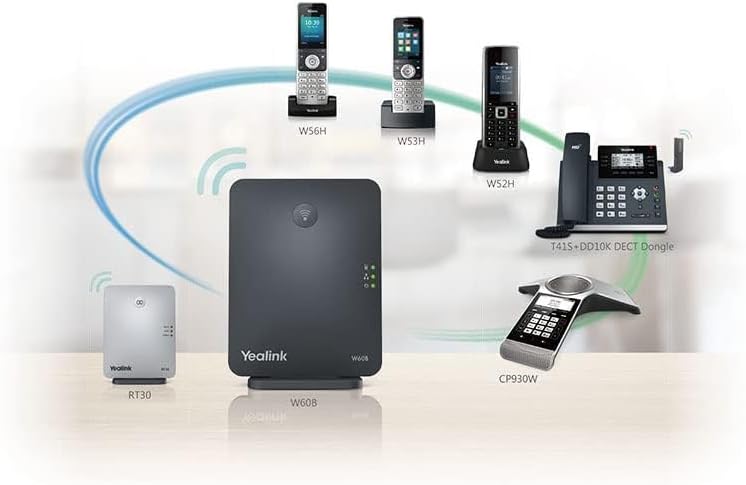
Image 3.3: An illustration depicting the Yealink W60B DECT base station supporting various Yealink DECT devices, including W56H, W53H, W52H handsets, a T41S+DD10K DECT Dongle, a CP930W conference phone, and an RT30 repeater.
4. Operating Instructions
4.1. Handset Overview

Image 4.1: A direct front view of the Yealink W56H handset in its charging cradle, highlighting the color display and keypad.

Image 4.2: A close-up view of the Yealink W56H handset's 2.4-inch color display, showing the time, date, and a contact name.
The W56H features a 2.4" 240x320 color display and an intuitive keypad for navigation and call management.
4.2. Basic Call Functions
- Making a Call:
- Enter the phone number using the keypad.
- Press the Green Call Key to initiate the call.
- Answering a Call:
- When the phone rings, press the Green Call Key.
- Ending a Call:
- Press the Red End Call Key.
- Adjusting Volume:
- During a call, use the Up/Down Navigation Keys to adjust the earpiece volume.
4.3. Navigation and Menu
Use the central navigation cluster to access menus and options:
- OK Key: Confirms selections or enters the main menu from idle.
- Up/Down/Left/Right Navigation Keys: Scroll through menus, lists, or adjust settings.
- Soft Keys: The keys directly below the screen (labeled "History" and "Line" in the image) perform context-sensitive functions displayed on the screen.
5. Maintenance
- Cleaning: Use a soft, dry cloth to clean the handset and charger cradle. Avoid using liquid cleaners or aerosols directly on the device.
- Battery Care: To prolong battery life, avoid exposing the handset to extreme temperatures. If the handset will not be used for an extended period, store it with a partial charge.
- Storage: Store the handset in a cool, dry place away from direct sunlight and moisture.
6. Troubleshooting
| Problem | Possible Cause | Solution |
|---|---|---|
| Handset does not power on. | Battery not installed or discharged. | Ensure battery is correctly installed and charge the handset for at least 30 minutes. |
| No dial tone. | Handset not registered to a DECT base or out of range. | Verify handset registration. Move closer to the DECT base station. Check base station power and network connection. |
| Poor audio quality. | Interference or weak signal. | Move away from other electronic devices. Ensure the handset is within optimal range of the DECT base. |
| Handset not charging. | Cradle or power adapter not connected properly; dirty contacts. | Check all connections. Clean the charging contacts on both the handset and cradle with a dry cloth. |
7. Specifications
- Model: W56H
- Display: 2.4" 240x320 color display
- Audio: HD Audio Quality (CAT-iq2.0 DECT standard)
- Battery: Rechargeable Lithium-ion battery
- Talk Time: Up to 18 hours
- Standby Time: Up to 240 hours
- Dimensions: 8.1 x 4.3 x 3.7 inches (Product Dimensions, likely including cradle)
- Weight: 14.4 ounces (Item Weight, likely including battery)
- Manufacturer: Yealink Network Technology Co., Ltd
8. Warranty and Support
For warranty information and technical support, please refer to the official Yealink website or contact your product vendor. Keep your purchase receipt for warranty claims.
You can typically find support resources, FAQs, and firmware updates on the Yealink Official Website.


