
Topdeep Combo Tumbler Heat Press
Topdeep Pro Heat Press 8-in-1 Instruction Manual
Model: Combo Tumbler Heat Press
Brand: Topdeep
1. Introduction
This manual provides detailed instructions for the safe and efficient operation of your Topdeep Pro Heat Press 8-in-1 machine. This versatile heat press is designed for transferring images onto various items, including T-shirts, hats, mugs, plates, and more, utilizing sublimation and heat transfer vinyl techniques.
Please read this manual thoroughly before operating the machine to ensure proper usage, maximize performance, and prevent potential hazards.

Figure 1: Topdeep Pro Heat Press 8-in-1 Machine and Included Accessories
This image displays the complete Topdeep Pro Heat Press 8-in-1 system, showcasing the main platen press, the tumbler press, hat press, and various plate press attachments, along with examples of items that can be customized, such as T-shirts, mugs, and plates.
2. Safety Instructions
Adhering to these safety guidelines is crucial for preventing injury and damage to the machine.
- Always operate the heat press on a stable, heat-resistant surface.
- Keep hands and fingers clear of the heating element during operation. The heating plate reaches very high temperatures.
- Use heat-resistant gloves when handling hot items or adjusting components.
- Ensure proper ventilation in your workspace to dissipate heat and fumes.
- Do not leave the machine unattended while it is powered on or operating.
- Unplug the machine from the power outlet when not in use, during cleaning, or when changing attachments.
- Do not immerse the machine or its electrical components in water or other liquids.
- Keep children and pets away from the operating area.
- If any part of the machine is damaged, do not operate it. Contact customer support for assistance.
3. Product Components and Features
Your Topdeep Pro Heat Press 8-in-1 includes the main unit and several interchangeable attachments for diverse applications.
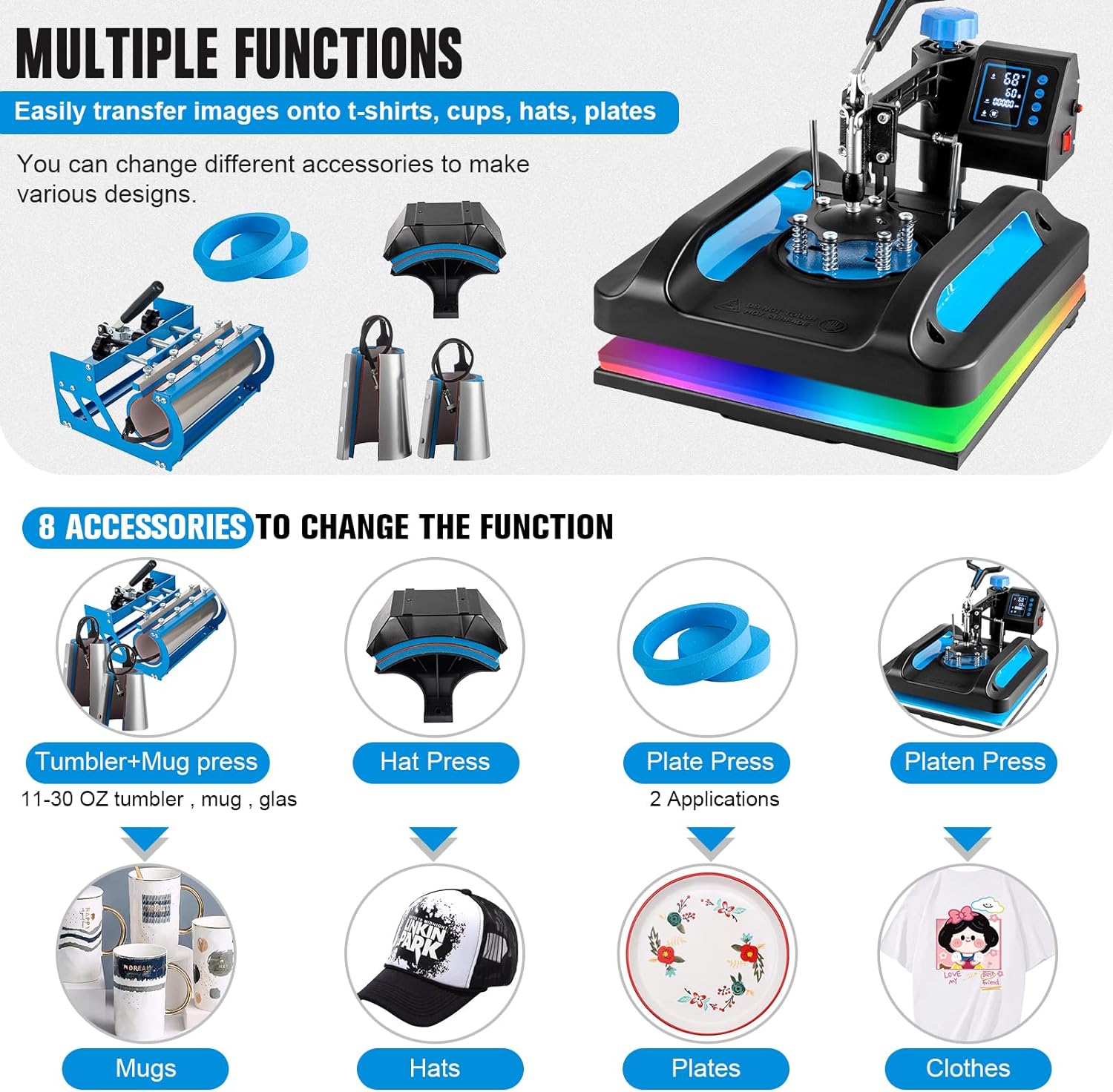
Figure 2: Multifunctionality and 8 Accessories
This image illustrates the various functions and the eight interchangeable accessories included with the heat press, such as the tumbler/mug press, hat press, two sizes of plate presses, and the main platen press for T-shirts and flat items.
Key Components:
- Main Platen Press (15x15 inch): For T-shirts, fabrics, mouse pads, and other flat items. Features a non-stick Teflon-coated surface.
- 30oz Tumbler Press: Detachable heating attachment (10.6 inches length) suitable for 11, 16, 20, and 30 oz skinny tumblers and straight mugs with a diameter range of 2.65-3.4 inches.
- Hat Press (5.5"x 3"): For caps and hats.
- Mug Presses (Cone): Includes 12oz and 17oz latte mug attachments.
- Plate Presses: Includes 5-inch and 6-inch plate press attachments.
- Digital Control Box: Features an upgraded mode selection function for pre-setting temperature and time, Fahrenheit/Celsius display, and automatic shut-off for overheating.
- 360° Rotation and Guide Rail Design: Allows the heating element to be safely moved aside for easier placement of items and reduced risk of accidental contact.
- Pressure Adjustment Knob: Located at the top for adjusting pressure to suit different materials.
- Silicone Pad and Sponge Pad: Located on the bottom platen for even pressure distribution.

Figure 3: Control Panel and Platen Design Details
This image provides a detailed view of the digital control panel with its 'Plus', 'Minus', 'Setup', and 'Mode' buttons, along with the thickened design of the platen which includes two layers of thermal insulation cotton and a silicone insulation cotton layer for optimal heat distribution.
4. Technical Specifications
| Specification | Value |
|---|---|
| Model Number | Combo Tumbler Heat Press |
| Voltage | 110 Volts |
| Wattage | 1400 Watts |
| Main Platen Size | 15 x 15 inches |
| Tumbler Press Length | 10.6 inches |
| Tumbler Press Diameter Range | 2.65 - 3.4 inches |
| Hat Press Size | 5.5 x 3 inches |
| Temperature Range | 30 - 450 °F (0 - 250 °C) |
| Timer Range | 0 - 999 seconds |
| Product Dimensions (Approx.) | 15.0" (L) x 15.0" (W) x 14.5" (H) (based on image) |
| Material | Ceramic, Silicone, Vinyl |
| Color | Blue & Black |
| UPC | 791137601894 |

Figure 4: Machine Dimensions
This image provides the approximate dimensions of the main heat press unit, indicating a length of 15.0 inches, a width of 15.0 inches, and a height of 14.5 inches.
5. Setup and Assembly
Follow these steps to set up your heat press machine.
- Unpacking: Carefully remove all components from the packaging. Inspect for any shipping damage. Retain packaging for future storage or transport.
- Placement: Place the main heat press unit on a sturdy, level, and heat-resistant surface. Ensure adequate space around the machine for safe operation and ventilation.
- Power Connection: Ensure the power switch is in the OFF position. Plug the power cord into a grounded 110V AC outlet.
- Attaching Accessories:
- To change attachments (e.g., from platen to hat press or mug press), ensure the machine is cool and unplugged.
- Loosen the securing screws or clamps that hold the current attachment.
- Carefully remove the attachment.
- Align the desired attachment with the mounting points and secure it firmly with the screws or clamps.
- Initial Power On: Turn the power switch ON. The digital control panel will illuminate.
6. Operating Instructions
6.1. Control Panel Overview
The digital control panel allows precise setting of temperature and time.
- SET Button: Press to cycle through temperature and time settings.
- +/- Buttons: Use to increase or decrease values.
- MODE Button: Used for selecting pre-set modes or confirming settings.
- Temperature Display: Shows current and set temperature (Fahrenheit or Celsius).
- Time Display: Shows current and set time in seconds.
6.2. Setting Temperature and Time
- Press the SET button once. The temperature display will flash.
- Use the + or - buttons to set your desired temperature (e.g., 385°F for sublimation).
- Press SET again. The time display will flash.
- Use the + or - buttons to set your desired time in seconds (e.g., 60 seconds).
- Press SET one more time to confirm and exit the setting mode. The machine will begin heating to the set temperature.
6.3. Adjusting Pressure
The pressure knob on top of the machine allows you to adjust the downward force. Turn clockwise for more pressure, counter-clockwise for less. Test on a scrap material to find the optimal pressure for your project.
6.4. General Printing Steps

Figure 5: Main Steps for Printing
This diagram outlines the three primary steps for using the heat press: placing the item on the transfer plate, rotating the plate and aligning it with the bottom plate, and firmly pressing down the handle to apply heat and pressure.
- Prepare your design and print it onto appropriate transfer paper (sublimation, HTV, etc.).
- Place the item (T-shirt, mug, hat, plate) onto the appropriate platen/attachment. Ensure it is flat and smooth.
- Position your transfer design face down onto the item. Use heat-resistant tape if necessary to secure it.
- If using the swing-away feature, rotate the heating element away from the platen.
- Swing the heating element back over the item.
- Firmly press down the handle to close the press. The timer will automatically start counting down.
- Once the timer reaches zero, an alarm will sound. Lift the handle to open the press.
- Swing the heating element away from the item.
- Carefully remove the hot item and peel off the transfer paper according to your transfer material's instructions (hot peel or cold peel).
6.5. Specific Attachment Usage
The machine supports various applications:

Figure 6: Multifunction Heat Press Applications
This image demonstrates the versatility of the heat press, showing successful transfers on a T-shirt, various tumblers and mugs, a hat, and ceramic plates, highlighting the machine's capability for different product types.
- T-Shirt/Flat Press: Use the main 15x15 inch platen. Ensure the garment is flat and free of wrinkles. Place a Teflon sheet over the transfer for protection.
- Tumbler/Mug Press: Attach the tumbler press module. Insert the tumbler or mug into the heating element. Adjust pressure using the knob on the tumbler press. Ensure the transfer paper is tightly wrapped around the item.
- Hat Press: Attach the hat press module. Place the hat securely on the curved platen. Adjust pressure as needed.
- Plate Press: Attach the desired size plate press module. Place the plate on the lower platen and the transfer on the plate.

Figure 7: Tumbler Press Compatibility
This image illustrates the dimensions of the tumbler press attachment, showing a maximum length of 10.6 inches and a diameter range of 2.65-3.4 inches, compatible with various sizes of skinny tumblers and straight mugs, including 11 oz, 15 oz, and 30 oz.
7. Maintenance
Regular maintenance ensures the longevity and optimal performance of your heat press.
- Cleaning the Heating Platen: Allow the machine to cool completely and unplug it. Use a soft, damp cloth to wipe down the non-stick surface. For stubborn residue, use a specialized heat press cleaner. Avoid abrasive cleaners or tools that could scratch the surface.
- Cleaning Silicone Pad: The silicone pad can be wiped clean with a damp cloth. Ensure it is dry before next use.
- General Cleaning: Wipe down the exterior of the machine with a dry or slightly damp cloth.
- Storage: Store the heat press in a clean, dry environment away from direct sunlight and extreme temperatures.
- Inspection: Periodically check all screws, bolts, and connections to ensure they are secure.
8. Troubleshooting
This section addresses common issues you might encounter.
| Problem | Possible Cause | Solution |
|---|---|---|
| Machine does not power on. | Power cord not plugged in; power switch off; faulty outlet. | Check power cord connection; ensure power switch is ON; test outlet with another device. |
| Temperature not reaching set value. | Incorrect temperature setting; heating element issue. | Verify temperature setting; allow more time for heating; contact support if issue persists. |
| Transfer not adhering properly. | Insufficient pressure; incorrect temperature/time; wrong transfer material. | Adjust pressure knob; verify temperature and time settings for your material; ensure correct transfer paper/vinyl is used. |
| Image is faded or blurry. | Too little pressure; insufficient time/temperature; movement during pressing. | Increase pressure; adjust time/temperature; ensure item and transfer are stable during pressing. |
| Overheating or error code on display. | Internal fault; sensor issue. | Immediately turn off and unplug the machine. Allow it to cool. If the issue persists, contact customer support. |
9. Warranty and Customer Support
Specific warranty details for this product were not provided in the available information. Please refer to the manufacturer's official website or your purchase documentation for comprehensive warranty terms and conditions.
For technical assistance, troubleshooting beyond this manual, or to inquire about replacement parts, please contact Topdeep customer support through their official channels. Contact information can typically be found on the product packaging or the manufacturer's website.
Ask a question about this manual
Ask about setup, troubleshooting, compatibility, parts, safety, or missing instructions. Manuals+ will review the question and use this page’s manual context to help answer it.