
Introduction
The Itomoro Baby Car Monitor provides a clear and continuous view of your infant in a rear-facing car seat, enhancing safety and peace of mind while driving. This system features a high-definition camera with night vision capabilities and a wide-angle lens, transmitting directly to a dashboard-mounted monitor. It is designed for easy installation and reliable performance.
What's in the Box
Please ensure all components are present before beginning installation:
- Baby Car Camera Unit
- Monitor Display Unit
- Power Cable (USB interface)
- Headrest Straps (for camera mounting)
- Dashboard Anti-slip Pad (for monitor placement)
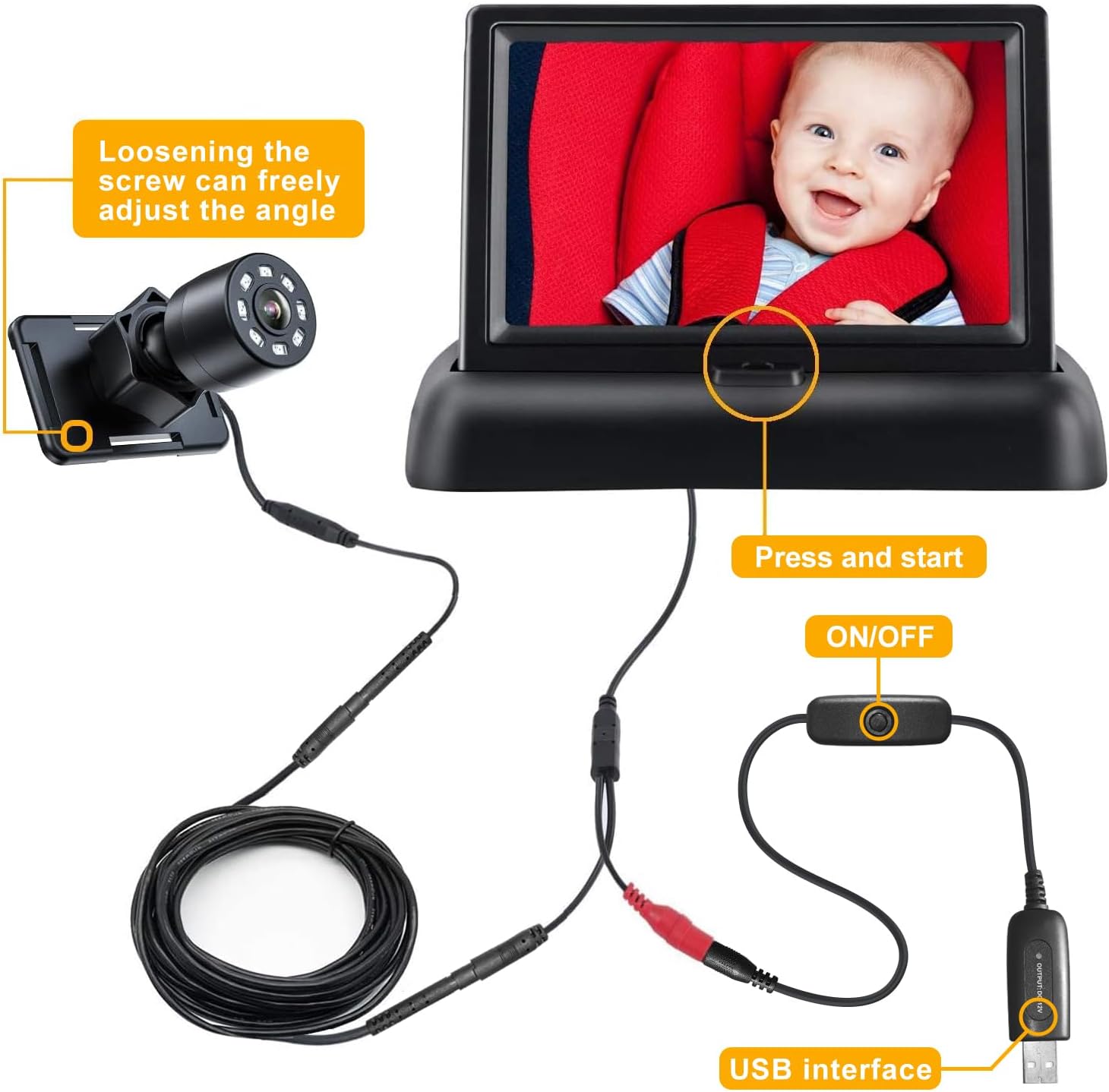
Image: Overview of the Itomoro Baby Car Monitor components, including the camera, monitor, and cables.
Safety Information
Always prioritize safe driving practices. This device is intended as an aid and should not replace direct supervision or proper car seat installation. Ensure all cables are routed safely and do not interfere with vehicle operation or passenger movement. Avoid placing the monitor in a position that obstructs your view of the road. Be aware that traditional mirrors can attract and concentrate heat, posing a burn risk in hot weather; this camera system mitigates that risk by not using a reflective mirror surface.
Setup Instructions
- Mount the Camera: Secure the camera unit to the headrest of the seat where the rear-facing car seat is installed. Use the provided straps to ensure a firm and stable attachment. The camera should be positioned to provide a clear view of your child.
- Route the Cable: Carefully route the camera's cable from the headrest to the front of your vehicle, ensuring it is tucked away and does not interfere with car seat straps, seat adjustments, or passenger foot space. The cable can be routed along the seat and under the car seat for a neat installation.
- Place the Monitor: Position the monitor display unit on your dashboard using the anti-slip pad. Choose a location that provides a clear view without obstructing your driving visibility. The monitor is designed to be stable during vehicle movement.
- Connect Power: Connect the power cable from the monitor to a USB power source in your vehicle. The monitor will automatically turn on and display the camera feed once connected.

Image: Step-by-step guide for attaching the camera to the headrest using the adjustable straps.

Image: Diagram illustrating the recommended path for routing the camera cable from the rear headrest to the front console.

Image: The monitor unit placed securely on the vehicle's center console/dashboard, showing a clear view of the baby in the rear-facing car seat.
Operating Instructions
- Power On/Off: The monitor powers on automatically when connected to a power source. To turn it off, simply disconnect the USB power cable.
- Adjust Camera Angle: The camera features a 360° rotation capability and a 149° wide-angle lens, allowing you to adjust it for the optimal view of your child. Loosen the screw on the camera mount to freely adjust the angle, then tighten to secure.
- Night Vision: The monitor automatically switches to night vision mode in low-light conditions, providing a clear and bright image of your child even at night.

Image: Illustration of the camera's 360-degree rotation capability for flexible viewing angles.

Image: Depiction of the wide-angle lens providing a broad view of the rear seat, capturing more of the child's surroundings.

Image: A comparison showing the clear visibility of the child in the car seat during nighttime conditions, thanks to the night vision feature.
Maintenance
To ensure the longevity and optimal performance of your Itomoro Baby Car Monitor:
- Cleaning: Use a soft, dry cloth to clean the camera lens and monitor screen. Avoid abrasive cleaners or solvents that could damage the surfaces.
- Storage: If storing the device for an extended period, disconnect it from power and store it in a cool, dry place away from direct sunlight.
- Cable Care: Regularly check cables for any signs of wear or damage. Ensure they are not pinched or stretched, which could affect performance.
Troubleshooting
| Problem | Possible Cause | Solution |
|---|---|---|
| No image on monitor | No power; loose connection; camera or monitor malfunction. | Check USB power connection. Ensure all cables are securely plugged in. Try a different USB port or power adapter. |
| Image is blurry or grainy (especially at night) | Camera lens is dirty; insufficient lighting; camera not focused correctly. | Clean the camera lens with a soft cloth. Ensure the camera is properly aimed and adjusted for optimal clarity. |
| Monitor screen freezes or shuts off randomly | Unstable power supply; faulty cable; overheating. | Ensure a stable power connection. Check the power cable for damage and replace if necessary. Ensure the monitor is not exposed to extreme heat. |
| Camera or monitor is unstable/vibrates | Improper mounting; loose straps. | Re-tighten the headrest straps for the camera. Ensure the anti-slip pad for the monitor is clean and securely placed on a flat surface. |
Specifications
| Feature | Detail |
|---|---|
| Brand | Itomoro |
| Model Number | AML017-USB |
| Item Dimensions (L x W x H) | 3 x 2.8 x 4 inches |
| Material | Plastic |
| Item Weight | 16 ounces |
| Mounting Type | Seat Mount (Camera), Dashboard (Monitor) |
| Special Feature | Night Vision |
| Lens Curvature | Convex |
| Camera Angle | 149° Wide Angle, 360° Rotatable |
| Power Source | USB Interface |
Warranty and Support
The Itomoro Baby Car Monitor comes with a 1-year manufacturer warranty. For any support needs, technical assistance, or warranty claims, please visit the official Itomoro Store or contact their customer service directly.
Official Itomoro Store: Itomoro Store on Amazon