
Mould King 17004
Contents
Mould King Remote Controlled Kran 17004 User Manual
Model: 17004
1. Introduction
This manual provides essential information for the assembly, operation, and maintenance of your Mould King Remote Controlled Kran 17004 building set. Please read these instructions carefully before beginning assembly or operation to ensure safe and correct use of the product.
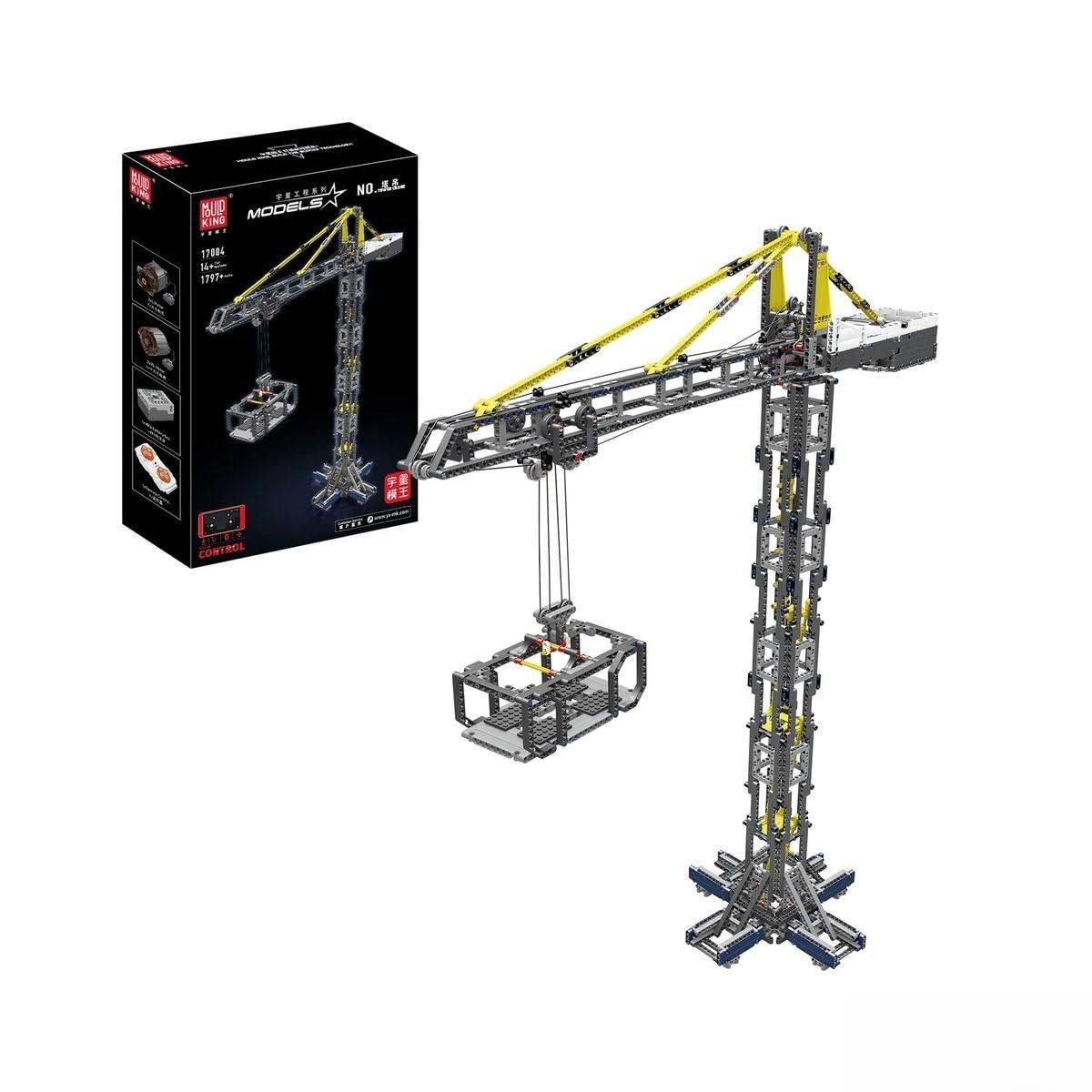
An illustration of the Mould King Remote Controlled Kran 17004 in its fully assembled state, showcasing its intricate design and scale.
2. Safety Information
WARNING! Not suitable for children under 36 months. Choking hazard due to small parts that can be swallowed.
- Always supervise children during play.
- Keep small parts away from infants and young children.
- Do not modify the product in any way not described in this manual.
- Ensure all connections are secure before operation.
3. What's in the Box
Your Mould King Remote Controlled Kran 17004 package should contain the following:
- Building Bricks (approx. 1700 pieces)
- Remote Control Unit
- Power Pack/Battery Unit
- USB Charging Cable
- Instruction Manual (this document)

The product packaging for the Mould King Kran 17004 is displayed next to the completed crane model, giving an idea of the product's presentation and the final assembled toy.
4. Setup
4.1 Assembly
Follow the detailed step-by-step assembly instructions provided in the separate building guide included with your set. Ensure all connections are firm and parts are correctly oriented.
4.2 Battery Installation and Charging
- Locate the battery compartment on the main power unit.
- Insert the required batteries (if not pre-installed) according to the polarity markings.
- Connect the provided USB charging cable to the power unit's charging port.
- Plug the other end of the USB cable into a standard USB power adapter (not included) or a computer USB port.
- Allow the unit to charge fully before first use. Refer to the charging indicator light for status.

A visual guide demonstrating the USB charging process for the crane's power unit. It shows the included charging cable connected to the unit, indicating how to recharge the battery.
4.3 Remote Control Pairing
Once the crane's power unit is charged and turned on, activate the remote control. The remote control should automatically pair with the crane. If pairing fails, refer to the specific remote control instructions for manual pairing procedures.
5. Operating Instructions
The Mould King Remote Controlled Kran 17004 offers various functions for realistic crane operation.
5.1 Basic Controls
- Rotation: Use the designated controls on the remote to rotate the crane's upper structure 360 degrees.
- Boom Movement: Control the raising and lowering of the main boom.
- Hook Operation: Operate the two-way hook to lift and lower objects.
- Sliding Boom: Extend and retract the suspended sliding boom for precise positioning.

The image highlights the crane's rotatable sweep capability, showing how the upper structure can rotate to cover a wide operational area, indicated by red directional arrows.
5.2 Key Features
- Suspended Sliding Boom: Allows for adjustable reach and precise load placement.
- Strong Power Pack: Provides reliable power for all motorized functions.
- Powerful Two-Way Hook: Designed for efficient lifting and lowering of various loads.
- Secure Base: Ensures stability during operation.

This image details the main operational features of the crane, including its suspended sliding boom, robust power pack, and versatile two-way hook. It also illustrates the secure base design and the remote control options, including a physical remote and a smartphone application.
6. Maintenance
6.1 Cleaning
To clean the model, gently wipe with a dry, soft cloth. Do not use water or chemical cleaners, as this may damage electronic components or the plastic bricks.
6.2 Storage
Store the assembled crane or its components in a cool, dry place away from direct sunlight and extreme temperatures. Disconnect batteries if storing for extended periods.
6.3 Battery Care
- Always use the provided USB charging cable.
- Do not overcharge the battery unit.
- If the product will not be used for a long time, remove the batteries from the remote control and the main power unit.
- Dispose of batteries responsibly according to local regulations.
7. Troubleshooting
- Crane not responding:
- Check if the power unit is turned on and fully charged.
- Ensure the remote control has fresh batteries and is paired correctly.
- Verify there are no obstructions to the remote control's signal.
- Motor functions are weak:
- The battery unit may need recharging.
- Ensure all gears and moving parts are free from debris.
- Parts are loose after assembly:
- Carefully re-examine the assembly steps in the building guide to ensure all bricks are securely connected.
8. Specifications
| Feature | Detail |
|---|---|
| Brand | Mould King |
| Model Number | 17004 |
| Material | Plastic |
| Color | White |
| Number of Pieces | 1700 |
| Item Dimensions (L x W x H) | 98.4 x 92.2 x 29.3 cm (38.7 x 36.29 x 11.53 inches) |
| Recommended Age | 3 years and up (Manufacturer's minimum age: 36 months) |
| Educational Objective | Engineering skill, Problem-solving skill, Spatial reasoning |
| Special Feature | Battery operated |
| Number of Players | 1 to 3 |

This diagram provides the precise dimensions of the assembled crane: 98.4 cm (38.7 inches) in height, 92.2 cm (36.29 inches) in length, and 29.3 cm (11.53 inches) in width.
9. Warranty and Support
For warranty information and customer support, please refer to the contact details provided on the product packaging or visit the official Mould King website. Keep your proof of purchase for any warranty claims.
If you encounter any issues not covered in this manual, please contact Mould King customer service for assistance.
Documents and downloads
Ask a question about this manual
Ask about setup, troubleshooting, compatibility, parts, safety, or missing instructions. Manuals+ will review the question and use this page’s manual context to help answer it.