
FREESEA 069AL
FREESEA Aquarium Automatic Fish Feeder User Manual
Model: 069AL
1. Introduction
Thank you for choosing the FREESEA Aquarium Automatic Fish Feeder. This device is designed to provide convenient and reliable feeding for your aquatic pets, ensuring they are fed even when you are away. With its rechargeable battery, moisture-proof design, and versatile feeding options, it simplifies fish care.
2. Product Features
- Manual & Automatic Mode: Offers flexible feeding schedules (8, 12, or 24 hours) and instant manual feeding.
- Upgrade Moisture-proof Cover Design: Keeps fish food dry and fresh by automatically opening and closing during feeding.
- USB-C Rechargeable: Long-lasting battery life (up to 6 months on a 6-hour charge), eliminating the need for frequent battery replacement.
- Two Mounting Options & 360° Rotation: Can be attached to tanks up to 1 inch thick with an adjustable clamp or stuck to the tank lid with double-sided stickers. The 360° rotation allows for optimal positioning.
- Compatible with All Feed Types: Suitable for powder, flake, or pellet fish food.
3. Package Contents
- FREESEA Automatic Fish Feeder Unit
- Adjustable Clamp (for clip-on mounting)
- Double-sided Adhesive Sticker (for stick-on mounting)
- USB-C Charging Cable
4. Setup
4.1 Charging the Feeder
Before first use, fully charge the feeder using the provided USB-C cable. A 6-hour charge provides approximately 6 months of usage.

Figure 4.1: Connecting the USB-C cable for charging.
4.2 Mounting Options
The feeder offers two installation methods:
- Clip-on Glass: Use the adjustable clamp to securely attach the feeder to the edge of your aquarium glass. This method is suitable for glass thickness up to 1 inch.
- Stick-on Aquarium Lid: For tanks with lids, use the included round double-sided adhesive sticker (2.3" diameter) to attach the feeder to the lid.
Ensure the feeder is installed directly above the fish tank to prevent equipment failure due to water splashing. The 360° rotation design allows you to adjust the feeder to the perfect position for dispensing food.

Figure 4.2: Two available installation methods.
4.3 Filling the Food Container
The feeder is compatible with various feed types including powder, flake, and pellet food. To fill, simply push the food container to open the inlet and add your desired fish food. No need to remove the device from the tank.

Figure 4.3: The feeder is suitable for various feed types.
Caution:
- Avoid using wet, spoiled, or oversized fish food, which may cause clogging of the device.
5. Operating Instructions
5.1 Setting Feeding Modes
The FREESEA feeder offers both manual and automatic feeding options:
- Manual Feeding: Press the manual feed button (hand icon) on the intuitive setting page to dispense food instantly.
- Automatic Feeding: Set regular feeding intervals by pressing the corresponding buttons: 8 hours, 12 hours, or 24 hours. The feeder will automatically dispense food at these intervals.

Figure 5.1: Control panel for setting feeding modes.
5.2 Adjusting Food Portion
The feeder allows you to adjust the amount of food dispensed per feeding. This is typically done via an adjustable door or slider on the dispenser tank. Refer to the specific mechanism on your feeder to fine-tune the portion size to prevent overfeeding.
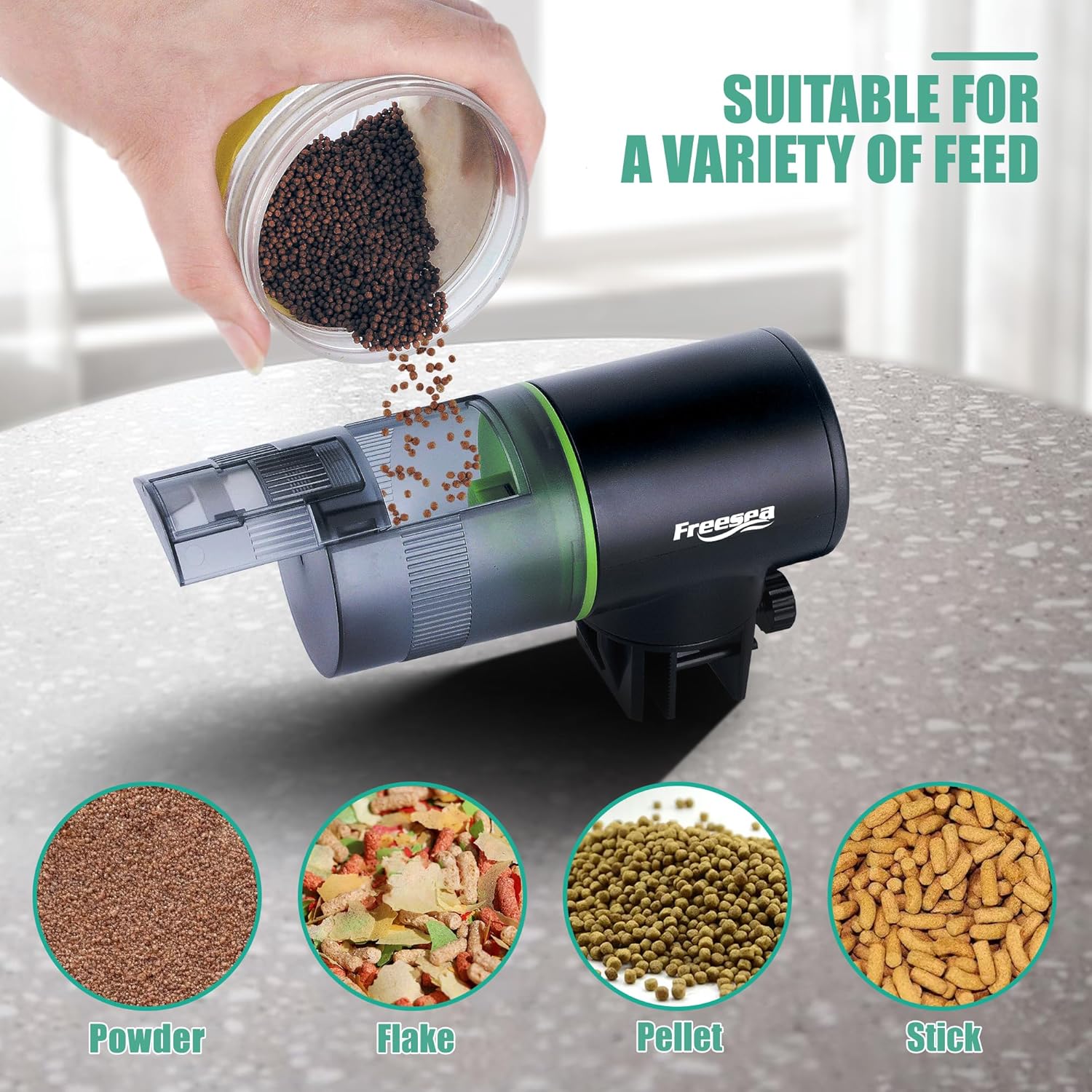
Figure 5.2: Food being dispensed from the moisture-proof container.
6. Maintenance
Regular cleaning of your automatic fish feeder is essential to ensure its proper operation and longevity. Follow these guidelines:
- Cleaning: Hand wash only. Do not use harsh chemical cleaners, as these can damage the device or harm your fish.
- Food Container: Periodically remove any residual food or dust from the food container and dispensing mechanism to prevent clogs and maintain food freshness.

Figure 6.1: Important maintenance considerations.
7. Troubleshooting
If you encounter issues with your FREESEA Automatic Fish Feeder, consider the following common solutions:
- Feeder Not Dispensing Food:
- Check if the food container is empty.
- Ensure the dispensing mechanism is not clogged by wet, spoiled, or oversized food. Clear any obstructions.
- Verify that the battery is charged.
- Food Dispensing Too Much/Too Little:
- Adjust the food portion setting on the feeder. Test the amount dispensed and fine-tune as needed for your aquarium environment.
- Feeder Not Holding Charge:
- Ensure the USB-C cable and charging adapter are functioning correctly.
- Allow the feeder to charge for the recommended 6 hours. If issues persist, contact customer support.
8. Specifications
| Feature | Detail |
|---|---|
| Model Name | Automatic Fish Feeder |
| Size | 069AL |
| Dimensions (LxWxH) | 5.9 x 2.8 x 4.7 inches |
| Item Weight | 7.2 ounces (0.45 Pounds) |
| Material | Plastic |
| Color | Black |
| Power Source | USB-C Rechargeable (1 Lithium Ion battery required) |
| Feeding Intervals | 8, 12, or 24 hours (Automatic) |
| Special Features | Adjustable, Durable, Moisture Proof, Timer |
| Included Components | Clip, Double-sided adhesive, USB-C cable |
| Target Species | Fish, Turtle |
9. Warranty and Support
Your FREESEA Automatic Fish Feeder comes with a 12-month warranty from the date of purchase.
For any questions, concerns, or assistance with your product, please contact our professional after-sales service. We offer 24-hour support to ensure your satisfaction.
Contact information can typically be found on the product packaging or the official FREESEA website.
Related documents069AL


Ask a question about this manual
Ask about setup, troubleshooting, compatibility, parts, safety, or missing instructions. Manuals+ will review the question and use this page’s manual context to help answer it.