
Introduction
This manual provides detailed instructions for the SHIDU X1 Portable Bluetooth Speaker with Wireless Microphone. Please read this manual thoroughly before using the product to ensure proper operation and to maximize your user experience. This device is designed to deliver high-quality audio with versatile connectivity and entertainment features.
Package Contents
Upon unpacking, please verify that all items listed below are present and in good condition:
- 1 x SHIDU X1 Portable Bluetooth Speaker
- 1 x Wireless UHF Microphone
- 1 x Type-C Charging Plug
- 1 x AUX Cable
- 1 x Live Stream Cable
- 1 x User Manual
Product Overview
Speaker Controls
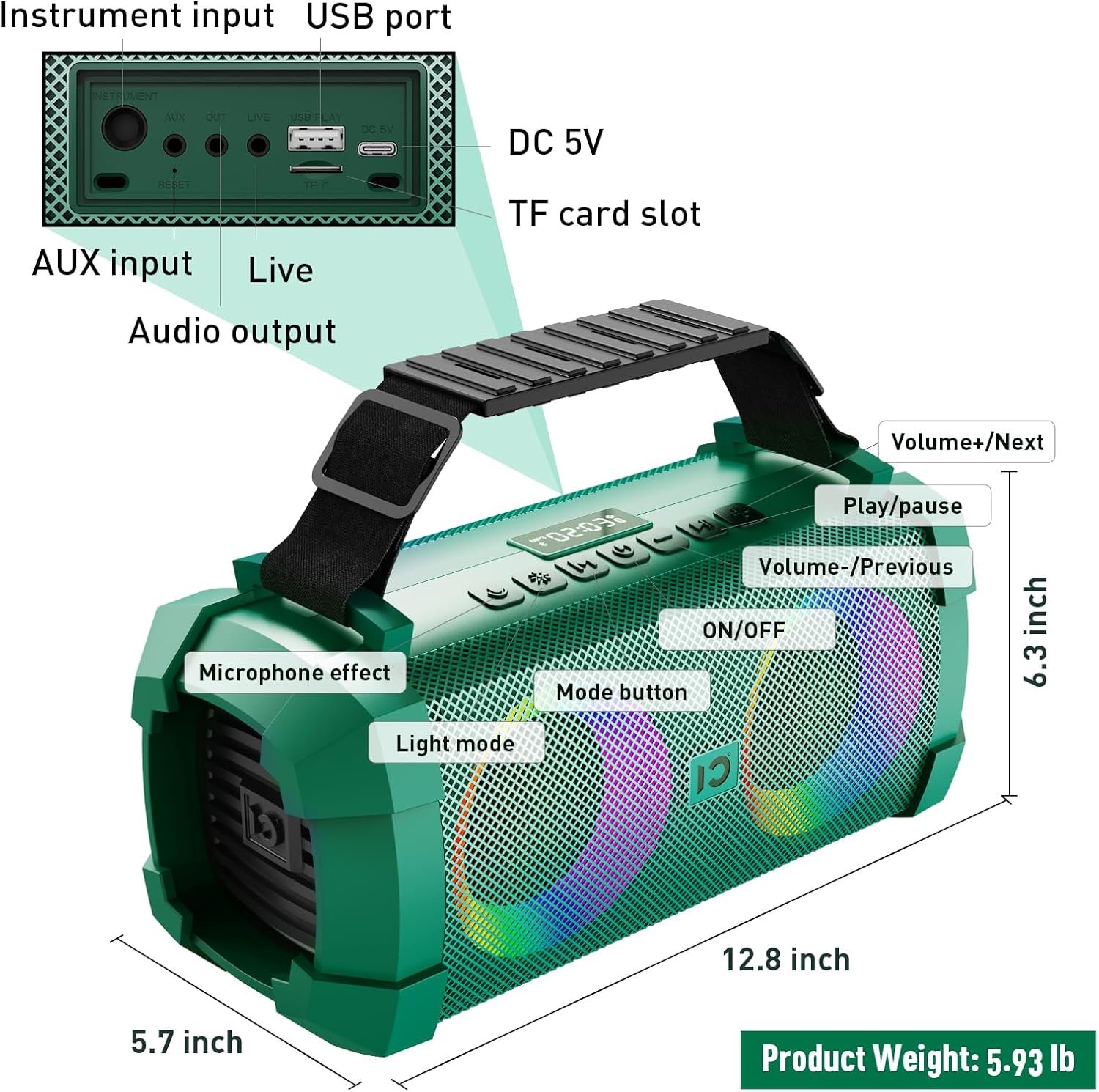
Image: SHIDU X1 Portable Bluetooth Speaker Control Panel Diagram
The speaker features a top-mounted control panel for easy access to various functions:
- ON/OFF Button: Long press to power the speaker on or off.
- Mode Button: Short press to cycle through input modes (Bluetooth, AUX, TF Card, U-Disk).
- Light Mode Button: Short press to switch between 5 dynamic LED light modes. Long press to turn the lights off.
- Microphone Effect Button: Short press to cycle through 3 sound effects (Popular, Professional, Original) for the microphone.
- Volume - / Previous Track Button: Short press for previous track. Long press to decrease volume.
- Play/Pause Button: Short press to play or pause audio.
- Volume + / Next Track Button: Short press for next track. Long press to increase volume.
Wireless Microphone Controls
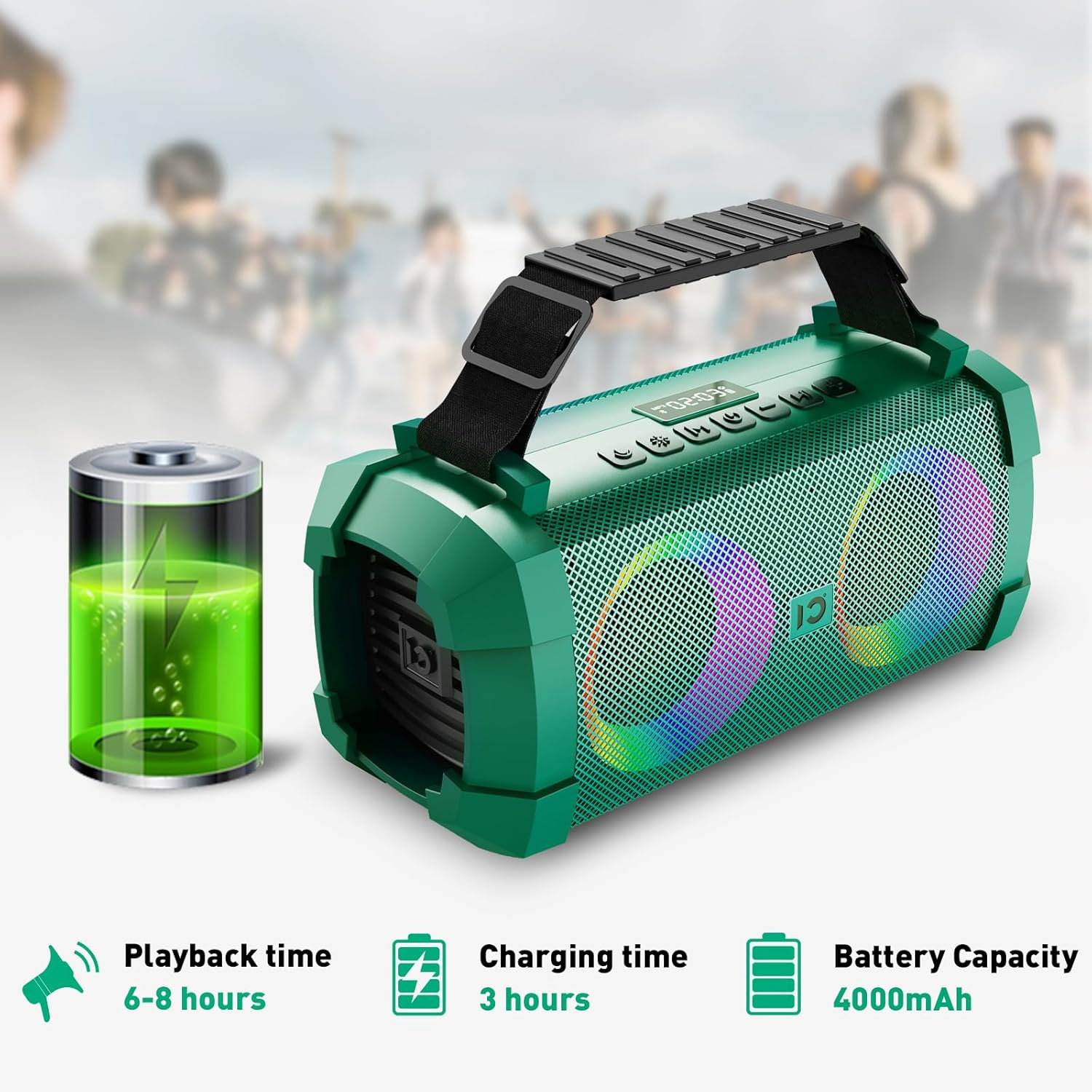
Image: SHIDU X1 Wireless Microphone Controls
The wireless microphone includes the following controls:
- Power Button: Long press to turn the microphone on or off.
- Frequency + Button: Short press to increase the microphone's frequency.
- Frequency - Button: Short press to decrease the microphone's frequency.
- Volume + Button: Long press to increase microphone volume.
- Volume - Button: Long press to decrease microphone volume.
- LED Screen: Displays current frequency and battery level.
Setup
Charging the Speaker
Before first use, fully charge the speaker. Connect the provided Type-C charging plug to the DC 5V port on the speaker and plug it into a power source. The charging indicator will show the charging status. A full charge takes approximately 3 hours.

Image: SHIDU X1 Portable Bluetooth Speaker battery life details: 6-8 hours playback, 3 hours charging, 4000mAh capacity.
Powering On/Off
Long press the ON/OFF button on the speaker's control panel to power it on or off.
Bluetooth Pairing
- Ensure the speaker is powered on and in Bluetooth mode (indicated by a flashing Bluetooth icon or voice prompt). If not, short press the Mode button to switch to Bluetooth mode.
- Enable Bluetooth on your mobile device (smartphone, tablet, etc.).
- Search for available Bluetooth devices and select "SHIDU X1" from the list.
- Once connected, the speaker will indicate successful pairing, and the Bluetooth icon will stop flashing.
Microphone Pairing
The UHF wireless microphone is factory-paired with the speaker. Simply power on both the speaker and the microphone, and they should connect automatically. If pairing is lost, refer to the troubleshooting section.
Operating Instructions
Switching Input Modes
Short press the Mode button on the speaker to cycle through available input sources: Bluetooth, AUX, TF Card, and U-Disk (USB flash drive).
Adjusting Volume and Tracks
- Volume Control: Long press the Volume + button to increase volume, and long press the Volume - button to decrease volume.
- Track Navigation: Short press the Next Track button to skip to the next song, and short press the Previous Track button to go to the beginning of the current song or the previous song.
- Play/Pause: Short press the Play/Pause button to pause or resume playback.
Using Sound Effects
The speaker offers three distinct sound effects for the wireless microphone:

Image: SHIDU X1 Portable Bluetooth Speaker demonstrating Original, Popular, and Professional sound modes.
- Original Mode: Standard vocal output.
- Popular Mode: Enhances vocals for a more vibrant sound.
- Professional Mode: Provides a refined vocal output suitable for performances.
Short press the Microphone Effect button on the speaker to cycle through these effects.
Controlling LED Lights
The speaker features 5 dynamic LED light modes to enhance the atmosphere.

Image: SHIDU X1 Portable Bluetooth Speaker showcasing 5 types of lighting modes.
Short press the Light Mode button to cycle through the different lighting patterns. Long press the Light Mode button to turn the LED lights off.
Live Streaming Function
The SHIDU X1 includes a professional live streaming interface. Connect your device using the provided Live Stream Cable to enable karaoke live streaming functionality.

Image: SHIDU X1 Portable Bluetooth Speaker with professional live broadcast interface for karaoke.
Product Features Overview
The SHIDU X1 is designed for versatile use, offering powerful sound and engaging features for various occasions.

Image: SHIDU X1 Portable Bluetooth Speaker with 60W output, Monstrous Bass, 3 Sound Effects, 5 Party Lights, Bluetooth 5.0, TF Card, 6.5mm Instrument Port, Live Streaming, UHF Wireless Mic, USB Flash Drive.
Experience deep bass and clear highs with 60W high-power stereo sound, suitable for both indoor and outdoor environments.

Image: SHIDU X1 Portable Bluetooth Speaker illustrating high-quality three-dimensional sound and overweight bass.
The speaker is ideal for various scenarios, including family karaoke, parties, band performances, and outdoor camping.

Image: SHIDU X1 Portable Bluetooth Speaker suitable for multiple scenarios: family karaoke, party interaction, band performance, outdoor camping.
Official Product Video
Video: Official SHIDU X1 Wireless Bluetooth Speaker with Wireless Microphone 60W Portable Karaoke Machine overview. This video demonstrates the product's features and functionality.
Specifications
| Brand | SHIDU |
| Model Number | X1 |
| Output Wattage | 60 Watts (Peak) / 40 Watts (RMS) |
| Connectivity Technology | Bluetooth 5.0, AUX, USB, TF Card |
| Item Dimensions (L x W x H) | 12.8 x 5.7 x 6.3 inches |
| Item Weight | 5.6 Pounds |
| Battery Capacity | 4000mAh |
| Playback Time | 6-8 hours (at medium volume) |
| Charging Time | 3 hours |
| Built-In Media | Microphone |
Troubleshooting
If you encounter any issues with your SHIDU X1 speaker, please refer to the following common solutions:
- No Power: Ensure the speaker is fully charged. Connect the charging cable and allow it to charge for at least 30 minutes before attempting to power on again.
- No Sound: Check the volume levels on both the speaker and your connected device. Ensure the correct input mode is selected. If using Bluetooth, verify successful pairing.
- Bluetooth Pairing Issues: Turn off Bluetooth on your device and the speaker, then restart both. Clear the speaker from your device's Bluetooth history and attempt to pair again. Ensure no other devices are actively connected to the speaker.
- Microphone Not Working: Ensure the microphone is powered on and fully charged. Check the microphone's frequency settings and adjust if necessary. Re-pair the microphone if connection is lost (usually automatic).
- Distorted Sound: Reduce the volume on both the speaker and the connected device. Ensure the audio source is of good quality.
Maintenance
To ensure the longevity and optimal performance of your SHIDU X1 speaker, follow these maintenance guidelines:
- Cleaning: Use a soft, dry cloth to clean the speaker's exterior. Do not use abrasive cleaners or solvents.
- Storage: Store the speaker in a cool, dry place away from direct sunlight and extreme temperatures.
- Battery Care: For optimal battery life, avoid fully discharging the battery frequently. Charge the speaker regularly, even if not in use, to maintain battery health.
- Water Resistance: While designed for outdoor use, avoid submerging the speaker in water or exposing it to heavy rain.
Warranty and Support
The SHIDU X1 Portable Bluetooth Speaker comes with a standard manufacturer's warranty. Please refer to the warranty card included in your package for specific terms and conditions.
For technical support, troubleshooting assistance, or warranty claims, please contact SHIDU customer service through the retailer where you purchased the product or visit the official SHIDU website for contact information.


