
Introduction
Thank you for choosing the American Lifetime DC12-EL Digital Dementia Clock. This large display clock is designed to provide clear and concise time, day, and date information, along with customizable alarms, to assist individuals who may benefit from enhanced daily orientation. Its user-friendly interface and robust features make it an ideal addition to any home environment.
Setup Instructions
Follow these steps to set up your American Lifetime Digital Dementia Clock:
- Unboxing: Carefully remove the clock and all accessories from the packaging. Ensure all components, including the power adapter and stand, are present.
- Power Connection: Connect the provided power adapter to the DC IN port on the back of the clock and plug it into a standard electrical outlet. The clock will power on automatically.
- Stand Installation: The clock includes a removable stand for tabletop use. Insert the stand into the designated slots on the back of the clock. For wall mounting, remove the stand and use the keyhole slots on the back of the device.
- Initial Settings: Upon first power-on, the clock may display default settings. Use the control buttons on the back or side of the clock to navigate the menu and set the correct time, date, and preferred display format.
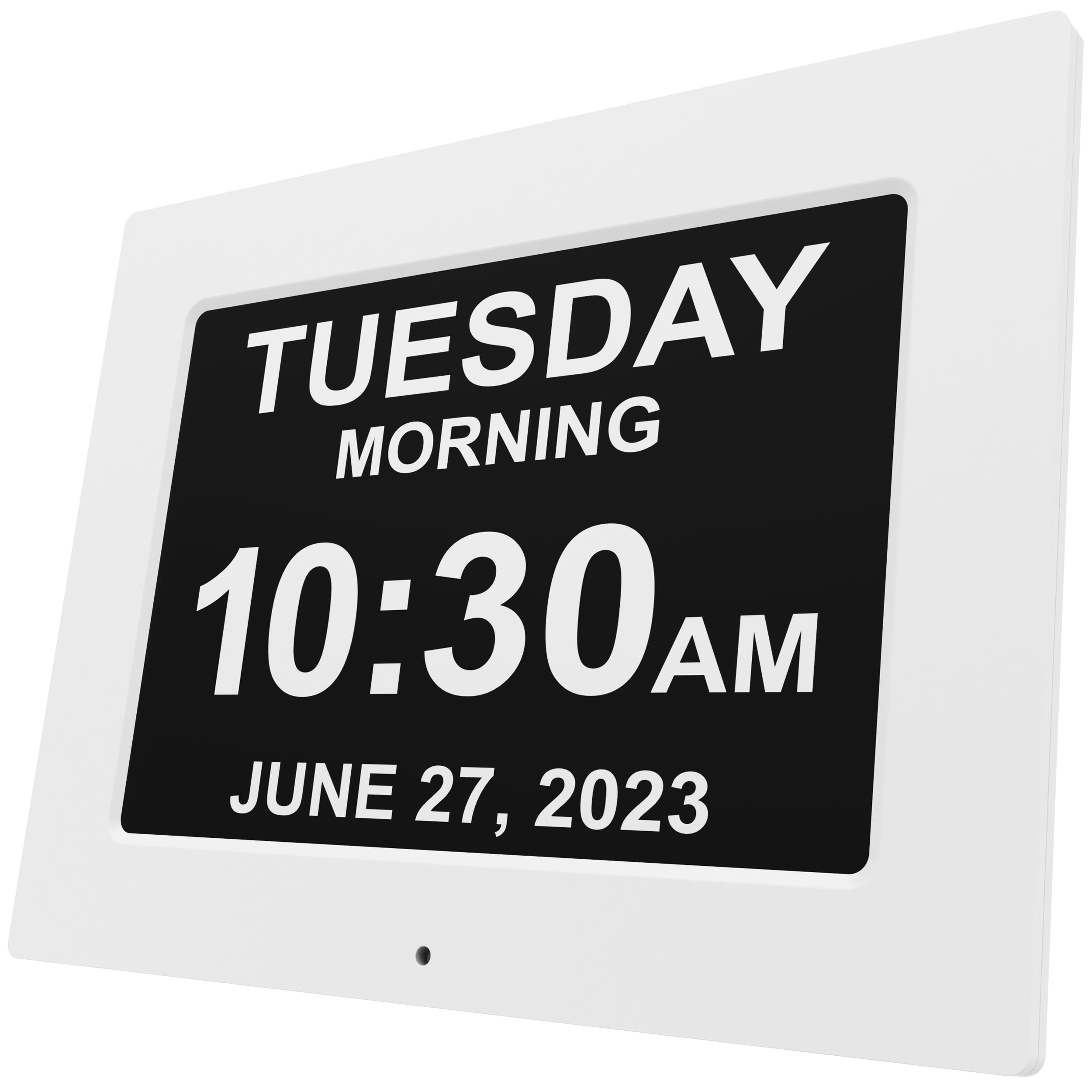
Figure 1: Front view of the American Lifetime DC12-EL Digital Dementia Clock.

Figure 2: Rear view of the clock showing the removable stand and control buttons for setup.
Video 1: Unboxing and initial setup of the American Lifetime Digital Dementia Clock. This video demonstrates how to unpack the clock, connect the power, and attach the stand.
Operating Instructions
The American Lifetime Digital Dementia Clock offers various features to enhance usability:
- Clear Display: The large, high-contrast display clearly shows the day of the week, period of the day (Morning, Afternoon, Evening, Night, Before Dawn), time (AM/PM), and full date.
- Customizable Alarms: Set up to 5 daily alarms for important events such as medication reminders or appointments. Each alarm can be customized with a specific message.
- Auto-Dimming: The clock automatically adjusts its brightness based on ambient light conditions, ensuring readability during the day and preventing disturbance at night.
- Multi-Language Support: Choose from multiple language options to suit user preferences.
- Hourly Chime: Activate an optional hourly chime feature, configurable for specific time ranges (e.g., 9 AM - 6 PM or 24 hours).
- Time and Date Modes: Select between 12-hour or 24-hour time formats and various date display formats (e.g., Month-Day-Year).

Figure 3: Example of the clock's clear display showing the day, period, time, and date.

Figure 4: The clock displaying a customizable medication reminder message.
Video 2: Demonstration of the clock's menu for setting time, date, alarms, and other customizable features.
Maintenance
To ensure the longevity and optimal performance of your clock:
- Cleaning: Wipe the screen and frame with a soft, dry cloth. Avoid using abrasive cleaners or solvents that may damage the display or finish.
- Battery Backup: The clock uses 1 CR2 battery for backup in case of power outages. Replace the battery as needed to maintain settings during power interruptions.
- Placement: Place the clock on a stable surface or mount it securely on a wall. Avoid exposing it to extreme temperatures, direct sunlight, or high humidity.
Troubleshooting
| Problem | Possible Cause | Solution |
|---|---|---|
| Clock does not power on. | Power adapter not connected or faulty outlet. | Ensure the power adapter is securely connected and the outlet is functional. |
| Time/Date is incorrect after power outage. | Backup battery is low or depleted. | Replace the CR2 backup battery. The clock should automatically reset to the correct time and date when power returns. |
| Display is too bright or too dim. | Auto-dimming feature or manual brightness setting. | Check the brightness settings in the menu. The auto-dimming feature adjusts automatically, but manual override may be available. |
| Alarm does not sound. | Alarm is turned off or volume is too low. | Verify that the alarm is enabled and the volume is set to an audible level in the settings menu. |
Specifications
- Brand: American Lifetime
- Model Number: DC12-EL
- ASIN: B0CKT7GZD3
- Color: White
- Display Type: Digital
- Style: Modern
- Product Dimensions: 12.4"W x 9.5"H
- Item Weight: 2.25 pounds
- Power Source: Power Cord (Corded)
- Room Type: Bedroom (suitable for various indoor settings)
- Shape: Rectangular
- Indoor/Outdoor Usage: Indoor
- Frame Material: Plastic
- Batteries: 1 CR2 battery required (for backup)
- Mounting Type: Wall Mount / Tabletop
- Operation Mode: Atomic (time synchronization)
Warranty
The American Lifetime Digital Dementia Clock comes with a 1-year limited warranty. Additionally, customers can return the product for free within the first 30 days, no questions asked. Extended protection plans are also available for purchase:
- 2-Year Protection Plan: Available for $9.99 (one-time payment).
- 3-Year Protection Plan: Available for $13.49 (one-time payment).
- Complete Protect: One plan covers all eligible past and future purchases for $16.99 (monthly billing).
Support
For any questions, assistance, or troubleshooting not covered in this manual, please contact the American Lifetime customer service team. Our dedicated team is ready to help you.
Website: www.American-Lifetime.com