
1. Introduction
The FiiO FF3S Dynamic Drive Earbuds are designed to deliver a high-resolution and lossless audio experience. Featuring a unique acoustic design and high-quality materials, these earbuds provide powerful bass and clear sound across various music genres. This manual provides essential information for setting up, operating, maintaining, and troubleshooting your FF3S earbuds.
2. Package Contents
Please verify that all items listed below are included in your package:
- FiiO FF3S Dynamic Drive Earbuds (1 pair)
- Earphone Cable (1)
- Transparent Sponge Covers (6 pairs, with hole)
- Bass Sponge Covers (6 pairs, without hole)
- Anti-slip Silicone Rings M (3 pairs, transparent black)
- Anti-slip Silicone Rings L (3 pairs, transparent black)
- Silicone Wing Hooks (1 pair, transparent black)
- 4.4mm Detachable Audio Plug (1) (3.5mm plug pre-installed)
- HB11 Protective Case (1)
- User Manual (1)

Figure 1: FiiO FF3S Earbuds and all included accessories, including various ear tips, cables, and a protective case.
3. Product Features
- High-Resolution Audio: Experience high-resolution and lossless sound quality.
- Dynamic Driver: Equipped with a 14.2mm large dynamic driver for rich audio.
- Swappable Plugs: Features an all-aluminum twist-lock swappable plug design, allowing interchangeability between 3.5mm and 4.4mm plugs.
- Premium Cable: The cable comprises 152 high-purity silver-plated monocrystalline copper wires, enhancing treble resolution and reducing sibilance.
- Comfortable Design: Ergonomic earbud style designed for comfortable and secure wearing.
- Bass-Enhancing Acoustic Flute: Optimized for bass-heavy sound, suitable for various music styles.

Figure 2: The FiiO FF3S Earbuds showcasing the detachable cable and swappable 3.5mm and 4.4mm audio plugs.

Figure 3: An exploded view illustrating the internal components of the FiiO FF3S earbud, highlighting the 14.2mm large dynamic driver.
4. Setup
4.1 Attaching the Cable and Plugs
- Identify the left (L) and right (R) earbuds and the corresponding connectors on the cable.
- Align the cable connectors with the earbud sockets and push firmly until they click into place.
- Select the desired audio plug (3.5mm or 4.4mm) and securely twist it onto the cable's connector. The 3.5mm plug is pre-installed.
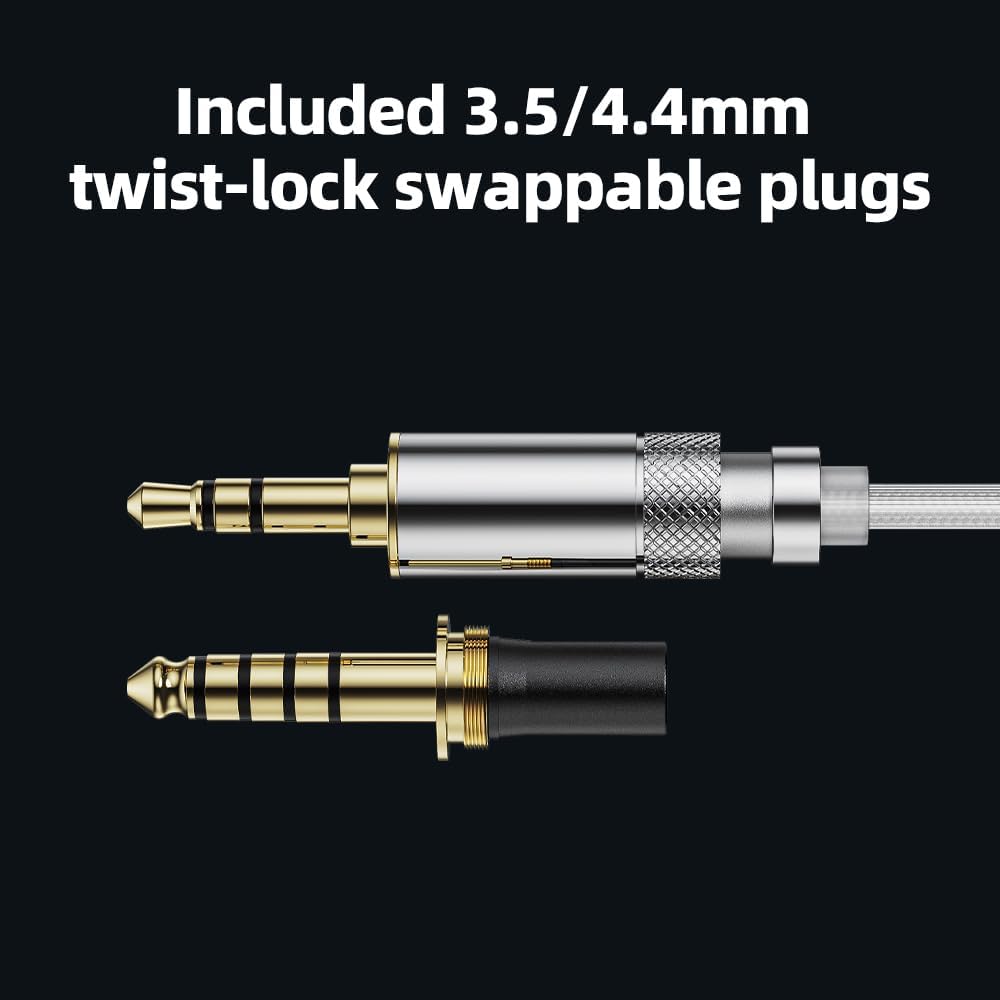
Figure 4: Detailed view of the included 3.5mm and 4.4mm twist-lock swappable audio plugs for versatile connectivity.
4.2 Choosing Ear Tips
The FF3S comes with various ear tips to optimize sound and comfort:
- Transparent Sponge Covers (with hole): For a balanced sound profile.
- Bass Sponge Covers (without hole): To enhance bass response.
- Anti-slip Silicone Rings & Silicone Wing Hooks: For a more secure and stable fit.
Experiment with different types and sizes to find the best fit and sound for your ears.
4.3 Connecting to a Device
Plug the selected audio plug into the corresponding audio jack of your smartphone, PC, laptop, tablet, or music player. Ensure the connection is secure.
5. Operating Instructions
5.1 Audio Playback
Once connected, begin audio playback on your device. Adjust the volume directly from your source device to a comfortable listening level. The FF3S earbuds are designed for high-fidelity audio across all music styles.
5.2 Media Control
The earbuds feature media control functionality. Refer to your device's manual for specific button functions if applicable, as the FF3S supports standard media control commands.
6. Maintenance
6.1 Cleaning
- Regularly clean the earbuds and ear tips with a soft, dry cloth.
- Remove ear tips and clean them separately with mild soap and water if necessary. Ensure they are completely dry before reattaching.
- Avoid using harsh chemicals or abrasive materials.
6.2 Storage
When not in use, store the FF3S earbuds in the provided HB11 protective case to prevent damage and tangling.
7. Troubleshooting
- No Sound: Ensure the audio plug is fully inserted into your device and the earbuds. Check your device's volume settings.
- Poor Sound Quality: Verify that the ear tips are correctly seated and form a good seal in your ear. Try different ear tip sizes or types. Check the audio source for quality issues.
- Uncomfortable Fit: Experiment with the various ear tips and silicone rings/hooks provided to find the most comfortable and secure fit for your ears.
- Cable Issues: Ensure the detachable cable connectors are securely attached to the earbuds.
8. Specifications
| Feature | Specification |
|---|---|
| Model Name | FF3S |
| Brand | FiiO |
| Connectivity Technology | Wired |
| Headphones Jack | 3.5 mm Jack (Swappable to 4.4mm) |
| Audio Driver Type | Dynamic Driver |
| Audio Driver Size | 14.2 Millimeters |
| Impedance | 45 Ohms |
| Sensitivity | 105 dB |
| Material | Aluminum (earbud housing) |
| Included Components | Protective Case, Various Ear Tips |
| Item Weight | 13.6 ounces |
9. Official Product Video
Video 1: An official product video showcasing the FiiO FF3S Dynamic Drive Earbuds, highlighting their design and features.
10. Warranty and Support
FiiO products are manufactured to high-quality standards. For warranty information, technical support, or service inquiries, please refer to the warranty card included in your package or visit the official FiiO website. You can also visit the FiiO Store on Amazon for additional product details and support resources.

