
1. Introduction
The SHAHE Model 5347 Small Digital Level Inclinometer is a compact and versatile measuring instrument designed for precise angle and slope measurements. Its small size, rechargeable battery, and magnetic base make it ideal for various applications, including woodworking, construction, plumbing, and general DIY tasks. This manual provides detailed instructions for the proper setup, operation, and maintenance of your device.
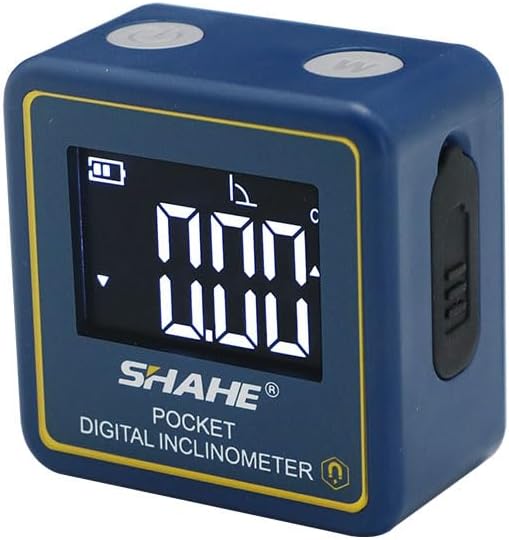
Front view of the SHAHE Model 5347 Small Digital Level Inclinometer, showing its compact blue casing, digital display, and control buttons.
2. Package Contents
Please verify that all items listed below are included in your package:
- 1 x SHAHE Model 5347 Digital Level Inclinometer
- 1 x Type-C Charging Cable
- 1 x Instruction Manual
- 1 x Product Box

Image showing the complete package contents: the SHAHE Model 5347 Digital Level, a Type-C charging cable, the instruction manual, and the product box.
3. Product Overview and Components
Familiarize yourself with the device's buttons and display indicators:

Detailed diagram illustrating the components of the SHAHE Model 5347 Digital Level, including the ON/OFF button, functional key, data hold indicator, relative measurement indicator, battery capacity, measuring range, and slope sign on the display.
- ON/OFF Button: Powers the device on or off.
- Functional Key (W): Used to switch between measurement modes or units.
- Display: Shows measurement readings, battery status, and mode indicators.
- Type-C Charging Port: Located on the side for recharging the internal battery.
- Magnetic Base: Built-in magnets on the bottom for secure attachment to metal surfaces.
4. Key Features
- High Accuracy: Measures angles with a range of 4*90°, resolution of 0.05°, accuracy of ±0.2°, and repeatability of 0.1°.
- Compact and Portable: Made from plastic, lightweight, and designed for easy one-hand operation.
- Rechargeable Battery: Features a Type-C charging port for convenient recharging.
- Automatic Power-Off: Conserves battery life by automatically shutting down after 3 minutes of inactivity.
- Data Hold Function: Allows the user to freeze the current measurement on the display.
- Zero Function: Enables setting any surface as a relative zero point for comparative measurements.
- Angle/Slope Conversion: Easily switch between displaying measurements in degrees or percentage slope.
- Relative-Absolute Measurement: Supports both absolute angle measurements and relative measurements from a set zero point.
- Built-in Magnets: Powerful magnets allow for secure attachment to metal surfaces, such as miter saw blades or table saw fences.
- Backlight: White backlight for improved readability in low-light conditions.

A collage showcasing key features: white backlight for visibility, Type-C charging port, built-in powerful magnets for attachment to metal surfaces, and the data hold function.
5. Setup
5.1 Charging the Device
Before first use, fully charge the inclinometer. Connect the provided Type-C charging cable to the device's charging port and plug the other end into a standard USB power source (e.g., computer, wall adapter). The battery indicator on the display will show charging status.
5.2 Powering On/Off
Press the ON/OFF button once to power on the device. The display will illuminate and show the current angle. To power off, press and hold the ON/OFF button for a few seconds. The device will automatically power off after 3 minutes of inactivity to save battery life.
6. Operation
6.1 Zero Function (Relative Measurement)
To set a relative zero point, place the inclinometer on the desired reference surface. Once stable, press the ZERO button. The display will show 0.00°, indicating that this surface is now the reference for subsequent relative measurements. This is useful for measuring the angle difference between two surfaces.
6.2 Absolute Measurement Mode
The device defaults to absolute measurement mode upon power-on, displaying the angle relative to a true horizontal plane. If you have set a relative zero, press the ZERO button again to return to absolute measurement mode.
6.3 Data Hold Function
To hold the current measurement on the display, press the HOLD button (often integrated with the functional key or a dedicated button). The 'H' icon will appear on the display. Press the HOLD button again to release the measurement and resume live readings.
6.4 Angle/Slope Conversion
The device can display measurements in degrees (°) or percentage slope (%). Press the W (Functional Key) button to toggle between these two units. The display will indicate the active unit.

Illustrations of the two measuring modes (Absolute and Relative) and two units of measurement (Angle in degrees and Slope in percentage) available on the SHAHE Model 5347 Digital Level.
6.5 Using the Magnetic Base
The powerful magnets on the base of the inclinometer allow it to be securely attached to ferrous metal surfaces. This is particularly useful for hands-free operation on saw blades, metal frames, or other magnetic workpieces.
6.6 Backlight Control
The white backlight automatically activates when the device is in use, ensuring clear readability of the display in various lighting conditions.
Official product video demonstrating the features and operation of the SHAHE Model 5347 Small Digital Level Inclinometer.
7. Maintenance
- Keep the device clean and dry. Wipe with a soft, damp cloth. Do not use abrasive cleaners or solvents.
- Avoid exposing the device to extreme temperatures, humidity, or direct sunlight.
- Store the inclinometer in a protective case or its original packaging when not in use to prevent damage.
- Ensure the charging port is free from dust and debris.
8. Troubleshooting
- Device does not power on: Ensure the battery is charged. Connect the Type-C cable and charge for at least 30 minutes.
- Inaccurate readings: Ensure the device is placed on a stable, clean surface. Recalibrate by performing the zero function on a known level surface.
- Display is dim or flickering: The battery may be low. Recharge the device.
- Buttons are unresponsive: Try powering the device off and on again. If the issue persists, ensure the device is fully charged.
9. Specifications
| Specification | Value |
|---|---|
| Model Number | 5347 |
| Measuring Range | 4*90° |
| Resolution | 0.05° |
| Accuracy | ±0.2° |
| Repeatability | 0.1° |
| Power Source | Battery-powered (1 Lithium Polymer battery included) |
| Battery Type | Lithium Polymer |
| Automatic Power-Off | 3 minutes of inactivity |
| Item Weight | 2.08 ounces |
| Package Dimensions | 6.02 x 4.25 x 2.52 inches |
| Manufacturer | Wenzhou Sanhe Measuring Instrument Co.,LTD |

Image demonstrating the compact size of the SHAHE Model 5347 Digital Level, easily held in one hand, with a size comparison to another device and dimensions.
10. Warranty and Support
For warranty information and technical support, please refer to the contact details provided with your purchase documentation or visit the official SHAHE Measuring Tools website. Keep your purchase receipt as proof of purchase.

