
1. Introduction and Overview
The MEADE EQM-127N is an entry-level reflecting telescope designed for astronomical observation. Manufactured by Meade, an American company specializing in celestial products, this telescope features a large 127mm aperture reflecting optical tube, an equatorial mount, and a stable steel tripod. It is well-suited for observing a variety of celestial objects, including the Moon's craters, Jupiter's Galilean moons, Saturn's rings, and distant nebulae and star clusters.
This comprehensive set includes all necessary accessories, such as multiple eyepieces and a Barlow lens, allowing for immediate use upon purchase. Additionally, it comes with a Kenko Telescope Case SEB-02, enhancing portability for outdoor observations.

2. Product Components
The MEADE EQM-127N telescope set includes the following components:
- Telescope Optical Tube: 127mm aperture reflecting type.
- Equatorial Mount: For tracking celestial objects.
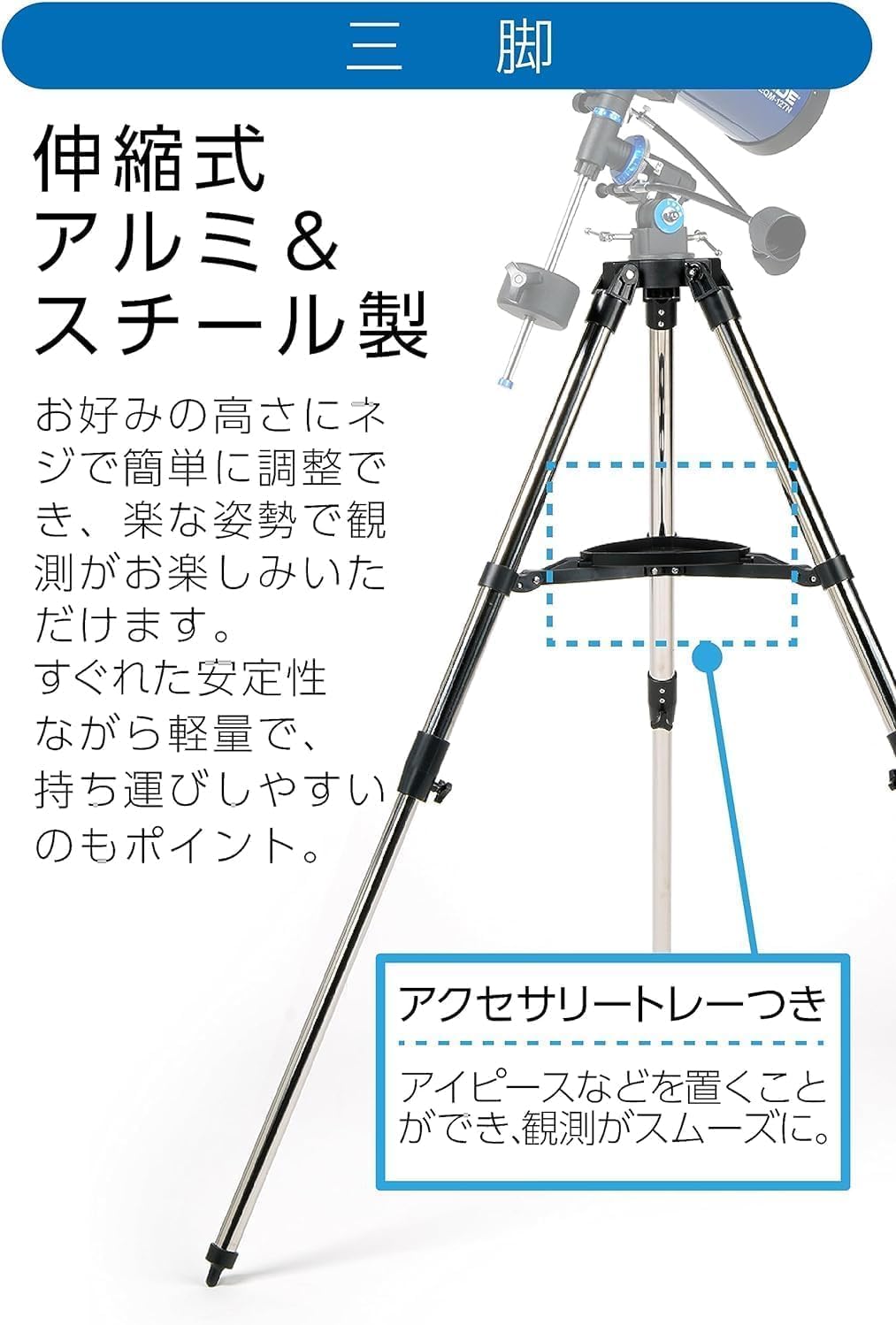
- Steel Tripod: Adjustable height for stability.
- Eyepieces (3x): 26mm, 20mm, and 9mm (American size).
- 2x Barlow Lens: Doubles the magnification of any eyepiece.
- Erecting Prism: For terrestrial viewing.
- 5x24 Optical Finder Scope: Assists in locating objects.
- Instruction Manual: This document.
- Warranty Card: Provides warranty details.
- Carrying Case (Kenko SEB-02): For transport and storage of the telescope and accessories.

3. Setup Instructions
Follow these steps to assemble your MEADE EQM-127N telescope:
- Assemble the Tripod: Extend the legs of the steel tripod to your desired height and secure them using the locking screws. Ensure the tripod is stable on a level surface.
- Attach the Equatorial Mount: Securely attach the equatorial mount to the top of the tripod. The mount allows for precise tracking of celestial objects.
- Mount the Optical Tube: Carefully place the 127mm reflecting optical tube onto the equatorial mount. Ensure it is balanced and securely fastened to prevent accidental movement.
- Install the Finder Scope: Attach the 5x24 optical finder scope to its designated bracket on the optical tube. This will aid in locating objects before viewing through the main telescope.
- Insert an Eyepiece: Choose an eyepiece (e.g., the 26mm eyepiece for lowest magnification) and insert it into the focuser. Secure it with the thumbscrew.
- Initial Alignment (Polar Alignment): For optimal tracking with the equatorial mount, it is recommended to perform a basic polar alignment. This involves aligning the mount's polar axis with the celestial pole (e.g., Polaris in the Northern Hemisphere). Refer to detailed astronomical guides for precise polar alignment procedures.

4. Operating Instructions
Operating your MEADE EQM-127N telescope involves several key steps to ensure clear and enjoyable observations.
4.1 Locating Celestial Objects
- Using the Finder Scope: The 5x24 optical finder scope provides a wide, low-magnification view of the sky. Look through the finder scope to locate your desired celestial object. Once centered in the finder scope, it should be visible in the main telescope's eyepiece.
- Aligning the Finder Scope: Before your first observation, align the finder scope with the main telescope. Point the main telescope at a distant terrestrial object during daylight. Center the object in the main telescope's lowest power eyepiece, then adjust the finder scope's alignment screws until the same object is centered in the finder scope's crosshairs.
4.2 Adjusting Focus and Magnification
- Focusing: Once an object is in view, use the focuser knob to achieve a sharp image. Turn the knob slowly until the object appears clear and distinct.
- Changing Eyepieces: Start with the lowest magnification eyepiece (26mm) to easily locate and center objects. Once centered, you can switch to higher magnification eyepieces (20mm, 9mm) for more detailed views.
- Using the 2x Barlow Lens: The included 2x Barlow lens doubles the magnification of any eyepiece. Insert the Barlow lens into the focuser first, then insert your chosen eyepiece into the Barlow lens. This allows for higher magnifications, but note that higher magnifications can make the image appear dimmer and more susceptible to atmospheric conditions.
Magnification Chart:
| Eyepiece | Normal Magnification | With 2x Barlow Lens |
|---|---|---|
| 26mm | 38.5x | 77x |
| 20mm | 50x | 100x |
| 9mm | 111.1x | 222.2x |

4.3 Tracking Celestial Objects with the Equatorial Mount
The equatorial mount is designed to compensate for the Earth's rotation, allowing you to keep celestial objects centered in your eyepiece with minimal adjustments. Once the mount is polar-aligned and an object is centered, you only need to turn one slow-motion control knob (the Right Ascension axis) to track the object as it moves across the sky. This is particularly useful for extended observation sessions.


5. Maintenance
Proper maintenance ensures the longevity and optimal performance of your telescope.
- Cleaning Lenses: Use a soft, lint-free cloth specifically designed for optical surfaces to gently wipe dust from eyepieces and the objective lens. For stubborn smudges, use a specialized optical cleaning solution. Avoid touching optical surfaces with bare hands.
- Cleaning the Telescope Body: Wipe the exterior of the telescope tube and mount with a soft, damp cloth. Avoid using harsh chemicals.
- Storage: When not in use, store the telescope in a dry, dust-free environment. The included Kenko Telescope Case SEB-02 is ideal for protecting the telescope from dust and physical damage during storage and transport.
- Avoid Extreme Temperatures: Do not expose the telescope to extreme temperatures or sudden temperature changes, as this can affect optical components.

6. Troubleshooting
If you encounter issues with your telescope, refer to the following common problems and solutions:
- Image is blurry or out of focus:
- Ensure you are using the focuser knob to adjust for a sharp image.
- Check that the eyepiece is fully inserted and secured.
- Atmospheric conditions (e.g., heat haze) can cause blurring; try observing on a clearer night.
- Cannot find celestial objects:
- Verify that the finder scope is properly aligned with the main telescope.
- Start with the lowest magnification eyepiece (26mm) for a wider field of view.
- Ensure you are observing from a dark location away from light pollution.
- Objects drift out of view quickly:
- Confirm that the equatorial mount has been adequately polar-aligned. Even a rough alignment will significantly improve tracking.
- Ensure the slow-motion controls are engaged and being used correctly to track the object along the Right Ascension axis.
- Image appears too dark at high magnification:
- This is normal for higher magnifications, as light is spread over a larger area.
- Use higher magnifications only when atmospheric conditions are stable and for brighter objects like the Moon and planets.
- Return to a lower magnification eyepiece for fainter objects like nebulae and star clusters.
7. Specifications
Detailed technical specifications for the MEADE EQM-127N telescope:
| Feature | Specification |
|---|---|
| Optical System | Reflecting |
| Aperture | 127mm |
| Focal Length | 1000mm |
| F-ratio | F7.9 |
| Limiting Magnitude | 12.3 |
| Light Gathering Power | 329x |
| Resolving Power | 0.91 arc seconds |
| Finder Scope | 5x24 Optical Finder |
| Mount Type | Equatorial |
| Tripod | Steel, Adjustable |
| Eyepieces Included | 26mm, 20mm, 9mm |
| Barlow Lens | 2x |
| Included Accessories | 3 Eyepieces, 2x Barlow Lens, Erecting Prism, 5x24 Optical Finder, Instruction Manual, Warranty Card, Carrying Case |
| Dimensions (D x W x H) | 140 x 100 x 100 cm |
| Weight | 12.1 kg |
| Origin | China |
| Model Number | 603321 |
8. Warranty and Support
Your MEADE EQM-127N telescope is covered by a 1-year manufacturer's warranty from the date of purchase. This warranty covers defects in materials and workmanship under normal use.
For warranty claims, technical support, or any questions regarding the operation or maintenance of your telescope, please refer to the contact information provided on the included warranty card or the official Meade website. Please retain your proof of purchase for warranty validation.


