
1. Introduction
This manual provides comprehensive instructions for the operation and maintenance of your Jazmm A320 Portable Shortwave Radio. This multi-functional device is designed to receive signals across various bands including AIR, VHF, SW, WB, AM, and FM, offering a wide range of listening options from news and sports to weather reports and aviation information. It also features Bluetooth connectivity, APP control, a powerful 5W bass speaker, a 2000mAh rechargeable battery, SOS alert, sleep timer, and multiple play modes.
2. What's in the Box
- High-Performance All-Band Radio (1 unit)
- Wire Antenna (1 unit)
- Storage Bag (1 unit)
- Type-C Charging Cable (1 unit)
- Earphone (1 unit)
Ensure all items are present and in good condition upon unboxing.
3. Product Overview
The Jazmm A320 radio is a compact and versatile device, featuring a clear LCD display, intuitive controls, and a robust design. Below are key visual references and descriptions of its features.

Figure 3.1: Front view of the Jazmm A320 Portable Shortwave Radio, showing the display, tuning dial, and control buttons.
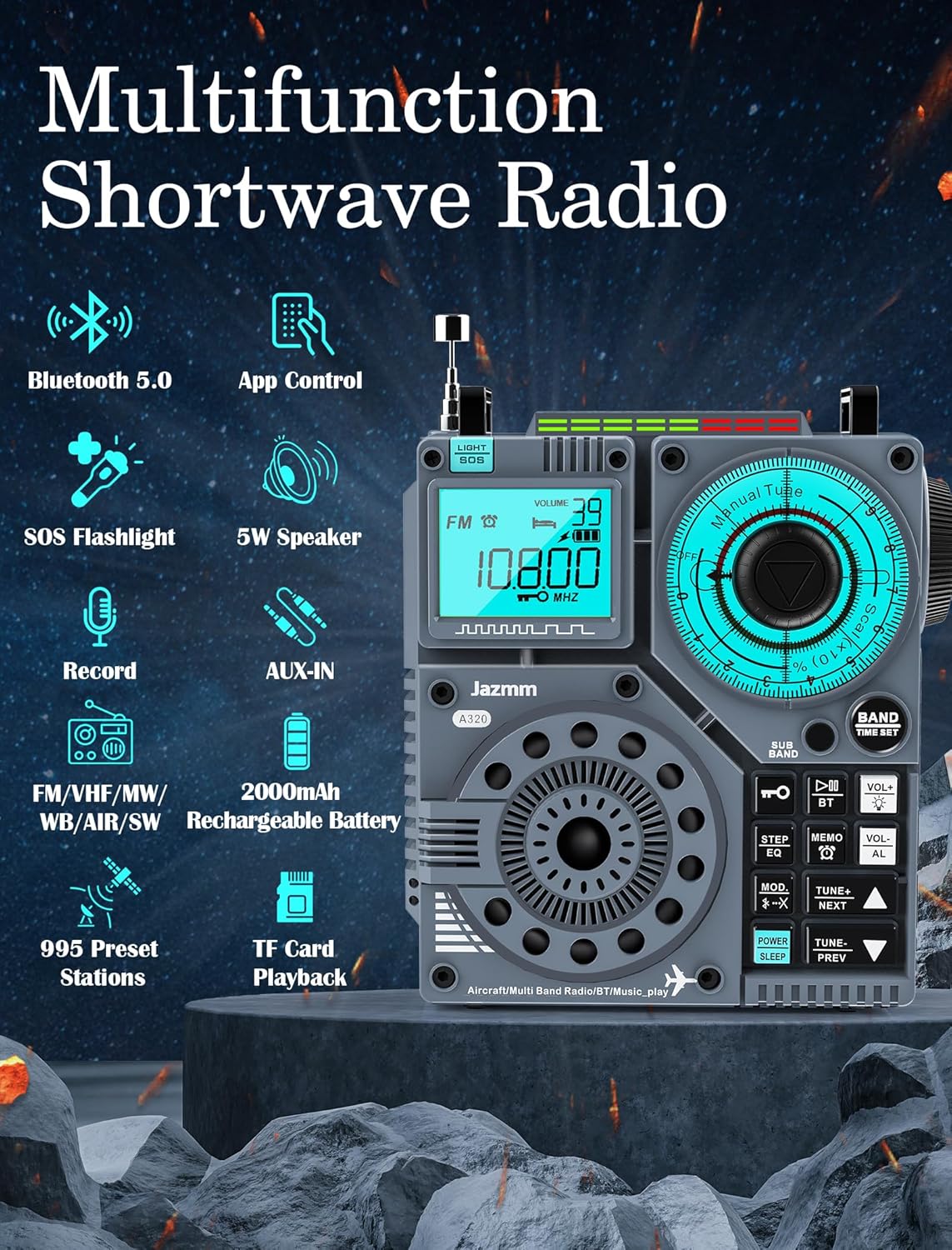
Figure 3.2: Overview of the radio's multifunction capabilities, including Bluetooth 5.0, App Control, SOS Flashlight, 5W Speaker, Record function, AUX-IN, 2000mAh Rechargeable Battery, FM/VHF/MW/WB/AIR/SW bands, 995 Preset Stations, and TF Card Playback.

Figure 3.3: Illustration of the radio's multi-band reception capabilities, covering FM (65-108MHz), MW (520-1710KHz), VHF (30.000-1999.975MHz), SW (3.20-21.95MHz), AIR (118-138MHz), and WB (162.400-162.550MHz).

Figure 3.4: Detailed view of the 2-inch 5W high-power speaker, highlighting its HIFI stereo sound and super bass capabilities.
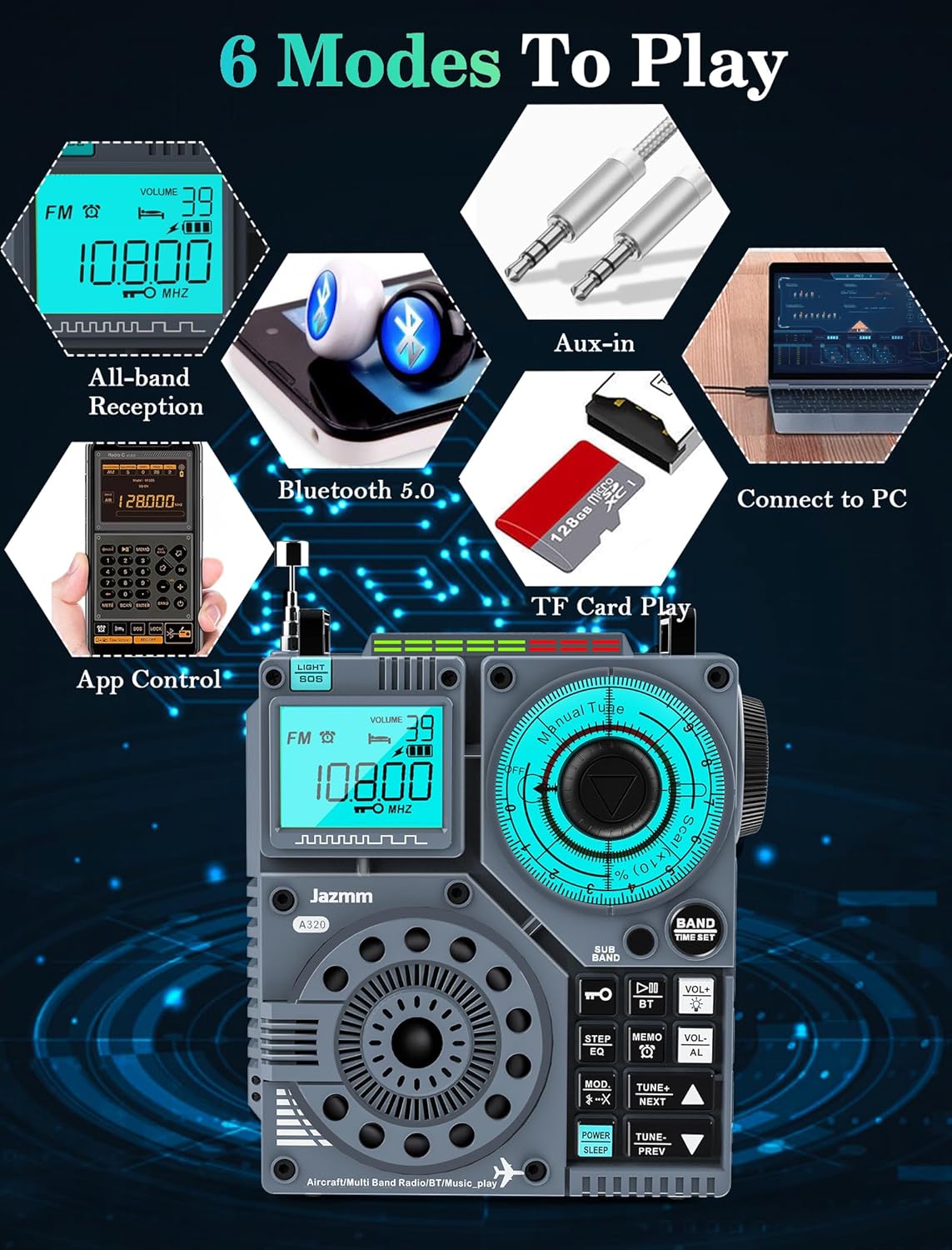
Figure 3.5: Visual representation of the six play modes: All-band Reception, Bluetooth 5.0, App Control, Aux-in, TF Card Play, and Connect to PC.

Figure 3.6: Close-up of the large turning knobs, illustrating the shuttle tuning and rotary tuning mechanisms for precise control.
4. Setup
4.1 Charging the Battery
The Jazmm A320 radio features a built-in 2000mAh rechargeable battery. To charge the device, use the provided Type-C charging cable and a 5V/1A power adapter (not included). A full charge takes approximately 4 hours and provides over 23 hours of usage time.
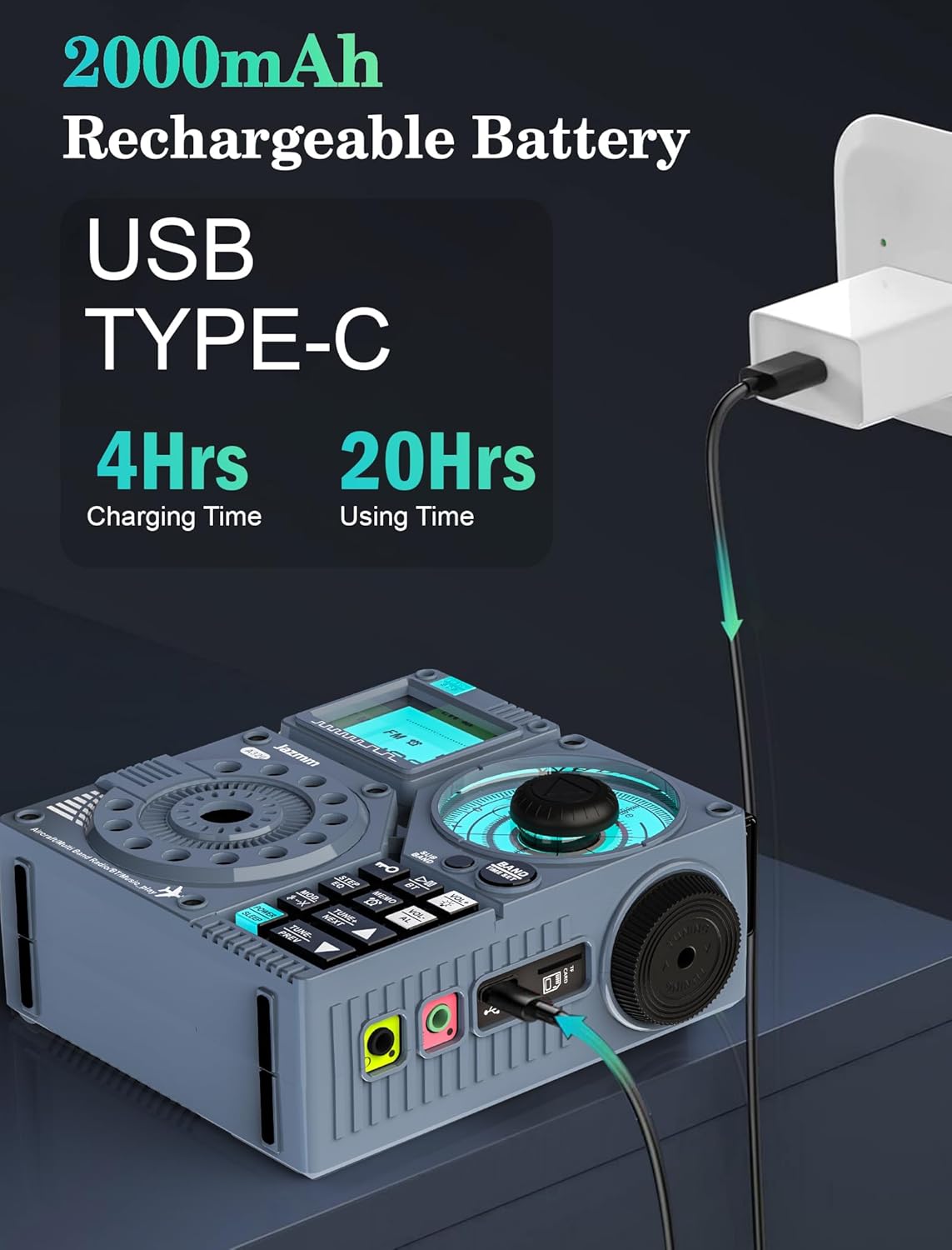
Figure 4.1: The radio connected to a power adapter via its USB Type-C port for charging.
4.2 Antenna Connection
The radio includes a built-in 15.4-inch ultra-long antenna for stable reception. For enhanced reception, especially in challenging environments, connect the external 9.5-foot wire antenna to the designated port on the radio.

Figure 4.2: The radio demonstrating its built-in antenna and the connection for the external wire antenna.
5. Operating Instructions
This section details the various functions and controls of your Jazmm A320 radio.
Video 5.1: An instructional video demonstrating key operations of the Jazmm A320 radio, including band selection, tuning, preset management, volume control, and screen lock/unlock.
5.1 Power On/Off
To power on the radio, press the POWER button. Press and hold the POWER button again to power off.
5.2 Selecting Different Modes (Radio, Bluetooth, PC, TF Card)
Short press the BT button on the control panel to cycle through different modes: Bluetooth mode, PC mode, Radio mode, and TF Card Playing mode.
5.3 Selecting Different Radio Bands
Short press the BAND button on the control panel to switch between different radio bands: FM, VHF, SW, AIR, MW, and WB.
5.4 Manually Tuning the Frequency
There are three ways to manually adjust the frequency:
- Turn the large rotary dial on the front of the radio to adjust the frequency.
- Turn the shuttle knob on the right side of the radio to adjust the frequency.
- Short press the TUNE+ or TUNE- buttons to fine-tune the frequency.
5.5 Automatically Tuning the Frequency
To automatically search for channels, long press the TUNE+ or TUNE- buttons for 2 seconds. The radio will begin searching for channels automatically and will stop when a channel is found.
5.6 Presetting Stations
To save a station as a preset:
- Tune to the desired channel.
- Long press the MEMO button for 2 seconds to enter preset station mode.
- Short press TUNE+ or TUNE- to select the desired preset station number (e.g., "P01", "P02").
- Short press the MEMO button again to confirm the setting.
The radio can preset up to 995 stations (199 for each band: FM/VHF/AM/SW/AIR).
5.7 Calling Out Preset Stations
To recall a preset station:
- Short press the MEMO button to enter preset recall mode.
- Short press TUNE+ or TUNE- to navigate through the saved preset stations.
5.8 Adjusting the Volume
Long press the VOL+ or VOL- buttons for 2 seconds to adjust the volume level.
5.9 Locking/Unlocking the Screen
To prevent accidental button presses, long press the key button (often indicated by a lock icon) for 2 seconds to lock the screen. Repeat the action to unlock the screen.
5.10 Using the Earphone Jack
Connect the included earphones to the 3.5mm earphone jack for private listening. This allows you to enjoy your audio without disturbing others.

Figure 5.1: The radio showing the 3.5mm earphone jack and the integrated flashlight.
5.11 Additional Features
- SOS Alert: The radio features an SOS emergency alert function for critical situations.
- Flashlight: A 1W integrated flashlight provides illumination when needed.
- LCD Backlit Display: The display is backlit for easy viewing in low-light conditions.
- Time Setting & Alarm Clock: Set the current time, configure alarms, and utilize the sleep countdown function.
- Recording Function: Use the companion APP to record current broadcasts.
- Bluetooth 5.0 & APP Control: Connect wirelessly to your smartphone (iOS, Android, HarmonyOS) for fast pairing and stable connection up to 20 meters. Control tuning, band selection, recording, preset stations, and synchronize time via the app.
- Multiple Play Modes: Besides radio, the device supports Bluetooth streaming, TF card playback (up to 256G for MP3, WMA, WAV, APE, FLAC formats), PC connection for file transfer, and AUX-IN for use as an external speaker.
6. Maintenance
To ensure the longevity and optimal performance of your Jazmm A320 radio, follow these maintenance guidelines:
- Cleaning: Use a soft, dry cloth to clean the exterior of the radio. Avoid using abrasive cleaners, solvents, or strong chemicals, as they may damage the finish.
- Storage: When not in use for extended periods, store the radio in a cool, dry place away from direct sunlight and extreme temperatures. Use the provided storage bag for protection.
- Battery Care: To maintain battery health, avoid fully discharging the battery frequently. If storing for a long time, charge the battery to about 50% every few months.
- Antenna Care: Handle the telescopic antenna gently to prevent bending or breaking. When not in use, retract the antenna fully.
- Water Resistance: This product is not water-resistant. Avoid exposure to water, rain, or high humidity.
7. Troubleshooting
If you encounter issues with your Jazmm A320 radio, refer to the following common troubleshooting steps:
| Problem | Possible Cause | Solution |
|---|---|---|
| No power / Does not turn on | Battery is depleted. | Charge the radio using the Type-C cable and a 5V/1A adapter. Ensure the charging indicator lights up. |
| Poor radio reception | Weak signal in current location; Antenna not extended or connected. | Fully extend the built-in antenna. Connect the external wire antenna for improved reception. Try moving to a location with better signal, such as near a window. |
| Bluetooth connection issues | Radio not in Bluetooth mode; Device too far; Interference. | Ensure the radio is in Bluetooth mode (indicated by 'bt' on display). Keep the connected device within 20 meters. Avoid obstacles between the radio and the device. |
| No sound / Low volume | Volume too low; Mute activated; Earphones connected. | Long press VOL+ to increase volume. Check if earphones are plugged in if expecting sound from the speaker. |
| Screen is unresponsive / Locked | Screen lock is active. | Long press the key button (lock icon) for 2 seconds to unlock the screen. |
| TF card not recognized | Incorrect format; Card not inserted properly; Corrupted card. | Ensure the TF card is formatted correctly and inserted fully. Try a different TF card if the issue persists. |
8. Specifications
- Product Dimensions: 4.67 x 2.05 x 4 inches
- Item Weight: 0.79 ounces
- Item Model Number: A320
- Batteries: 1 Lithium Metal battery (included)
- Manufacturer: Jimeng
- Brand: Jazmm
- Color: Blue
- Number of Channels: 1
- Special Features: AIR/AM/FM/VHF/SW/WB, Bluetooth, Rechargeable, APP Control, 5W Bass Sound
- Frequency Range: 1 MHz to 174 MHz
- Tuner Technology: AM/FM/SW/WB/AIR/VHF
- Voltage: 5 Volts
- Water Resistance Level: Not Water Resistant
9. Warranty and Support
For detailed warranty information and customer support, please refer to the official documentation provided with your product or contact the seller directly. Additional resources are available:
- User Guide (PDF): Download User Guide
- User Manual (PDF): Download User Manual
Protection plans are also available for extended coverage:
- 2-Year Protection Plan
- 3-Year Protection Plan
- Complete Protect (monthly plan)
For specific inquiries or technical assistance, please reach out to the manufacturer, Jimeng, or the seller, JiMeng.

