Product Overview
The toocki USB C Adapter is a versatile 2-pack solution designed to extend USB-C connections while providing real-time power monitoring. Each adapter features a digital display that shows charging speed in watts, making it easy to verify power delivery. These compact adapters support high-speed charging up to 100W and data transfer rates of 480Mbps, making them ideal for a wide range of USB-C devices including laptops, smartphones, and tablets.

Image: The toocki USB C Adapter 2-pack, showcasing the digital power display on each unit.
Key Features
- Smart LED Power Display: Monitor real-time charging speed (3-100W) with an intuitive LED screen that displays voltage, current, and power output. This allows for clear visibility of charging status.
- 100W Fast Charging & 480Mbps Data Transfer: Supports blazing 100W Power Delivery (PD3.0) and Quick Charge (QC3.0) for rapid charging of devices like MacBook Pro in approximately 1.5 hours. It also facilitates USB 2.0 data transfer at 480Mbps for efficient file sharing.
- Durable and Portable Design: Constructed with rugged zinc alloy and reinforced joints, ensuring durability for over 10,000 plug cycles. Its compact, thumb-sized design makes it highly portable for travel or daily use.
- Driver-Free Simplicity: Requires no additional software or drivers for operation. Simply connect to your USB-C devices, chargers, consoles, or PCs for immediate use.
- Wide Compatibility: Compatible with over 500 devices, including iPhones 15/16, iPads, Samsung Galaxy devices, Steam Deck, Surface Book, and most USB-C laptops. It is also backward-compatible with older USB-C accessories.

Image: An exploded view of the adapter highlighting its internal chip and features like output power display and fast charge indicator.
Setup and Installation
The toocki USB C Adapter is designed for plug-and-play functionality, requiring no complex setup or driver installation. Follow these simple steps to begin using your adapter:
- Identify the USB-C male end of the adapter. This end will connect to your power source (e.g., wall charger, power bank, laptop USB-C port).
- Connect the USB-C male end of the adapter into the USB-C output port of your charger or device.
- Connect your USB-C charging cable or data cable into the USB-C female port of the adapter.
- Connect the other end of your USB-C cable to your target device (e.g., smartphone, tablet, laptop).
The digital display on the adapter will illuminate and show the current power delivery (in watts) once a connection is established and power begins to flow.

Image: The adapter connected in a charging setup, illustrating its role in power delivery.
Operating Instructions
The primary function of this adapter is to provide real-time power monitoring and facilitate high-speed charging and data transfer. Here’s how to interpret and utilize its features:
Power Display Operation:
- Once connected and power is flowing, the LED screen on the adapter will automatically display the current power in watts (W).
- The display updates in real-time, allowing you to observe fluctuations in charging speed.
- The display may show "PD" or "QC" indicators if Power Delivery or Quick Charge protocols are active, confirming fast charging.
- Note that the display may appear slightly dim in very bright environments, but it is designed for clear visibility under normal conditions.
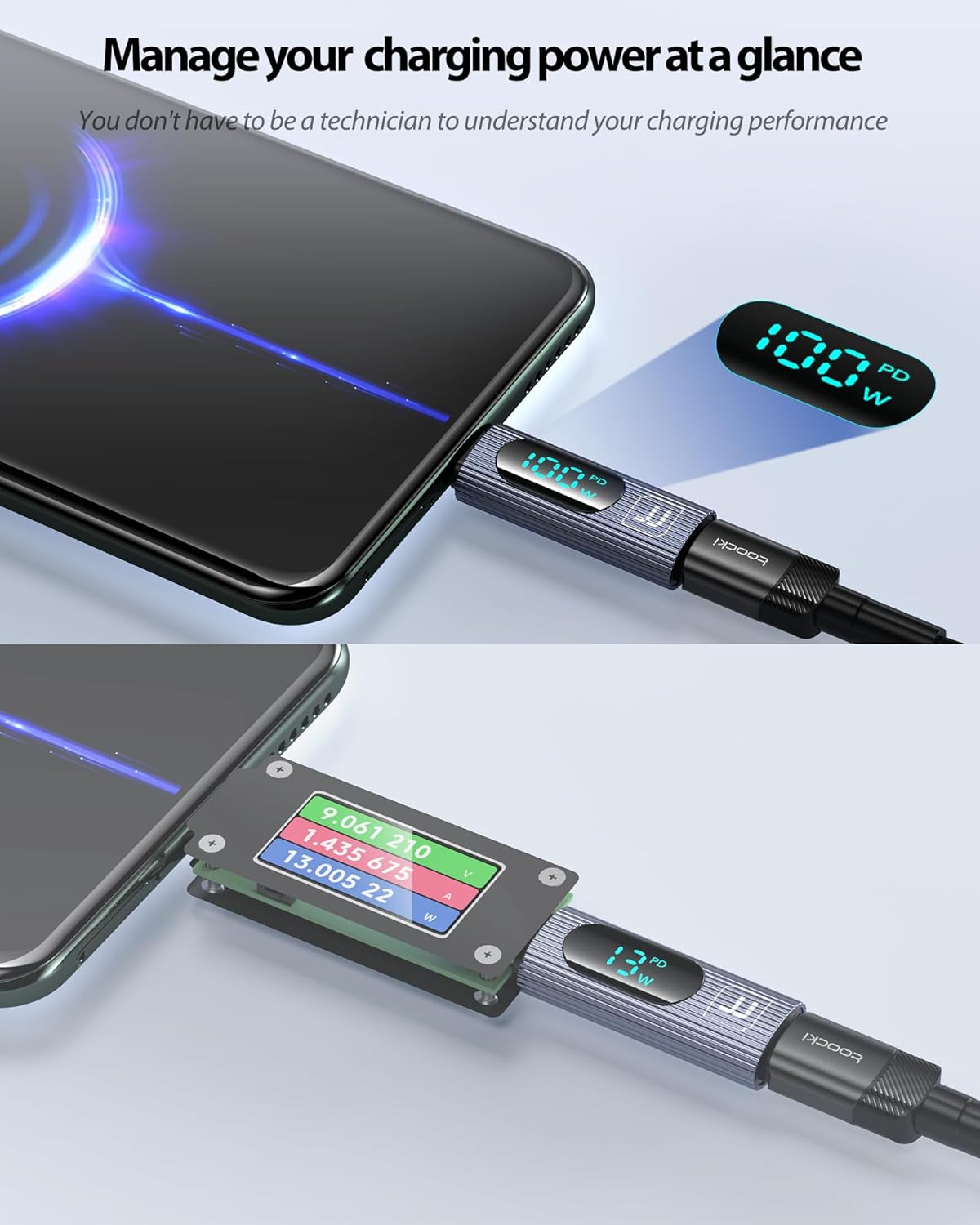
Image: The adapter connected to a smartphone, demonstrating how to manage and view charging power at a glance.
Data Transfer:
- When connected between two compatible devices (e.g., phone and laptop), the adapter supports USB 2.0 data transfer speeds up to 480Mbps.
- This allows for quick and efficient transfer of files, photos, and music.

Image: The adapter facilitating both fast charging and data transfer between a smartphone and a laptop.
Maintenance
To ensure the longevity and optimal performance of your toocki USB C Adapter, please follow these maintenance guidelines:
- Cleaning: Use a soft, dry cloth to gently wipe the adapter. Avoid using liquid cleaners, solvents, or abrasive materials, as these can damage the display or the adapter's finish.
- Storage: Store the adapter in a cool, dry place away from direct sunlight and extreme temperatures. Its compact size allows for easy storage in bags, cases, or pockets.
- Handling: While designed for durability with zinc alloy and reinforced joints, avoid excessive force when plugging or unplugging the adapter. Do not bend or twist the adapter excessively.
- Environmental Conditions: Protect the adapter from moisture, dust, and dirt. Do not expose it to water or other liquids.
Troubleshooting
If you encounter any issues while using your toocki USB C Adapter, refer to the following common troubleshooting tips:
| Problem | Possible Cause / Solution |
|---|---|
| Digital display is blank or not showing power. |
|
| Display appears dim in bright light. | This is a characteristic of the LED display. While designed for clear visibility, direct bright light can reduce its apparent brightness. This is not a defect. |
| Slow charging speed displayed. |
|
| Data transfer not working. |
|
Specifications
| Feature | Detail |
|---|---|
| Model Number | TQ-OTG07 |
| Product Dimensions (L x W x H) | 1.57 x 0.55 x 0.31 inches (40 x 14 x 8 mm) |
| Item Weight | 0.352 ounces (approximately 10 grams) |
| Connector Type | USB Type C (Female to Male) |
| Power Delivery | Up to 100W (PD3.0, QC3.0 compatible) |
| Data Transfer Speed | 480Mbps (USB 2.0) |
| Display Type | LED Digital Display (shows wattage) |
| Material | Rugged Zinc Alloy |
| Color | Grey |
| Compatible Devices | Laptops (MacBook Pro, DELL XPS, Surface Book), Smartphones (iPhone 15/16, Samsung Galaxy, Huawei, One Plus), Tablets (iPad Pro/Air), Gaming Consoles (Steam Deck, Switch), and other USB-C devices. |
| Manufacturer | Shenzhen Toocki Network Technology Co., Ltd. |

Image: The compact dimensions of the toocki USB C Adapter, highlighting its portability.
Warranty and Support
toocki products are manufactured with high-quality standards. For specific warranty information and support, please refer to the official toocki website or contact their customer service directly.
For technical assistance, troubleshooting beyond this manual, or warranty claims, please visit the toocki Official Store on Amazon or contact their support team.


