
1. Introduction
Welcome to the user manual for your Yixinxin Waterproof 4K 48MP Autofocus Digital Camera, Model YS810. This manual provides essential information on how to set up, operate, and maintain your camera to ensure optimal performance and longevity. Please read this manual thoroughly before using the camera, especially for underwater activities.
2. Safety Information
- Waterproof Seal: Before any water exposure, always ensure the battery compartment cover is securely closed and the safety lock is in the 'LOCK' position. Failure to do so will compromise the camera's waterproof integrity and may cause irreparable damage.
- Temperature: Avoid exposing the camera to extreme temperatures.
- Cleaning: After use in saltwater, rinse the camera with fresh water and dry thoroughly with a soft cloth.
- Battery: Use only the specified battery type. Do not attempt to open or modify the battery.
- Storage: Store the camera in a cool, dry place away from direct sunlight.
3. Package Contents
Verify that all items listed below are included in your package:
- 1 x Yixinxin YS810 Digital Camera
- 1 x European Charger
- 1 x Li-ion Battery (1500 mAh)
- 1 x USB Cable (Type-C)
- 1 x User Manual
- 1 x Storage Bag
- 1 x Wrist Strap

Image: Contents of the Yixinxin YS810 camera package, including the camera, charger, battery, USB cable, wrist strap, and storage pouch.
4. Product Overview
The Yixinxin YS810 is a robust digital camera designed for capturing high-quality photos and videos, even in challenging environments. It features 4K video recording, 48-megapixel still images, autofocus capabilities, and a waterproof design suitable for depths up to 3 meters (10 feet).
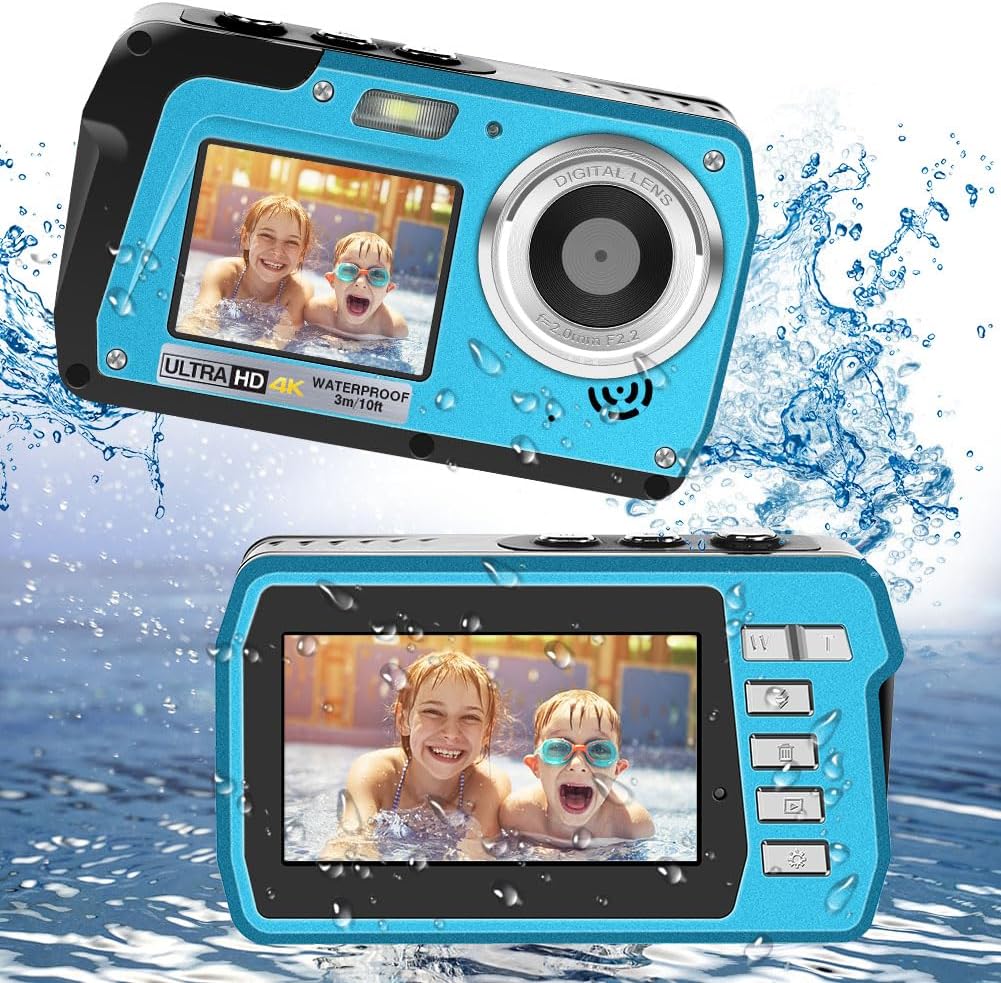
Image: Front and rear views of the Yixinxin YS810 camera, highlighting its dual screens and lens.

Image: Illustration of the camera's dual IPS screens, showing the 3.0-inch rear display and the 2.0-inch front display.
5. Setup
5.1. Battery Installation
- Locate the battery compartment cover on the side of the camera.
- Slide the lock mechanism to the 'OPEN' position.
- Open the cover and insert the 1500 mAh Li-ion battery, ensuring correct polarity.
- Close the cover firmly and slide the lock mechanism to the 'LOCK' position.
5.2. Memory Card Insertion
The camera supports MicroSD cards up to 128GB (not included).
- With the battery compartment open, locate the MicroSD card slot.
- Insert the MicroSD card with the gold contacts facing the front of the camera until it clicks into place.
- To remove, gently press the card until it springs out.
5.3. Charging the Battery
- Connect the USB cable to the camera's Type-C port.
- Connect the other end of the USB cable to the provided European charger or a compatible USB power source.
- The charging indicator light will illuminate. It will turn off or change color once charging is complete.

Image: Visual guide demonstrating the correct method to open and close the camera's battery cover, emphasizing the safety lock.
6. Operating the Camera
6.1. Power On/Off
Press and hold the Power button (usually located on the top or side) to turn the camera on or off.
6.2. Photo Mode
- Taking Photos: Press the shutter button to capture a 48MP image.
- Autofocus: For clear photos, lightly press the shutter button. The camera will automatically focus. Once the focus indicator turns green, fully press the shutter button to take the picture.
- Digital Zoom: Use the 'W' (Wide) and 'T' (Telephoto) buttons to adjust the 16x digital zoom.
- Flash: Cycle through Auto, On, and Off flash modes using the dedicated flash button.
- Self-timer: Set a delay of 2, 5, or 10 seconds before a photo is taken.
- Burst Shot: Enable burst mode to capture multiple photos in quick succession.
- ISO Settings: Adjust light sensitivity with Auto, 100, 200, or 400 ISO options.
- Face Recognition: The camera supports face recognition for optimized portraits.

Image: The camera's screen displaying the autofocus function, with a green box indicating successful focus on a subject.
6.3. Video Mode
- Recording: Press the video record button to start and stop recording.
- Resolutions: Select from FHD 4K, 2.7K, FHD 1920x1080, or HD 1280x720P video resolutions.
- Image Stabilization: The camera features electronic image stabilization to reduce blur from camera shake.
6.4. Dual Screens
The camera is equipped with a 3.0-inch IPS rear screen and a 2.0-inch IPS front screen. Use the front screen for convenient selfies and vlogging.
6.5. Playback
Enter playback mode to review your captured photos and videos. Use the navigation buttons to browse through your media.
7. Underwater Use
The Yixinxin YS810 camera is designed to be waterproof up to 3 meters (10 feet) for a duration of 1 hour per use, and is IP68 dust and water resistant. This makes it suitable for snorkeling, swimming, and other shallow water activities.
- Critical Precaution: Before submerging the camera, double-check that the battery compartment cover is completely sealed and the safety lock is firmly in the 'LOCK' position. Any water ingress due to improper sealing will void the warranty.
- Depth and Time Limits: Adhere strictly to the 3-meter (10-foot) depth limit and 1-hour continuous submersion time limit. Exceeding these limits may damage the camera.
- Post-Underwater Care: After using the camera in saltwater, rinse it thoroughly with fresh water to remove salt residue, then dry it completely with a soft, clean cloth before opening any compartments.

Image: A collage of images showing individuals, including children, using the Yixinxin YS810 camera during various water activities, highlighting its waterproof capability.
8. Maintenance
- Cleaning the Lens: Use a soft, lint-free cloth specifically designed for camera lenses. Do not use abrasive materials or harsh chemicals.
- Cleaning the Body: Wipe the camera body with a soft, damp cloth. For stubborn dirt, use a mild soap solution, then wipe with a clean, damp cloth and dry thoroughly.
- Battery Care: Remove the battery if the camera will not be used for an extended period. Store batteries in a cool, dry place.
- Storage: Store the camera in its protective pouch in a dry, well-ventilated area, away from dust and extreme temperatures.
9. Troubleshooting
| Problem | Possible Cause | Solution |
|---|---|---|
| Camera does not power on. | Battery is depleted or incorrectly inserted. | Charge the battery fully. Ensure the battery is inserted with correct polarity. |
| Photos are blurry. | Autofocus not engaged, camera shake, or dirty lens. | Lightly press shutter for autofocus. Hold camera steady. Clean the lens. |
| Cannot take photos/videos. | Memory card full or not inserted. | Insert a MicroSD card. Delete unnecessary files or replace the card. |
| Water inside camera. | Battery cover not properly sealed. | Immediately power off the camera, remove battery and memory card. Allow to dry completely. Contact support. (Note: Water damage voids warranty if seal was compromised by user error). |
10. Specifications
| Feature | Specification |
|---|---|
| Model | YS810 |
| Waterproofing | 3 meters (10 feet) for 1 hour, IP68 rated |
| Max Photo Pixels | 48.0 MP |
| Image Formats | JPEG |
| Video Resolution | 4K, 2.7K, 1920x1080 FHD, 1280x720P HD |
| Video Format | AVI |
| Dual Screen | Rear 3.0-inch IPS; Front 2.0-inch IPS |
| Auto Shut-off | Off/1 minute/3 minutes/5 minutes |
| Anti-shake | Electronic Image Stabilization |
| Digital Zoom | 16x |
| Focal Length | 1 meter - infinity |
| Self-timer | 2 seconds, 5 seconds, 10 seconds |
| Battery Capacity | 1500 mAh Li-ion |
| Internal Memory/RAM | None |
| ISO | Auto, 100, 200, 400 |
| Face Recognition | Supported |
| Aperture | F/2.2 |
| Burst Shooting | Supported (30 frames per second) |
| Flash | Auto, On, Off |
| Camera Dimensions | 112 (L) x 32 (W) x 67 (H) mm |
| Language Support | English, German, French, Italian, Spanish |
| Memory Card Support | MicroSD up to 128GB (not included) |
| Weight | 340 Grams |
| Connectivity | USB |
11. Warranty and Support
For warranty information and technical support, please refer to the documentation provided at the time of purchase or contact your retailer. You may also visit the official Yixinxin website for further assistance.