
1. Introduction
This manual provides essential information for the safe and efficient operation of your iWALK 20000mAh 65W Laptop Power Bank, Model HBT001. Please read these instructions thoroughly before use and retain for future reference.
2. Package Contents
Verify that all items listed below are included in your package:
- iWALK 20000mAh 65W Power Bank
- USB-C to C Cable
- Welcome Guide (User's Manual)
Video: Unboxing the iWALK 20000mAh 65W Power Bank and its contents.
3. Product Overview
The iWALK HBT001 is a high-capacity portable charger designed for fast charging a wide range of devices, including laptops, tablets, and smartphones. It features a built-in USB-C cable for convenience and a smart LED display for real-time information.

Image: Front view of the iWALK 20000mAh 65W Laptop Power Bank in Light Gold, showing the LED display and built-in USB-C cable.
3.1 Key Features
- 65W High Capacity Output: Delivers up to 65W, capable of charging a MacBook Pro 13-inch up to 50% in 30 minutes. The 20000mAh capacity provides approximately 1.0 full charge for a MacBook Pro 13-inch, 1.6 times for an iPad Pro, and 3.4 times for an iPhone 15 Pro.
- Smart LED Display: A multi-display LED screen shows battery levels, charging status (voltage, current), and other information. Double-tap the power button to activate low-current mode for small devices like AirPods and smartwatches.
- Triple Device Simultaneous Charging: Equipped with one built-in 65W PD USB-C cable, one 65W PD USB-C port, and one 30W QC USB-A port. Note that simultaneous charging may affect individual charging speeds.
- Wide Compatibility: Supports various laptops (MacBook Pro/Air, HP, Dell XPS, Microsoft Surface Book 2, Steam Deck), tablets (iPad Pro/Air/Mini), and smartphones (iPhone 15/14/13/12/11, Samsung S22/S21/S20, and other Android devices).
- Integrated Cable for Portability: Features a built-in 65W fast-charging USB-C cable, eliminating the need to carry an additional cable. Its sleek, rounded design ensures easy portability.

Image: Detailed view of the power bank's ports: USB-C (IN/OUT), USB-A (OUT), and the built-in USB-C cable (IN/OUT).
4. Setup and Initial Use
4.1 Charging the Power Bank
Before first use, fully charge your iWALK Power Bank. Use a 65W or higher output charger (not included) with the built-in USB-C cable or the dedicated USB-C IN/OUT port for optimal charging speed. A full recharge can take approximately 1.5 hours with a compatible 65W charger.

Image: Illustration of two methods to recharge the power bank: using the built-in USB-C cable or an external USB-C to C cable.
4.2 Understanding the LED Display
The smart LED display provides real-time information:
- Battery Percentage: Shows the remaining power.
- Charging Voltage/Current: Displays the output voltage and current during device charging.
- Low-Current Mode: Double-tap the power button to enter this mode, indicated on the display, for charging low-power devices.

Image: Examples of the Dynamic Power LED Display indicating remaining battery percentage, output wattage, and input wattage.
5. Operating Instructions
5.1 Charging Your Devices
Connect your device to the power bank using the appropriate port:
- Built-in USB-C Cable: For devices with a USB-C port (e.g., laptops, newer smartphones, tablets).
- USB-C PD Port (IN/OUT): For devices requiring Power Delivery (PD) charging, including laptops and fast-charging smartphones.
- USB-A QC Port (OUT): For devices compatible with Quick Charge (QC) or standard USB-A charging.
The power bank will automatically detect the connected device and begin charging. The LED display will show the charging status.
Video: Demonstration of how to use the iWALK TANKER power bank to charge devices.
5.2 Low-Current Mode
For small devices that require low-current charging (e.g., Bluetooth earbuds, smartwatches), double-tap the power button to enter low-current mode. This ensures safe and optimized charging for these devices.

Image: Visual guide on activating low-current mode for charging small electronic accessories.
5.3 Simultaneous Charging
The power bank supports charging up to three devices concurrently. Connect each device to an available port (built-in USB-C cable, USB-C PD port, USB-A QC port). While convenient, note that total power output is shared, which may reduce individual charging speeds.
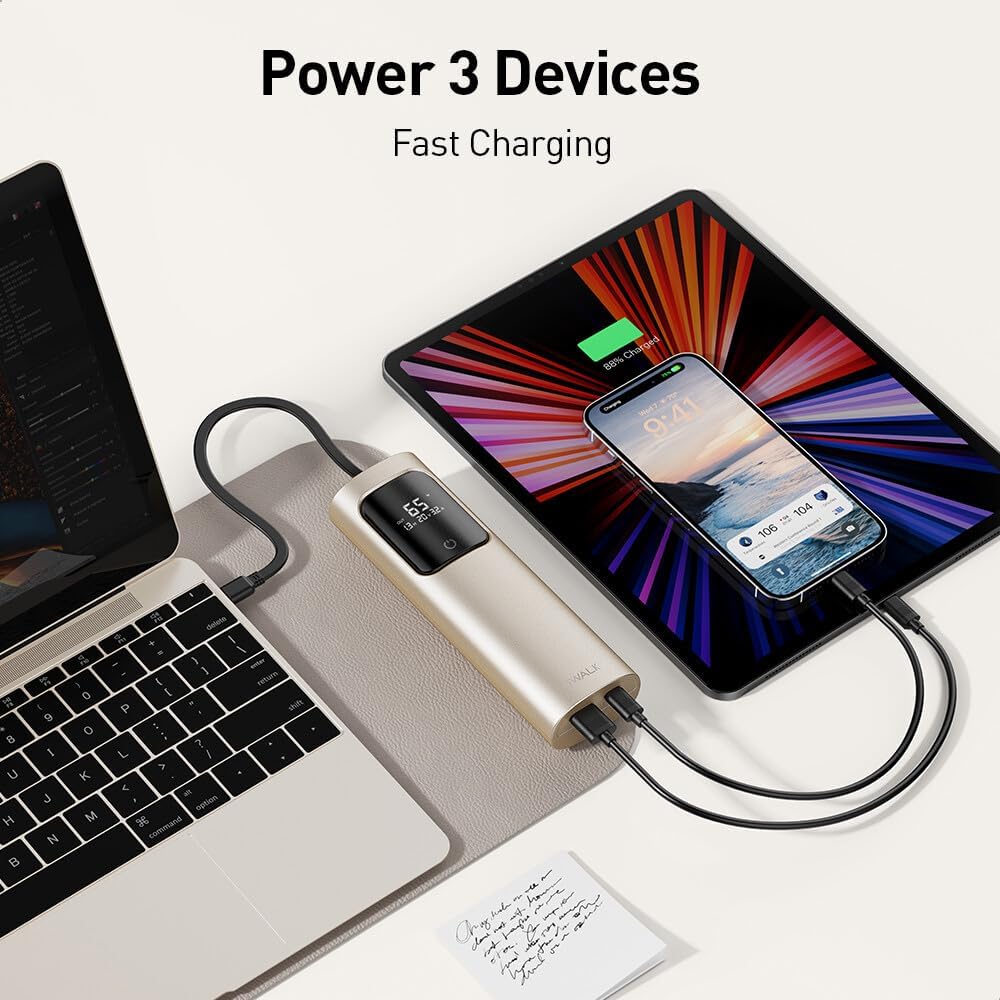
Image: The iWALK Power Bank connected and charging a laptop, a tablet, and a smartphone at the same time.

Image: Visual representation of the power bank's capability to charge three devices at once.
6. Compatibility
The iWALK HBT001 is compatible with a broad range of devices, including but not limited to:
- Laptops: MacBook Pro, MacBook Air, Chromebook, Dell XPS, Microsoft Surface Book 2, Steam Deck.
- Tablets: iPad Pro, iPad Air, iPad, iPad Mini.
- Smartphones: iPhone 15 series, iPhone 14 series, iPhone 13 series, iPhone 12 series, iPhone 11 series, Samsung Galaxy S22/S21/S20 series, and other Android devices.

Image: A comprehensive chart illustrating the wide range of compatible devices, including laptops, tablets, and smartphones.
7. Safety Information
To ensure safe operation and prolong the lifespan of your power bank, please observe the following:
- Do not expose the power bank to extreme temperatures (hot or cold), direct sunlight, or high humidity.
- Avoid dropping, hitting, or disassembling the device.
- Keep away from water and flammable materials.
- Use only certified charging cables and adapters.
- Keep out of reach of children.
- This power bank is airline safe and complies with aviation standards for travel.

Image: The power bank positioned near an airplane window, highlighting its compliance with airline safety regulations for travel.
8. Specifications
| Feature | Detail |
|---|---|
| Model Number | HBT001 |
| Battery Capacity | 20000 Milliamp Hours (mAh) |
| Output Power | 65W (Max) |
| Input/Output Ports | 1x USB-C (IN/OUT, 65W), 1x USB-A (OUT, 30W), 1x Built-in USB-C Cable (IN/OUT, 65W) |
| Special Features | Built-in Cable, Digital Display, Fast Charging, Low-Current Mode |
| Product Dimensions | 10 x 2 x 2 inches |
| Item Weight | 1.36 pounds |
| Battery Type | Lithium Polymer |
| Color | Light Gold |
9. Maintenance
To maintain optimal performance and longevity of your iWALK Power Bank:
- Store the device in a cool, dry place away from direct sunlight.
- Clean the exterior with a soft, dry cloth. Do not use harsh chemicals or abrasive materials.
- If not used for extended periods, recharge the power bank at least once every three months to prevent battery degradation.
10. Troubleshooting
10.1 Power Bank Not Charging
- Ensure the charging cable is securely connected to both the power bank and the wall adapter.
- Verify that the wall adapter is functioning correctly and provides sufficient power (65W or higher recommended).
- Try a different USB-C cable or wall adapter.
10.2 Device Not Charging from Power Bank
- Check if the power bank has sufficient charge.
- Ensure the device's charging cable is properly connected to both the power bank and the device.
- Try a different port on the power bank or a different charging cable.
- For low-power devices, ensure Low-Current Mode is activated (double-tap power button).
10.3 Slow Charging Speed
- Ensure your device supports fast charging protocols (PD, QC) and is connected to the appropriate port.
- If multiple devices are charging simultaneously, the total output is shared, which can reduce individual speeds. Try charging fewer devices.
- Check the quality and rating of your charging cable; a low-quality cable can limit charging speed.
11. Warranty and Support
For warranty information, technical support, or customer service inquiries, please refer to the contact details provided in the Welcome Guide included with your product or visit the official iWALK website.


