
1. Product Overview
The DICTAC LED Nightstand with Charging Station is designed to provide convenient bedside storage and power access. This unit features integrated LED lighting, a charging station with AC outlets and USB ports, and two fabric drawers for organization.
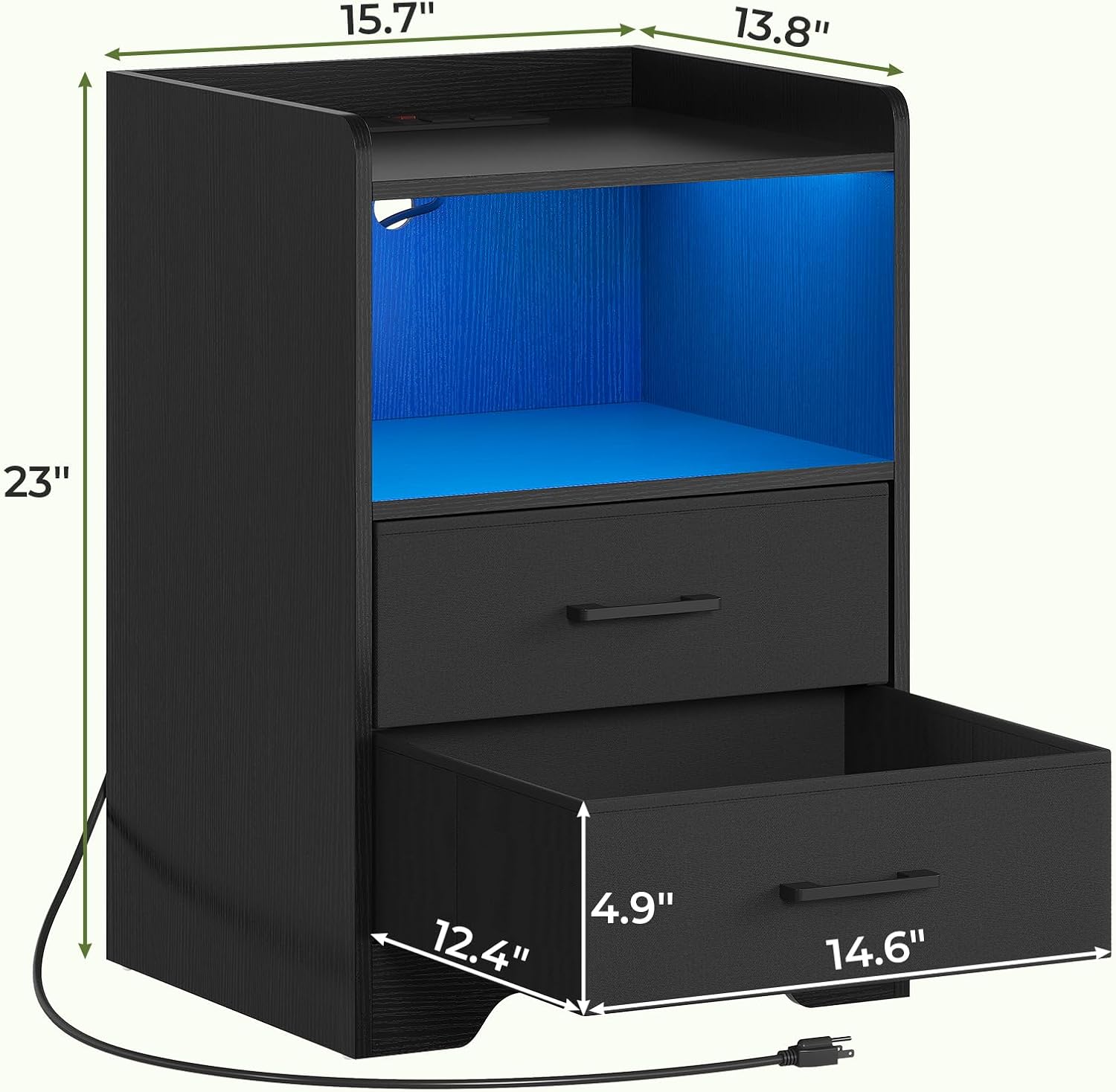
Image 1.1: Overview of the DICTAC LED Nightstand.
2. Safety Information
- Read all instructions carefully before assembly and use.
- Keep small parts away from children during assembly.
- Ensure all connections for the charging station are secure before plugging into a power outlet.
- Do not overload the electrical outlets. Refer to specifications for maximum load.
- Place the nightstand on a flat, stable surface to prevent tipping.
- Avoid exposing the unit to excessive moisture or direct sunlight.
3. Package Contents
Verify that all components are present before beginning assembly. If any parts are missing or damaged, contact customer support.
| Item | Description | Quantity |
|---|---|---|
| A | Top Panel | 1 |
| B | Side Panels | 2 |
| C | Bottom Panel | 1 |
| D | Shelf Panel | 1 |
| E | Back Panel | 1 |
| F | Fabric Drawers | 2 |
| G | Charging Station Unit | 1 |
| H | LED Light Strip | 1 |
| I | Hardware Pack (screws, dowels, etc.) | 1 |
| J | Assembly Tools (screwdriver) | 1 |
4. Assembly Instructions
Assembly typically takes approximately 30 minutes. Follow the numbered steps and diagrams provided in the included manual. A screwdriver is recommended for assembly.
- Unpack Components: Carefully remove all parts from the packaging and lay them out on a clean, soft surface to prevent scratches. Verify all parts are present using the package contents list.
- Assemble Frame: Attach the side panels (B) to the bottom panel (C) and shelf panel (D) using the provided hardware (I). Ensure all connections are tightened securely.
- Install Back Panel: Slide or fasten the back panel (E) into the designated grooves or attach it to the rear of the frame.
- Attach Top Panel: Secure the top panel (A) to the assembled frame using the remaining hardware.
- Install Charging Station: Insert the charging station unit (G) into the pre-cut opening on the top panel. Ensure it sits flush and is secured if necessary.
- Attach LED Light Strip: Adhere the LED light strip (H) to the underside of the shelf panel (D) or as indicated in the detailed manual. Connect the LED strip to the charging station unit.
- Assemble Fabric Drawers: Fold and assemble the fabric drawers (F) according to their individual instructions. Insert the assembled drawers into their respective compartments.
- Final Placement: Position the nightstand in its desired location. Plug the charging station's power cord into a wall outlet.
5. Operating Instructions
5.1. LED Lighting Control
The integrated LED light strip offers over 60,000 color options. Control can be achieved via a mobile application or a manual control unit.
- App Control: Download the specified mobile application (refer to the detailed manual for app name and QR code). Connect the LED light to the app via Bluetooth or Wi-Fi. The app allows adjustment of color, brightness, lighting modes, and timing functions.
- Manual Control: Use the included manual control unit to cycle through colors, adjust brightness, and select basic lighting modes.
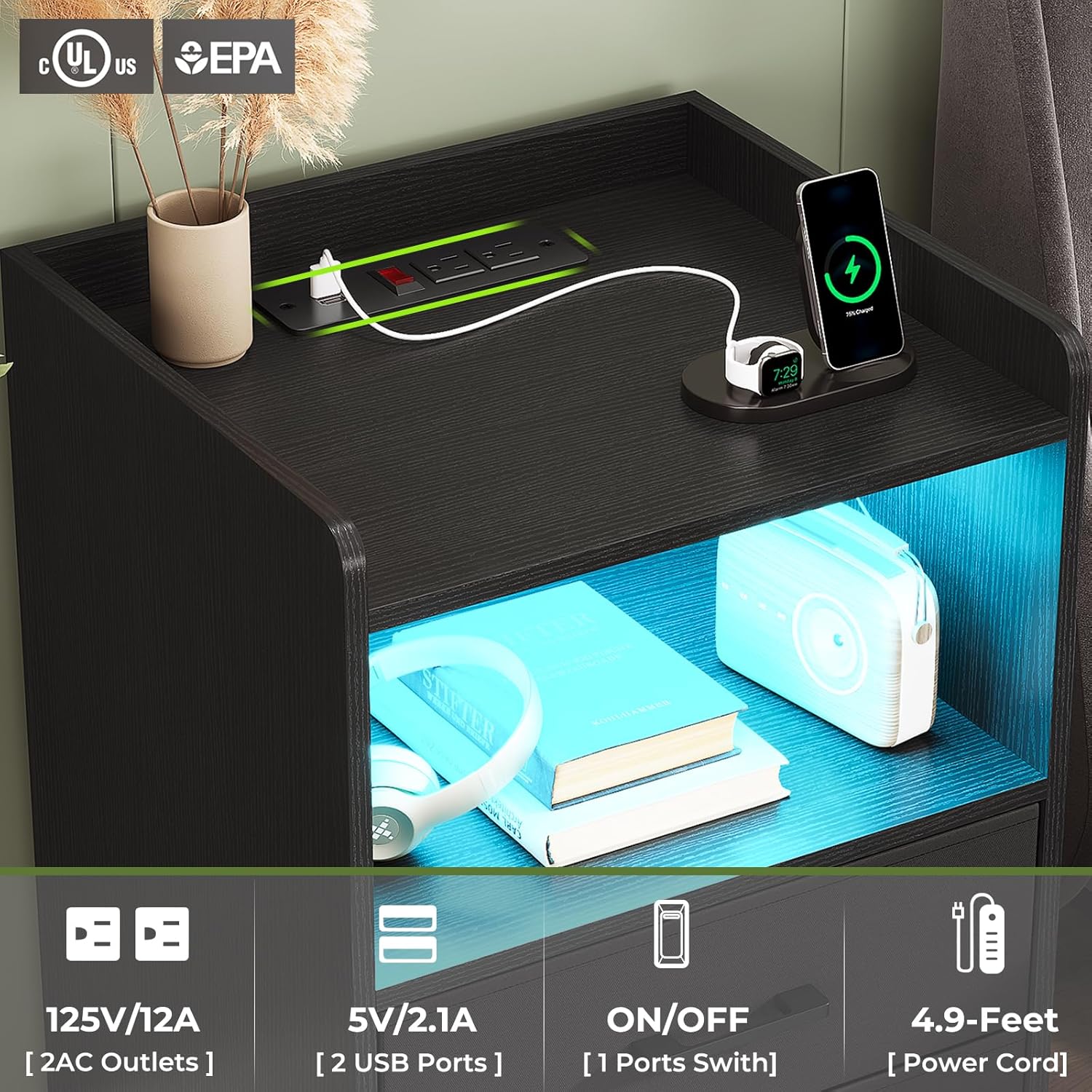
Image 5.1: LED light control options (App and Manual).
5.2. Charging Station Usage
The nightstand includes a built-in charging station with two standard AC outlets and two USB ports.
- Power On/Off: The charging station features a power switch. Toggle the switch to the 'ON' position to activate the outlets and USB ports.
- AC Outlets: Plug in devices requiring standard 125V/12A power.
- USB Ports: Connect devices for charging via the 5V/2.1A USB ports.

Image 5.2: Detail of the integrated charging station.
5.3. Storage Compartments
The nightstand offers an open compartment and two fabric drawers for storage.
- Open Compartment: Ideal for displaying books, decorative items, or frequently accessed electronics.
- Fabric Drawers: Use for storing personal essentials, clothing, or other items to keep them out of sight. The drawers are designed for smooth gliding.

Image 5.3: Storage capacity with open drawers.
6. Maintenance
- Cleaning: Wipe the surface with a soft, damp cloth. Avoid harsh chemicals or abrasive cleaners that may damage the finish.
- Dusting: Regularly dust the nightstand to maintain its appearance.
- Drawer Care: The fabric drawers can be spot cleaned with a mild detergent if necessary. Ensure they are completely dry before returning them to the unit.
- Electrical Components: Ensure the charging station and LED lights are unplugged before cleaning. Do not immerse electrical components in water.
7. Troubleshooting
| Problem | Possible Cause | Solution |
|---|---|---|
| LED lights not turning on | Power switch off; Loose connection; LED strip malfunction | Ensure charging station power switch is ON. Check LED strip connection to charging station. If problem persists, contact support. |
| Charging station not working | Not plugged in; Power switch off; Wall outlet issue; Overload | Verify power cord is securely plugged into a working wall outlet. Ensure charging station power switch is ON. Reduce number of devices if overloaded. |
| Nightstand is wobbly | Loose screws; Uneven surface | Check and tighten all assembly screws. Move nightstand to a flat, even surface. |
| Drawers do not slide smoothly | Improper assembly; Obstruction | Ensure drawers are assembled correctly and nothing is obstructing their path. |
8. Specifications
| Feature | Detail |
|---|---|
| Model Name | NSD-02 |
| Brand | DICTAC |
| Product Dimensions (D x W x H) | 13.8" x 15.7" x 23" |
| Item Weight | 35.7 Pounds |
| Frame Material | Engineered Wood |
| Number of Drawers | 2 (Fabric) |
| Charging Station | 2 AC Outlets (125V/12A), 2 USB Ports (5V/2.1A) |
| Power Cord Length | Approximately 4.9 Feet |
| LED Light | Multi-color (60,000+ options), App/Manual Control |
| Assembly Required | Yes |

Image 8.1: Product dimensions.
9. Product Video
Watch this video for a visual overview of the DICTAC LED Nightstand with its features.
Video 9.1: Demonstration of the DICTAC LED Nightstand, highlighting its LED lighting and charging capabilities.
10. Warranty and Support
For warranty information or technical support, please refer to the contact details provided in your product packaging or visit the official DICTAC website. If any parts are missing or damaged upon arrival, please contact customer service for assistance.
