
1. Introduction
The GuliTech Victor 86B is a handheld, auto-ranging digital multimeter designed for precise electrical measurements. It features a clear LCD display with 3999 counts, automatic polarity, and unit display. This instrument is capable of measuring AC/DC voltage, AC/DC current, resistance, capacitance, temperature, diode, continuity, frequency, and duty cycle. It includes a USB interface for data transmission to a computer, data hold, and an auto power-off function for convenience and battery conservation. The meter also features a metallic screen board for strong antimagnetic and anti-interferential function, and full function protection with an anti-high voltage circuit design.
2. Safety Information
To ensure safe operation and avoid damage to the meter, please read and follow all instructions carefully. Keep this manual for future reference.
- Always ensure the test leads are correctly connected and the function range knob is set to the appropriate measurement type before making any measurements.
- Do not attempt to measure voltages or currents exceeding the maximum specified limits for the meter.
- Exercise extreme caution when working with live circuits. High voltages can be dangerous.
- Never use the meter if it appears damaged or if the test leads are compromised.
- Replace batteries promptly when the low battery indicator appears to ensure accurate readings.
- Avoid operating the meter in environments with high humidity or extreme temperatures outside the specified range.
3. Product Overview
3.1 Front Panel Introduction
The front panel of the Victor 86B multimeter features the LCD display, function buttons, and the central rotary switch for selecting measurement modes.
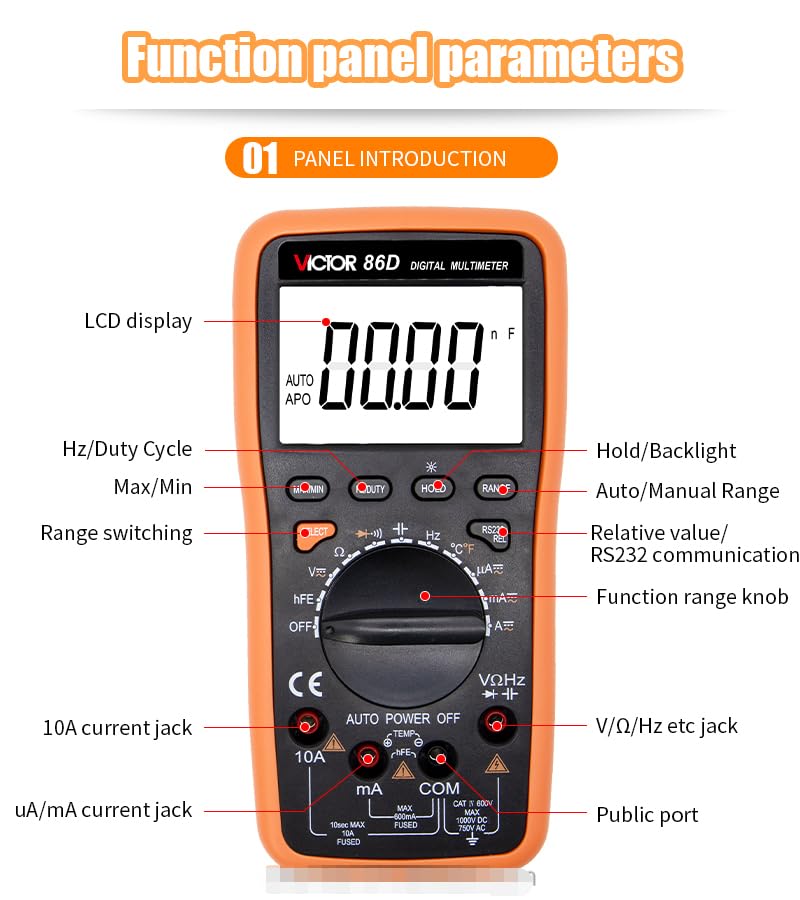
Figure 1: Front Panel Layout (Victor 86D model shown, similar to 86B)
- LCD Display: Shows measurement readings, units, and indicators.
- Hz/Duty Cycle Button: Selects frequency or duty cycle measurement.
- Max/Min Button: Toggles between maximum and minimum recorded values.
- Select Button: Switches between different measurement types within a single rotary switch position (e.g., AC/DC voltage).
- Hold/Backlight Button: Freezes the current display reading or activates the backlight.
- Auto/Manual Range Button: Toggles between automatic and manual ranging.
- Relative Value/RS232 Communication Button: Activates relative measurement mode or initiates RS232 communication.
- Function Range Knob: Rotary switch to select the desired measurement function (e.g., V~, V-, A~, A-, Ω, F, °C/°F, Diode, Continuity).
- 10A Current Jack: Input terminal for high current measurements (up to 10A).
- uA/mA Current Jack: Input terminal for microampere and milliampere current measurements.
- V/Ω/Hz etc. Jack: Input terminal for voltage, resistance, frequency, capacitance, and temperature measurements.
- Public Port (COM): Common negative input terminal for all measurements.
3.2 Back Panel Features
The back of the multimeter includes features for convenience and battery access.

Figure 2: Back Panel Layout (Victor 86D model shown, similar to 86B)
- USB Computer Interface: Port for connecting the multimeter to a computer for data transfer.
- Hanging Hole: Allows the meter to be hung for hands-free operation.
- Pen Tray: Convenient storage for test leads.
- Support Frame: Kickstand to prop up the meter on a flat surface for easier viewing.
- Battery Compartment: Houses the 1.5V AAA batteries.
3.3 Additional Design Details

Figure 3: Pen Socket Design and Large Screen Backlight
- Pen Socket Design: Features a humanized design with marked maximum limits, tight sockets for good contact, and fast measurement.
- Large Screen Backlight: Provides a dual display of digital and analog bars (46 segments) for clear readings, with automatic polarity and unit display.
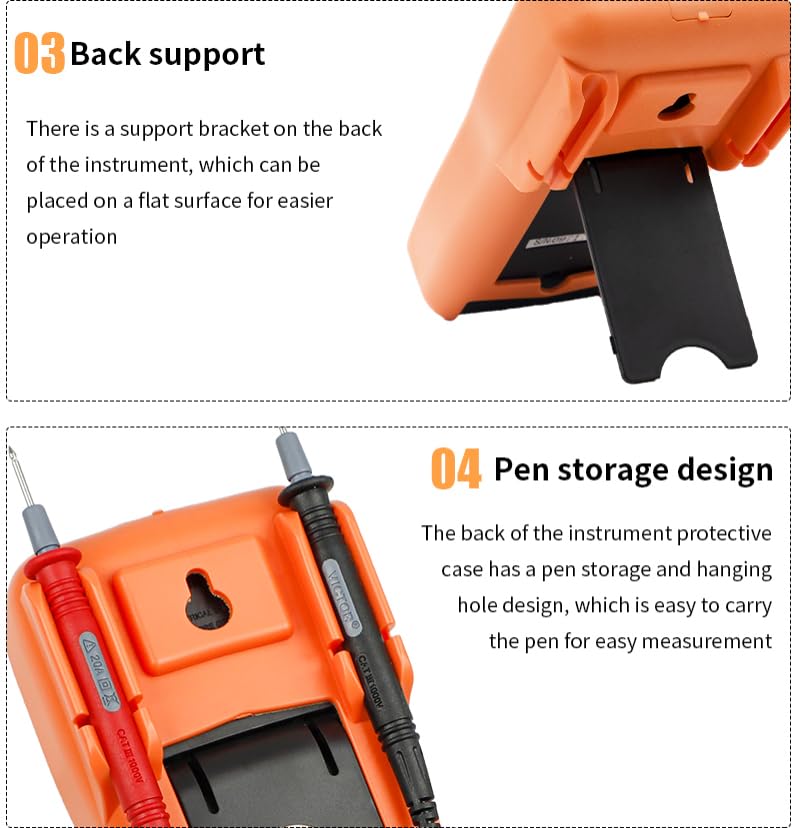
Figure 4: Back Support and Pen Storage Design
- Back Support: A built-in support bracket allows the instrument to be placed on a flat surface for convenient operation.
- Pen Storage Design: The protective case on the back includes a pen storage and hanging hole design, making it easy to carry the test leads.
4. Setup
4.1 Battery Installation
The Victor 86B multimeter requires two 1.5V AAA batteries for operation. The battery compartment is located on the back of the unit.
- Ensure the multimeter is turned off.
- Locate the battery compartment cover on the back of the meter (refer to Figure 2).
- Unscrew the retaining screw(s) and remove the battery cover.
- Insert two 1.5V AAA batteries, observing the correct polarity (+/-) as indicated inside the compartment.
- Replace the battery cover and secure it with the screw(s).
When the low battery indicator appears on the display, replace the batteries promptly to maintain measurement accuracy.
4.2 Test Lead Connection
Connect the test leads to the appropriate input jacks on the multimeter for your desired measurement.
- Always connect the black test lead to the COM (Public Port) jack.
- For voltage, resistance, frequency, capacitance, and temperature measurements, connect the red test lead to the V/Ω/Hz etc. jack.
- For microampere (uA) or milliampere (mA) current measurements, connect the red test lead to the uA/mA jack.
- For high current (up to 10A) measurements, connect the red test lead to the 10A jack.
5. Operating Instructions
This section details how to perform various measurements with your Victor 86B digital multimeter.
5.1 General Operation
- Power On/Off: Rotate the Function Range Knob from the "OFF" position to any desired measurement function to turn the meter on. To turn off, rotate the knob back to "OFF".
- Auto Ranging: The meter defaults to auto-ranging. It automatically selects the best range for the measurement. Press the "RANGE" button to switch to manual ranging, then press it repeatedly to cycle through available ranges. Press and hold "RANGE" to return to auto-ranging.
- Data Hold: Press the "HOLD" button to freeze the current reading on the display. Press it again to release.
- Backlight: Press and hold the "HOLD" button to activate the display backlight. Press and hold again to turn it off.
- Auto Power Off: The meter will automatically power off after approximately 15 minutes of inactivity to conserve battery life. This function is disabled when connected via RS232.
5.2 Specific Measurement Functions
Always ensure the test leads are connected to the correct jacks and the Function Range Knob is set to the appropriate position before measuring.
- DC Voltage (V-):
- Set the Function Range Knob to the "V-" position.
- Connect the red test lead to the V/Ω/Hz etc. jack and the black test lead to the COM jack.
- Connect the test leads across the DC voltage source to be measured.
- AC Voltage (V~):
- Set the Function Range Knob to the "V~" position.
- Connect the red test lead to the V/Ω/Hz etc. jack and the black test lead to the COM jack.
- Connect the test leads across the AC voltage source to be measured.
- DC Current (A-, mA-, uA-):
- Set the Function Range Knob to the appropriate "A-", "mA-", or "uA-" position.
- Connect the red test lead to the 10A or uA/mA jack (depending on expected current) and the black test lead to the COM jack.
- Open the circuit and connect the meter in series with the load.
- AC Current (A~, mA~, uA~):
- Set the Function Range Knob to the appropriate "A~", "mA~", or "uA~" position.
- Connect the red test lead to the 10A or uA/mA jack (depending on expected current) and the black test lead to the COM jack.
- Open the circuit and connect the meter in series with the load.
- Resistance (Ω):
- Set the Function Range Knob to the "Ω" position.
- Connect the red test lead to the V/Ω/Hz etc. jack and the black test lead to the COM jack.
- Connect the test leads across the component to be measured. Ensure the circuit is de-energized.
- Capacitance (F):
- Set the Function Range Knob to the "F" position.
- Connect the red test lead to the V/Ω/Hz etc. jack and the black test lead to the COM jack.
- Connect the test leads across the capacitor. Ensure the capacitor is discharged before measurement.
- Frequency (Hz) / Duty Cycle (%):
- Set the Function Range Knob to the "Hz" position.
- Connect the red test lead to the V/Ω/Hz etc. jack and the black test lead to the COM jack.
- Connect the test leads across the signal source. Press the "Hz/Duty Cycle" button to toggle between frequency and duty cycle.
- Temperature (°C/°F):
- Set the Function Range Knob to the "°C/°F" position.
- Connect the temperature probe (thermocouple) to the V/Ω/Hz etc. and COM jacks, observing polarity.
- Place the probe on or near the object whose temperature is to be measured.
- Diode Test (indicated by a diode symbol):
- Set the Function Range Knob to the Diode/Continuity position. Press "SELECT" if necessary to choose Diode Test.
- Connect the red test lead to the V/Ω/Hz etc. jack and the black test lead to the COM jack.
- Connect the red lead to the anode and the black lead to the cathode of the diode. The display will show the forward voltage drop. Reverse the leads; the display should show "OL" for an open circuit.
- Continuity Test (indicated by a speaker symbol):
- Set the Function Range Knob to the Diode/Continuity position. Press "SELECT" if necessary to choose Continuity Test.
- Connect the red test lead to the V/Ω/Hz etc. jack and the black test lead to the COM jack.
- Connect the test leads across the circuit or component. If resistance is below approximately 50Ω, the buzzer will sound, indicating continuity.
5.3 USB Computer Connection
The Victor 86B features a USB interface for connecting to a computer, allowing for data logging, analysis, and printing.
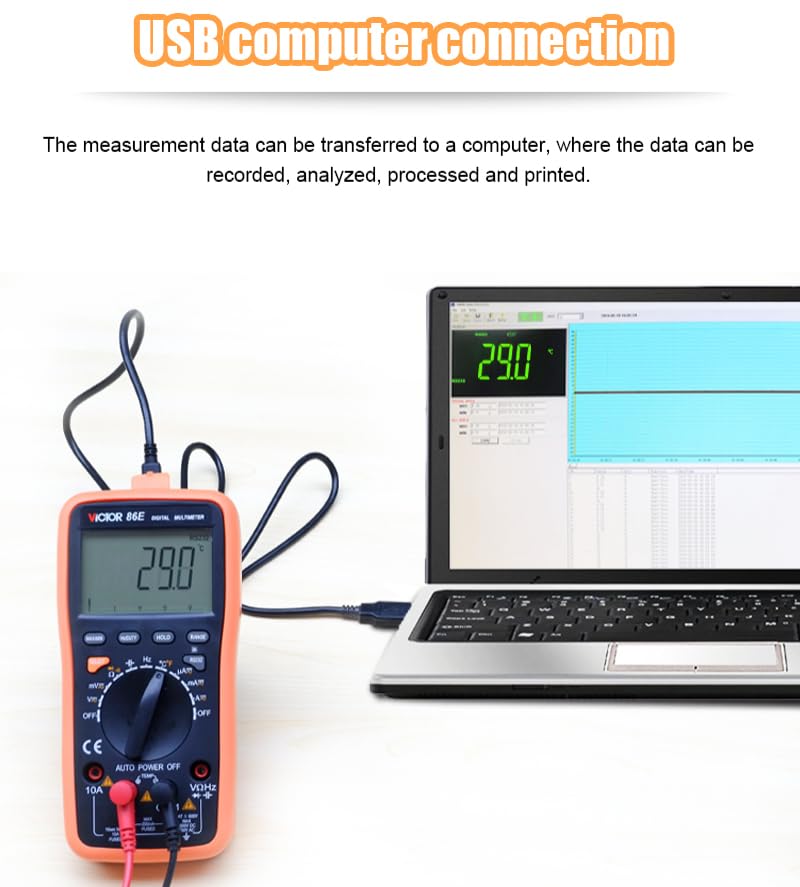
Figure 5: USB Computer Connection (Victor 86E model shown, similar to 86B)
To connect the multimeter to a computer:
- Install the necessary driver and software on your computer (typically provided with the multimeter or available from the manufacturer's website).
- Connect one end of the USB cable to the USB computer interface port on the back of the multimeter.
- Connect the other end of the USB cable to an available USB port on your computer.
- Launch the software on your computer to begin data acquisition and analysis.
When connected via USB, the auto power-off function is automatically disabled.
6. Maintenance
6.1 Cleaning
To clean the meter, wipe the case with a damp cloth and a mild detergent. Do not use abrasives or solvents. Ensure the meter is completely dry before use.
6.2 Battery Replacement
Refer to section 4.1 for detailed instructions on battery installation and replacement. Always use two fresh 1.5V AAA batteries.
6.3 Storage
When not in use for extended periods, store the multimeter in a dry environment with temperatures between -10°C and 50°C and relative humidity below 80%. Remove batteries if storing for very long durations to prevent leakage.
7. Troubleshooting
| Problem | Possible Cause | Solution |
|---|---|---|
| Meter does not power on. | Dead or incorrectly installed batteries. | Check battery polarity or replace batteries (refer to Section 4.1). |
| "OL" (Overload) displayed. | Measurement exceeds the selected range or meter's maximum capacity. | Switch to a higher range (if in manual ranging) or ensure the measurement is within the meter's specifications. |
| Inaccurate readings. | Low battery, incorrect function selected, or poor test lead connection. | Replace batteries, verify function knob setting, ensure test leads are securely connected. |
| No continuity beep. | Circuit resistance is too high or continuity function not selected. | Ensure continuity function is active (use SELECT button if needed) and check the circuit for breaks. |
| USB communication not working. | Driver not installed, software not running, or cable connection issue. | Install drivers, launch software, check USB cable connection. |
8. Specifications
The following table outlines the technical specifications for the Victor 86B Digital Multimeter.

Figure 6: Technical Parameters (Victor 86B column is relevant)
| Parameter | Victor 86B Specification |
|---|---|
| Max Display | 3999 counts |
| Measuring Method | Dual-integral A/D converter |
| Sampling Rate | 3 times/second |
| Over Range Indication | "OL" display |
| Low Battery Indication | Yes |
| RS232 Serial Data Transmission | Yes |
| Auto Power Off | Yes (disabled with RS232) |
| Operating Environment | 0°C~40°C, relative humidity <80% |
| Storage Environment | -10°C~50°C, relative humidity <80% |
| Power | 2 x 1.5V AAA batteries |
| Dimensions | 192mm x 95mm x 48mm |
| Weight | Approx. 390g (including batteries) |
| DC Voltage Range | 1000V (±0.5%+4d) |
| AC Voltage Range | 750V (±0.8%+10d) |
| DC Current Range | 10A (±1.0%+10d) |
| AC Current Range | 10A (±1.5%+10d) |
| Resistance Range | 40MΩ (±0.8%+4d) |
| Capacitance Range | 100uF (±3.0%+5d) |
| Frequency Range | 30MHz (±0.5%+10d) |
| Temperature Range | (-20~1000)°C (±1.5%+15) |
| Input Resistance | 10MΩ |
| AC Frequency Response | (40-1000)Hz |
| Specification Met | EMC, ISO 9001, RoHS |
9. Packaging Accessories
The Victor 86B Digital Multimeter package includes the following items:
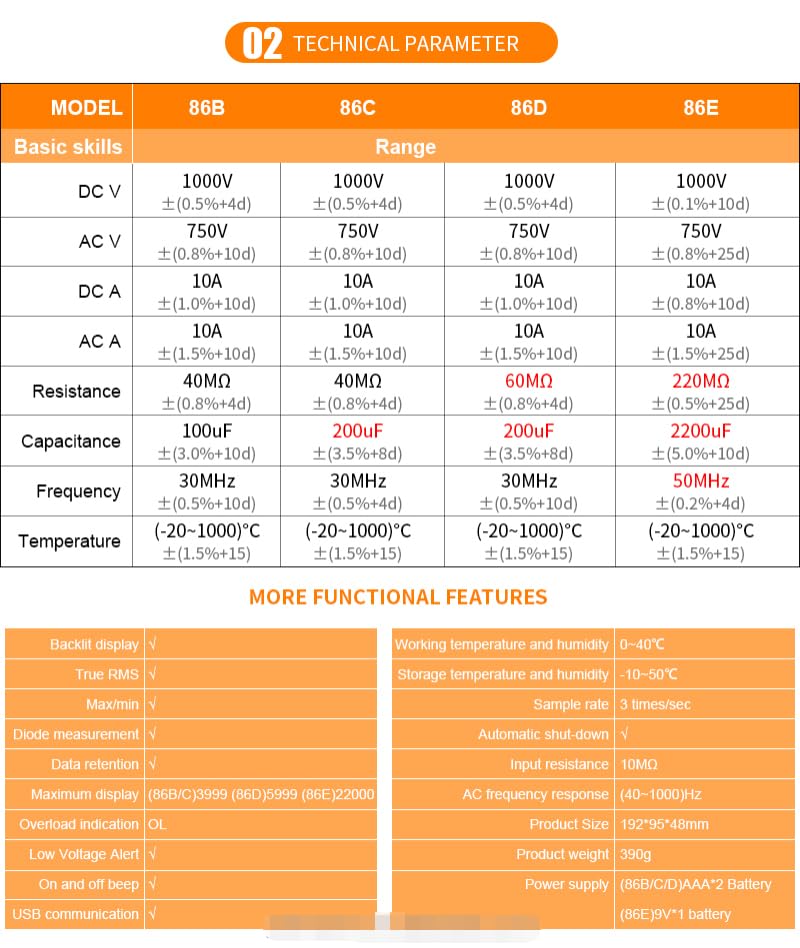
Figure 7: Packaging Accessories
- Packaging box
- Instrument package (carrying case)
- Multimeter (Victor 86B)
- Product Manual
- USB cable
- Temperature probe (cable)
- Test leads
- 2 x 1.5V AAA batteries (included)
10. Warranty and Support
The GuliTech Victor 86B Digital Multimeter comes with a 1-year warranty from the date of purchase. This warranty covers manufacturing defects and malfunctions under normal use.
For warranty claims, technical support, or service inquiries, please contact your retailer or the manufacturer directly. Keep your purchase receipt as proof of purchase.