
1. Introduction
The GuliTech VICTOR VC980+ is a high-performance, battery-operated digital multimeter designed for precise electrical measurements. It features a large 19999-count LCD display with a 42mm character height for clear readability, intelligent anti-burn protection, and True RMS measurement capabilities. This instrument is ideal for measuring DCV, ACV, DCA, ACA, resistance, capacitance, frequency, diode, and continuity, making it a versatile tool for professionals and hobbyists alike.
2. Safety Information
Always observe safety precautions when using any electrical testing equipment. Failure to do so may result in injury or damage to the meter or equipment under test.
- Read and understand all instructions in this manual before use.
- Do not exceed the maximum input limits for any measurement function.
- Ensure the test leads are properly connected and the function switch is set to the correct range before making measurements.
- Exercise extreme caution when working with voltages above 30V AC RMS, 42V peak, or 60V DC. These voltages pose a shock hazard.
- Always disconnect power to the circuit and discharge all high-voltage capacitors before testing resistance, continuity, diodes, or capacitance.
- Replace batteries and fuses only with the specified type and rating.
- Do not operate the meter if it appears damaged or if the case is open.
- The meter is equipped with overload protection. However, avoid intentional overloads.
3. Product Overview
The VICTOR VC980+ Digital Multimeter is designed for ease of use and durability. Key features include:
- Intelligent Anti-Burn Protection: Equipped with a robust protection circuit and double fuses (250mA and 20A) to prevent damage from incorrect operation.
- Large LCD Display: A 19999-count display with a bright backlight for clear readings in various lighting conditions.
- True RMS Measurement: Provides accurate readings for non-sinusoidal AC waveforms.
- Multi-functional: Measures DC/AC Voltage, DC/AC Current, Resistance, Capacitance, Frequency, Diode, and Continuity.
- Convenient Design: Features a test lead storage design, a built-in flashlight, and a kickstand for hands-free operation.
3.1. Intelligent Anti-Burn Protection
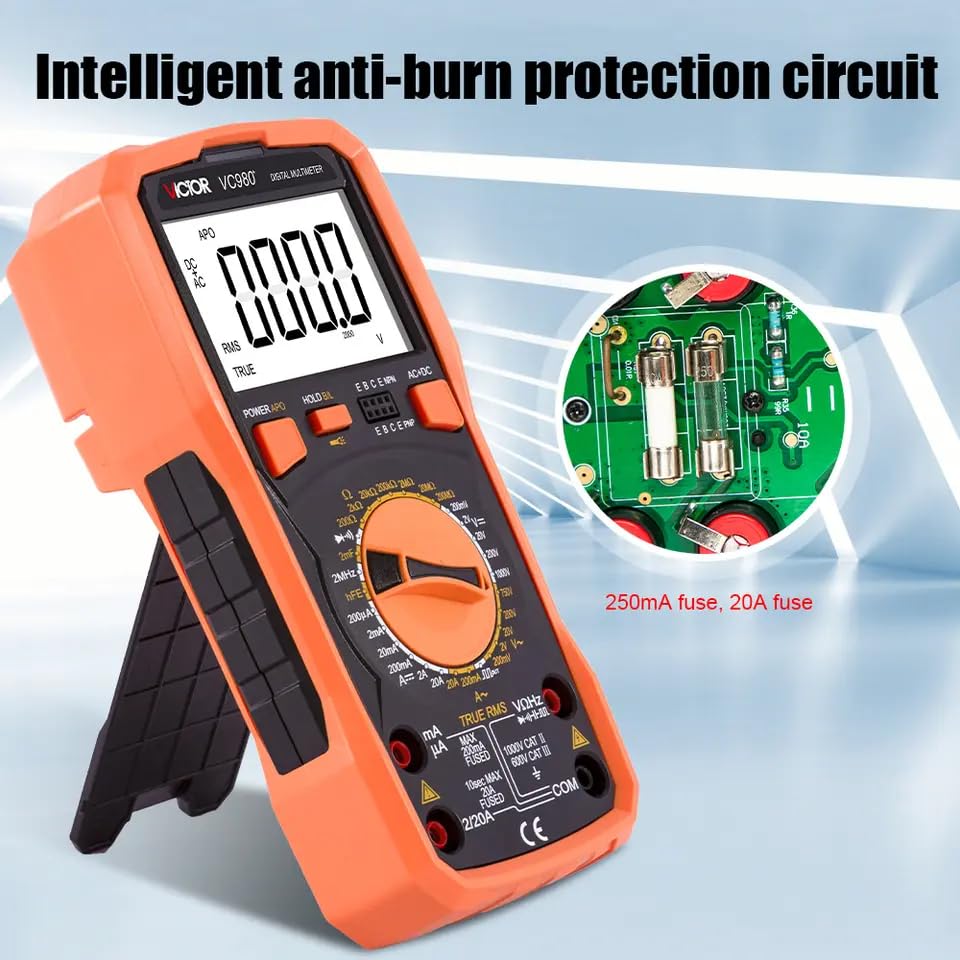
Image: The internal circuit board of the VC980+ multimeter, showing the intelligent anti-burn protection with clearly labeled 250mA and 20A fuses, designed for enhanced safety.
3.2. Test Lead Storage and Flashlight
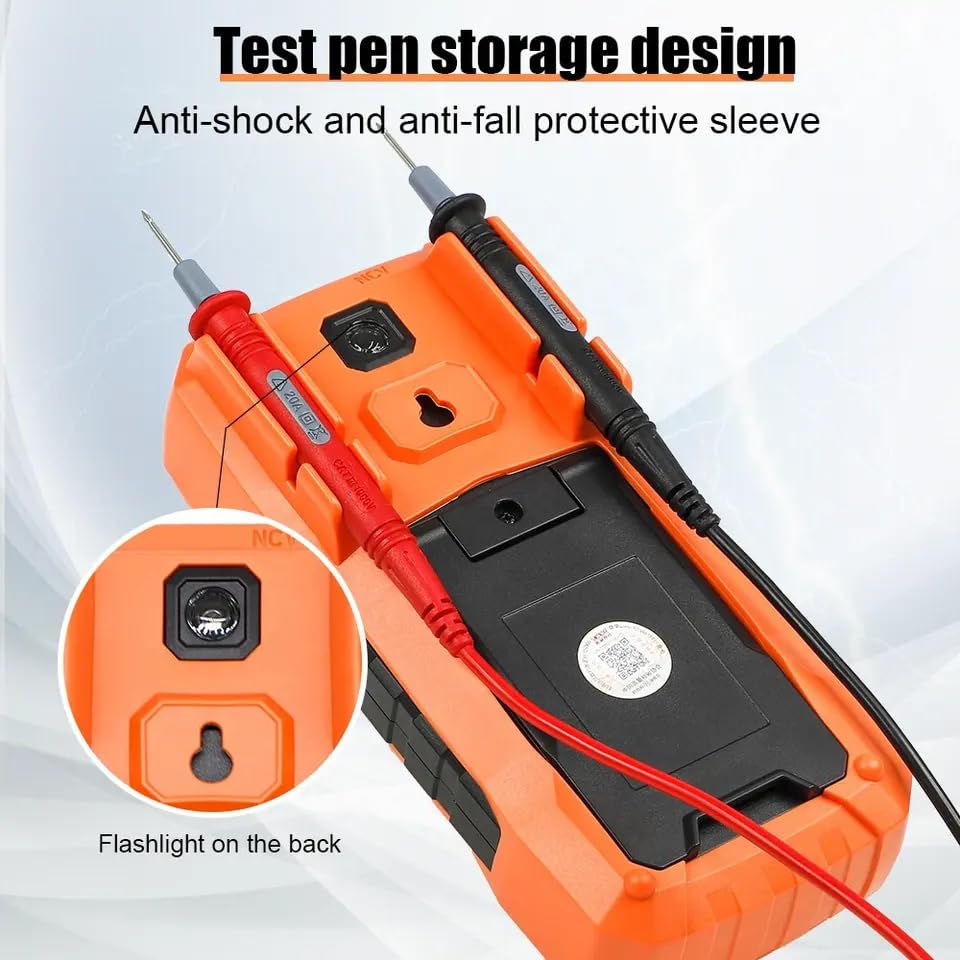
Image: The rear of the VC980+ multimeter, illustrating the integrated storage slots for test leads and a built-in flashlight for illumination in dark environments.
3.3. Front Panel Features
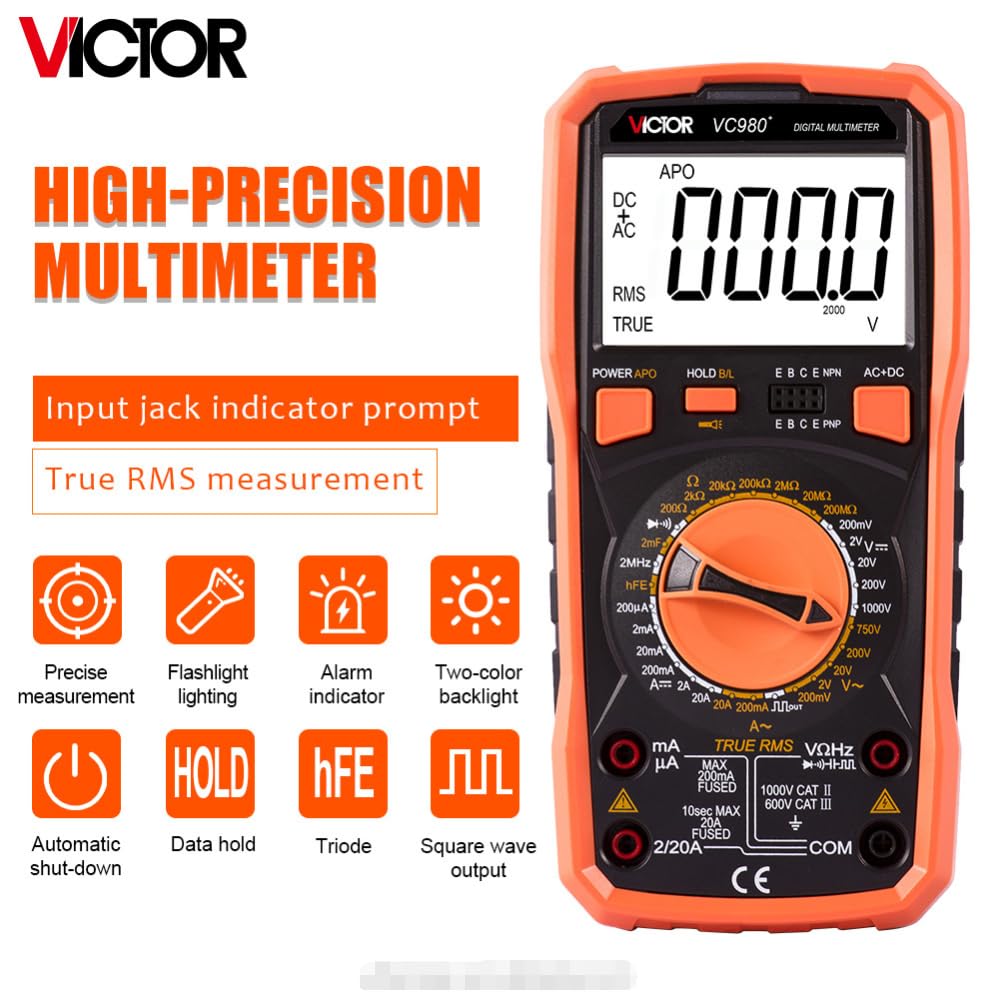
Image: A clear view of the VC980+ multimeter's front panel, showcasing its high-precision capabilities and various function icons such as precise measurement, flashlight, alarm, two-color backlight, auto shut-down, data hold, hFE test, and square wave output.
3.4. Component Identification
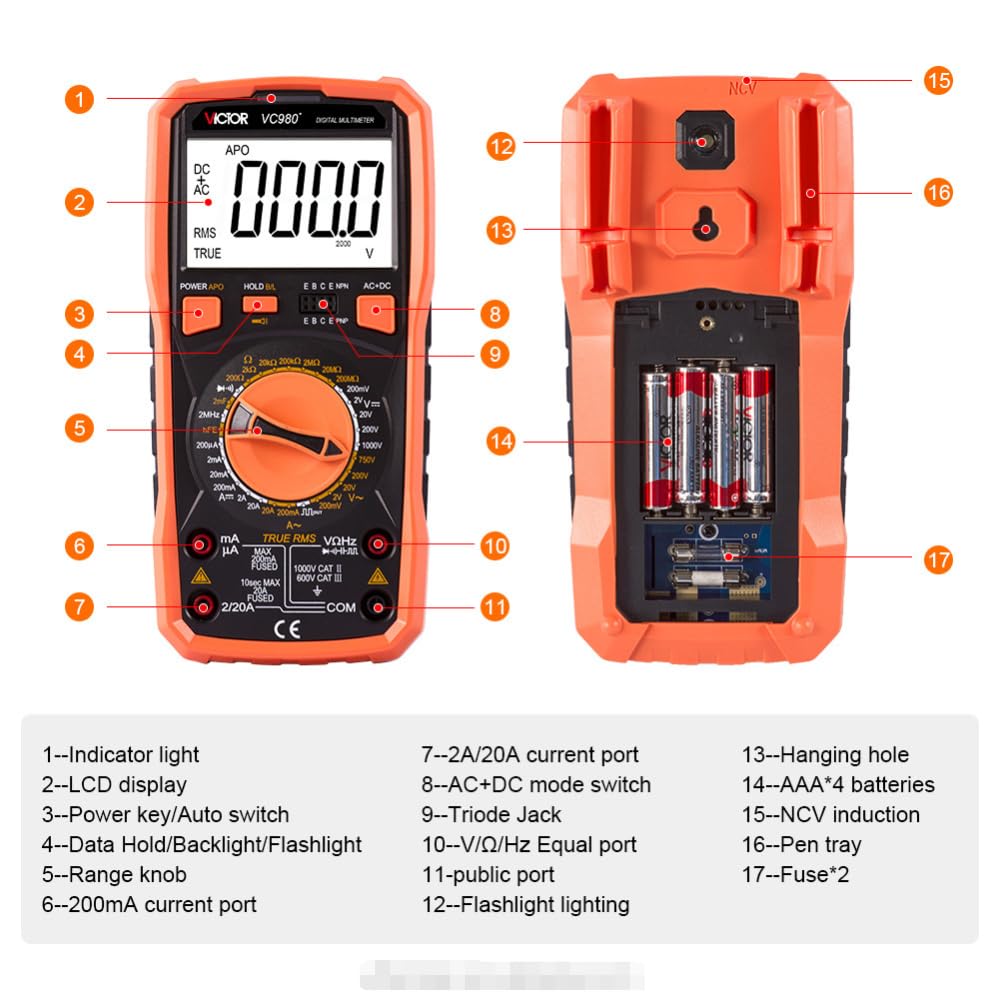
Image: A comprehensive diagram labeling the key components of the VC980+ multimeter for easy identification and understanding.
- Indicator light
- LCD display
- Power key/Auto switch
- Data Hold/Backlight/Flashlight button
- Range knob
- 200mA current port
- 2A/20A current port
- AC+DC mode switch
- Triode jack
- V/Ω/Hz Equal port
- Flashlight lighting
- Hanging hole
- AAA*4 batteries (internal compartment)
- NCV induction area
- Pen tray
- Fuses (internal compartment)
4. Setup
4.1. Battery Installation
The VC980+ multimeter requires four AAA batteries for operation. To install or replace batteries:
- Ensure the multimeter is powered off and test leads are disconnected.
- Locate the battery compartment cover on the back of the unit.
- Unscrew the retaining screw(s) and remove the cover.
- Insert four AAA batteries, observing the correct polarity (+ and -).
- Replace the cover and secure it with the screw(s).
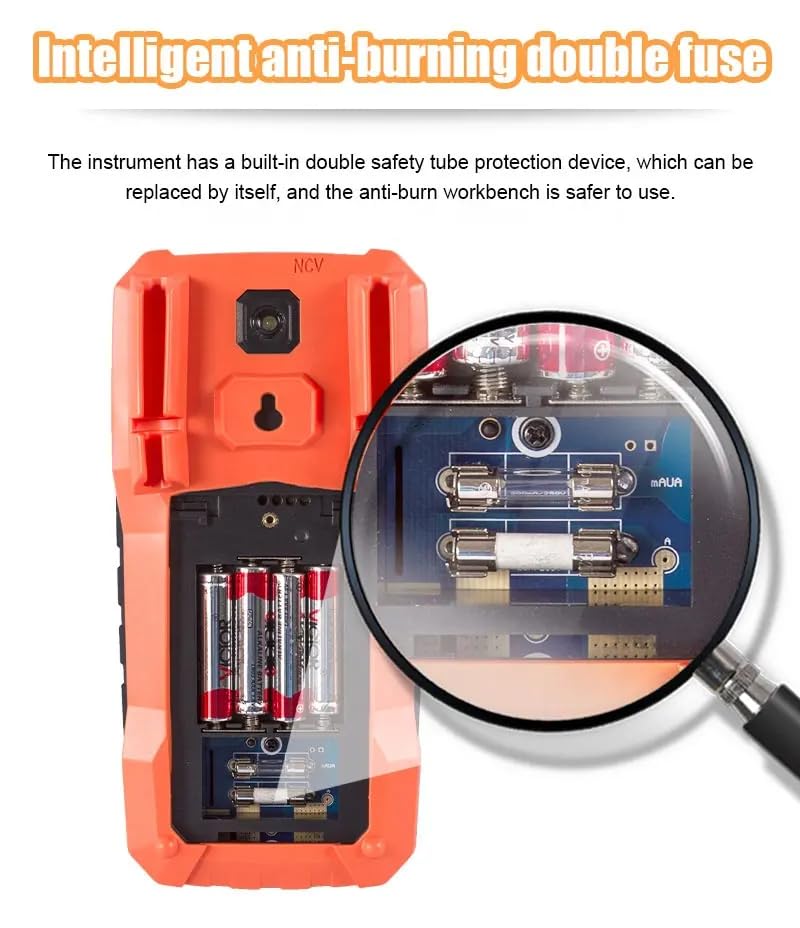
Image: The battery compartment of the VC980+ multimeter, showing the placement of four AAA batteries and the double fuse protection.
4.2. Connecting Test Leads
Connect the red test lead to the "VΩHz" jack and the black test lead to the "COM" jack for most voltage, resistance, and frequency measurements. For current measurements, refer to the specific current measurement section.
5. Operating Instructions
5.1. Power On/Off
Press the POWER/APO button (3) to turn the multimeter on. The meter will automatically power off after a period of inactivity to conserve battery life. Press the POWER/APO button again to turn it off manually.
5.2. Function Selection
Rotate the Range knob (5) to select the desired measurement function (e.g., DCV, ACV, Resistance, Capacitance, etc.).
5.3. Data Hold (HOLD)
Press the HOLD/BL button (4) briefly to freeze the current reading on the display. Press it again to release the hold function.
5.4. Backlight (BL) and Flashlight
Press and hold the HOLD/BL button (4) for approximately 2 seconds to turn the display backlight on or off. The flashlight (11) can be activated by a separate button or by a long press on the backlight button, depending on the model variant.
5.5. NCV (Non-Contact Voltage) Detection
Select the NCV function using the range knob. Place the NCV induction area (15) near a live AC voltage source. The meter will indicate the presence of AC voltage without direct contact.
6. Measurement Functions
The VC980+ offers a wide range of measurement capabilities. Refer to the table below for detailed ranges and precision.
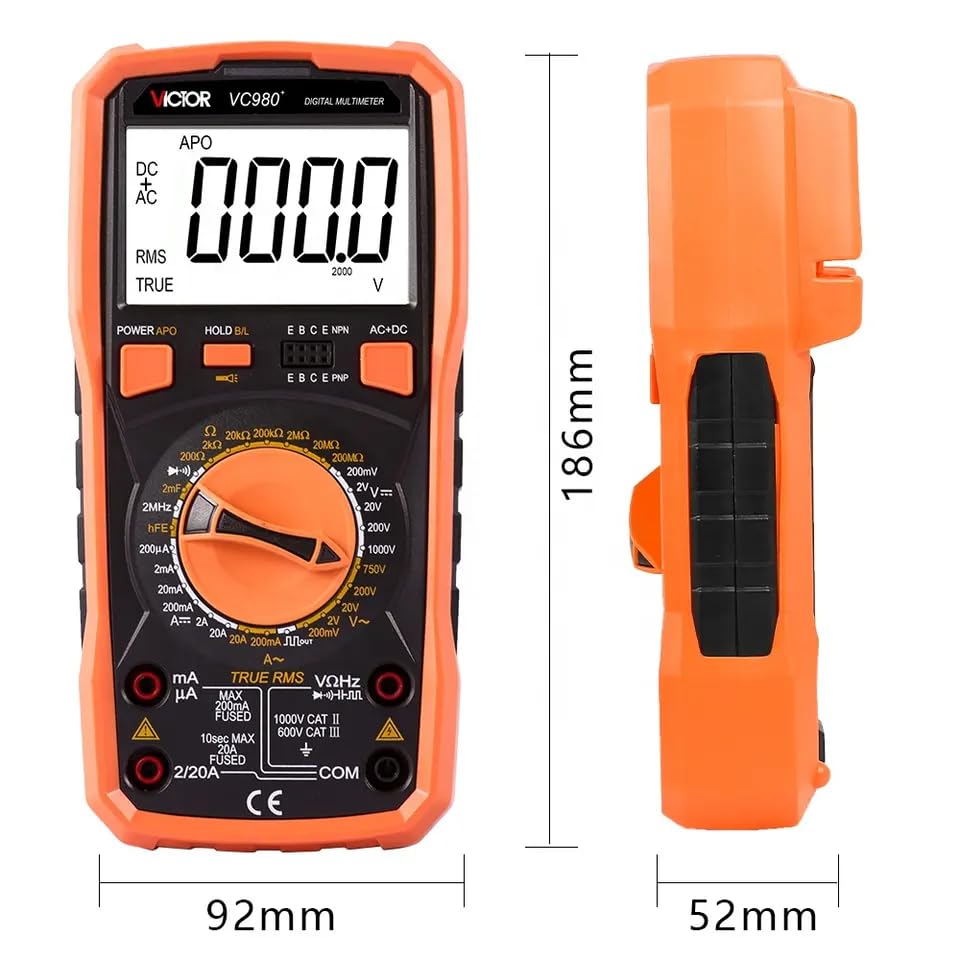
Image: Technical specifications table detailing the measurement ranges and precision for various functions of the VC980+ multimeter.
6.1. Basic Skills: Range and Precision
| Basic Skill | Range | Precision |
|---|---|---|
| DC V | 200mV/2V/20V/200V/1000V | ±(0.1%+5) |
| AC V | 200mV/2V/20V/200V/750V | ±(0.8%+25) |
| DC A | 200uA/2mA/20mA/200mA/2A/20A | ±(0.8%+6) |
| AC A | 200mA/20A | ±(1.5%+15) |
| Resistance | 200Ω/2kΩ/20kΩ/200kΩ/2MΩ/20MΩ/200MΩ | ±(1.2%+25) |
| Capacitance | 20nF/200nF/2uF/20uF/200uF/2mF | ±(4.0%+5) |
| Frequency | 200Hz/2kHz/20kHz/200kHz/2MHz | ±(0.1%+3) |
6.2. More Functional Features
| Feature | Status | Feature | Value/Status |
|---|---|---|---|
| Backlit display | ✓ | Working temperature and humidity | 0-40℃ |
| True RMS | ✓ | Storage temperature and humidity | -20-60℃ |
| Triode measurement | ✓ | Sample rate | 3 times/sec |
| Diode measurement | ✓ | Automatic shut-down | ✓ |
| Data retention | ✓ | Unit symbol | ✓ |
| Maximum display | 19999 | Input resistance | 10MΩ |
| Overload Indication | OL | AC frequency response | (40-1000)Hz |
| Low Voltage Alert | ✓ | Power supply | AAA*4 batteries |
| On and off beep | ✓ | Product Size | 186*92*52mm |
| Measurement method | Double integral A/D conversion | Product weight | 395g |
7. Maintenance
7.1. Cleaning
Wipe the case with a damp cloth and mild detergent. Do not use abrasives or solvents. Ensure the meter is completely dry before use.
7.2. Battery Replacement
When the low battery indicator appears on the display, replace the batteries as described in Section 4.1. Prompt battery replacement ensures accurate readings and proper operation.
7.3. Fuse Replacement
If the current measurement function fails, the fuse may need replacement. The VC980+ uses double fuses for protection. Refer to the internal diagram for fuse locations. Always replace with fuses of the specified type and rating (e.g., 250mA and 20A, as indicated on the circuit board).
8. Troubleshooting
| Problem | Possible Cause | Solution |
|---|---|---|
| No display or dim display | Low battery or dead batteries. | Replace batteries (AAA*4). |
| "OL" (Overload) displayed | Input value exceeds selected range. | Select a higher range or ensure the input is within the meter's capabilities. |
| Incorrect readings | Incorrect function selected, poor test lead connection, or damaged test leads. | Verify function switch position, check lead connections, or replace leads if damaged. |
| Current measurement not working | Blown fuse. | Replace the appropriate current fuse (250mA or 20A). |
| Meter automatically shuts off too quickly | Auto Power Off (APO) feature is active. | This is normal behavior to save battery. To disable APO (if supported by model), refer to advanced settings in the full manual. |
9. Specifications
Detailed technical specifications for the GuliTech VICTOR VC980+ Digital Multimeter.
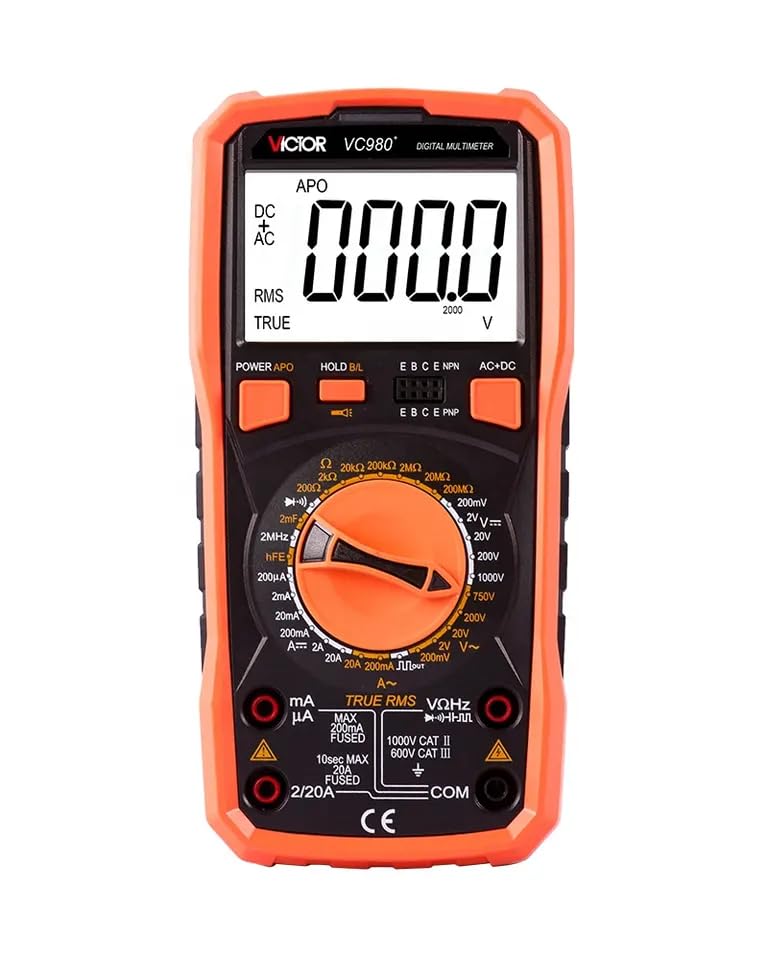
Image: The VC980+ multimeter displaying its physical dimensions.
| General Specifications | |
|---|---|
| Model | VC980+ |
| Display Count | 19999 |
| True RMS | Yes |
| Backlight | Yes |
| Data Hold | Yes |
| Diode Test | Yes |
| hFE Test (Triode Measurement) | Yes |
| Continuity Test | Yes |
| Auto Power Off | Yes |
| Low Battery Indication | Yes |
| Over Range Indication | OL |
| Overload Protection | Yes (Intelligent Anti-Burn Double Fuse) |
| Power Supply | 4 x AAA Batteries |
| Product Size | 186mm x 92mm x 52mm |
| Product Weight | 395g |
| Working Temperature | 0°C to 40°C |
| Storage Temperature | -20°C to 60°C |
| Sample Rate | 3 times/second |
| Input Resistance | 10MΩ |
| AC Frequency Response | (40-1000)Hz |
| Measurement Method | Double integral A/D conversion |
| Certifications | EMC, ISO 9001, RoHS compliant |
10. Warranty and Support
10.1. Warranty Information
The GuliTech VICTOR VC980+ Digital Multimeter comes with a 1-year warranty from the date of purchase. This warranty covers defects in materials and workmanship under normal use. It does not cover damage caused by misuse, accident, unauthorized repair, or modification.
10.2. Customer Support
For technical assistance, warranty claims, or product inquiries, please contact GuliTech customer support through your retailer or the official GuliTech website. Please have your model number (VC980+) and purchase information ready when contacting support.