
Aheaplus B0CKNCK65K
Aheaplus Gaming Computer Desk User Manual
Model: B0CKNCK65K
1. Product Overview
The Aheaplus Gaming Computer Desk is designed for optimal functionality and aesthetic appeal, featuring integrated LED lighting, power outlets, and ample storage solutions. Its reversible design allows for flexible placement within your space, making it suitable for various room configurations and user preferences.
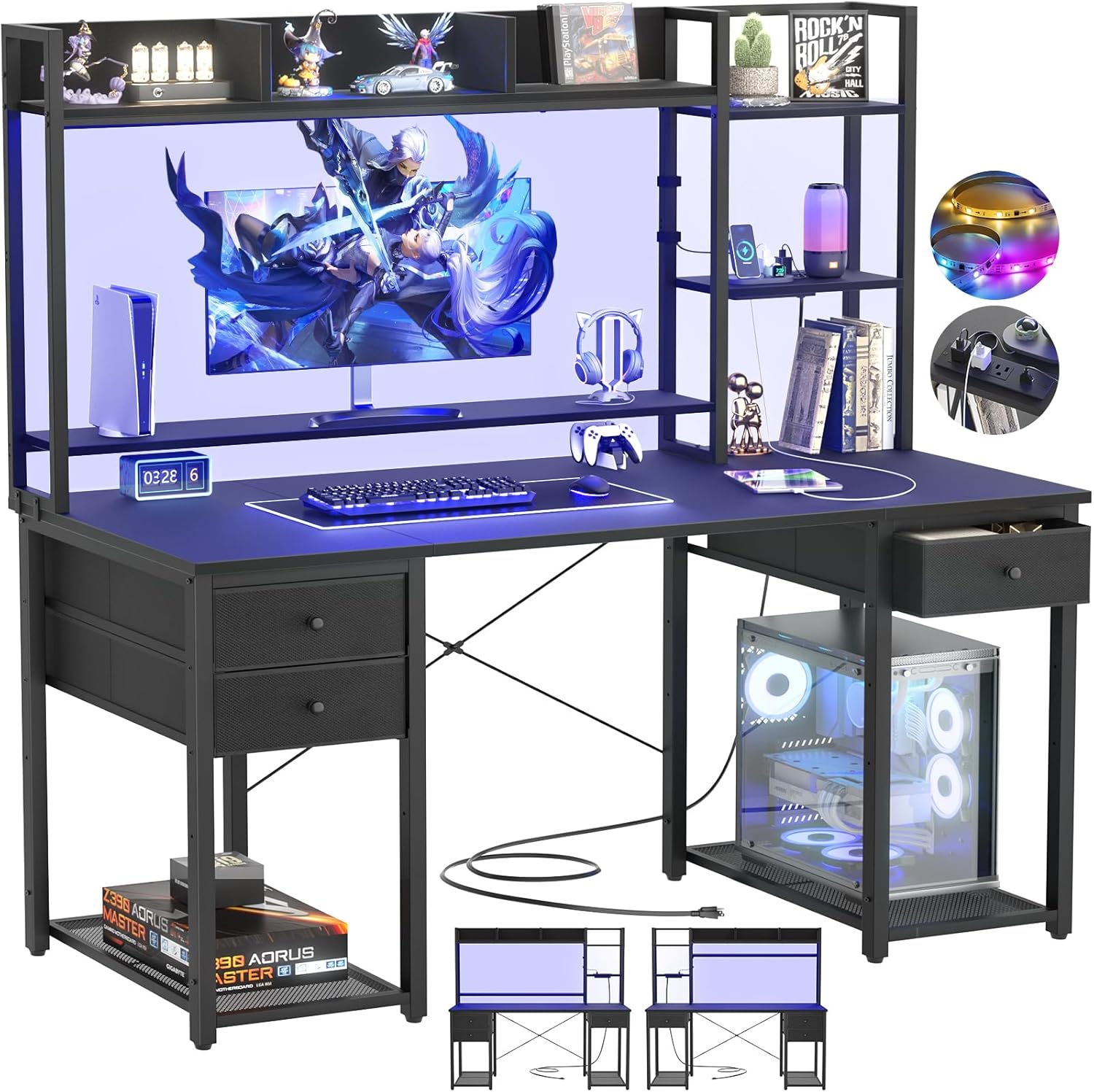
Figure 1.1: Overview of the Aheaplus Gaming Computer Desk, showcasing its integrated LED lighting, monitor stand, hutch, and storage drawers.
2. Key Features
- Integrated Storage: Features a spacious hutch, side bookshelf, three fabric drawers, and a CPU stand for efficient organization.
- LED Lighting System: Equipped with LED lights offering over 60,000 color options, multiple flashing modes, music synchronization, and timer functions for customizable ambiance.
- Built-in Power Outlets: Includes an integrated power strip with 3 AC outlets and 2 USB ports for convenient charging of electronic devices.

Figure 2.1: Detail of the integrated power outlets and USB ports, providing easy access to power for various devices.
- Ergonomic & Reversible Design: The side bookshelf can be positioned on either the left or right. A long monitor stand helps elevate the screen to eye level, promoting better posture.

Figure 2.2: Illustration of the desk's reversible configuration and key dimensions.

Figure 2.3: The movable monitor stand helps improve sitting posture by elevating the display.
- Easy Assembly: Designed for straightforward assembly with all necessary hardware and tools included.
3. Setup and Assembly
The Aheaplus Gaming Computer Desk is designed for user-friendly assembly. Please follow the included instructions carefully. It is recommended to have a clear, spacious area for assembly.
3.1. Before You Begin
- Verify all parts are present according to the packing list.
- Ensure you have the necessary tools (usually included).
- Read through the entire instruction manual before starting.
3.2. Assembly Steps
- Unpack all components and lay them out on a soft, clean surface to prevent scratches.
- Assemble the main desk frame, ensuring all connections are secure.
- Attach the hutch and side bookshelf. Note that the side bookshelf is reversible and can be installed on either the left or right side based on your preference.

Figure 3.1: The desk's reversible design allows for flexible configuration of the storage shelves.
- Install the fabric drawers into their designated slots.

Figure 3.2: The desk features multiple fabric drawers for convenient storage.
- Secure the monitor stand. This stand can be removed or adjusted upwards if not needed for monitor elevation.
- Connect the power strip to a wall outlet.
- Organize cables using the integrated cable management features.
Note: Some users have found the instructions for reversing the shelves to be in a separate section. Please refer to all provided documentation for complete assembly guidance.
4. Operating Instructions
4.1. LED Lighting System
The integrated LED lighting system enhances your gaming or work environment. It can be controlled via a remote control (if included) or a dedicated app (if applicable).
- Color Selection: Choose from over 60,000 colors to match your mood or room decor.
- Lighting Modes: Select from various flashing and dynamic modes.
- Music Sync: Activate music synchronization to make the lights react to audio rhythms.
- Timer Function: Set a timer for the lights to turn off automatically.
4.2. Power Outlets and USB Ports
The desk features a built-in power strip for convenient access to power.
- AC Outlets (3): Use for standard electronic devices (e.g., monitors, laptops, lamps).
- USB Ports (2): Ideal for charging smartphones, tablets, headphones, and other USB-powered devices.
Ensure the desk's power cord is securely plugged into a functional wall outlet before using the integrated power features.
5. Maintenance
Regular maintenance will help preserve the appearance and functionality of your Aheaplus Gaming Computer Desk.
- Cleaning:
- Wipe surfaces with a soft, damp cloth.
- Avoid harsh chemicals or abrasive cleaners, which can damage the finish.
- For fabric drawers, spot clean with a mild detergent if necessary.
- Hardware: Periodically check and tighten all screws and fasteners to ensure stability.
- Electrical Components: Ensure the power cord and outlets are free from damage. Do not attempt to repair electrical components yourself.
6. Troubleshooting
This section addresses common issues you might encounter with your desk.
| Problem | Possible Cause | Solution |
|---|---|---|
| Desk feels wobbly. | Loose fasteners or uneven floor. | Check and tighten all screws. Adjust leveling feet if present, or place shims under legs on uneven surfaces. |
| LED lights are not working. | Power cord not plugged in, remote battery dead, or connection issue. | Ensure the desk is plugged into a live outlet. Check remote battery. Verify all LED strip connections are secure. |
| Power outlets/USB ports not functioning. | Desk not plugged in, or circuit overload. | Confirm the desk's power cord is fully inserted into a working wall outlet. Unplug some devices to check for overload. If issue persists, contact support. |
| Difficulty with assembly. | Misinterpretation of instructions or missing parts. | Review the instruction manual carefully, paying attention to diagrams. Ensure all parts are correctly oriented. Contact customer service for assistance or replacement parts. |
7. Specifications
| Attribute | Detail |
|---|---|
| Brand | Aheaplus |
| Model Number | B0CKNCK65K |
| Color | Black |
| Product Dimensions (L x W x H) | 119.89 x 48.01 x 149.86 cm (47.2 x 18.9 x 59 inches) |
| Item Weight | 20.96 kg (46.2 lbs) |
| Material | Engineered Wood, Metal |
| Special Features | Integrated USB outlet, LED lights, Reversible design, Drawers, Storage shelves |
| Number of Drawers | 3 |
| Style | Industrial |
8. Customer Support
Aheaplus is committed to providing excellent customer service. If you encounter any issues or have questions regarding your desk, please do not hesitate to contact us.
- Lifetime Customer Service: We offer lifetime customer service for our products.
- Our experienced customer service team is available to provide prompt and effective assistance.
- Please refer to your purchase documentation for specific contact information or visit the Aheaplus official website.
Ask a question about this manual
Ask about setup, troubleshooting, compatibility, parts, safety, or missing instructions. Manuals+ will review the question and use this page’s manual context to help answer it.