
1. Introduction
The Lenco SCD-860 is a versatile portable audio device featuring DAB+ and FM radio reception, Bluetooth connectivity for wireless audio streaming, and a top-loading CD player. It includes a 2.4-inch TFT color display, dual alarm functions, and stereo speakers. This manual provides essential information for the safe and efficient operation of your device.
2. Safety Information
Please read these safety instructions carefully before using the device and retain them for future reference. Incorrect use may result in electric shock, fire, or other hazards.
- Do not expose the unit to rain or moisture to prevent fire or electric shock.
- Ensure proper ventilation around the unit. Do not block ventilation openings.
- Use only the power adapter supplied with the unit.
- Do not open the unit casing. Refer all servicing to qualified personnel.
- Dispose of batteries responsibly according to local regulations.
3. Package Contents
Verify that all items are present upon unpacking:
- Lenco SCD-860 Unit
- AC Power Cable
- User Manual (this document)
4. Product Overview
Familiarize yourself with the main components and controls of your Lenco SCD-860.
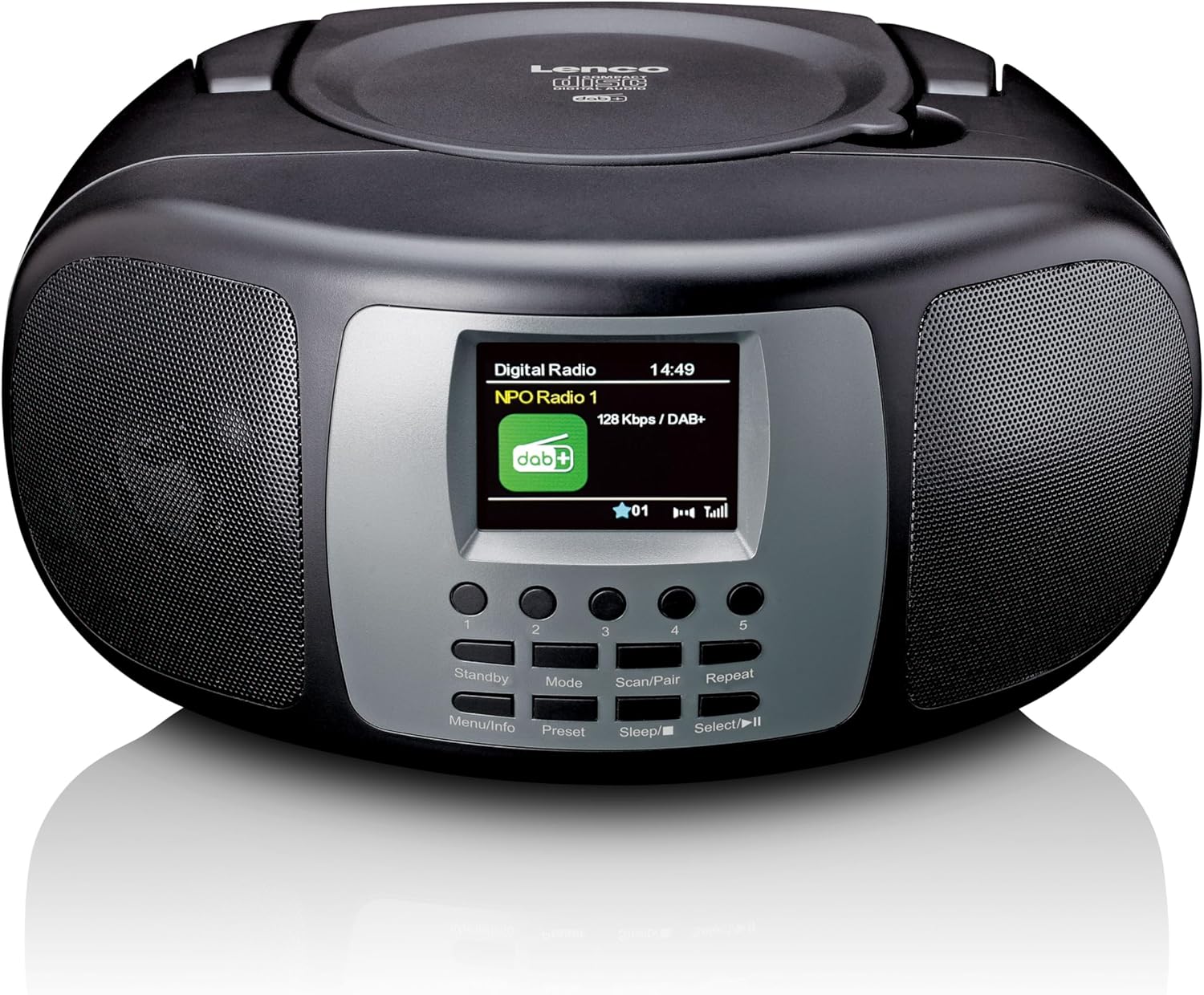
Figure 4.1: Front View. This image displays the front of the Lenco SCD-860, highlighting the central 2.4-inch TFT color display, the array of control buttons below it, and the two integrated speakers on either side. The top-loading CD compartment is visible on the upper surface.

Figure 4.2: CD Compartment Open. This image shows the Lenco SCD-860 with its top-loading CD compartment lid open, revealing a compact disc placed inside, ready for playback. The display and control buttons are also visible.

Figure 4.3: Left Side Controls. This image illustrates the left side of the Lenco SCD-860, featuring the headphone output jack, the power ON/OFF switch, and the rotary volume control knob.
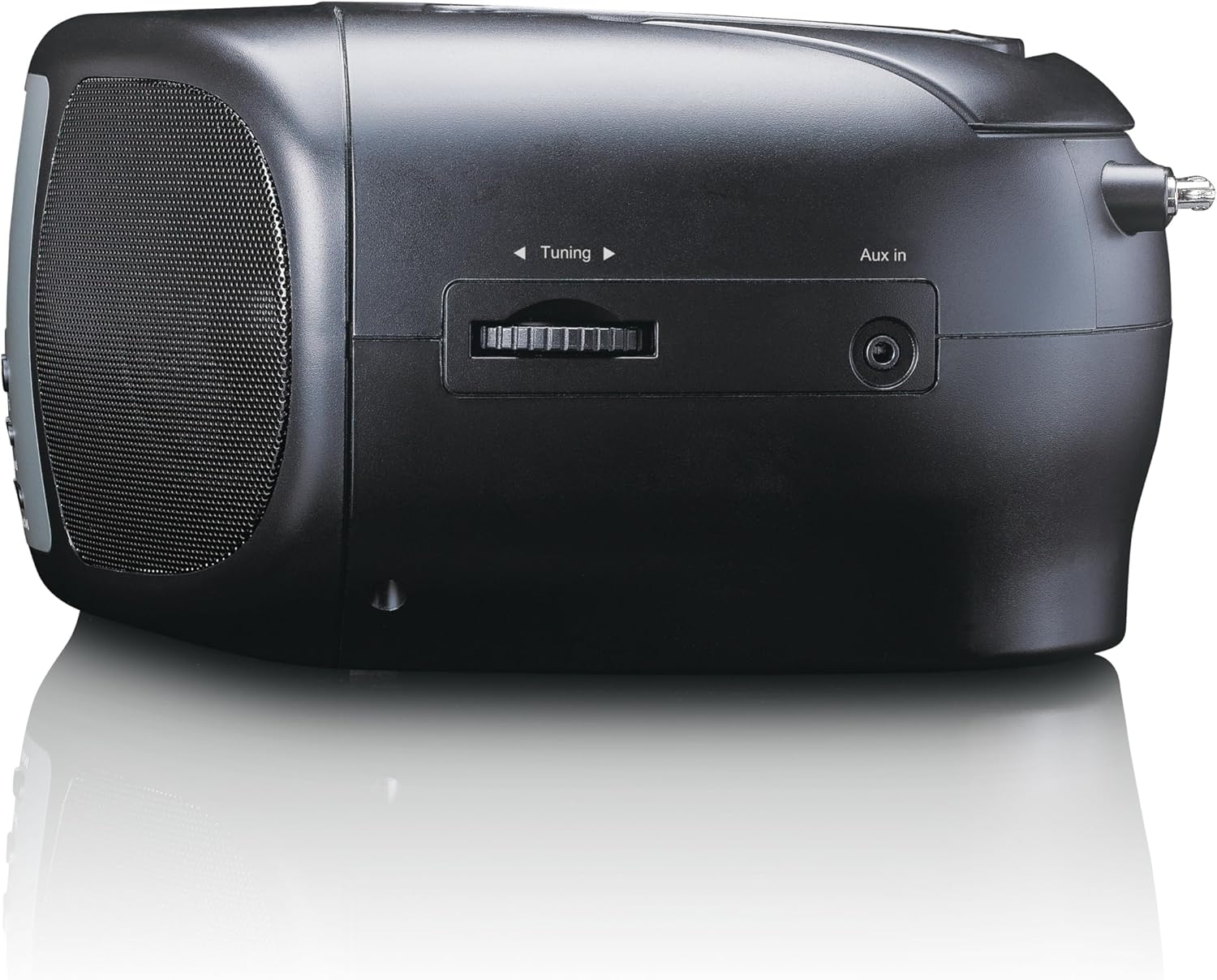
Figure 4.4: Right Side Controls. This image shows the right side of the Lenco SCD-860, highlighting the rotary tuning knob for radio frequency selection and the AUX input jack for connecting external audio devices.

Figure 4.5: Rear View. This image displays the rear of the Lenco SCD-860, featuring the AC power input socket and the fully extended telescopic antenna for improved radio reception.
4.1. Control Buttons
- Standby/Menu/Info: Power on/off, access menu, display information.
- Mode/Preset: Switch between modes (DAB+, FM, CD, Bluetooth, AUX), save/recall radio presets.
- Scan/Pair/Sleep: Scan for radio stations, pair Bluetooth devices, activate sleep timer.
- Repeat/Select/Play/Pause: Repeat CD track/all, confirm selection, play/pause CD/Bluetooth.
- Tuning Knob: Adjust radio frequency, navigate menus.
- Volume Knob: Adjust audio output level.
- 1-5 Buttons: Direct access to preset radio stations.
5. Setup
5.1. Powering the Device
The SCD-860 can be powered by AC mains or batteries.
5.1.1. AC Power
- Connect the supplied AC power cable to the AC IN socket on the rear of the unit (refer to Figure 4.5).
- Plug the other end of the cable into a standard wall outlet.
5.1.2. Battery Power
For portable use, the unit requires 6 x 'C' size batteries (not included).
- Open the battery compartment cover on the bottom of the unit.
- Insert 6 'C' size batteries, ensuring correct polarity (+/-).
- Close the battery compartment cover securely.
5.2. Antenna Setup
For optimal DAB+ and FM radio reception, fully extend the telescopic antenna located at the rear of the unit (refer to Figure 4.5). Adjust its position for the best signal quality.
6. Operating Instructions
6.1. Power On/Off
Slide the Power switch on the left side of the unit to the ON position. Press the Standby button on the front panel to turn the unit on or put it into standby mode.
6.2. Mode Selection
Press the Mode button repeatedly to cycle through available modes: DAB+, FM, CD, Bluetooth, AUX.
6.3. DAB+ Radio Operation
- Switch to DAB+ mode using the Mode button.
- The unit will automatically scan for available DAB+ stations upon first use or if no stations are found. To initiate a manual scan, press the Scan button.
- Use the Tuning Knob to scroll through the list of available stations. Press Select (often integrated with Repeat/Select/Play/Pause button) to confirm your selection.
- To save a station as a preset, press and hold the Preset button (often integrated with Mode button), then use the Tuning Knob to select a preset number (1-5) and press Select to confirm.
- To recall a preset, briefly press the corresponding numbered button (1-5).
6.4. FM Radio Operation
- Switch to FM mode using the Mode button.
- To auto-scan for stations, press and hold the Scan button. The radio will scan and stop at the next strong station.
- For manual tuning, rotate the Tuning Knob to adjust the frequency.
- Saving and recalling presets works similarly to DAB+ mode, using the Preset button and numbered buttons (1-5).
6.5. Bluetooth Operation
- Switch to Bluetooth mode using the Mode button. The display will show "Bluetooth Pairing" or similar.
- Activate Bluetooth on your external device (smartphone, tablet, etc.).
- Search for "SCD-860" in your device's Bluetooth list and select it to pair.
- Once paired, you can stream audio from your device to the SCD-860. Use the Play/Pause button on the unit or your external device to control playback.
6.6. CD Player Operation
- Switch to CD mode using the Mode button.
- Open the top-loading CD compartment cover (refer to Figure 4.2).
- Place a CD with the label side facing up.
- Close the CD compartment cover. The unit will read the CD and begin playback automatically.
- Use the Play/Pause button to pause or resume playback.
- Press the Repeat button to cycle through repeat modes (repeat one track, repeat all tracks).
- The unit supports programmable CD playback for up to 20 tracks. Refer to the full manual for detailed programming instructions.
6.7. AUX Input
Connect an external audio device (e.g., MP3 player) to the AUX In jack on the right side of the unit (refer to Figure 4.4) using a 3.5mm audio cable (not included). Switch to AUX mode using the Mode button. Audio will play through the SCD-860 speakers.
6.8. Alarm Function
The SCD-860 features a dual alarm function. Detailed instructions for setting and managing alarms are typically found in the full product manual. Generally, you will access the alarm settings via the Menu (long press Standby/Menu/Info) and use the Tuning Knob and Select button to configure alarm times, sources (buzzer, radio, CD), and volume.
6.9. Headphone Use
Connect headphones to the 3.5mm headphone jack on the left side of the unit (refer to Figure 4.3) for private listening. The internal speakers will be muted automatically.
7. Maintenance
- Cleaning: Wipe the unit with a soft, dry cloth. Do not use abrasive cleaners or solvents.
- CD Care: Handle CDs by their edges. Clean dirty CDs with a soft, lint-free cloth, wiping from the center outwards.
- Storage: If not used for extended periods, remove batteries and store the unit in a cool, dry place.
8. Troubleshooting
| Problem | Possible Cause | Solution |
|---|---|---|
| No power | Power cable not connected; Batteries depleted or incorrectly inserted. | Check AC cable connection; Replace batteries or ensure correct polarity. |
| No sound | Volume too low; Headphones connected; Incorrect mode selected. | Increase volume; Disconnect headphones; Select correct mode (DAB+, FM, CD, Bluetooth, AUX). |
| Poor radio reception | Antenna not extended or poorly positioned; Weak signal area. | Fully extend and adjust the telescopic antenna; Try moving the unit to a different location. |
| CD not playing | CD inserted incorrectly; CD is dirty or scratched; Incorrect mode. | Ensure CD is label-side up; Clean or replace CD; Select CD mode. |
| Bluetooth pairing failed | Bluetooth not enabled on external device; SCD-860 not in pairing mode; Devices too far apart. | Enable Bluetooth on your device; Ensure SCD-860 is in Bluetooth mode; Move devices closer (within 10m). |
9. Specifications
| Feature | Description |
|---|---|
| Model Number | SCD-860BK |
| Brand | Lenco |
| Connectivity Technology | Bluetooth |
| Special Features | Bluetooth, DAB+/FM Radio, CD Player, Color Display, Dual Alarm |
| Compatible Devices | Headphones, Earphones, MP3 Player, Smartphone, Laptop, Speaker, Tablet, USB Stick |
| Output Power | 2 x 2 W RMS |
| Display | 2.4-inch TFT LCD Color Display |
| CD Memory | Programmable for 20 tracks |
| Radio Bands Supported | DAB+ (Band III 174-240 MHz), FM |
| Power Source | AC Mains, 6 x 'C' Batteries (not included) |
| Connections | AUX Input, 3.5mm Audio Output (Headphone) |
| Dimensions (L x W x H) | 24 cm x 22 cm x 11.5 cm (approx.) |
| Color | Black |
10. Warranty and Support
For warranty information and technical support, please refer to the warranty card included with your product or visit the official Lenco website. Keep your proof of purchase for any warranty claims.
For further assistance, please contact Lenco customer service through their official channels.


