
ANDELI TIG-250Pro ACDC
ANDELI TIG-250Pro ACDC Welding Machine User Manual
Model: TIG-250Pro ACDC
Brand: ANDELI
1. Introduction
This manual provides detailed instructions for the safe and effective operation, setup, and maintenance of your ANDELI TIG-250Pro ACDC Welding Machine. This versatile 220V, 200 AMP welder supports AC/DC TIG, Cold Pulse, and Cold Welding modes, making it suitable for a wide range of materials including aluminum, stainless steel, and other thinner metals.
The TIG-250Pro ACDC is designed for efficiency and reliability, featuring multiple IGBT inverters for enhanced duty cycle and a user-friendly LCD display for precise control over welding parameters.
2. Safety Information
Always prioritize safety when operating welding equipment. Failure to follow safety guidelines can result in serious injury or property damage.
General Welding Safety Precautions:
- Wear appropriate Personal Protective Equipment (PPE), including a welding helmet with proper shade, flame-resistant clothing, welding gloves, and safety shoes.
- Ensure adequate ventilation in the work area to disperse welding fumes.
- Keep a fire extinguisher nearby and be aware of fire hazards.
- Do not weld near flammable materials.
- Ensure all electrical connections are secure and properly grounded.
Machine-Specific Safety Features:
The ANDELI TIG-250Pro ACDC is equipped with several protective features to ensure safe operation:
- VDR (Voltage Reduction Device): Reduces open-circuit voltage for increased safety.
- Over-Voltage Protection: Safeguards the machine from excessive input voltage.
- Overload Protection: Prevents damage due to excessive current draw.
- Overheating Protection: Shuts down the machine if internal temperatures become too high.
- Over-Current Protection: Protects against excessive output current.

Image: Visual representation of the safety features integrated into the ANDELI TIG-250Pro ACDC welding machine, highlighting VDR, over-voltage, overload, overheating, and over-current protection.
3. Product Overview and Components
The ANDELI TIG-250Pro ACDC welding machine comes with essential accessories to get you started.

Image: The ANDELI TIG-250Pro ACDC welding machine displayed with its complete set of accessories, including the main unit, ground clamp, WP-26 torch, foot pedal, various nozzles, collets, and tungsten rods.
Package Contents:
- TIG-250Pro ACDC Welding Machine (220V)
- Ground Clamp (2m cable)
- WP-26 Aluminum Welding Torch (4m cable)
- Nozzles (10 pieces)
- Collets (10 pieces)
- Tungsten Rods (10 pieces)
- Foot Pedal (2 pieces)
4. Setup
Follow these steps to set up your welding machine for operation:
- Power Connection: Connect the machine to a stable 220V power supply. Ensure the power outlet is properly grounded and can handle the machine's current requirements.
- Ground Clamp Connection: Attach the ground clamp cable securely to the designated ground terminal on the welding machine. Connect the ground clamp to your workpiece or welding table, ensuring good electrical contact.
- Welding Torch Connection: Connect the WP-26 welding torch cable to the appropriate connector on the front panel of the machine. Ensure it is tightened securely.
- Gas Connection: For TIG welding, connect your pure argon gas cylinder to the gas inlet on the machine using a suitable gas hose and regulator. Ensure all gas connections are leak-free.
- Foot Pedal Connection: Plug the foot pedal cable into its dedicated port on the machine. The foot pedal allows for precise control of welding current during operation.
- Tungsten Electrode Installation: Insert the appropriate tungsten electrode into the torch collet and tighten the collet body. Ensure the tungsten is properly sharpened for your application.
5. Operating Instructions
The ANDELI TIG-250Pro ACDC offers multiple welding modes and precise control via its LCD display.
LCD Display and Controls:
The machine features an intuitive LCD display that allows for easy selection of welding modes, tungsten type, electrode type, and workpiece thickness. Parameters can be adjusted by rotating and pressing the control knobs.

Image: A detailed view of the digital display screen on the ANDELI TIG-250Pro ACDC, illustrating its graphical interface and the clear presentation of welding parameters like voltage, current, and pulse settings.
Welding Modes:
The TIG-250Pro ACDC supports 4 primary modes, with a total of 9 versatile selections for various applications:
- TIG Pulse (AC/DC): Provides pulsed current for better control of heat input, reduced distortion, and improved weld appearance.
- HF TIG: High-frequency start for non-contact arc ignition, preventing tungsten contamination.
- Cold Pulse: A specialized pulse mode for minimal heat input.
- Cold Welding: Significantly reduces deformation and discoloration. Ideal for sensitive materials, producing white-silver welds on aluminum and stainless steel.
- MMA (Manual Metal Arc): For stick welding applications.
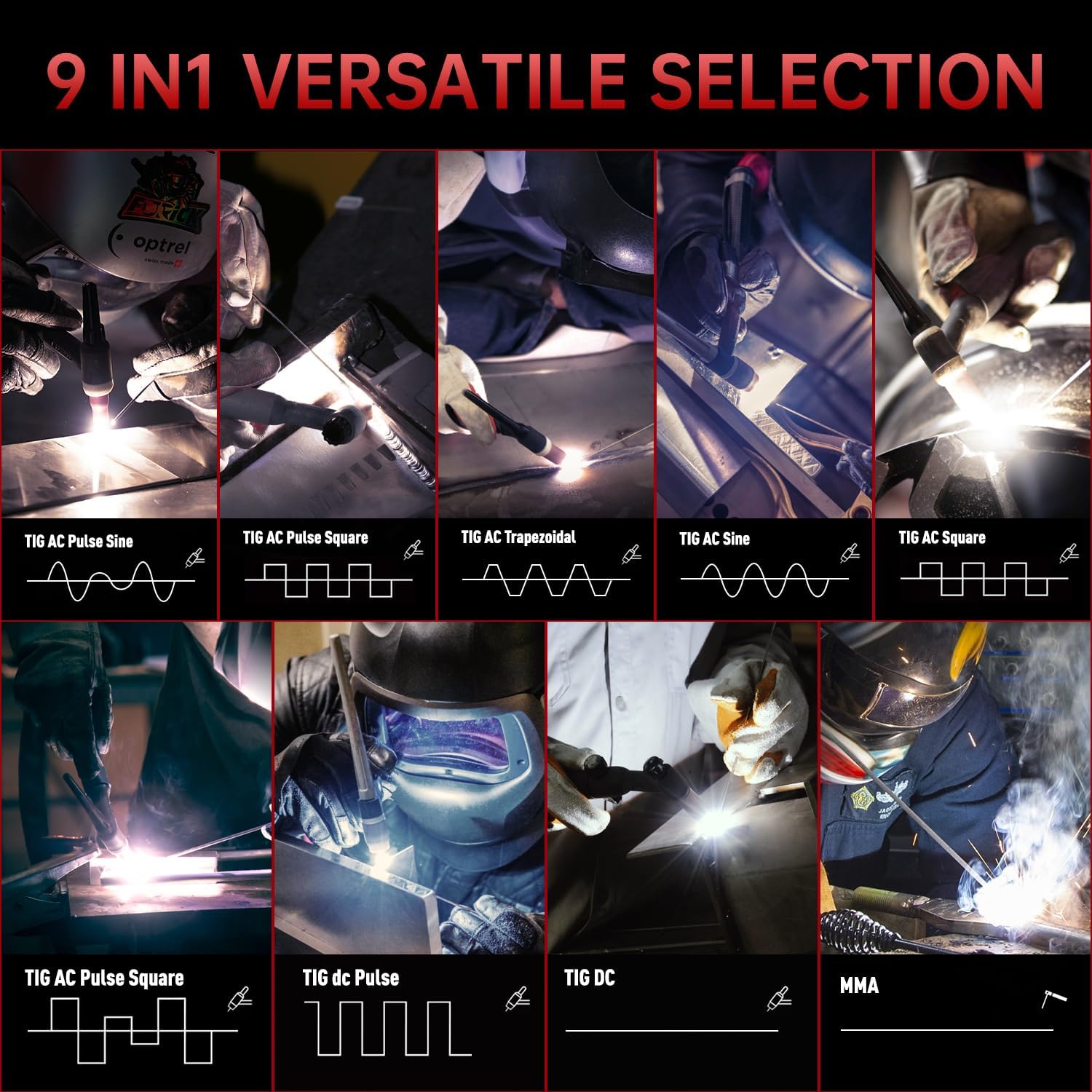
Image: A comprehensive display of the nine versatile welding modes offered by the ANDELI TIG-250Pro ACDC, illustrating different TIG AC Pulse, TIG AC, TIG DC, and MMA options for diverse welding needs.
Waveform Selection (AC TIG):
For AC TIG welding, you can select different waveforms to optimize your weld characteristics:
- Square Wave: Provides a stable dynamic arc and forms a stable molten pool.
- Sine Wave: Offers lower noise decibels for a quieter welding process.
- Trapezoidal Wave: Delivers low heat output, suitable for rapid prototyping when welding thin plates.

Image: A graphical representation of the Square Wave, Sine Wave, and Trapezoidal Wave outputs available for AC TIG welding, along with brief descriptions of their unique characteristics and applications.
Material Compatibility:
The machine is designed to weld a wide range of metals:
- Aluminum
- Stainless Steel
- Mild Steel
- Galvanized Sheet
- Cast Iron
- Square Pipe

Image: A visual collage demonstrating the extensive material compatibility of the ANDELI TIG-250Pro ACDC welding machine, featuring examples such as square pipes, metal cages, mild steel, galvanized sheets, cast iron, and stainless steel.
6. Maintenance
Regular maintenance ensures the longevity and optimal performance of your welding machine.
- Cleaning: Periodically clean the machine's exterior and ventilation openings to prevent dust and debris buildup, which can hinder cooling. Use compressed air to clear internal components if necessary, ensuring the machine is unplugged.
- Cable and Connection Inspection: Regularly inspect all cables (power, ground, torch, foot pedal) for signs of wear, cuts, or damage. Ensure all connections are tight and free of corrosion.
- Torch Maintenance: Clean the torch nozzle, collet, and collet body regularly. Replace worn or damaged parts as needed to maintain arc stability and gas flow.
- Gas Line Inspection: Check gas hoses and fittings for leaks using a soapy water solution. Ensure the gas regulator is functioning correctly.
- Storage: Store the machine in a clean, dry environment, away from excessive dust, moisture, and extreme temperatures.
7. Troubleshooting
This section addresses common issues you might encounter during operation.
| Problem | Possible Cause | Solution |
|---|---|---|
| Machine does not power on | No power supply; Faulty power cable; Internal fuse blown | Check power outlet and circuit breaker; Inspect power cable for damage; Contact service for fuse replacement. |
| No arc or unstable arc | Poor ground connection; Incorrect gas flow; Contaminated tungsten; Incorrect settings | Ensure ground clamp has good contact; Check gas cylinder and regulator; Clean or replace tungsten; Verify welding parameters on LCD. |
| Machine overheats and shuts down | Exceeded duty cycle; Blocked ventilation; High ambient temperature | Allow machine to cool down; Clear any obstructions from vents; Operate in a cooler environment. |
| Poor weld quality (porosity, discoloration) | Insufficient gas shielding; Contaminated workpiece; Incorrect travel speed or current | Check gas flow rate and purity; Clean workpiece thoroughly; Adjust welding technique and parameters. |
8. Specifications
| Feature | Detail |
|---|---|
| Manufacturer | ANDELI |
| Model | TIG-250Pro ACDC |
| Input Voltage | 220V |
| Output Current | 200 A (Max) |
| Welding Modes | AC/DC TIG Pulse, HF TIG, Cold Pulse, Cold Welding, MMA |
| Power Type | Electric (Corded) |
| Package Dimensions | 58.4 x 53.4 x 31 cm |
| Item Weight | 20.64 kilograms |
| ASIN | B0CKMQRG6H |
| Date First Available | October 7, 2023 |
9. Warranty and Support
For any product inquiries, technical support, or warranty claims, please contact the seller directly. The ANDELI Official Store is committed to providing excellent customer service.
Please note that information regarding the availability of spare parts is currently not provided. For specific spare part needs, it is recommended to contact the seller for assistance.
You can typically find seller contact information on the product's purchase page or your order details.
Ask a question about this manual
Ask about setup, troubleshooting, compatibility, parts, safety, or missing instructions. Manuals+ will review the question and use this page’s manual context to help answer it.