
1. Introduction
Thank you for purchasing the mooov 477320 Digital FM Radio Alarm Clock. This device combines a digital alarm clock with an FM radio tuner and an indoor temperature display, all housed in a stylish bamboo design. This manual provides essential information for safe and efficient use of your new alarm clock. Please read these instructions carefully before use and retain them for future reference.
2. Safety Information
- Do not expose the device to extreme temperatures, direct sunlight, or high humidity.
- Avoid dropping or subjecting the device to strong impacts.
- Do not attempt to disassemble or modify the device. This will void the warranty.
- Use only the specified battery type (2 x AAA batteries, not included). Ensure correct polarity when inserting batteries.
- Remove batteries if the device will not be used for an extended period to prevent leakage.
- Keep the device away from water and other liquids.
3. Package Contents
Please check that all items are present and in good condition:
- mooov 477320 Digital FM Radio Alarm Clock
- User Manual
4. Product Overview
Familiarize yourself with the components of your mooov 477320 alarm clock.
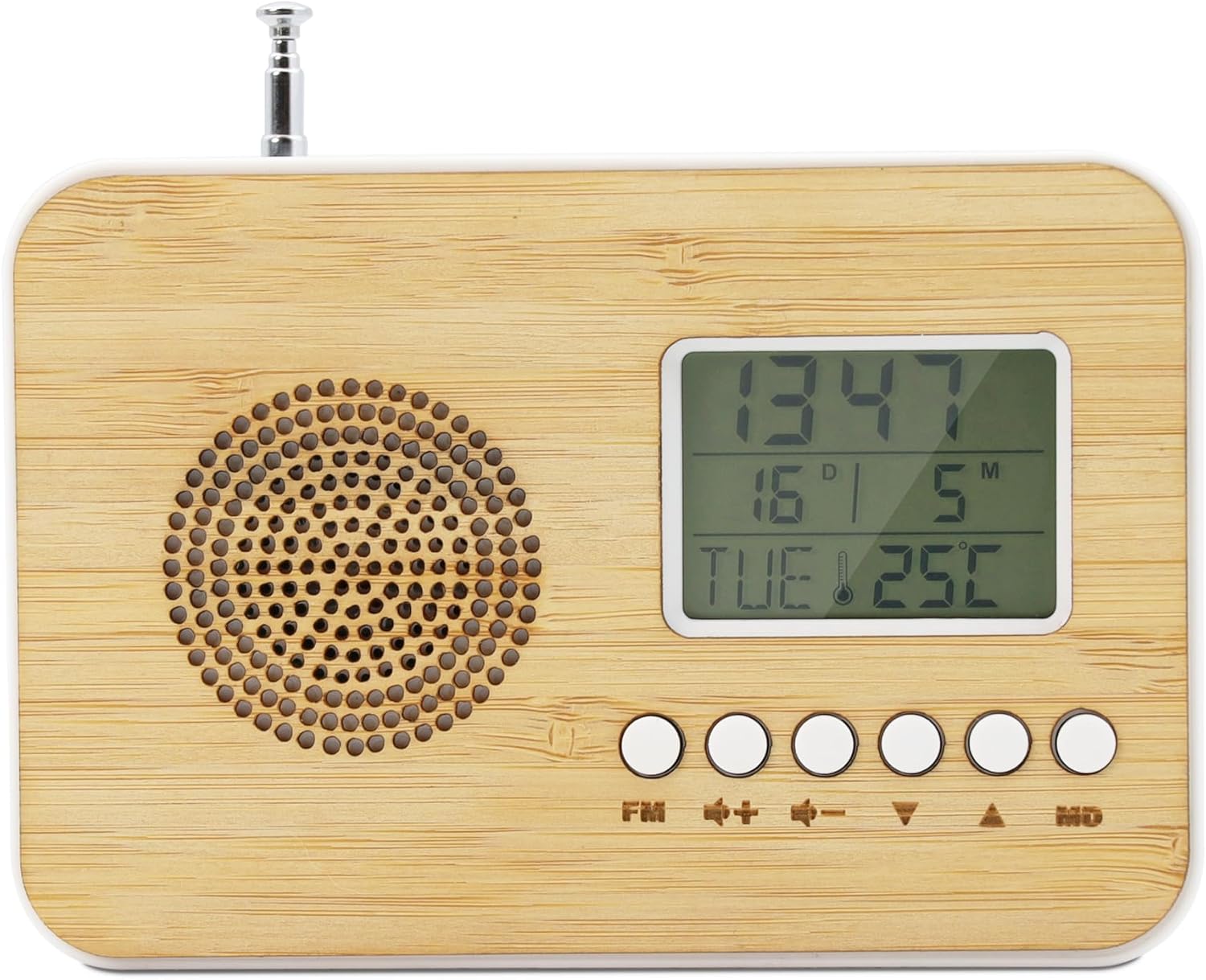
Figure 1: Front View. This image shows the front of the mooov 477320 radio alarm clock, featuring the speaker grille on the left, the LCD display on the right, and control buttons below the display.

Figure 2: LCD Display. A detailed view of the LCD screen, indicating the current time, day of the week, date, and indoor temperature.

Figure 3: Back View. The back of the mooov 477320 radio alarm clock, showing the battery compartment and the extendable antenna.
Controls and Display:
- LCD Display: Shows time, date, day of the week, and indoor temperature.
- Speaker: For radio playback and alarm sounds.
- FM Button: Activates FM radio mode.
- '+' / '-': Adjusts volume, navigates menus, or sets values.
- '^' / 'v': Navigates menus or sets values.
- MD Button: Mode button for setting time, date, and alarms.
- Antenna: Extendable for improved FM radio reception.
- Battery Compartment: Located on the back for 2x AAA batteries.
5. Setup
5.1. Battery Installation
- Open the battery compartment cover on the back of the device (refer to Figure 3).
- Insert two (2) AAA batteries, ensuring the correct polarity (+ and -) as indicated inside the compartment.
- Close the battery compartment cover securely.
The device will power on automatically once batteries are inserted.
5.2. Setting Time and Date
- Press and hold the MD button for 3 seconds to enter time setting mode. The hour digits will flash.
- Use the ^ or v buttons to adjust the hour.
- Press MD again to confirm the hour and move to minute setting. The minute digits will flash.
- Use the ^ or v buttons to adjust the minutes.
- Continue pressing MD to cycle through and set the year, month, and day using the ^ or v buttons.
- Press MD one last time to exit the setting mode.
6. Operating Instructions
6.1. FM Radio Function
- Extend the antenna for optimal reception.
- Press the FM button to enter radio mode. The display will show the current frequency.
- To auto-scan and save stations, press and hold the FM button for 3 seconds. The radio will scan for available stations and store them.
- Use the ^ or v buttons to cycle through saved stations.
- Adjust the volume using the + or - buttons.
- To activate the SLEEP function, press the MD button while in radio mode. The radio will automatically turn off after 30 minutes.
- To exit radio mode, press the FM button again.
6.2. Alarm Function
- Press the MD button repeatedly until the alarm time display flashes.
- Press and hold the MD button for 3 seconds to enter alarm setting mode. The hour digits will flash.
- Use the ^ or v buttons to adjust the alarm hour.
- Press MD again to confirm the hour and move to minute setting.
- Use the ^ or v buttons to adjust the alarm minutes.
- Press MD to select the alarm sound: classic beep or FM radio.
- Press MD one last time to confirm and exit alarm setting.
- To activate/deactivate the alarm, press the MD button briefly when the alarm time is displayed. An alarm icon will appear/disappear on the screen.
- When the alarm sounds, press any button (except MD) to activate the snooze function for 9 minutes.
- To turn off the alarm completely, press the MD button when the alarm is sounding.
6.3. Temperature Display
The device automatically displays the indoor temperature on the LCD screen (refer to Figure 2). No specific action is required to activate this feature.
6.4. Display Brightness
The LCD display features an anti-glare screen. While specific brightness adjustment buttons are not detailed, many digital clocks automatically adjust brightness or have a dedicated button (often combined with snooze) to cycle through brightness levels. Refer to the device's physical buttons for any labeled brightness control.
7. Maintenance
7.1. Cleaning
- Wipe the device with a soft, dry cloth.
- Do not use abrasive cleaners, solvents, or chemical sprays, as these may damage the bamboo finish or electronic components.
7.2. Battery Replacement
- When the display becomes dim or the device functions erratically, it is time to replace the batteries.
- Follow the steps in Section 5.1 for battery installation.
- Dispose of used batteries responsibly according to local regulations.
8. Troubleshooting
| Problem | Possible Cause | Solution |
|---|---|---|
| Device does not turn on. | Batteries are not inserted or are depleted. | Ensure batteries are correctly inserted with proper polarity. Replace with new AAA batteries. |
| Display is dim or unreadable. | Low battery power. | Replace batteries with new ones. |
| Poor FM radio reception. | Antenna not extended or weak signal. | Fully extend the antenna. Reposition the device for better signal. |
| Alarm does not sound. | Alarm is not activated or set incorrectly. | Verify alarm settings and ensure the alarm icon is visible on the display. |
| Incorrect time/date. | Time/date not set or batteries removed. | Re-set the time and date as per Section 5.2. |
9. Specifications
- Model Number: 477320
- Brand: mooov
- Dimensions (W x H x D): 125 mm x 85 mm x 46 mm (approximately 13 x 9 cm; 160 g)
- Power Source: 2 x AAA Batteries (not included)
- Display Type: Digital LCD, anti-glare
- FM Radio Frequency: 87.0 - 108.0 MHz
- Special Features: Alarm, Illuminated display, Indoor Temperature Indicator, FM Radio, Silent Clock
- Material: Bamboo, Plastic
- Movement Type: Quartz
- Country of Origin: China

Figure 4: Product Dimensions. This image illustrates the compact dimensions of the radio alarm clock: 125 mm width, 85 mm height, and 46 mm depth.
10. Warranty and Support
This mooov product is covered by a limited warranty. For specific warranty terms and conditions, please refer to the documentation provided at the time of purchase or contact your retailer. For technical support or inquiries, please reach out to the customer service department of your retailer or the manufacturer.