1. Introduction
This manual provides comprehensive instructions for the XINJI COBEE C1 Pros Smart Watch. It covers setup, operation, maintenance, and troubleshooting to ensure optimal use of your device. The XINJI COBEE C1 Pros features a 1.91" HD display, Bluetooth calling, 100+ sports modes, SpO2 monitoring, and 24/7 heart rate tracking.

Figure 1: Front view of the XINJI COBEE C1 Pros Smart Watch. This image displays the watch face with various health metrics and the black silicone strap.
2. What's in the Box
Upon opening the package, verify that all components are present:
- XINJI COBEE C1 Pros Smart Watch
- Charging Cable
- Extra Band (if included in your specific package)
- User Manual (this document)
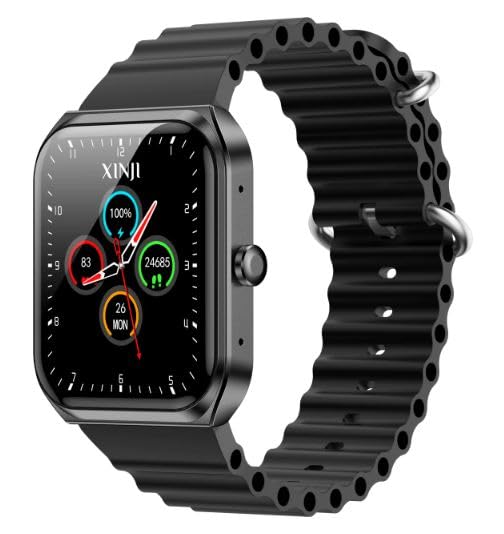
Figure 2: The XINJI COBEE C1 Pros Smart Watch, showcasing its design and strap.
3. Setup
3.1 Initial Charging
Before first use, fully charge your XINJI COBEE C1 Pros Smart Watch. Connect the magnetic charging cable to the charging points on the back of the watch and plug the USB end into a compatible power adapter (not included) or a computer USB port.
- A full charge typically takes approximately 2 hours.
- The watch display will indicate charging status.

Figure 3: Rear view of the XINJI COBEE C1 Pros Smart Watch, highlighting the optical sensors and magnetic charging contacts.
3.2 App Installation and Pairing
To unlock the full functionality of your smart watch, download and install the companion application on your smartphone. The watch is compatible with Android 5.0 and above, and iOS 10.0 and above.
- Scan the QR code provided in the watch's quick start guide or search for the official XINJI app in your smartphone's app store (Google Play Store for Android, Apple App Store for iOS).
- Install the application and open it.
- Enable Bluetooth on your smartphone.
- Follow the in-app instructions to search for and pair with your XINJI COBEE C1 Pros Smart Watch. Ensure the watch is powered on and within Bluetooth range.
- Confirm the pairing request on both your phone and the watch.
Once paired, you can synchronize data, customize settings, and receive notifications directly on your watch.
4. Operating Your Smart Watch
4.1 Basic Navigation
- Touchscreen: Swipe up, down, left, or right to navigate through menus and screens. Tap to select items.
- Side Button: Press the side button to return to the home screen or wake the display. A long press may access power options or a quick menu, depending on the context.
4.2 Bluetooth Calling
The XINJI COBEE C1 Pros supports direct Bluetooth calling. Once paired with your smartphone, you can answer incoming calls or dial out directly from the watch.
- Ensure your watch is connected to your phone via Bluetooth.
- When a call comes in, the watch will display the caller ID. Tap the green icon to answer or the red icon to reject.
- To dial out, access the call function on the watch (usually through the main menu) and use the on-screen dial pad or contact list.
4.3 Sports Modes
The watch offers over 100 sports modes to track various physical activities. Select your desired sport to monitor metrics such as duration, calories burned, heart rate, and more.
- Navigate to the "Sports" or "Workout" section on your watch.
- Browse and select the specific activity you are performing (e.g., Running, Cycling, Yoga).
- Start the activity. The watch will begin recording data.
- End the activity when finished. Data will be saved and synchronized with the app.
4.4 Health Monitoring
The XINJI COBEE C1 Pros is equipped with advanced sensors for continuous health tracking.
- Heart Rate Monitoring: The watch continuously monitors your heart rate. View real-time data on the watch or detailed historical data in the app.
- SpO2 (Blood Oxygen) Monitoring: Measure your blood oxygen saturation levels. Ensure the watch is worn snugly on your wrist for accurate readings.
- Sleep Tracking: The watch automatically tracks your sleep patterns, including deep sleep, light sleep, and awake times. Review your sleep quality in the companion app.
- Activity Tracking: Monitors steps taken, distance covered, and calories burned throughout the day.
Note: The health monitoring features are for general fitness and wellness purposes only and should not be used for medical diagnosis or treatment. Consult a medical professional for health concerns.
5. Maintenance
5.1 Cleaning
Regular cleaning helps maintain the watch's appearance and functionality.
- Wipe the watch screen and body with a soft, lint-free cloth.
- For stubborn smudges, slightly dampen the cloth with water. Avoid using harsh chemicals or abrasive materials.
- Clean the charging contacts on the back of the watch periodically to ensure proper charging.
5.2 Water Resistance
The XINJI COBEE C1 Pros is IP68 water-resistant. This means it is protected against dust and can withstand immersion in water up to 1.5 meters for up to 30 minutes. It is suitable for daily use, such as hand washing or light rain.
- Do not use the watch for diving, snorkeling, or high-pressure water activities.
- Avoid exposing the watch to hot water, steam, or detergents, as this may compromise the water resistance.
- If the watch gets wet, wipe it dry before charging or operating buttons.
5.3 Battery Care
To prolong battery life:
- Avoid extreme temperatures.
- Charge the watch fully before long periods of inactivity.
- Do not let the battery completely drain frequently.
6. Troubleshooting
| Problem | Possible Cause | Solution |
|---|---|---|
| Watch does not turn on | Low battery; Power button not pressed correctly | Charge the watch for at least 30 minutes. Press and hold the side button for 5-10 seconds. |
| Cannot pair with phone | Bluetooth off; Watch not in pairing mode; App issue | Ensure Bluetooth is enabled on both devices. Restart both watch and phone. Reinstall the app. |
| Inaccurate health data | Watch not worn snugly; Sensor obstruction | Ensure the watch is worn snugly on the wrist. Clean the sensors on the back of the watch. |
| Short battery life | Frequent use of power-intensive features; High screen brightness | Reduce screen brightness. Limit continuous heart rate monitoring or GPS usage if not needed. Disable unnecessary notifications. |
7. Specifications
The following table outlines the key technical specifications for the XINJI COBEE C1 Pros Smart Watch:
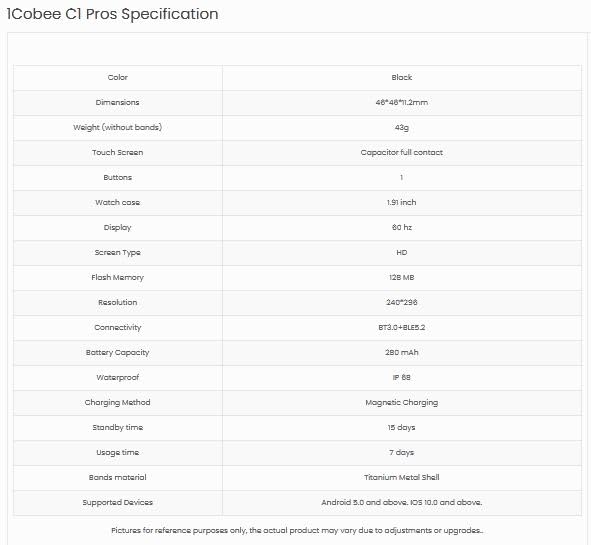
Figure 4: Detailed specifications for the XINJI COBEE C1 Pros Smart Watch, including dimensions, display, memory, and connectivity.
| Feature | Detail |
|---|---|
| Brand | XINJI |
| Model Name | Cobee C1 Pros |
| Display Size | 1.91 Inches HD Display |
| Refresh Rate | 60Hz |
| Resolution | 240 x 240 |
| Connectivity | Bluetooth |
| Battery Life (Average) | 15 Days (Standby), 7 Days (Usage) |
| Water Resistance | IP68 |
| Memory Storage | 128 MB |
| Compatible OS | Android 5.0+, iOS 10.0+ |
| Dimensions | 4.6 x 4.6 x 1.12 cm |
| Weight | 300 g |
| Special Features | Activity Tracker, Blood Pressure Monitor, Cycle Tracking, Daily Workout Memory, ECG, GPS, Oxymeter (SpO2), Phone Call |
8. Warranty and Support
The XINJI COBEE C1 Pros Smart Watch comes with a 1 Year Warranty from the date of purchase. This warranty covers manufacturing defects and material flaws under normal use.
- Warranty Claims: For warranty service, please retain your proof of purchase. Contact XINJI customer support through their official website or the contact information provided with your product packaging.
- Exclusions: The warranty does not cover damage caused by misuse, accidents, unauthorized repairs, or normal wear and tear.
Customer Support
For technical assistance, troubleshooting, or general inquiries, please contact XINJI customer support. Refer to the official XINJI website or your product packaging for the most up-to-date contact information.

Figure 5: The official XINJI brand logo.


