
1. Introduction
This manual provides comprehensive instructions for the installation, operation, and maintenance of your TAXNELE TVPS1-63TP Smart Energy Monitor and Surge Protector. This device is designed to monitor electricity consumption, provide various electrical protections, and offer smart control features via a mobile application, compatible with Google Home and Alexa. Please read this manual thoroughly before installation and use to ensure safe and optimal performance.
2. Product Overview and Features
The TAXNELE TVPS1-63TP is a multi-functional smart device that integrates energy monitoring with advanced protection features and smart home compatibility.


Key Features:
- Multi-function Metering: Monitors electricity consumption, displaying voltage, current, and power on a large LCD screen.
- Adjustable Protection Limits: Users can configure overvoltage/undervoltage, current limits, leakage current alarms, and reconnection times.
- Remote Control & Voice Control: Control connected appliances from your smartphone via the app, anytime and anywhere. Compatible with Google Home and Alexa for voice commands.
- Timer & Schedule Functionality: Automate power ON/OFF, set timers, and countdowns for household appliances based on daily schedules.
- Energy Value Storage: The device stores kWh, overvoltage, undervoltage, and overcurrent values even after a power outage.
- Leakage Current & Voltage Protection: Automatically cuts power when nominal current, voltage, or leakage current exceeds preset values. The device attempts to reconnect after a set time. Note: If three leakage protections occur, manual intervention is required to resolve the underlying issue before reconnection attempts resume.


3. Setup and Installation
Proper installation is crucial for the safe and effective operation of the TVPS1-63TP device. It is recommended that installation be performed by a qualified electrician.
3.1 Physical Installation
The device is designed for surface mounting, typically on a DIN rail within an electrical panel.
- Ensure the main power supply is turned off before beginning installation.
- Mount the TVPS1-63TP securely on a standard DIN rail.
- Connect the input (IN) and output (OUT) wiring as per the wiring diagram. The 'N' terminal is for Neutral and 'L' for Live.

3.2 App Pairing and Configuration
After physical installation and power-up, configure the device using the Smart Living app.
- Download the Smart Living app from your smartphone's app store.
- Register or log in to your account.
- Add a new device within the app. The app will scan for nearby devices.
- Follow the on-screen prompts to connect the TVPS1-63TP to your Wi-Fi network.
- Once connected, you can set various parameters such as overvoltage/undervoltage limits, current limits, and leakage current thresholds directly from the app or using the device's physical buttons.
4. Operating Instructions
The TVPS1-63TP offers multiple ways to control and monitor your electrical system.
4.1 Manual Operation
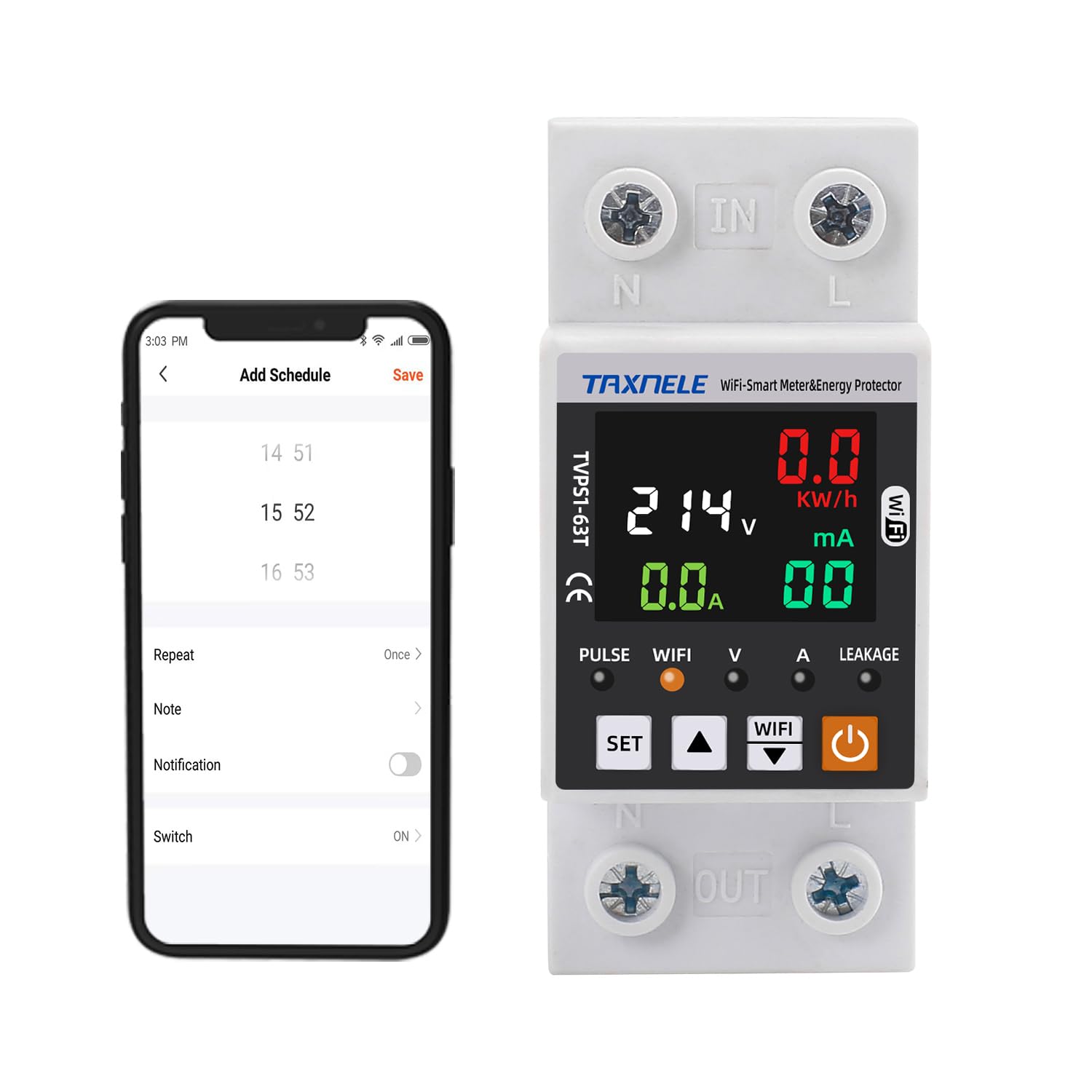
Use the physical buttons on the device to view current readings and adjust settings directly. The 'SET' button allows cycling through parameters, and the up/down arrows adjust values.
4.2 Remote Control via App
The Smart Living app provides full control and monitoring capabilities from your smartphone.
- Remote ON/OFF: Toggle power to connected appliances.
- Energy Monitoring: View real-time voltage, current, power, and accumulated kWh data. Access daily, monthly, and yearly electricity statistics.
- Scheduling: Set up daily, weekly, or custom schedules for automatic power control.
- Timer/Countdown: Configure timers for specific tasks or countdowns for temporary power control.
- Prepayment Function: The app allows for managing energy prepayment, enabling you to charge energy in kWh. This feature can be enabled or disabled in the app settings.

4.3 Voice Control
Integrate your TVPS1-63TP with Google Home or Amazon Alexa for convenient voice-activated control.
- Link your Smart Living account to your Google Home or Alexa app.
- Use voice commands such as "Hey Google, turn on the living room light" or "Alexa, turn off the fan" to control connected devices.
5. Maintenance
To ensure the longevity and reliable operation of your TAXNELE TVPS1-63TP, follow these general maintenance guidelines:
- Regular Cleaning: Keep the device clean and free from dust. Use a soft, dry cloth for cleaning. Do not use liquid cleaners.
- Connection Checks: Periodically inspect all wiring connections to ensure they are secure and free from corrosion.
- Firmware Updates: Check the Smart Living app regularly for any available firmware updates for your device to ensure optimal performance and security.
- Environmental Conditions: Ensure the device is operated within its specified environmental conditions (temperature, humidity) to prevent damage.
6. Troubleshooting
If you encounter issues with your TVPS1-63TP, refer to the following troubleshooting tips:
- Device Not Connecting to Wi-Fi:
- Ensure your Wi-Fi network is 2.4GHz. The device may not support 5GHz networks.
- Verify the Wi-Fi password entered in the app is correct.
- Move the device closer to your Wi-Fi router or consider a Wi-Fi extender.
- Restart your Wi-Fi router and the TVPS1-63TP device.
- Device Not Responding to App Commands:
- Check your internet connection on your smartphone.
- Ensure the device is still connected to Wi-Fi (check the Wi-Fi indicator on the device).
- Restart the app and try again.
- Frequent Power Trips due to Leakage Protection:
- If the device trips three times due to leakage protection, it will not automatically reconnect. This indicates a persistent electrical fault.
- Immediately disconnect the load and consult a qualified electrician to identify and resolve the leakage issue. Do not attempt to bypass the protection.
- Incorrect Energy Readings:
- Verify that the current transformer (CT) is correctly installed and oriented according to the wiring diagram.
- Ensure the device is properly calibrated (if calibration options are available in the app or device settings).
If problems persist after attempting these steps, please contact TAXNELE customer support.
7. Specifications
| Specification | Value |
|---|---|
| Brand | TAXNELE |
| Model Number | TVPS1-63TP |
| Product Dimensions (L x W x H) | 35 x 66 x 89 cm |
| Item Weight | 180 grams |
| Current Rating | 50 A |
| Circuit Breaker Type | RCD (Residual Current Device) |
| Mounting Type | Surface Mount (DIN Rail) |
| Number of Poles | 1 |
| Components Included | CT (Current Transformer) |
| Country of Origin | China |

8. Warranty and Support
For warranty information, please refer to the documentation provided with your purchase or contact the retailer. For technical support, troubleshooting assistance, or inquiries about your TAXNELE TVPS1-63TP Smart Energy Monitor & Surge Protector, please visit the official TAXNELE website or contact their customer service department.
