
1. Introduction
This manual provides detailed instructions for the installation, operation, and maintenance of your Irfora H600G GPS Digital Speedometer and Altimeter Head-Up Display. This device is designed to enhance your driving experience by providing essential vehicle information directly in your line of sight, utilizing GPS and BDS satellite systems for accurate data.
2. Product Overview
The Irfora H600G is a versatile head-up display unit that projects crucial driving data such as speed and altitude. It features a large, clear digital display for easy readability and incorporates a global positioning system for precise measurements. The device is compatible with most vehicles and offers a simple plug-and-play installation.
- Displays driving speed and altitude.
- Calculates and displays driving time and mileage.
- Features a large, clear screen for convenient reading.
- Utilizes GPS and Russian satellite timing for accurate signal calculation.
- Automatic brightness adjustment for optimal visibility day and night.


3. Features
The H600G is equipped with advanced features to provide a comprehensive and user-friendly experience:
- Dual Mode Chip: Supports both GPS and BDS satellite systems for stronger and more reliable signals.
- High Refresh Rate: A 10 Hz refresh rate ensures no delay in displaying information, capable of receiving signals from up to 32 satellites.
- Gesture Switching Interface: Allows users to switch between display interfaces using simple hand gestures.
- Automatic Brightness: A built-in light sensor automatically adjusts display brightness for clear visibility in various lighting conditions, from bright daylight to soft night-time illumination.
- Multi-functional Display: Can function as both a speedometer and an altimeter, providing real-time altitude display.


4. Setup
The Irfora H600G is designed for easy installation, requiring no professional assistance. Follow these steps to set up your device:
- Placement: Choose a suitable flat surface on your car's dashboard where the display will be clearly visible without obstructing your view of the road.
- Secure the Device: Use the provided adhesive pad or mounting base to securely attach the H600G to the chosen location.
- Power Connection: Connect the device to your car's USB port using the supplied USB cable. The device is designed to start and shut down automatically with your car's ignition.

5. Operating Instructions
Once powered on, the H600G will automatically acquire satellite signals and begin displaying information. The device offers multiple display interfaces and can be controlled via gesture recognition.
5.1. Display Modes
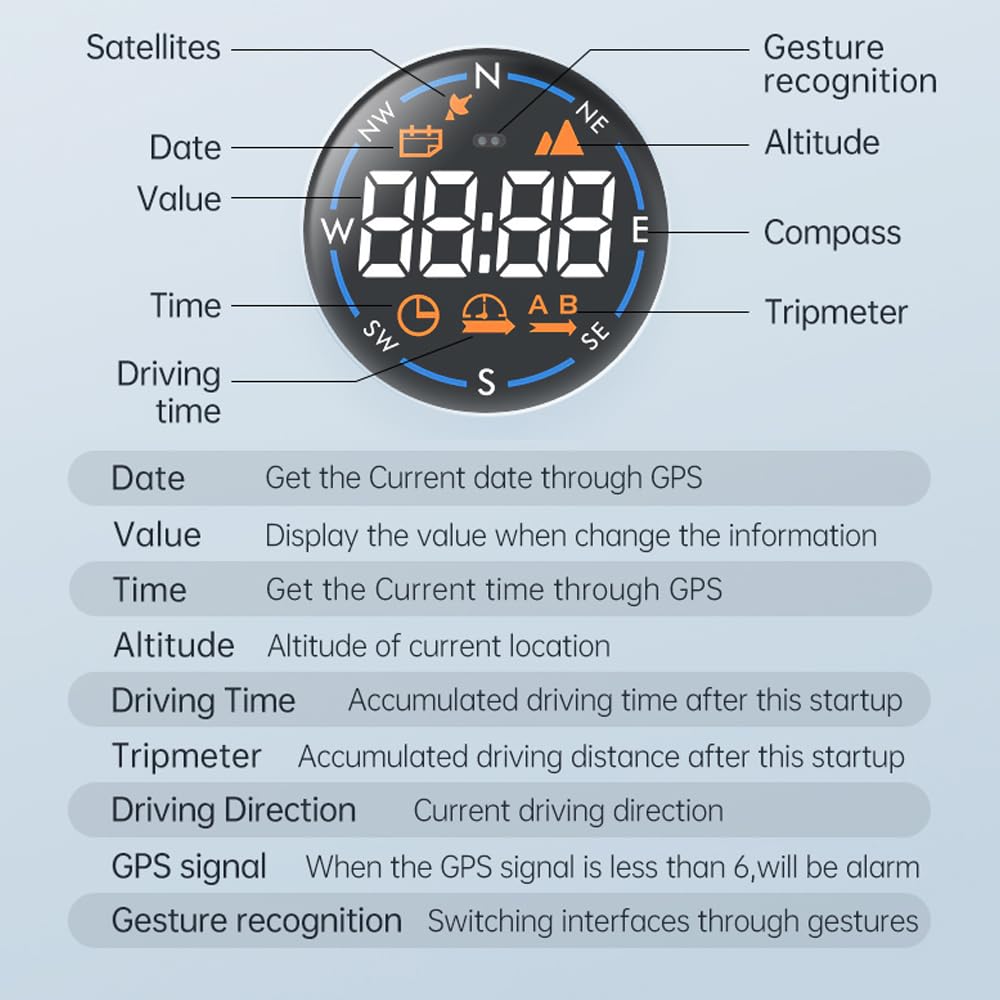
The H600G provides various display modes to show different types of information. These modes typically include:
- Speed: Current driving speed.
- Altitude: Current altitude based on GPS data.
- Time: Current time obtained via GPS.
- Date: Current date obtained via GPS.
- Satellites: Number of connected satellites.
- Driving Time: Accumulated driving time since the last startup.
- Tripmeter: Accumulated driving distance since the last startup.
- Driving Direction: Current cardinal driving direction (e.g., N, S, E, W).

5.2. Gesture Switching
The device supports gesture recognition for switching between different display interfaces. Refer to the device's side buttons or integrated sensors for specific gesture controls. This allows for hands-free operation while driving.

5.3. Ambient Light
The H600G features surrounding atmosphere lights with 5 switchable colors (Green, Yellow, Blue, Red, Purple) to match your vehicle's interior or personal preference.

6. Display Interfaces
The H600G offers 7 distinct display interfaces, each providing specific information. These interfaces are designed for clarity and ease of reading.
| Interface No. | Display Content | Description |
|---|---|---|
| 1 | Compass + Speed | Shows current driving direction and speed. |
| 2 | Compass + Altitude | Shows current driving direction and altitude. |
| 3 | Compass + Time | Shows current driving direction and time. |
| 4 | Compass + Date | Shows current driving direction and date. |
| 5 | Compass + Satellites | Shows current driving direction and number of connected satellites. |
| 6 | Compass + Driving Time | Shows current driving direction and accumulated driving time. |
| 7 | Compass + Tripmeter | Shows current driving direction and accumulated driving distance. |
7. Maintenance
To ensure the longevity and optimal performance of your Irfora H600G, follow these simple maintenance guidelines:
- Cleaning: Use a soft, dry cloth to clean the display and exterior of the device. Avoid using abrasive cleaners or solvents, which can damage the surface.
- Storage: When not in use for extended periods, store the device in a cool, dry place away from direct sunlight and extreme temperatures.
- Handling: Handle the device with care to prevent physical damage. Avoid dropping or subjecting it to strong impacts.
8. Troubleshooting
If you encounter issues with your Irfora H600G, refer to the following common problems and solutions:
- No Display/Power: Ensure the USB cable is securely connected to both the device and a functional USB port in your vehicle. Verify that the vehicle's ignition is on.
- Inaccurate Speed Reading: The H600G obtains actual speed from satellites, which may differ slightly from your car's dashboard speedometer. The H600G's reading is generally more accurate. It can be used as an overspeed alarm.
- Weak GPS Signal: If the GPS signal strength is less than 6, the device may issue an alarm or display inaccurate data. Ensure the device has a clear view of the sky and is not obstructed by metallic objects or tinted windows that might interfere with satellite reception. Move the vehicle to an open area if necessary.
- Display Not Changing: If the display is frozen or not responding to gestures, try disconnecting and reconnecting the USB power cable to restart the device.
9. Specifications
| Feature | Detail |
|---|---|
| Brand | Irfora |
| Model Number | TYHDEK21895 (H600G) |
| Dimensions (L x W x H) | 11 x 11 x 7 cm |
| Weight | 60 Grams |
| Material | Acrylonitrile Butadiene Styrene (ABS) PC |
| Type de fil (Connection Type) | USB |
| Display Type | Digital Head-Up Display |
| Satellite Systems | GPS, BDS |
| Refresh Rate | 10 Hz |
10. Warranty and Support
For warranty information or technical support, please refer to the documentation included with your purchase or contact Irfora customer service directly. Keep your purchase receipt as proof of purchase for any warranty claims.