
Wavtech link300.4mini
Wavtech link300.4mini - 300 Watt 4-Channel Amplifier User Manual
Model: link300.4mini | Brand: Wavtech
1. Introduction
The Wavtech link300.4mini is a compact and powerful 300 Watt 4-channel amplifier designed to enhance your vehicle's audio system. Its small footprint allows for flexible installation options, while its advanced integration features ensure compatibility with both factory and aftermarket head units. This manual provides essential information for the proper setup, operation, and maintenance of your amplifier.

Figure 1.1: Angled view of the Wavtech link300.4mini amplifier, showcasing its compact design.
2. Features
- Compact Design: Small size for versatile installation in various vehicle locations.
- High-Level Input: Built-in high-level input allows direct connection to factory radio speaker outputs, eliminating the need for a separate line output converter.
- Power Output: Delivers 300 Watts RMS across 4 channels, providing significant power for interior speakers.
- Expandability: Designed to integrate seamlessly with other Wavtech Link Mini series amplifiers, allowing for future system expansion (e.g., adding a subwoofer amplifier).
Video 2.1: An overview of the Wavtech Linkmini Amplifier Series, highlighting key features and benefits.
3. Setup
3.1. Installation Location
Due to its compact size, the link300.4mini can be installed in various discreet locations within your vehicle, such as under the back seat, beneath the dashboard, or in the trunk area, without consuming excessive space.

Figure 3.1: Example of Wavtech amplifiers installed discreetly within a vehicle's interior.
3.2. Wiring Connections
The amplifier features both RCA inputs and high-level speaker inputs for versatile connection options. Ensure all connections are secure and properly insulated to prevent short circuits.
- Power Connections: Connect the GND (Ground), REM (Remote Turn-On), and +12V (Power) terminals to the vehicle's electrical system.
- Input Connections: Use the RCA IN terminals for low-level inputs from an aftermarket head unit, or utilize the high-level speaker inputs (CH1(L), CH2(R), CH3(L), CH4(R)) for direct connection to your factory radio's speaker wires.
- Output Connections: Connect your speakers to the corresponding CH1(L), CH2(R), CH3(L), CH4(R) speaker output terminals.
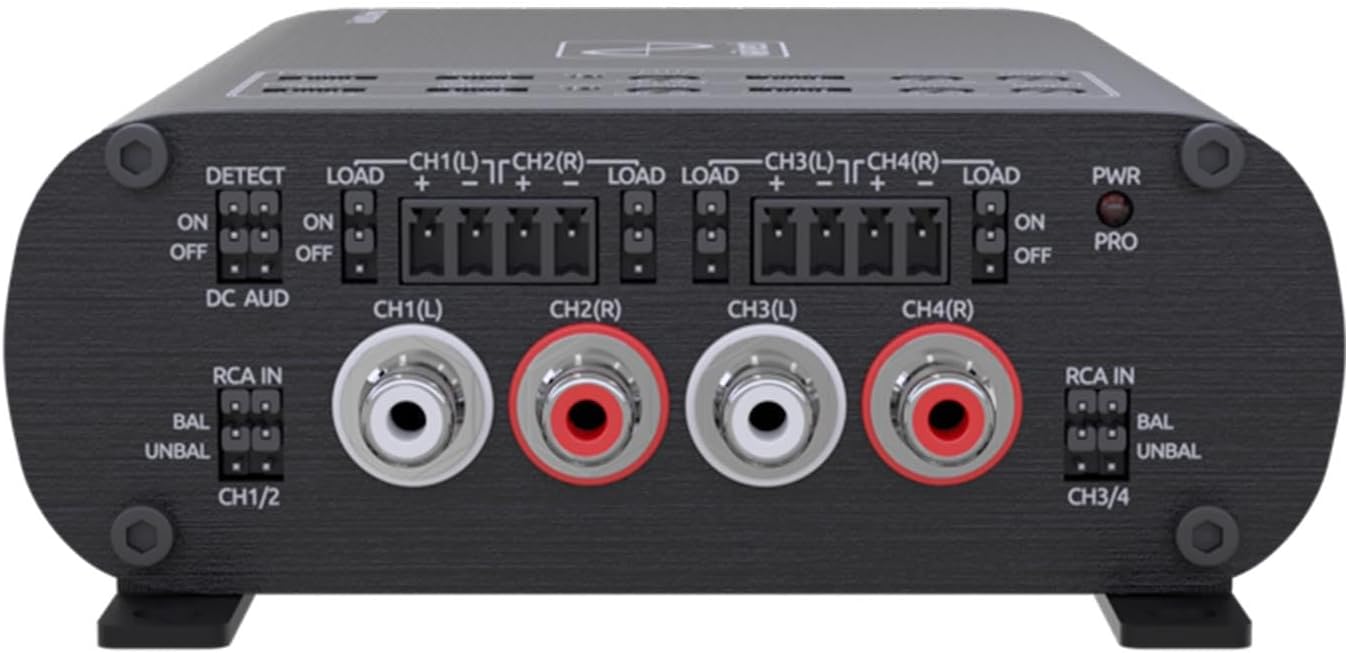
Figure 3.2: Front panel of the amplifier, detailing RCA and high-level input connections.
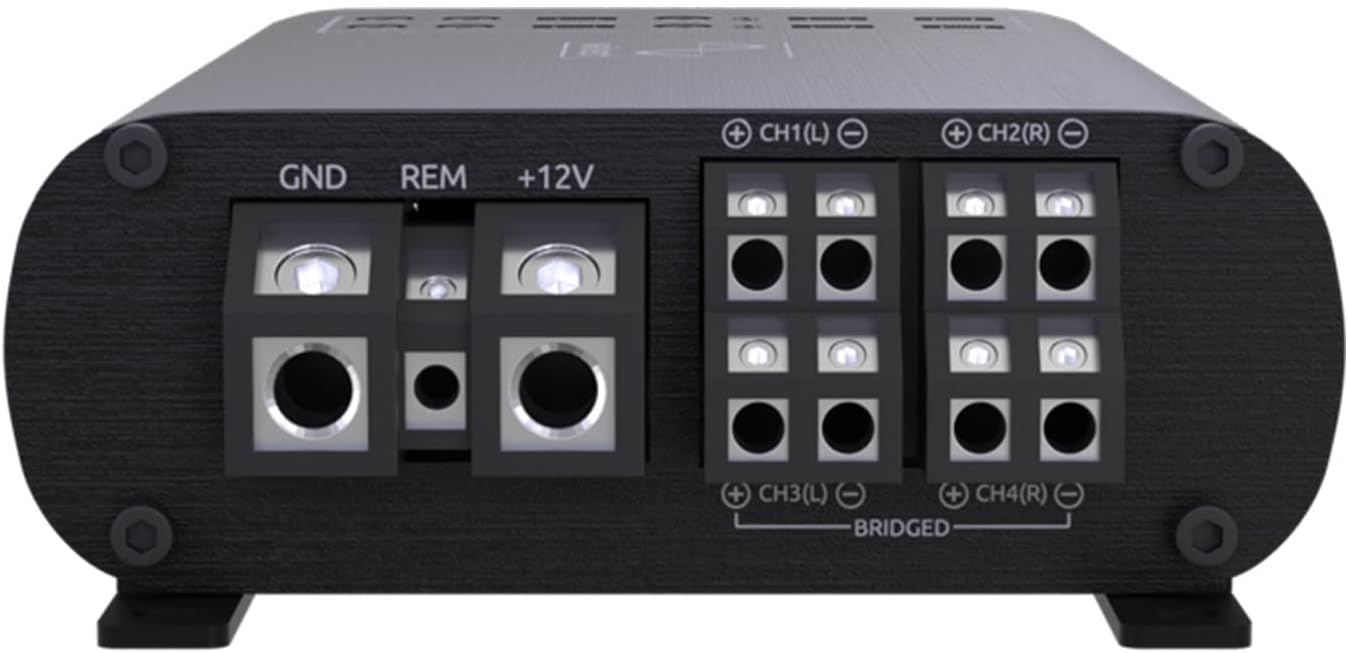
Figure 3.3: Rear panel of the amplifier, showing power input and speaker output terminals.
4. Operating the Amplifier
Once properly installed, the Wavtech link300.4mini amplifier will automatically power on with your vehicle's audio system when connected via the remote turn-on lead or DC Audio detect feature. Adjust gain settings and crossover frequencies as needed to match your speakers and desired sound profile. The amplifier is designed to provide clean, powerful audio output for an enhanced listening experience.

Figure 4.1: Close-up view of the amplifier's adjustable controls for fine-tuning audio output.
5. Maintenance
To ensure optimal performance and longevity of your Wavtech link300.4mini amplifier, keep the unit clean and free from dust and debris. Periodically check all wiring connections to ensure they remain secure. Avoid exposing the amplifier to extreme temperatures or moisture.
6. Troubleshooting
If you experience issues with your amplifier, first verify all power, ground, and signal connections are correctly made and secure. Check the vehicle's fuse for the amplifier. If problems persist, consult a professional audio installer or contact Wavtech customer support.
7. Specifications
| Attribute | Value |
|---|---|
| Model Number | link300.4mini |
| Item Weight | 3.2 pounds |
| Package Dimensions | 8.3 x 6 x 3 inches |
| Manufacturer | Wavtech |
| Date First Available | October 4, 2023 |

Figure 7.1: Amplifier with length dimension indicated.

Figure 7.2: Amplifier with width and height dimensions indicated.
8. Warranty and Support
Wavtech products are designed for reliability and performance. For specific warranty details, please refer to the warranty card included with your product or visit the official Wavtech website. Protection plans are also available for extended coverage.
- Manufacturer: Wavtech
- Seller: Creative Audio
- Available Protection Plans:
- 2-Year Protection Plan
- 3-Year Protection Plan
- Complete Protect (monthly billing option)
For technical support or service inquiries, please contact Wavtech customer service or the authorized seller, Creative Audio.
Ask a question about this manual
Ask about setup, troubleshooting, compatibility, parts, safety, or missing instructions. Manuals+ will review the question and use this page’s manual context to help answer it.