
1. Product Overview
The Wavtech link1000.1mini is a powerful 1000 Watt Mono Amplifier designed for car audio systems. This amplifier is part of the Wavtech mini series, known for its compact size and advanced integration capabilities. It is engineered to provide significant power output for subwoofers while maintaining a small footprint, allowing for flexible installation options within your vehicle.
Key features include:
- Most powerful amplifier in the Wavtech mini series.
- Speaker level inputs capable of handling up to 40V with adaptive loading technology.
- Provides fine tuning for optimal subwoofer system performance.
- Auto Turn-On via DC-Offset or Audio Signal Detect.
- Adaptive OEM Load Detect Technology for seamless integration with factory systems.

Figure 1: Front view of the Wavtech link1000.1mini amplifier.
2. Setup and Installation
The link1000.1mini amplifier is designed for straightforward installation, even with factory head units. Its compact design allows for placement in various locations such as under seats, behind the dashboard, or in the trunk, without occupying excessive space.
2.1 Wiring Connections
Ensure all power, ground, remote, and speaker connections are secure and correctly polarized. Refer to the diagrams below for proper connection points.

Figure 2: Rear panel connections including GND, REM, +12V, and MONO speaker outputs.
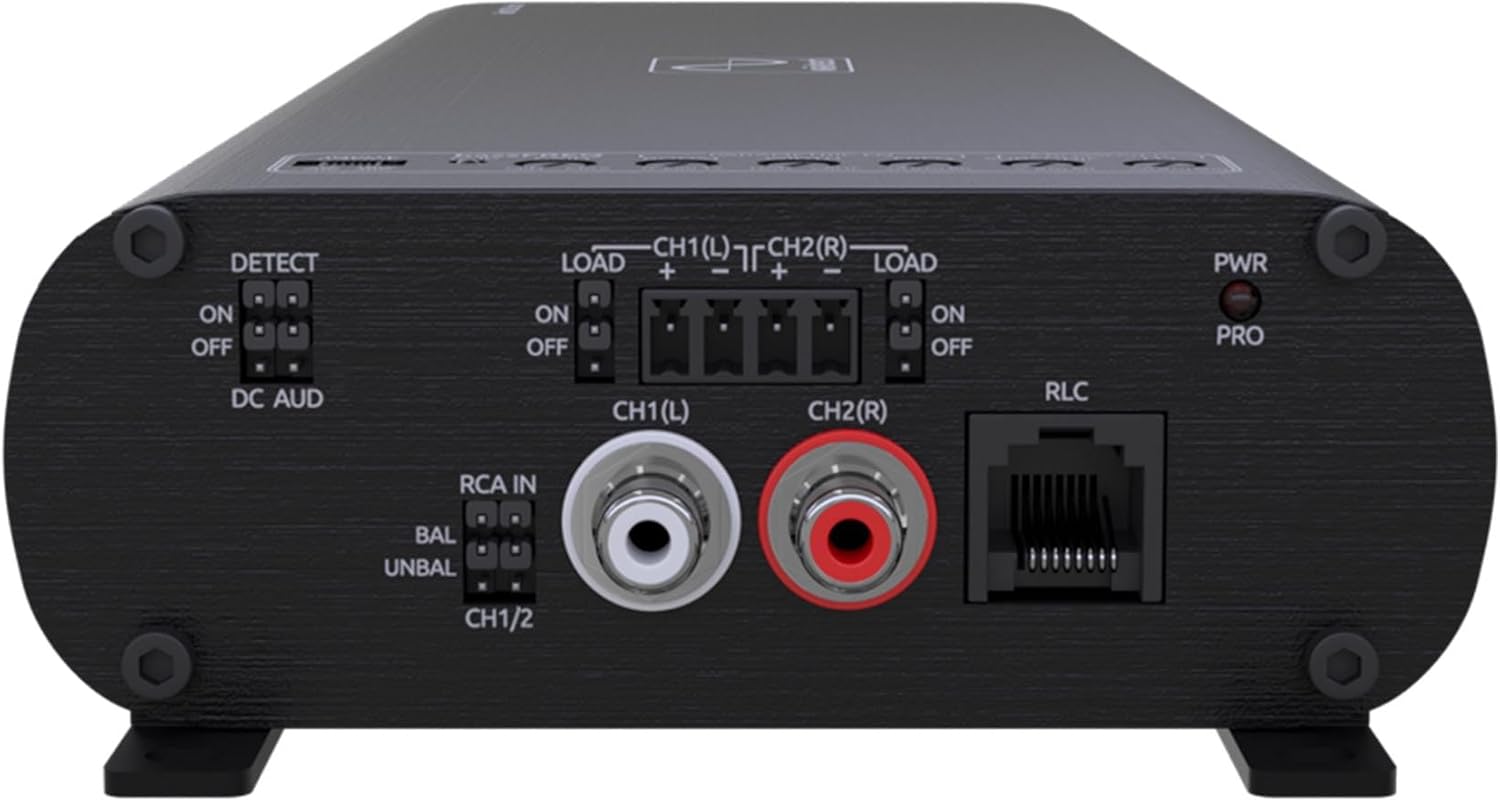
Figure 3: Front panel connections including DETECT switch, LOAD switches, RCA IN, and RLC port.
2.2 High-Level Input Integration
This amplifier features a built-in high-level input, eliminating the need for a separate line output converter when connecting to a factory radio or an aftermarket radio with low voltage output. Connect your vehicle's speaker wires directly to the high-level inputs on the amplifier.
2.3 Auto Turn-On
The amplifier supports Auto Turn-On via DC-Offset or Audio Signal Detect. This feature allows the amplifier to power on automatically when it detects an audio signal or a DC offset from the source unit, simplifying installation by potentially removing the need for a dedicated remote turn-on wire.
3. Operating Instructions
Once installed, the link1000.1mini provides robust power for your subwoofer system. Adjustments for optimal sound can be made using the integrated controls.
3.1 Gain Adjustment
Set the gain control to match the output voltage of your source unit. Start with the gain at its minimum setting and slowly increase it until the desired volume is achieved without distortion.
3.2 Crossover and EQ Settings
The amplifier includes controls for fine-tuning the audio output, such as crossover frequencies and parametric EQ. These adjustments allow you to optimize the amplifier's performance to suit your specific subwoofer and vehicle acoustics, ensuring the best possible sound quality.
4. Maintenance
To ensure the longevity and optimal performance of your Wavtech link1000.1mini amplifier, follow these general maintenance guidelines:
- Cleaning: Periodically clean the exterior of the amplifier with a soft, dry cloth. Avoid using harsh chemicals or abrasive cleaners.
- Ventilation: Ensure that the amplifier's cooling fins are free from obstructions to allow for proper heat dissipation. Overheating can lead to reduced performance and potential damage.
- Connections: Regularly check all wiring connections (power, ground, remote, speaker) to ensure they are tight and free from corrosion. Loose connections can cause intermittent issues or damage.
- Environment: Avoid exposing the amplifier to extreme temperatures, moisture, or direct sunlight for extended periods.
5. Troubleshooting
If you encounter issues with your link1000.1mini amplifier, consult the following common troubleshooting steps:
| Problem | Possible Cause | Solution |
|---|---|---|
| No Power / Amplifier does not turn on |
|
|
| No Audio Output |
|
|
| Distorted Sound |
|
|
For persistent issues, it is recommended to consult a professional car audio installer or contact Wavtech customer support.
6. Specifications
Below are the technical specifications for the Wavtech link1000.1mini 1000 Watt Mono Amplifier:
- Model Number: link1000.1mini
- Power Output: 1000 Watts (RMS Mono Amplifier)
- Item Weight: 7 pounds
- Package Dimensions: 13.25 x 4.5 x 1.75 inches
- ASIN: B0CKFNRYVH
- Date First Available: October 4, 2023

Figure 4: Side view illustrating the amplifier's length (13.35 inches).

Figure 5: Front view illustrating the amplifier's width (4.53 inches) and height (1.73 inches).
7. Warranty and Support
7.1 Manufacturer's Warranty
The Wavtech link1000.1mini amplifier comes with a 1-Year Manufacturer Warranty. Please retain your proof of purchase for any warranty claims.
7.2 Extended Protection Plans
Additional protection plans may be available for purchase, offering extended coverage beyond the standard manufacturer's warranty. These plans typically include:
- 2-Year Protection Plan
- 3-Year Protection Plan
- Asurion Complete Protect (monthly billing)
For details on coverage and terms, please refer to the specific plan documentation or contact your retailer.
7.3 Customer Support
For technical assistance, warranty inquiries, or further product information, please visit the official Wavtech website or contact their customer support department. Contact details can typically be found on the product packaging or the manufacturer's website.
8. Product Video Overview
Watch the official product overview video for the Wavtech Linkmini Amplifier Series to learn more about its features and capabilities.
Video: Wavtech Linkmini Amplifier Series Product Overview. This video provides a detailed look at the features and benefits of the Wavtech Linkmini amplifier series, including its compact size, integration capabilities, and various power options.