
1. Introduction
This manual provides essential instructions for the installation, operation, and maintenance of the BBAUER Enhanced V3.0 Controller Main Board ESC Switchboard. This product is designed as a replacement or upgrade for compatible Xiaomi electric scooters, offering enhanced performance and durability. Please read this manual thoroughly before proceeding with installation or use.
2. Product Overview
The Enhanced V3.0 Controller Main Board is the central processing unit for your electric scooter, managing motor control, battery management, and communication with other scooter components. It features a robust design for high wear resistance and durability.

Figure 2.1: Top view of the BBAUER Enhanced V3.0 Controller Main Board, showing internal components through a clear protective casing.

Figure 2.2: The BBAUER Enhanced V3.0 Controller Main Board circuit board without its protective casing, highlighting the electronic components.
3. Compatibility
This Enhanced V3.0 Controller Main Board is compatible with the following Xiaomi electric scooter models:
- Xiaomi M365
- Xiaomi 1S
- Xiaomi Pro
- Xiaomi Pro 2
- Xiaomi MI3
The V3.0 version is designed for broad compatibility and stable performance across these models.
4. Setup and Installation
Important Safety Notice: Installation of this component requires technical knowledge and careful handling of electronic parts. If you are unsure about any step, it is recommended to seek professional assistance. Disconnect the scooter's battery before beginning any installation.
- Preparation: Ensure the scooter is powered off and the battery is disconnected. Gather necessary tools (e.g., screwdrivers, wire cutters).
- Access the Controller Compartment: Locate and open the scooter's main board compartment, typically found at the base or stem.
- Disconnect Old Board: Carefully disconnect all cables and connectors from the existing controller main board. Note the orientation and connection points for reassembly.
- Remove Old Board: Unscrew and remove the old main board from its mounting.
- Install New Board: Place the BBAUER Enhanced V3.0 Controller Main Board into the compartment. Ensure it fits securely.
- Connect Cables: Reconnect all cables and connectors to the new main board, matching them to their correct ports. Refer to the scooter's original wiring diagram if available.
- Secure Board: Fasten the new main board using the appropriate screws.
- Close Compartment: Carefully close and secure the controller compartment cover.
- Initial Power-Up: Reconnect the battery and power on the scooter. Observe for any error codes or unusual behavior.
- Firmware Flashing (Optional): The V3.0 board supports flashing and modifying firmware. Users can utilize tools like M365 Downgrade for custom firmware if desired. Proceed with caution and understand the risks associated with firmware modification.
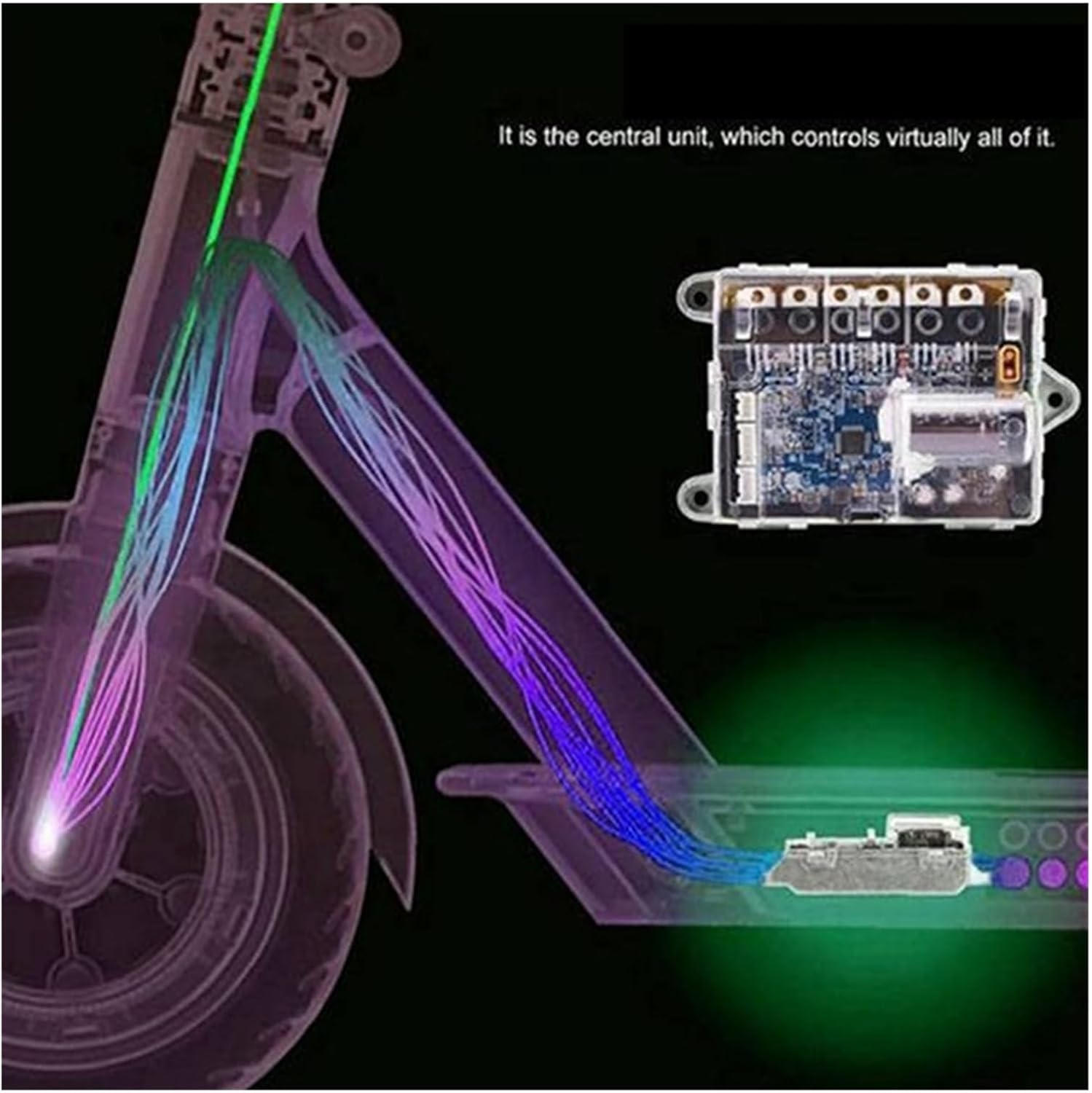
Figure 4.1: Illustrative diagram depicting the controller board as the central unit, controlling various scooter functions via internal wiring.
5. Operation
Once installed, the Enhanced V3.0 Controller Main Board operates automatically as the core control unit of your scooter. It manages power delivery to the motor, interprets throttle and brake inputs, and communicates with the scooter's display and other sensors. No specific user operation is required for the board itself beyond the normal use of the scooter.
- Normal Functionality: The board ensures smooth acceleration, braking, and overall scooter performance.
- Firmware Customization: Advanced users may choose to flash custom firmware to adjust performance parameters (e.g., speed limits, acceleration curves). This should only be done by experienced individuals.
6. Maintenance
The BBAUER Enhanced V3.0 Controller Main Board is designed for durability and requires minimal maintenance. However, adhering to general electronic component care practices can prolong its lifespan:
- Keep Dry: Avoid exposing the scooter, and thus the main board, to excessive moisture or water. While the board may have some protection, it is not fully waterproof.
- Cleanliness: Periodically inspect the controller compartment for dust, dirt, or debris. Clean gently with compressed air or a soft, dry brush if necessary. Ensure the scooter is powered off and battery disconnected before cleaning.
- Avoid Physical Impact: Protect the scooter from severe impacts, which could damage internal electronic components.
- Temperature Control: Operate and store the scooter within recommended temperature ranges to prevent overheating or cold damage to electronics.
7. Troubleshooting
If you encounter issues after installing the new main board, consider the following troubleshooting steps:
- Scooter Not Powering On:
- Check battery connection and charge level.
- Verify all cables to the main board are securely connected.
- Ensure the power button is functioning correctly.
- Error Codes on Display:
- Consult your scooter's original user manual for specific error code meanings.
- Common issues relate to motor, battery, or communication errors. Recheck relevant connections.
- Motor Not Responding:
- Inspect motor cable connections to the main board.
- Ensure the throttle is correctly installed and functioning.
- Unusual Behavior (e.g., erratic speed, sudden stops):
- Immediately stop using the scooter.
- Recheck all connections for looseness or damage.
- If custom firmware was flashed, consider reverting to official firmware or a known stable version.
If problems persist after basic troubleshooting, contact customer support or a qualified technician.
8. Specifications
| Feature | Detail |
|---|---|
| Product Name | Enhanced V3.0 Controller Main Board ESC Switchboard |
| Compatibility | Xiaomi M365, 1S, Pro, Pro 2, MI3 Electric Scooters |
| Version | V3.0 (Most stable and high-quality version) |
| Material | PC + Metal |
| Color | Blue (Circuit Board) |
| Max Speed Support | Up to 30km/h (depending on scooter model and firmware) |
| Firmware Support | Flashable and modifiable (e.g., M365 Downgrade) |
| Item Weight | 0.035 ounces (approx.) |
9. Warranty and Support
Warranty Information: Specific warranty details for this product may vary depending on the retailer and region of purchase. Please refer to your purchase documentation or contact the seller for information regarding warranty coverage and terms.
Customer Support: For technical assistance, troubleshooting beyond this manual, or inquiries regarding your product, please contact the seller or manufacturer directly. Provide your purchase details and a clear description of the issue to facilitate support.