
1. Introduction
Thank you for choosing the Della 35K BTU ODU Quad 4 Zone Mini Split Air Conditioner. This manual provides essential information for the safe and efficient installation, operation, and maintenance of your new system. Please read it thoroughly before use and retain it for future reference.
Video: Overview of Della Mini Split Energy Star features. This video provides a general introduction to the system's capabilities and energy efficiency.
2. Safety Information
Your safety and the safety of others are very important. Please read all safety messages in this manual and on your appliance. This product contains chemicals known to the State of California to cause cancer and birth defects or other reproductive harm (Proposition 65 warning).
Professional Installation Required: This system mandates professional installation. It is not a DIY mini split AC. Improper installation can lead to electric shock, fire, serious injury, or death. Always consult with a qualified HVAC professional for installation.
Electrical Safety: Ensure safe electrical connection. Always verify your connection for safety. When choosing the correct breaker, check your home's voltage for either 110V or 220V and select the appropriate size and quality wire for the mini split system, ensuring it's UL listed for safety.
3. Product Features
- Energy Efficient Cooling: 35000 BTU/h, 19 SEER2, 208-230V, ETL Listed, AHRI Certified. Features a mini split inverter plus system with a heat pump (up to -13°F/-25°C) and DC Inverter technology for up to 30% power savings.
- Ample Coverage: Provides cooling and heating for up to 1750 Sq. Ft (3 indoor units recommended for 400 Sq. Ft each, one for 550 Sq. Ft). Operates in environments as low as -13°F.
- Multi-Room Comfort: Comes with 4 indoor air handlers (9000 BTU + 9000 BTU + 9000 BTU + 12000 BTU) with separate controllers for individual rooms and 1 outdoor condenser. Enjoy individual temperature controls in each room.
- Smart Functions: 4D air flow (up-down, left-right), I Feel mode, 24-hour timer, sleep mode, Eco energy saving mode, multiple fan speeds, turbo function, heating, cooling, and dry mode for dehumidifying.
- Quiet Operation: Operates at an ultra-silent 29 dBa.
- Smart Home Integration: Works with Alexa and Wi-Fi.
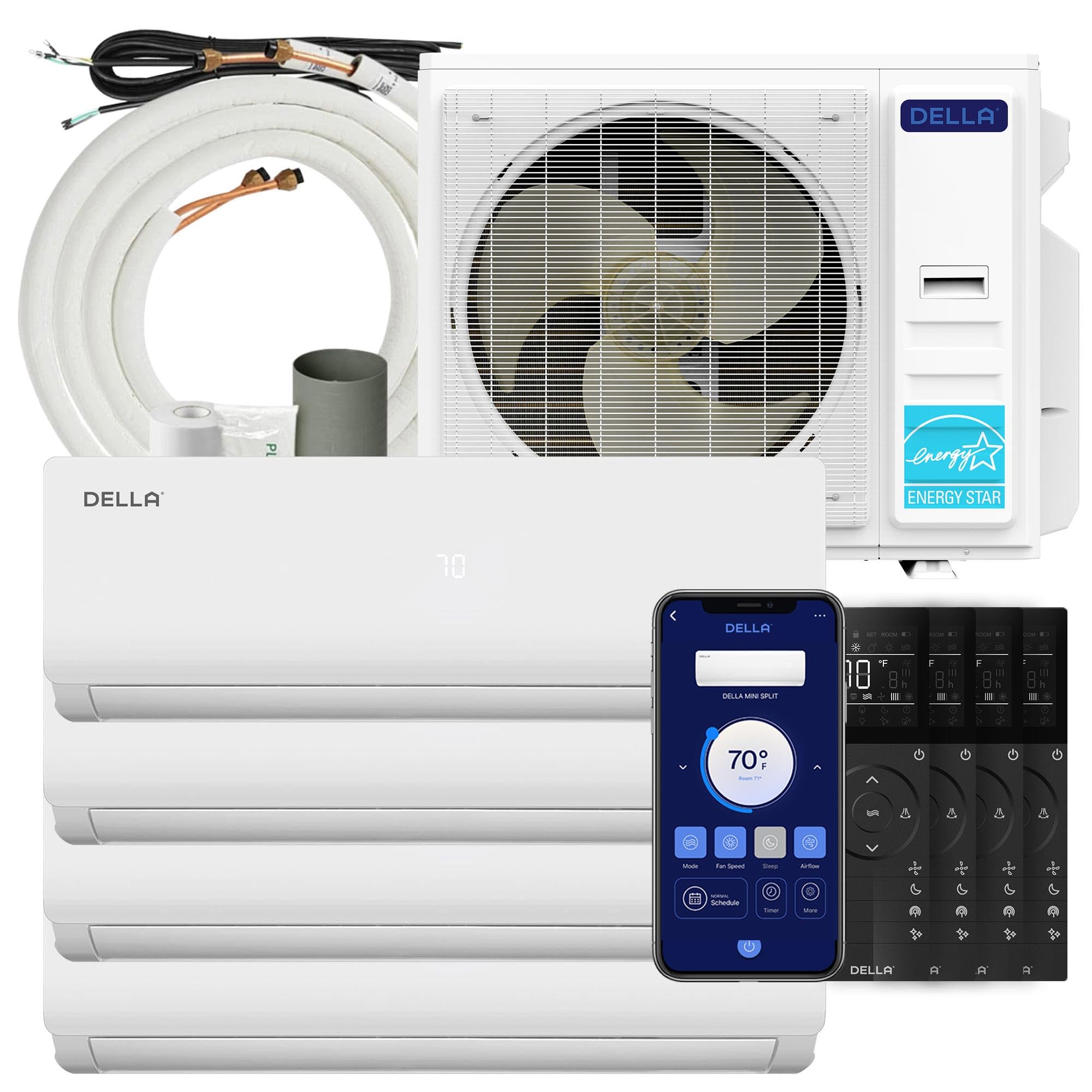
Image: The complete Della 35K BTU ODU Quad 4 Zone Mini Split system, including indoor and outdoor units.

Image: The remote control for the Della Mini Split, showing various function buttons.
4. Setup and Installation
Proper installation is crucial for the optimal performance and longevity of your Della Mini Split system. This process requires professional expertise.
4.1 Pre-Installation Steps
- Installation Location: The indoor unit must be at least 6 inches below the ceiling for proper airflow. Ensure the inlet and outlet are clear of any obstructions. Install the indoor unit 10 feet (3 meters) away from any TV or radio appliance to prevent interference.
- Wall Strength: Test the wall to ensure it is sturdy enough to hold the indoor unit's weight without vibrating.
- Outdoor Unit Placement: The outdoor unit must be spaced away from the wall. Ensure no plants or objects are within 3 feet of the appliance.
- Refrigerant Pipes: Handle refrigerant pipes carefully. Use a bending tool if available, or bend slowly to avoid damage. Damaged pipes can lead to leaks.
- Line Set Bundling: After installing the indoor unit, ensure the set line is angled downward and the drain pipe is pointed straight down to allow proper liquid flow and prevent leaks.
Video: 5 Urgent Steps to Know Before Installing Della Mini Split. This video highlights critical considerations before beginning the installation process.
4.2 Vacuuming the Refrigerant Circuit
Vacuuming your lines is critical to remove air and moisture for maximum efficiency. You'll need to vacuum for at least 15 minutes for each line set, depending on the strength of your pump. For multi-zone systems, you'll have to vacuum each line set separately and for varying amounts of time depending on the length of the line set. We recommend using a micron gauge to reach 500 microns. If using a manifold gauge, aim for -30 PSI. You may need to add refrigerant if your line set exceeds 25 feet.
Video: How to Install Your DELLA Mini Split Unit. This video provides a step-by-step guide for the physical installation of the unit.
4.3 Electrical Wiring
Always ensure all power sources are turned off before connecting any wires. Connect the numbered wires to their corresponding terminals in the compartment. Ensure the correct breaker and UL-listed wire are used for your home's voltage (110V or 220V).
Video: How to Wire Your Della Unit. This video demonstrates the correct procedure for electrical wiring of the mini split system.
5. Operating Instructions
Your Della Mini Split system offers various modes and smart features for optimal comfort and energy efficiency.
5.1 Remote Control Functions
Use the provided remote control to adjust settings such as 4D air flow (up-down, left-right), I Feel mode, 24-hour timer, sleep mode, Eco energy saving mode, multiple fan speeds, turbo function, heating, cooling, and dry mode for dehumidifying.
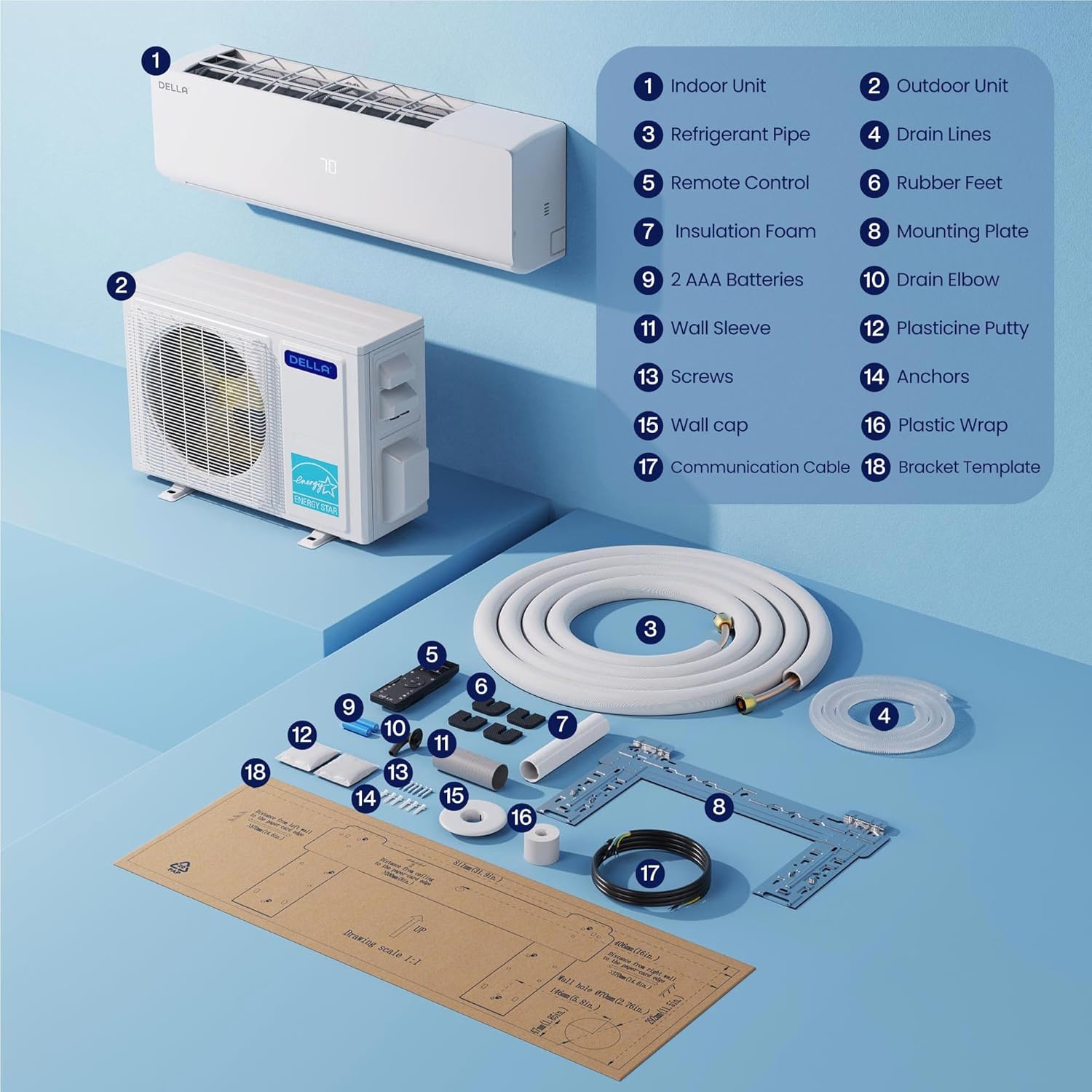
Image: Diagram illustrating the main components of the Della Mini Split system, including indoor and outdoor units, refrigerant pipes, and remote control.
5.2 Della+ App and Smart Features
Control your unit effortlessly with the free Della+ app, offering a sleek, user-friendly interface. The app allows you to set schedules, timers, choose various modes (Auto, Cool, Heat, Dehumidify, Fan Only, ECO), adjust fan speed, and control airflow. It also features Smart Geo Location, which automatically turns your AC on or off based on your location, and Voice Control Compatibility with Alexa and Google Assistant.
Video: Della Mini Split App 3.0. This video demonstrates the features and interface of the Della+ mobile application for controlling your unit.
Video: Geo Location Function. This video explains how to set up and utilize the Geo Location feature for automatic climate control based on your proximity to home.
6. Maintenance
Regular maintenance ensures the efficiency and longevity of your Della Mini Split system. It is recommended to have your system inspected and serviced by a qualified professional annually.
- Filter Cleaning: Regularly clean or replace air filters in the indoor units to maintain optimal airflow and air quality.
- Outdoor Unit Cleaning: Keep the outdoor condenser unit free from debris, leaves, and other obstructions to ensure proper heat exchange.
- Drainage Check: Periodically check the drain hose for blockages to prevent water leakage.
7. Troubleshooting
If you experience issues with your Della Mini Split system, refer to the following basic troubleshooting steps. For complex problems, contact Della customer support or a qualified HVAC technician.
- Unit Not Turning On: Check the power supply and circuit breaker. Ensure the remote control batteries are functional.
- Insufficient Cooling/Heating: Verify that the correct mode is selected and the temperature setting is appropriate. Check for any obstructions around the indoor or outdoor units. Clean or replace air filters.
- Unusual Noises: Minor operational noises are normal. If you hear loud or unusual sounds, contact customer support.
- Water Leakage: Check the drain hose for kinks or blockages. Ensure the indoor unit is properly leveled.
8. Specifications
| Feature | Specification |
|---|---|
| Brand | Della |
| Model Name | 1D4-TL+Q99912 |
| Capacity | 3 Tons (35000 BTU/h) |
| SEER2 Rating | 19 |
| Voltage | 208-230V |
| Coverage Area | Up to 1750 Sq. Ft |
| Indoor Units | 3 x 9000 BTU, 1 x 12000 BTU |
| Noise Level | 29 dBa (ultra silent) |
| Refrigerant | R-454B |
| Special Features | Alexa and WiFi Enabled, Dehumidifier, Fast Cooling and Heating, Remote Controlled |
| Product Dimensions (Outdoor Unit) | 8.07"D x 31.92"W x 11.49"H |
9. Warranty and Support
Della offers a lifetime warranty for this product. For any questions or support, please do not hesitate to contact Della directly. Our expert support team is ready 24/7 via chat on the app or website. You can also reach our in-house technicians Monday to Friday.
Contact Information:
- Phone support: 6am-4pm PST
- LiveChat: 24/7


