
Introduction
Thank you for choosing the Newskill Takamikura V2 Ergonomic Gaming Chair. This manual provides essential information for the safe and correct assembly, operation, and maintenance of your chair. Please read these instructions carefully before beginning assembly and retain them for future reference.
Product Overview
The Newskill Takamikura V2 is an ergonomic gaming chair designed for extended comfort during gaming sessions or office work. It features 4D adjustable armrests, a 180-degree reclinable backrest, and a robust steel base, ensuring stability and adaptability to various user preferences.

The Newskill Takamikura V2 ergonomic gaming chair, designed for comfort and support in both gaming and office environments.
Safety Information
- Ensure all components are securely fastened before use.
- Do not stand on the chair or use it as a step stool.
- Avoid placing heavy objects on the chair that exceed the maximum weight capacity of 136 kg.
- Keep children and pets away from the chair during assembly.
- Use the chair on a flat, stable surface to prevent tipping.
- Do not expose the chair to direct sunlight or extreme temperatures.
Package Contents
Before assembly, verify that all parts are present and undamaged. If any parts are missing or damaged, contact customer support.
- Backrest
- Seat Base
- Armrests (2)
- Star Base
- Wheels (5)
- Gas Lift Cylinder
- Gas Lift Cover
- Mechanism Plate
- Lumbar Cushion
- Neck Cushion
- Hardware Kit (screws, washers, Allen key)
Setup and Assembly
Follow these steps carefully to assemble your Newskill Takamikura V2 gaming chair.
- Attach Wheels to Star Base: Insert each of the five wheels into the holes at the end of the star base arms until they click securely into place.
- Insert Gas Lift: Place the gas lift cylinder into the center hole of the assembled star base. Cover the gas lift with the telescopic cover.
- Attach Mechanism Plate: Align the mechanism plate with the screw holes on the underside of the seat base. Ensure the front of the mechanism faces the front of the seat. Secure with screws from the hardware kit.
- Attach Armrests: Secure the armrests to the underside of the seat base using the provided screws. Ensure they are firmly attached.
- Attach Backrest: Align the backrest brackets with the corresponding holes on the seat base. Secure with screws. Do not overtighten initially; adjust for alignment, then tighten all screws.
- Connect Seat to Base: Carefully place the assembled seat and backrest onto the gas lift cylinder, ensuring the cylinder fits snugly into the mechanism plate.
- Attach Cushions: Secure the lumbar and neck cushions using their integrated straps. The lumbar cushion typically attaches around the backrest, and the neck cushion can be positioned at head height.
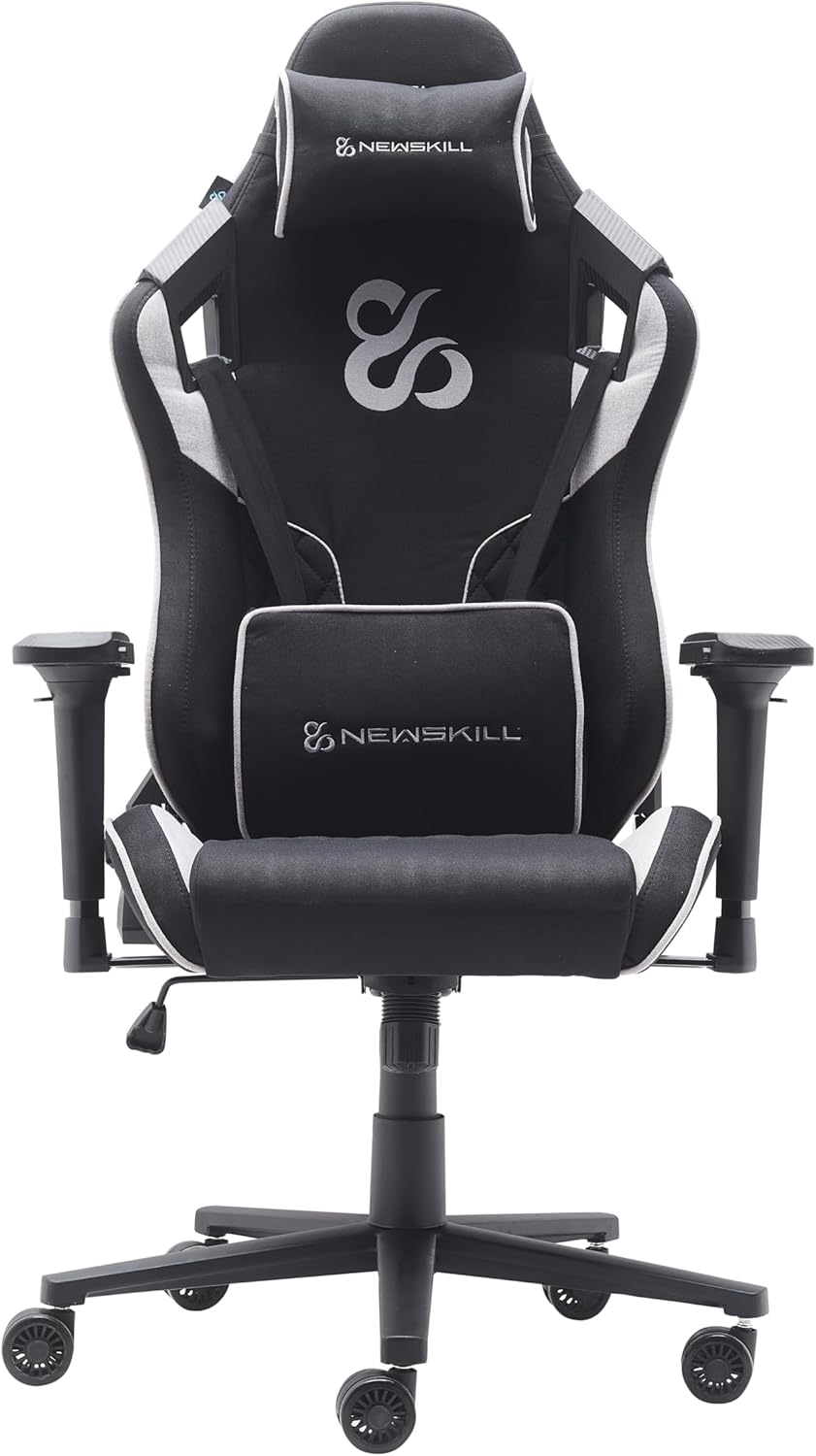
A clear front view of the Takamikura V2 chair, highlighting the seat, backrest, and armrests after assembly.
Operating Instructions
Your Newskill Takamikura V2 chair offers several adjustment options for personalized comfort.
Height Adjustment
To adjust the chair's height, pull the lever located on the right side of the seat upwards. While holding the lever, stand up to raise the chair or remain seated to lower it. Release the lever at your desired height.
Backrest Recline
To recline the backrest, pull the lever on the left side of the seat upwards. Lean back to your desired angle (up to 180 degrees) and release the lever to lock it in place. To return to an upright position, pull the lever and lean forward slightly.

The Takamikura V2 chair demonstrated in its fully reclined position, showcasing the 180-degree recline function.
4D Armrest Adjustment
The 4D armrests can be adjusted in four directions:
- Height: Press the button on the side of the armrest and move it up or down.
- Angle (Rotation): Rotate the armrest pad left or right.
- Depth (Forward/Backward): Slide the armrest pad forward or backward.
- Width (In/Out): Slide the entire armrest assembly closer to or further from the seat.
Lumbar and Neck Cushions
The included lumbar and neck cushions are adjustable. Position them along the backrest and headrest to provide optimal support for your lower back and neck, respectively. The straps allow for easy repositioning.

The Takamikura V2 chair equipped with its adjustable lumbar and neck support cushions for enhanced ergonomic comfort.
Maintenance
- Cleaning: The chair is covered with high-quality breathable fabric. For general cleaning, use a soft, damp cloth. For deeper cleaning, dry cleaning is recommended. Avoid harsh chemicals or abrasive cleaners.
- Inspection: Periodically check all screws and bolts to ensure they are tight. Retighten if necessary.
- Lubrication: If any moving parts (e.g., wheels, mechanism) begin to squeak, apply a small amount of silicone-based lubricant.
- Avoid Damage: Do not drag the chair; lift it when moving to prevent damage to the wheels or base.
Troubleshooting
| Problem | Possible Cause | Solution |
|---|---|---|
| Chair is unstable/wobbles | Loose screws; improper base assembly | Check and tighten all screws, especially those connecting the mechanism to the seat and the backrest. Ensure the star base is fully assembled. |
| Height adjustment not working | Gas lift issue; lever not engaged | Ensure the height adjustment lever is fully engaged. If the issue persists, the gas lift cylinder may need replacement. |
| Backrest recline not locking | Recline lever issue; mechanism obstruction | Verify the recline lever is functioning correctly and not obstructed. Check the recline mechanism for any foreign objects. |
| Squeaking noises | Loose connections; lack of lubrication | Tighten all screws. Apply silicone-based lubricant to moving parts, especially around the mechanism and wheel axles. |
Specifications

Overall dimensions of the Takamikura V2 chair, showing its height of 132cm, width of 70cm, and depth of 60cm.
| Feature | Detail |
|---|---|
| Model Name | Takamikura V2 |
| Model Number | NS-CH-TAKAMIKURAV2-G |
| Dimensions (L x W x H) | 60 x 70 x 132 cm |
| Item Weight | 22.5 Kilograms |
| Maximum Load Capacity | 136 Kilograms |
| Frame Material | Alloy Steel |
| Seat Filling Material | Cold-molded Foam |
| Upholstery Material | Breathable Fabric |
| Armrests | 4D Adjustable |
| Backrest Recline | Up to 180 degrees |
| Height Adjustment | 80 mm range |
| Wheels | XL PU-coated (65 mm) |
| Included Components | Lumbar Cushion, Neck Cushion, Wheels |
| Care Instructions | Dry cleaning recommended |
Warranty and Support
Newskill is committed to providing quality products. This product is designed for durability, and spare parts are available for up to 10 years. For any questions, technical support, or warranty claims, please contact Newskill customer service through their official website or your retailer.


