
IKOED IK193
IKOED Fingerprint Door Lock User Manual
Model: IK193
Brand: IKOED
1. Product Overview
The IKOED Fingerprint Door Lock provides a secure and convenient keyless entry solution for residential homes, home offices, and indoor private spaces. This electronic biometric door knob offers multiple unlocking methods, including fingerprint, passcode, and traditional physical keys, ensuring flexible access control.

Image 1.1: Front view of the IKOED Fingerprint Door Lock, showcasing its sleek black design with a visible fingerprint sensor and keypad.

Image 1.2: Overview of key features including long battery life, easy installation, volume control, durable material, anti-peep function, normal open mode, auto-lock, and emergency charging.
2. Package Contents
Before beginning installation, please verify that all components are present in the package:
- Front Handle Assembly
- Behind Handle Assembly
- Latch Bolt
- Strike Plate
- Mechanical Keys (2 PCS)
- Screwdriver and Screws Kit

Image 2.1: Visual representation of all components included in the IKOED Fingerprint Door Lock package, such as the front and rear handles, latch, strike plate, keys, and installation hardware.
3. Setup and Installation
The IKOED Fingerprint Door Lock is designed for easy installation. Follow these steps carefully to ensure proper functionality.
3.1 Door Preparation
Ensure your door meets the following specifications:
- Door thickness: Compatible with standard door thicknesses.
- Backset: Adjustable for 2-3/8" (60mm) or 2-3/4" (70mm).
3.2 Installation Steps
- Install the Latch Bolt into the door edge. Ensure the latch is oriented correctly for your door's swing.
- Attach the Front Handle Assembly to the exterior side of the door.
- Attach the Behind Handle Assembly to the interior side of the door, aligning it with the front handle.
- Secure both handle assemblies using the provided screws.
- Install the Strike Plate on the door frame, aligning it with the latch bolt.

Image 3.1: Diagram illustrating the components and dimensions for easy installation, including the front handle, behind handle, latch bolt, and overall lock dimensions.
3.3 Battery Installation
The smart door lock requires 4 AAA batteries (not included). Install them into the battery compartment located in the interior handle assembly. Ensure correct polarity.
4. Operating Instructions
The IKOED Fingerprint Door Lock offers three primary methods for unlocking your door.
4.1 Unlocking Methods
- Fingerprint: The lock features a precise fingerprint sensor with a 99% recognition rate. To unlock, first wake up the lock by touching the sensor, then place your registered finger on the sensor. Unlocking takes approximately 0.2 seconds. The larger 160x160 DPI sensor area provides higher identification efficiency compared to older models.
- Passcode: The lock supports up to 100 group passwords. To unlock, enter your registered passcode on the keypad. The lock supports virtual password anti-snooping, allowing you to enter random numbers before or after your actual password to prevent others from guessing it.
- Physical Key: In case of battery depletion or electronic malfunction, use one of the two provided physical keys to manually unlock the door.

Image 4.1: Visual guide to the three unlocking methods: fingerprint, passcode, and standard safety key, along with additional features like auto-lock and volume adjustment.
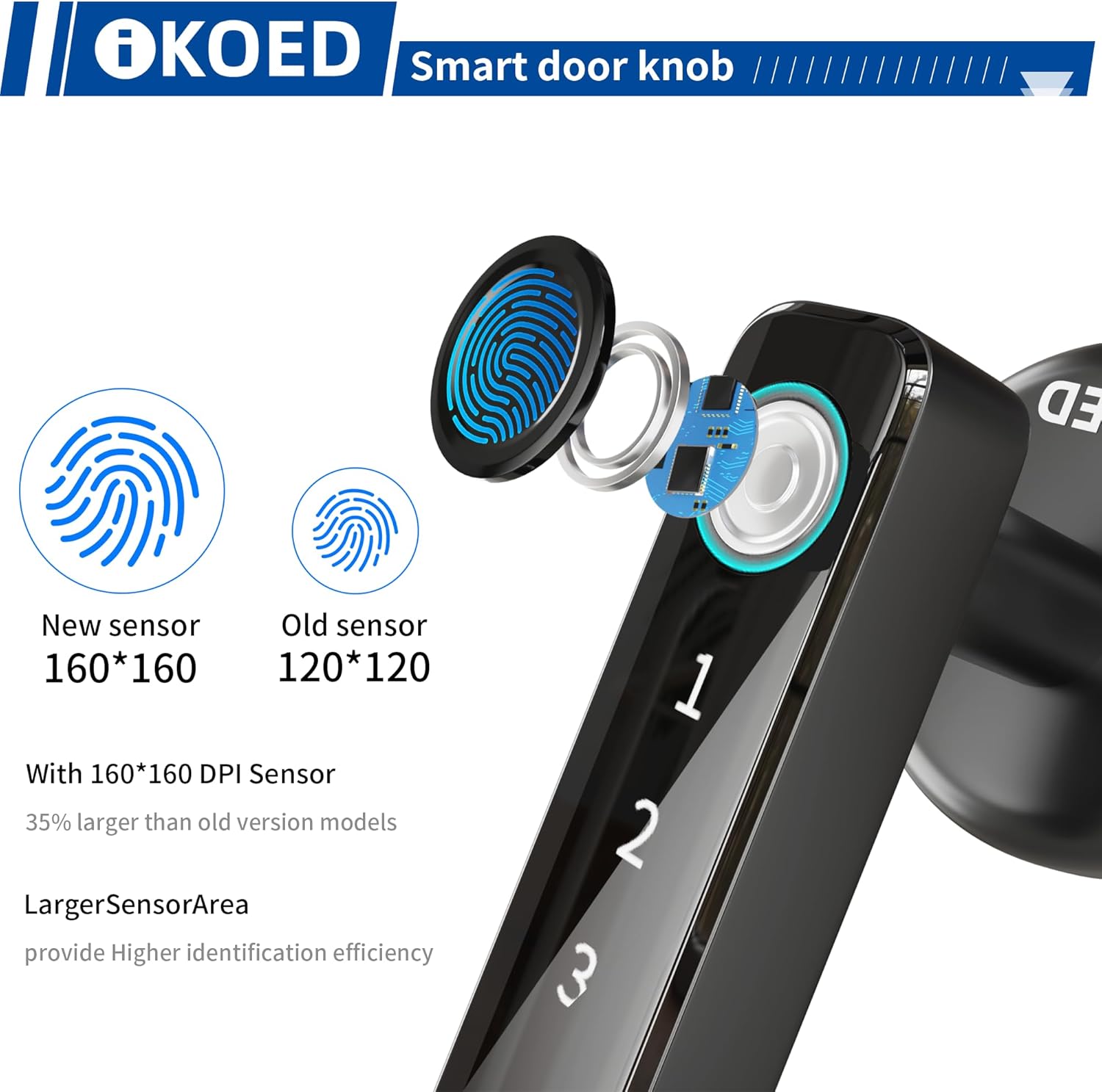
Image 4.2: Comparison of the new 160x160 DPI fingerprint sensor with an older 120x120 sensor, highlighting the larger and more efficient recognition area.

Image 4.3: Demonstration of the virtual password anti-snooping feature, showing how random numbers can be entered before or after the real password for enhanced security.
4.2 Automatic and Manual Locking
The lock supports both automatic and manual locking modes. In automatic mode, the door will auto-lock within 5 seconds after being closed. You can switch between automatic and manual locking modes as needed.

Image 4.4: Illustration of the automatic/manual locking mode switching and the auto-lock feature engaging after 5 seconds.
4.3 Volume Adjustment
The sound of the smart lock can be adjusted to three levels:
- Level 1: Minimum volume
- Level 2: Medium volume
- Level 3: Maximum volume
Adjust the volume according to your preference for increased home comfort.
5. Maintenance
5.1 Battery Life and Replacement
Depending on usage frequency, the batteries can last up to 8-10 months. The lock features a low battery reminder function: the red light will flash three times when unlocking, indicating that the batteries need to be replaced soon.
5.2 Emergency Power Supply
The lock is equipped with a USB interface for emergency charging. This interface is for temporary power supply only to unlock the door when batteries are completely drained. It does not charge the installed batteries, and the batteries must be replaced in a timely manner after emergency use.

Image 5.1: Illustration showing the USB backup power socket and the physical backup key, providing emergency access options.
6. Troubleshooting
If you encounter any issues with your IKOED Fingerprint Door Lock, refer to the following common problems and solutions:
- Fingerprint Not Recognized: Ensure your finger is clean and dry. Make sure to wake up the lock first by touching the sensor before placing your finger. Re-registering your fingerprint might resolve persistent issues.
- Passcode Not Working: Double-check that you are entering the correct passcode. Remember to wake up the lock before entering the code. If using the anti-snooping feature, ensure the correct sequence of your actual password is included.
- Lock Not Responding (No Power): Check if the AAA batteries are correctly installed and not depleted. If batteries are dead, use the physical key or connect a power bank to the USB emergency charging port to temporarily power the lock. Replace batteries immediately.
- Lock Malfunctions After USB-C Plug Insertion: If the lock behaves erratically after using the USB emergency power, ensure the USB cable is disconnected. If issues persist, remove and reinsert the batteries. If the problem continues, contact customer support.
7. Specifications
| Feature | Description |
|---|---|
| Brand | IKOED |
| Model Name | IK193 |
| Lock Type | Biometric |
| Unlocking Methods | Fingerprint, Passcode, Physical Key |
| Fingerprint Recognition Rate | 99% |
| Fingerprint Sensor Size | 160x160 DPI |
| Unlocking Speed | 0.2 seconds |
| Passcode Capacity | 100 groups |
| Material | Zinc |
| Color | Black |
| Finish Type | Polished |
| Item Dimensions (L x W x H) | 8.5 x 7 x 7 inches |
| Item Weight | 1.6 pounds |
| Power Source | 4 x AAA Batteries (not included) |
| Battery Life | Up to 8-10 months (depending on usage) |
| Emergency Power | USB Interface |
| Recommended Use | Residential homes, home offices, indoor private spaces |
8. Warranty and Support
IKOED is committed to providing excellent customer service and product support.
8.1 Warranty Information
- Money Back Guarantee: 30 days
- Product Warranty: 12 months
- Technical Support: Lifetime technical support
8.2 Customer Service
If you have any questions about your IKOED Fingerprint Door Lock, require assistance with installation, operation, or troubleshooting, please do not hesitate to contact our customer service team. We offer a response within 24 hours.
For support, please refer to the contact information provided with your product packaging or visit the official IKOED website.
Ask a question about this manual
Ask about setup, troubleshooting, compatibility, parts, safety, or missing instructions. Manuals+ will review the question and use this page’s manual context to help answer it.