
AEROSQUAD B0CK9DLL2B
AEROSQUAD Kids Astronaut Helmet Instruction Manual
Model: B0CK9DLL2B
Product Overview
The AEROSQUAD Kids Astronaut Helmet is designed to provide an immersive space exploration experience for children and adults. It features brilliant LED lights that mimic the vastness of space, authentic mission control sounds, a movable visor, and a real LED flashlight. This helmet offers a high level of authenticity, making every space mission feel genuinely out of this world.

Image: A child happily wearing the AEROSQUAD Astronaut Helmet, showcasing its illuminated visor and realistic design.
Package Contents
- 1 x AEROSQUAD Astronaut Helmet
- Instruction Manual (this document)
- Note: Batteries are not included and must be purchased separately.
Setup Guide
1. Battery Installation
The helmet requires AA batteries (not included) to power the LED lights, mission sounds, and flashlight. Follow these steps:
- Locate the battery compartment, typically on the underside or rear of the helmet.
- Using a small Phillips head screwdriver, unscrew the battery compartment cover.
- Insert the required AA batteries, ensuring correct polarity (+/-) as indicated inside the compartment.
- Replace the cover and secure it with the screw.
2. Adjusting the Interior Strap
For a comfortable and secure fit, adjust the interior strap to the user's head size. The strap is designed to accommodate both children and adults.
- Gently pull the adjustable strap inside the helmet to loosen or tighten it until a snug fit is achieved.
- Ensure the helmet sits evenly and comfortably on the head without obstructing vision.
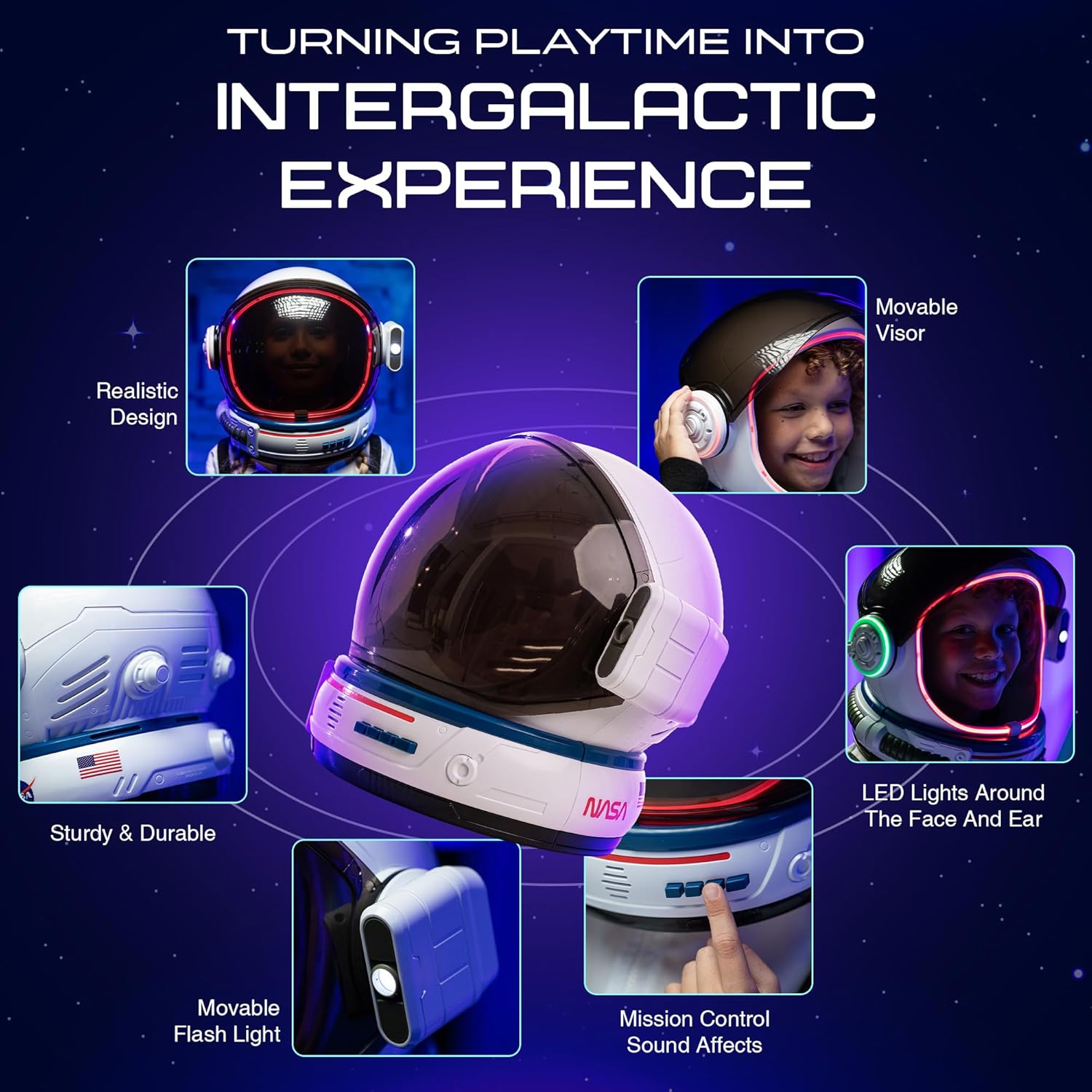
Image: Detailed views of the helmet's features, including the adjustable interior for a secure fit and the movable flashlight.
Operating Instructions
1. Powering On/Off
Locate the main power switch, usually near the battery compartment or on the side of the helmet. Flip the switch to the "ON" position to activate the helmet's electronic features.
2. LED Lights
The helmet features dynamic LED lights around the visor and possibly other areas. Press the designated LED button (often labeled with a light bulb icon) to cycle through different light modes or colors. Press again to turn off the lights.
3. Mission Sounds
Immerse yourself in space with authentic mission control sounds. Press the sound effect buttons (often labeled with speaker icons or specific mission names) to activate various audio clips, such as countdowns, communications, or rocket launch sounds.
4. Movable Visor
The helmet is equipped with a movable visor for added realism and functionality. Gently slide the visor up or down to open or close it. Ensure it clicks into place if designed to do so.
5. LED Flashlight
A real LED flashlight is integrated into the helmet for exploration in low-light conditions. Locate the flashlight button (often on the side of the helmet) and press it to turn the light on or off.
Video: Demonstration of the AEROSQUAD Astronaut Helmet's LED lights and mission control sounds, showcasing its interactive features.
Maintenance
Cleaning
- Wipe the helmet's exterior with a soft, damp cloth.
- Do not use abrasive cleaners or solvents, as they may damage the finish or electronic components.
- Ensure the helmet is completely dry before storage.
Storage
- Store the helmet in a cool, dry place away from direct sunlight.
- Remove batteries if the helmet will not be used for an extended period to prevent leakage and damage.
Troubleshooting
| Problem | Possible Cause | Solution |
|---|---|---|
| Lights or Sounds Not Working |
|
|
| Movable Visor is Stiff | Accumulated dust or debris. | Gently clean the visor tracks with a soft, dry cloth. Do not force the visor. |
| Helmet Feels Heavy/Uncomfortable | Interior strap not properly adjusted. | Adjust the interior strap for a more secure and comfortable fit. |
Specifications
| Feature | Detail |
|---|---|
| Brand | AEROSQUAD |
| Model Number | B0CK9DLL2B |
| Package Dimensions | 13.11 x 12.71 x 7.4 inches |
| Item Weight | 2 pounds |
| Country of Origin | China |
| Department | Unisex Child, Unisex Adult |
| Manufacturer | AeroSquad |
| Power Source | Batteries (not included) |
| Key Features | LED Lights, Movable Visor, Mission Sounds, LED Flashlight, Adjustable Interior Strap |
Warranty and Support
For warranty information or product support, please contact the manufacturer, AeroSquad, or the seller, Sticky lil fingers, directly through their respective channels on Amazon. As this product is from a small business brand, your support is greatly appreciated.
Please retain your proof of purchase for any warranty claims.
Ask a question about this manual
Ask about setup, troubleshooting, compatibility, parts, safety, or missing instructions. Manuals+ will review the question and use this page’s manual context to help answer it.