
1. Introduction
Thank you for choosing the AISENS FT86TRE-197 Mobile TV Floor Stand. This product is designed to provide a versatile and robust solution for displaying your television or monitor in various environments. Constructed from high-strength steel and aluminum, it supports screens from 37 to 86 inches and up to 50 kg in weight. Its integrated wheels and ergonomic handle ensure easy mobility, while the adjustable height and tilt features offer optimal viewing angles. This manual provides detailed instructions for assembly, operation, and maintenance to ensure safe and efficient use of your new floor stand.

Image 1: Front view of the AISENS FT86TRE-197 Mobile TV Floor Stand with its integrated DVD tray.
2. Safety Instructions
Please read all instructions carefully before assembly and use. Failure to follow these instructions may result in property damage, serious injury, or death.
- Weight Capacity: Do not exceed the maximum load capacity of 50 kg (110 lbs). This stand is designed for screens between 37 and 86 inches.
- Proper Assembly: Ensure all components are securely fastened as instructed. Do not use power tools for assembly unless specified, as overtightening may damage components.
- Stability: Always ensure the stand is on a stable, level surface. Engage wheel brakes when the stand is stationary to prevent accidental movement.
- Children and Pets: Keep children and pets away from the stand during assembly and operation. Do not allow them to climb on or play with the stand or mounted TV.
- Moving the Stand: When moving the stand, ensure the TV is securely mounted and all cables are managed to prevent snagging. Move slowly and carefully, especially over uneven surfaces.
- Maintenance: Regularly check all screws and connections to ensure they remain tight and secure.
3. Package Contents
Before beginning assembly, please verify that all parts are present and undamaged. If any parts are missing or damaged, do not attempt to assemble the product. Contact your retailer for assistance.
- 1 x Mobile TV Floor Stand (main components)
- 1 x Mounting Kit (includes various screws, washers, spacers, and tools for assembly and TV attachment)
4. Assembly Instructions
Follow these steps carefully to assemble your AISENS FT86TRE-197 Mobile TV Floor Stand. It is recommended to have two people for certain steps, especially when mounting the TV.
- Unpack Components: Carefully remove all parts from the packaging and lay them out on a clean, soft surface to prevent scratches. Identify all components against the parts list provided in the mounting kit.
- Assemble the Base: Attach the support legs to the central base column. Secure them using the provided screws and an Allen key. Ensure all connections are tight.
- Attach Wheels: Screw the four wheels into the designated holes on the underside of the base legs. Ensure two of the wheels have locking mechanisms and position them at the front for easy access. Lock the wheels once attached to prevent movement during further assembly.
- Install Main Support Pole: Insert the main vertical support pole into the assembled base. Secure it with the appropriate screws and bolts from the mounting kit.
- Mount the DVD Tray: Slide the DVD/media tray onto the main support pole. Adjust its height to your preference and secure it using the locking mechanism or screws provided. The tray measures 260x400mm.
- Attach TV Mounting Bracket: Secure the TV mounting bracket to the top section of the main support pole. This bracket allows for height adjustment and tilt.
- Prepare TV for Mounting: Attach the VESA adapter arms to the back of your television using the screws, washers, and spacers appropriate for your TV model. The stand supports VESA patterns from 200x200mm to 600x400mm. Refer to your TV's manual for correct screw sizes.
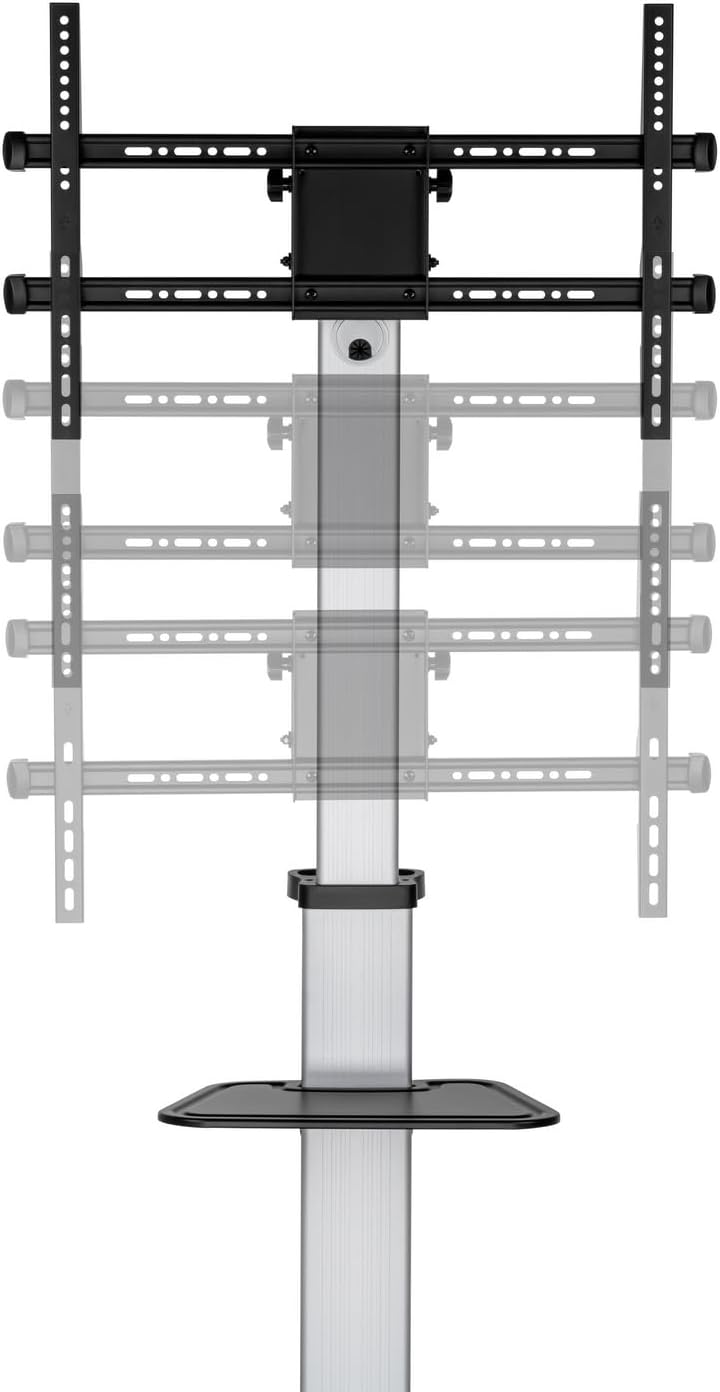
Image 2: Illustration of various VESA mounting patterns supported by the stand, demonstrating how the adapter arms attach to the TV.
- Mount the TV: With assistance, carefully lift your television and hook the VESA adapter arms onto the TV mounting bracket on the stand. Ensure the TV is securely seated and then fasten any safety screws or locking mechanisms to prevent accidental dislodgement.

Image 3: The stand's height adjustment feature, allowing the TV to be positioned at various vertical levels.
5. Operating Instructions
The AISENS FT86TRE-197 stand offers several adjustable features for optimal viewing and mobility.
- Adjusting TV Height: The TV mounting bracket can be adjusted vertically along the main support pole. Loosen the locking mechanism, slide the TV to the desired height (between 1200mm and 1600mm from the floor), and then securely tighten the lock.
- Adjusting Tilt Angle: The TV can be tilted vertically to achieve the best viewing angle. Loosen the tilt adjustment knobs on the TV bracket, adjust the screen between -10° (downward) and +5° (upward), and then retighten the knobs.

Image 4: Detailed view of the tilt mechanism, showing how the TV angle can be adjusted.
- Rotating the TV: The TV can be rotated from 0° (horizontal) to +90° (vertical), allowing for portrait or landscape orientation. Carefully rotate the screen to the desired position and ensure it is stable.
- Mobility: To move the stand, unlock the wheels. Use the ergonomic handle located at the rear of the stand to push or pull it to the desired location. Once in position, lock the wheels to secure the stand.
- Cable Management: Utilize the integrated cable management system by routing cables through the holes inside the main support tube. This keeps cables organized and prevents tripping hazards.
6. Maintenance
Regular maintenance ensures the longevity and safe operation of your TV floor stand.
- Cleaning: Wipe the stand with a soft, damp cloth. Avoid using abrasive cleaners, solvents, or harsh chemicals, as these can damage the finish.
- Inspections: Periodically check all screws, bolts, and connections to ensure they are tight. Retighten any loose fasteners.
- Wheel Care: Keep the wheels free of debris to ensure smooth movement. If wheels become stiff, clean them and apply a small amount of silicone lubricant if necessary.
7. Troubleshooting
If you encounter any issues with your AISENS FT86TRE-197 stand, refer to the following common problems and solutions:
- Stand is unstable:
- Ensure all assembly screws are tightened securely.
- Verify the TV weight and size are within the specified limits (max 50kg, 37-86 inches).
- Ensure the stand is on a flat, level surface.
- Difficulty moving the stand:
- Check that the wheel brakes are disengaged.
- Clear any obstructions around the wheels.
- Clean the wheels if they are obstructed by dirt or debris.
- TV adjustments (height/tilt) do not hold:
- Ensure the locking mechanisms for height and tilt adjustments are fully tightened after positioning.
8. Specifications
| Model | FT86TRE-197 |
| Material | High-strength Steel and Aluminum |
| Screen Size Compatibility | 37" - 86" |
| Maximum Load Capacity | 50 kg (110 lbs) |
| VESA Compatibility | 200x200, 300x200, 400x200, 300x300, 400x300, 400x400, 600x400mm |
| Tilt Angle | -10° to +5° |
| Rotation Angle | 0° to +90° (Landscape to Portrait) |
| Maximum Stand Height | 1820 mm |
| TV Height Adjustment Range | 1200 mm - 1600 mm |
| DVD Tray Size | 260 x 400 mm |
| Base Dimensions (Max Wheel Separation) | 848 x 610 mm |
| Cable Management | Integrated System |
| Color | Black and Silver |

Image 5: Detailed technical drawing showing the dimensions and adjustable ranges of the stand.
9. Warranty and Support
This product is covered by a standard manufacturer's warranty. For specific warranty terms and conditions, please refer to the documentation provided with your purchase or contact your retailer.
For technical support, missing parts, or any questions regarding the assembly or operation of your AISENS FT86TRE-197 Mobile TV Floor Stand, please contact your point of purchase or the AISENS customer service department.