
Xsarius Avant 3+
Xsarius Avant 3+ UHD 4K Android 11 TV Box User Manual
Model: Avant 3+
1. Introduction
The Xsarius Avant 3+ is a powerful UHD 4K Android 11 TV Box designed to transform your television into a smart entertainment hub. Featuring a robust Android 11 operating system, Gigabit LAN, Bluetooth 5.0, and Wi-Fi connectivity, this device offers seamless streaming, app access, and media playback. It supports advanced video technologies like HDR10+ and H.265 decoding, ensuring a superior viewing experience. The included Bluetooth remote control with learning function and voice control enhances user interaction.
Key features include:
- Android 11 Operating System: Access countless applications from the Google Play Store, including Netflix, Disney+, Spotify, YouTube, and more.
- Gigabit Network & Bluetooth 5.0: Ensures high-speed data transfer and allows connection of various Bluetooth devices like gamepads, soundbars, and headphones.
- PremiumTV 2 Platform: A user-friendly interface for live TV, catch-up, and recording functionalities, enhancing your viewing experience.
- 4K UHD & HDR10+: Delivers realistic color details and sharp images, even in challenging lighting conditions, with support for 4K 60fps and AV1 Media Codec.
- Ample Storage: Equipped with 2GB RAM and 16GB Flash storage for smooth operation and app performance.
- Portable Design: Compact and lightweight, making it easy to take your entertainment with you.
- Automatic Software Updates: Ensures access to the latest features and improvements.
2. What's in the Box
Please check the contents of your package. If any items are missing or damaged, contact your retailer.
- Xsarius Avant 3+ Android 4K TV Box
- HM-Sat HDMI Cable
- Bluetooth Remote Control with Learning Function
- Power Adapter / Power Cable
- Quick Start Guide
3. Product Overview

Figure 3.1: Xsarius Avant 3+ TV Box with included accessories (remote control and cables).

Figure 3.2: Top view of the Xsarius Avant 3+ TV Box, showcasing its sleek design and Xsarius branding.

Figure 3.3: Front view of the TV Box, featuring a digital clock display.

Figure 3.4: Rear view of the TV Box, showing the DC 5V power input, Ethernet port, HD OUT (HDMI) port, S/PDIF audio output, and IR IN port.
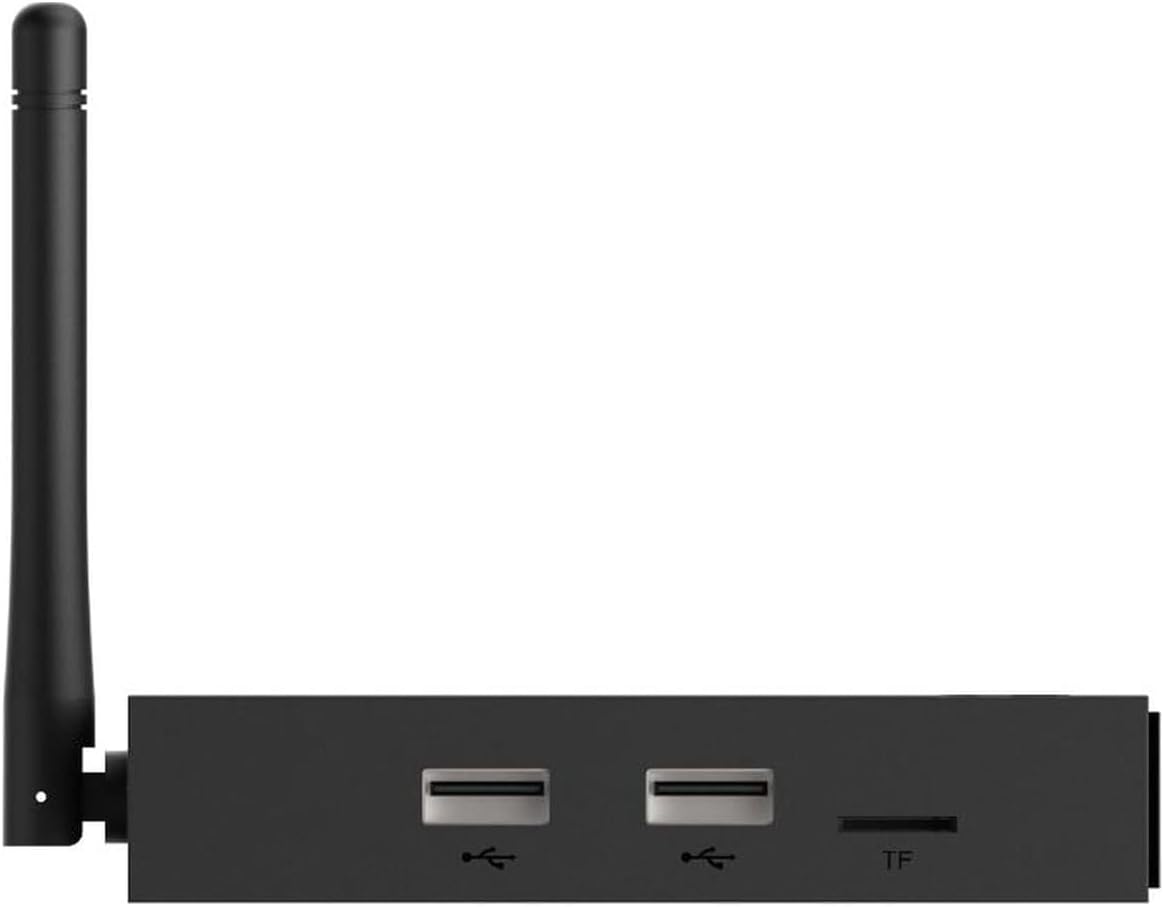
Figure 3.5: Side view of the TV Box, illustrating the USB ports and TF (microSD) card slot.

Figure 3.6: The Bluetooth remote control with learning function and voice control capabilities.
4. Setup
4.1 Connecting the Device
- Connect to TV: Use the provided HM-Sat HDMI cable to connect the HD OUT port on the Xsarius Avant 3+ to an HDMI input port on your television.
- Connect to Power: Plug the power adapter into the DC 5V port on the TV Box and then into a wall outlet. The device will typically power on automatically or can be turned on using the remote control.
- Connect to Network (Optional):
- Wired Connection: For optimal performance, connect an Ethernet cable from your router to the Ethernet port on the TV Box.
- Wireless Connection: If using Wi-Fi, you will configure this during the initial setup process.
4.2 Initial Setup and Android Configuration
Upon first power-on, the device will guide you through the initial Android TV setup. Follow the on-screen prompts to:
- Select your language.
- Connect to a Wi-Fi network (if not using Ethernet).
- Sign in with your Google Account to access the Google Play Store and other Google services.
- Accept terms and conditions.
- Configure basic settings like date, time, and location.

Figure 4.1: Example of the Android TV home screen interface.
4.3 Remote Control Pairing
The Xsarius Avant 3+ comes with a Bluetooth remote control. For optimal functionality, it needs to be paired with the TV Box.
- Ensure the TV Box is powered on.
- Press and hold the pairing button on the remote control (refer to the quick start guide for exact button location, usually a small button inside the battery compartment or a combination of buttons).
- Follow the on-screen instructions to complete the pairing process. Once paired, the remote will function via Bluetooth, allowing you to operate the box even if it's hidden behind your TV.
- Learning Function: The remote also has a learning function for your TV's power and volume buttons. Refer to the quick start guide for instructions on programming these buttons.
5. Operating the Device
5.1 Navigating the Android TV Interface
Use the directional pad and OK button on your remote to navigate the Android TV home screen. The home screen provides quick access to installed apps, recommended content, and system settings.
- Home Button: Returns you to the main Android TV home screen.
- Back Button: Returns to the previous screen or menu.
- App Button: Opens the list of all installed applications.
- Voice Control Button: Activates Google Assistant for voice commands (e.g., "Open Netflix," "What's the weather?").
5.2 Using the PremiumTV 2 Platform
The Xsarius Avant 3+ comes with the exclusive PremiumTV 2 platform, designed for an intuitive media viewing experience.
- Launch the PremiumTV 2 application from your home screen or app list.
- Explore live TV channels, EPG (Electronic Program Guide), catch-up TV, and recording options.
- The platform is optimized for ease of use, allowing quick navigation through your favorite content.

Figure 5.1: The PremiumTV 2 application interface, showing various content options.
5.3 App Installation and Media Playback
- Google Play Store: Access the Google Play Store app to download and install a wide variety of streaming services, games, and utility applications.
- Media Playback: The device supports playback of MP3 files, photos, and videos from external storage devices such as USB sticks, external HDDs, or SD cards inserted into the TF slot. Use a file manager app to browse and play your media.
5.4 Bluetooth Device Connectivity
To connect Bluetooth devices like gamepads, soundbars, keyboards, or headphones:
- Go to Settings on the Android TV home screen.
- Select Remotes & Accessories or Connected Devices.
- Choose Add accessory and put your Bluetooth device into pairing mode.
- Select your device from the list to pair.
6. Maintenance
6.1 Software Updates
The Xsarius Avant 3+ supports automatic software updates to ensure you always have the latest features and performance improvements. It is recommended to keep your device connected to the internet to receive these updates.
- To manually check for updates, go to Settings > Device Preferences > About > System update.
6.2 Cleaning
To maintain the appearance and functionality of your device:
- Disconnect the power before cleaning.
- Use a soft, dry cloth to wipe the exterior of the TV Box and remote control.
- Do not use liquid cleaners, aerosols, or abrasive solvents.
7. Troubleshooting
If you encounter issues with your Xsarius Avant 3+, refer to the following common problems and solutions:
| Problem | Possible Cause | Solution |
|---|---|---|
| No power | Power cable not connected; Power outlet faulty; Device off. | Ensure power cable is securely connected. Try a different power outlet. Press the power button on the remote or device. |
| No signal on TV | Incorrect HDMI input selected on TV; HDMI cable loose or faulty. | Switch your TV's input source to the correct HDMI port. Check HDMI cable connections; try a different HDMI cable. |
| Remote control not responding | Batteries low or dead; Remote not paired; Obstruction between remote and device (if not Bluetooth). | Replace batteries. Re-pair the Bluetooth remote (refer to Section 4.3). Ensure no obstructions if using IR. |
| No internet connection | Wi-Fi disconnected; Ethernet cable loose; Router issue. | Check Wi-Fi settings and reconnect. Ensure Ethernet cable is secure. Restart your router. |
| Apps crashing or slow performance | Too many apps running; Low storage; App specific issue. | Close background apps. Clear app cache (Settings > Apps). Restart the device. Uninstall and reinstall problematic apps. |
8. Specifications
| Feature | Detail |
|---|---|
| Model Name | Avant 3+ |
| Operating System | Android 11 |
| Resolution | 4K UHD (up to 60fps) |
| Video Decoding | H.265, AV1 Media Codec |
| HDR Support | HDR10+, HLG |
| RAM | 2GB |
| Flash Storage | 16GB |
| Connectivity | Gigabit Ethernet, Wi-Fi, Bluetooth 5.0 |
| Ports | HDMI, USB, TF (MicroSD) Card Slot, S/PDIF, IR IN, DC 5V |
| Supported Internet Services | Netflix, Prime Video, YouTube, Disney+ (via apps) |
| Controller Type | Remote Control & Voice Control |
| Color | Black |
| Dimensions (Packaging) | 26 x 22 x 10 cm |
| Weight | 600 Grams |
| Country of Origin | China |
9. Warranty and Support
The Xsarius Avant 3+ TV Box is covered by a manufacturer's warranty. For specific warranty terms and conditions, please refer to the documentation included with your product or contact your point of purchase.
For technical support, troubleshooting assistance beyond this manual, or warranty claims, please contact Xsarius customer service or your authorized retailer. Keep your purchase receipt and product serial number handy when seeking support.
Related documentsAvant 3+


Ask a question about this manual
Ask about setup, troubleshooting, compatibility, parts, safety, or missing instructions. Manuals+ will review the question and use this page’s manual context to help answer it.