1. Introduction
The Sofirn IF30 is a high-performance, ultra-bright flashlight designed for versatile lighting needs, including hunting, searching, and general outdoor use. It features both a powerful spotlight and a wide floodlight, offering exceptional illumination up to 12000 lumens and a beam distance of 685 meters. Constructed from aircraft-grade aluminum, it is durable, impact-resistant, and IPX8 waterproof.

Image 1.1: The Sofirn IF30 Flashlight, showcasing its design and a demonstration of its powerful beam in a dark environment.
2. Package Contents
Please check the package for the following items:
- Sofirn IF30 Flashlight
- 1 Lithium Polymer Battery (included and pre-installed)
- USB-C Charging Cable
- Lanyard
- User Manual

Image 2.1: The Sofirn IF30 Flashlight shown with its included accessories: a USB-C charging cable, a lanyard, and the user manual.
3. Setup
3.1 Battery Installation
The Sofirn IF30 comes with a pre-installed Lithium Polymer battery. Before first use, ensure the battery is fully charged. If you need to access the battery compartment, unscrew the tail cap counter-clockwise. Insert the battery with the positive (+) terminal facing towards the head of the flashlight. Screw the tail cap back on clockwise until secure.
3.2 Initial Charge
It is recommended to fully charge the flashlight before its first use to ensure optimal performance and battery longevity. Refer to the 'Charging' section for detailed instructions.
4. Operating Instructions
The Sofirn IF30 features an intuitive user interface with a single side button and a rotary dial for brightness adjustment.
4.1 Power On/Off
- To Turn On: Short press the side button.
- To Turn Off: Short press the side button again.
4.2 Mode Switching (Spotlight, Floodlight, Both)
The IF30 offers three primary lighting modes: Spotlight, Floodlight, and a combination of both.
- To Cycle Modes: While the flashlight is on, long-press the side button to switch between Floodlight, Spotlight, and Spotlight & Floodlight combined.
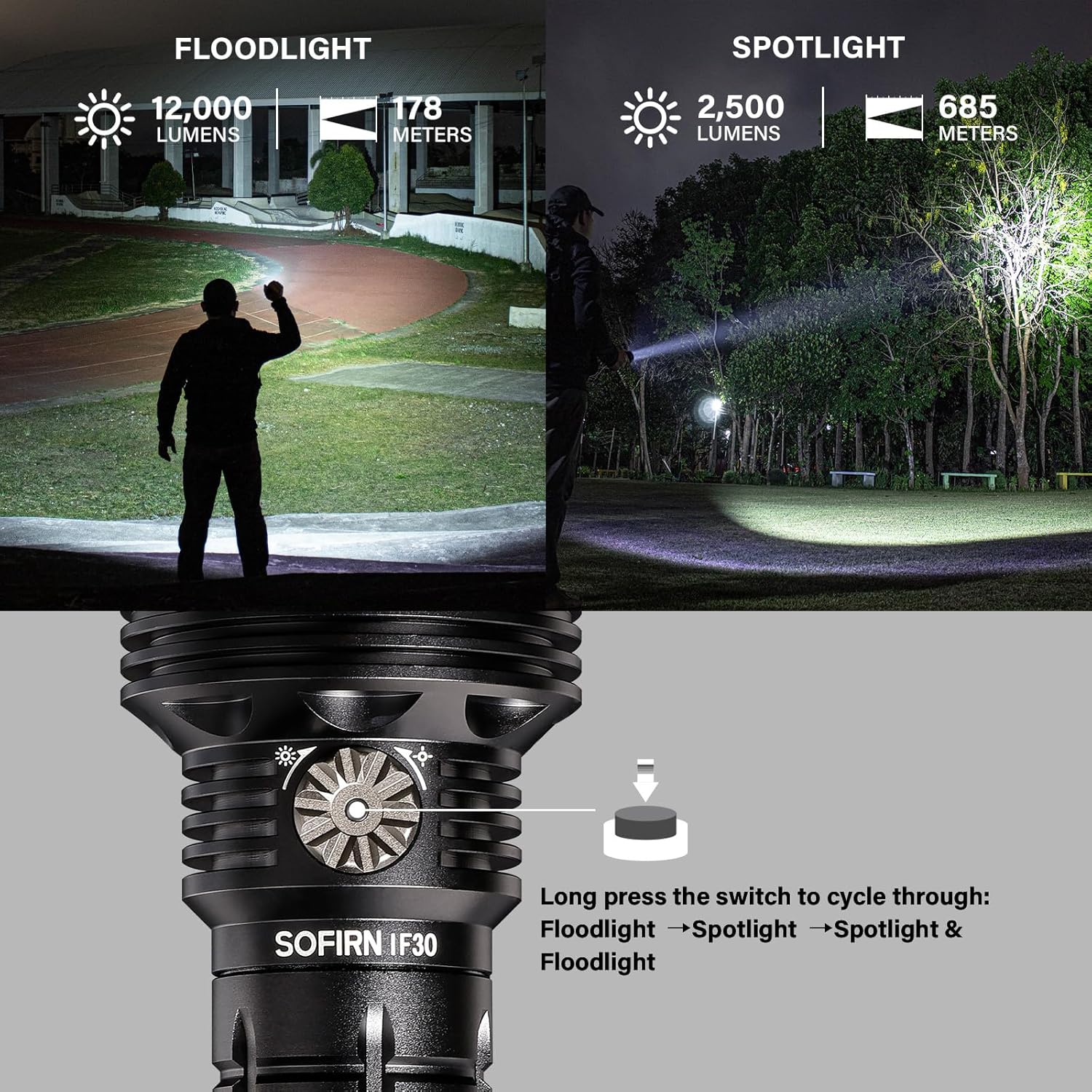
Image 4.1: Illustration of the long-press function on the side button to cycle through Floodlight, Spotlight, and combined Floodlight & Spotlight modes.
4.3 Brightness Adjustment (Stepless Dimming)
The rotary dial around the side button allows for stepless brightness adjustment.
- To Increase Brightness: Rotate the dial clockwise.
- To Decrease Brightness: Rotate the dial counter-clockwise.
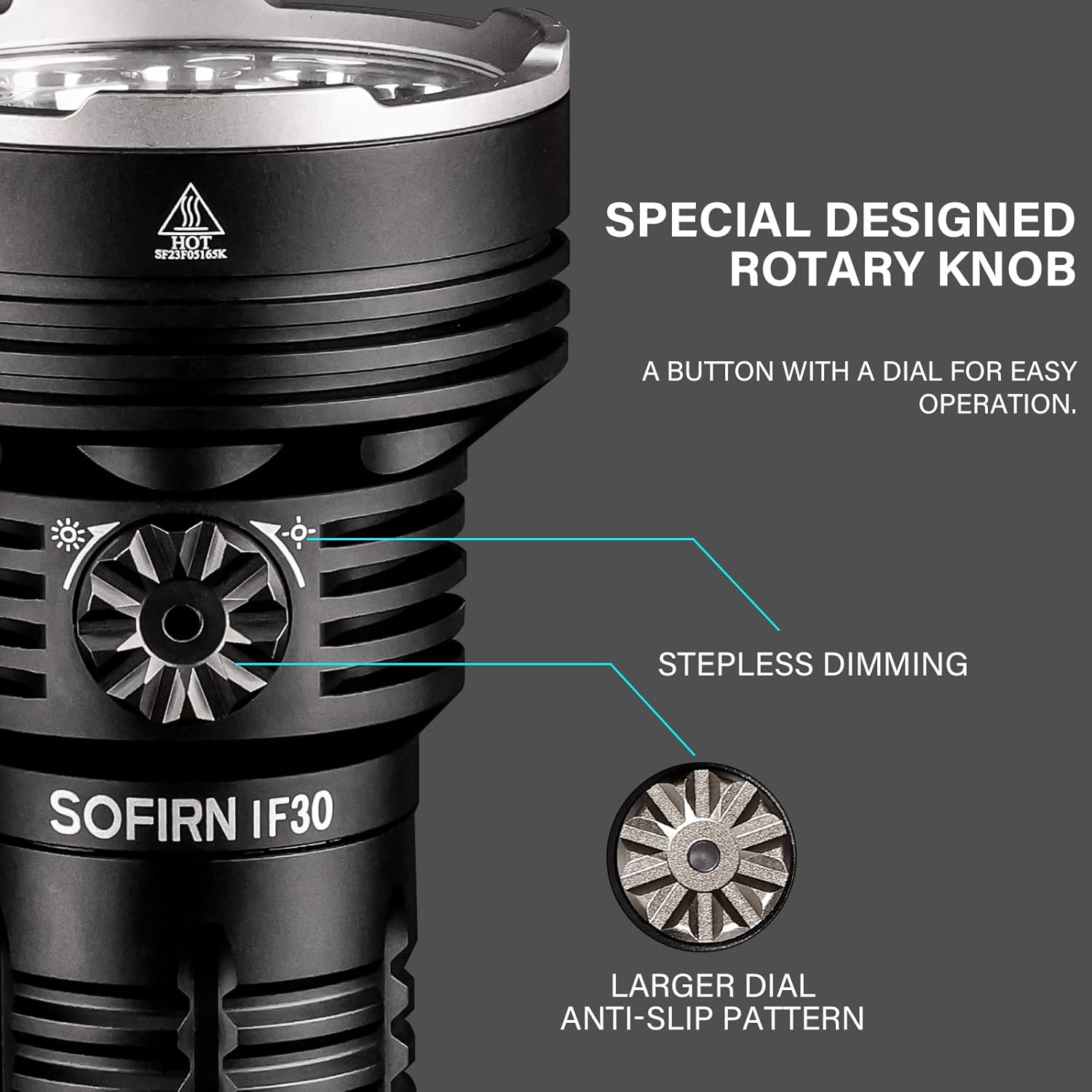
Image 4.2: A detailed view of the specially designed rotary knob on the Sofirn IF30, indicating its function for stepless dimming and anti-slip pattern.
4.4 Quick Access Features
The IF30 provides quick access to specific modes for convenience:
- From Unlocked State:
- Turbo: Double-click the side button.
- Strobe: Triple-click the side button.
- Low: Long-press the side button (from off).
- From Locked State:
- Momentary Low: Long-press the side button. Release to turn off.

Image 4.3: Visual guide to the quick access functions of the Sofirn IF30, including Turbo, Strobe, and Low modes from both unlocked and locked states.
4.5 Smart Lockout & Unlocking
The flashlight features an automatic lockout function to prevent accidental activation and battery drain.
- Automatic Lockout: The flashlight automatically locks after 15 seconds of non-operation when turned off.
- To Unlock: Quickly rotate the rotary dial clockwise or counter-clockwise by approximately 60 degrees. The indicator light will confirm unlocking.

Image 4.4: Demonstration of the smart lockout feature and the method to unlock the Sofirn IF30 by rotating the control dial.
5. Charging
The Sofirn IF30 is equipped with a built-in USB-C port for convenient and fast charging.
- Connect the provided USB-C cable to the flashlight's charging port and to a 5V/3A power source.
- The indicator light will show charging status (refer to 'Battery Indicator' section).
- A full charge typically takes approximately 3 hours.
- The flashlight also supports reverse charging, allowing it to function as a power bank for other devices.

Image 5.1: The Sofirn IF30 demonstrating its USB-C fast charging capability and its ability to reverse charge other devices.
6. Battery Information
The IF30 uses a high-capacity Lithium Polymer battery to provide extended runtime.
6.1 Intuitive Battery Indicator
After turning on the IF30, the indicator light will display the power status for 5 seconds:
- Green: 50%-100% battery remaining.
- Red: 25%-50% battery remaining.
- Flashing Red: Less than 25% battery remaining. Please charge immediately.

Image 6.1: The intuitive battery indicator on the Sofirn IF30, illustrating the different color codes for battery charge levels.
6.2 Low Voltage Protection
The flashlight is equipped with low voltage protection. When the battery voltage is too low, the flashlight will automatically step down to a lower brightness level or turn off to prevent battery damage.
7. Maintenance
Proper maintenance ensures the longevity and optimal performance of your Sofirn IF30 flashlight.
- Cleaning: Clean the flashlight body with a soft, damp cloth. Do not use abrasive cleaners or solvents.
- Threads: Lubricate the threads of the tail cap and head with silicone grease periodically to ensure smooth operation and maintain water resistance.
- O-rings: Check the O-rings regularly for wear and tear. Replace them if damaged to maintain the IPX8 waterproof rating.
- Storage: If storing the flashlight for an extended period, remove the battery or ensure it is partially charged (around 50%) to prevent over-discharge. Store in a cool, dry place.
8. Troubleshooting
If you encounter issues with your Sofirn IF30, please refer to the following common problems and solutions:
| Problem | Possible Cause | Solution |
|---|---|---|
| Flashlight does not turn on | Battery depleted; Battery not installed correctly; Flashlight in lockout mode; Loose connections | Charge the battery; Ensure battery is inserted with correct polarity; Unlock the flashlight (rotate dial); Tighten tail cap and head. |
| Brightness is low or inconsistent | Low battery; Dirty lens; Overheating protection activated | Recharge the battery; Clean the lens; Allow flashlight to cool down. |
| Flashlight gets hot quickly on Turbo mode | High power output is normal for Turbo mode; Advanced Temperature Regulation (ATR) is working | This is normal behavior. The ATR system will automatically reduce output to prevent overheating. Avoid prolonged use on Turbo if discomfort occurs. |
| Cannot unlock the flashlight | Incorrect unlocking procedure | Ensure you quickly rotate the rotary dial by at least 60 degrees in either direction. Avoid pressing the button while rotating. |
9. Specifications
Detailed technical specifications for the Sofirn IF30 Flashlight:
| Feature | Detail |
|---|---|
| Model | SOFIRNIF30 |
| Light Source Type | LED (SFT40 for spotlight, surrounding LEDs for floodlight) |
| Max Output | 12000 Lumens (Floodlight) |
| Max Beam Distance | 685 Meters (Spotlight) |
| Power Source | Battery Powered (1 Lithium Polymer battery included) |
| Charging Port | USB-C (5V/3A fast charging) |
| Material | Aircraft-grade Aluminum |
| Water Resistance | IPX8 Waterproof (submersible up to 2 meters) |
| Impact Resistance | 1 Meter |
| Product Dimensions | 2.46"D x 5.07"W x 2.46"H (approx. 6.25cm D x 12.88cm W x 6.25cm H) |
| Item Weight | 1.39 Pounds (approx. 0.63 kg) |
| Special Features | Advanced Temperature Regulation (ATR), Automatic Lockout, Low Voltage Protection, Reverse Charging |

Image 9.1: A table detailing the performance specifications of the Sofirn IF30 across different modes (Floodlight, Spotlight, and combined), including lumens, beam distance, and runtime.
10. Safety Information
Please read and follow these safety guidelines to ensure safe operation and prevent damage to the flashlight or injury:
- Do not shine the flashlight directly into eyes. The intense light can cause temporary vision impairment or permanent eye damage.
- Keep out of reach of children.
- Do not disassemble the flashlight head or other sealed parts, as this may damage the flashlight and void the warranty.
- The flashlight may generate significant heat during prolonged use at high output levels. Handle with care to avoid burns.
- Use only the recommended battery type.
- Do not dispose of batteries in fire.
11. Warranty and Support
The Sofirn IF30 Flashlight comes with a Limited Warranty. Please refer to the warranty card included in your package or contact Sofirn customer support for details regarding warranty coverage and service.
For technical support, troubleshooting assistance, or warranty claims, please contact Sofirn customer service through their official website or the retailer where the product was purchased.


