
Product Overview
The 1Mii SafeFly Pro is a versatile Bluetooth 5.3 audio transmitter and receiver designed to provide wireless audio connectivity for a wide range of devices. It features an OLED screen for clear status display, dual-link functionality for connecting two devices simultaneously, and a long-lasting battery, making it an ideal companion for travel and home use.
This device can transmit audio wirelessly from sources like airplane entertainment systems, gym equipment, PCs, and TVs to your Bluetooth headphones or earbuds. It can also receive audio wirelessly from your mobile phone or tablet to upgrade wired speakers or car audio systems with Bluetooth capability.
What's in the Box
- 1Mii SafeFly Pro 2-in-1 Bluetooth Transmitter Receiver
- USB-C Charging Cable
- 3.5mm Female to Female Audio Adapter
- Keychain Attachment
- User Manual

Image: All components included in the 1Mii SafeFly Pro package.
Product Features
- Premium OLED Screen: Displays battery status, volume level, paired device names, and decoding format (SBC, AAC, aptX/LL/HD).
- Bluetooth 5.3 Dual Function: Operates as both a transmitter (TX) and receiver (RX). Ensures stable and faster connections.
- Long Distance Connectivity: Up to 100ft (30m) in RX mode and 50ft (15m) in TX mode without obstacles. Reduced range with obstacles.
- Share Audio (Dual Link): In TX mode, connect two Bluetooth headsets or speakers. In RX mode, connect two mobile phones simultaneously. Note: aptX Low Latency is not supported when two devices are connected.
- Long Battery Life: Integrated 250mAh battery provides up to 30 hours of use and fully charges in 1.5 hours.
Visual Guide to Features

Image: Labeled diagram of the 1Mii SafeFly Pro highlighting its components and controls.
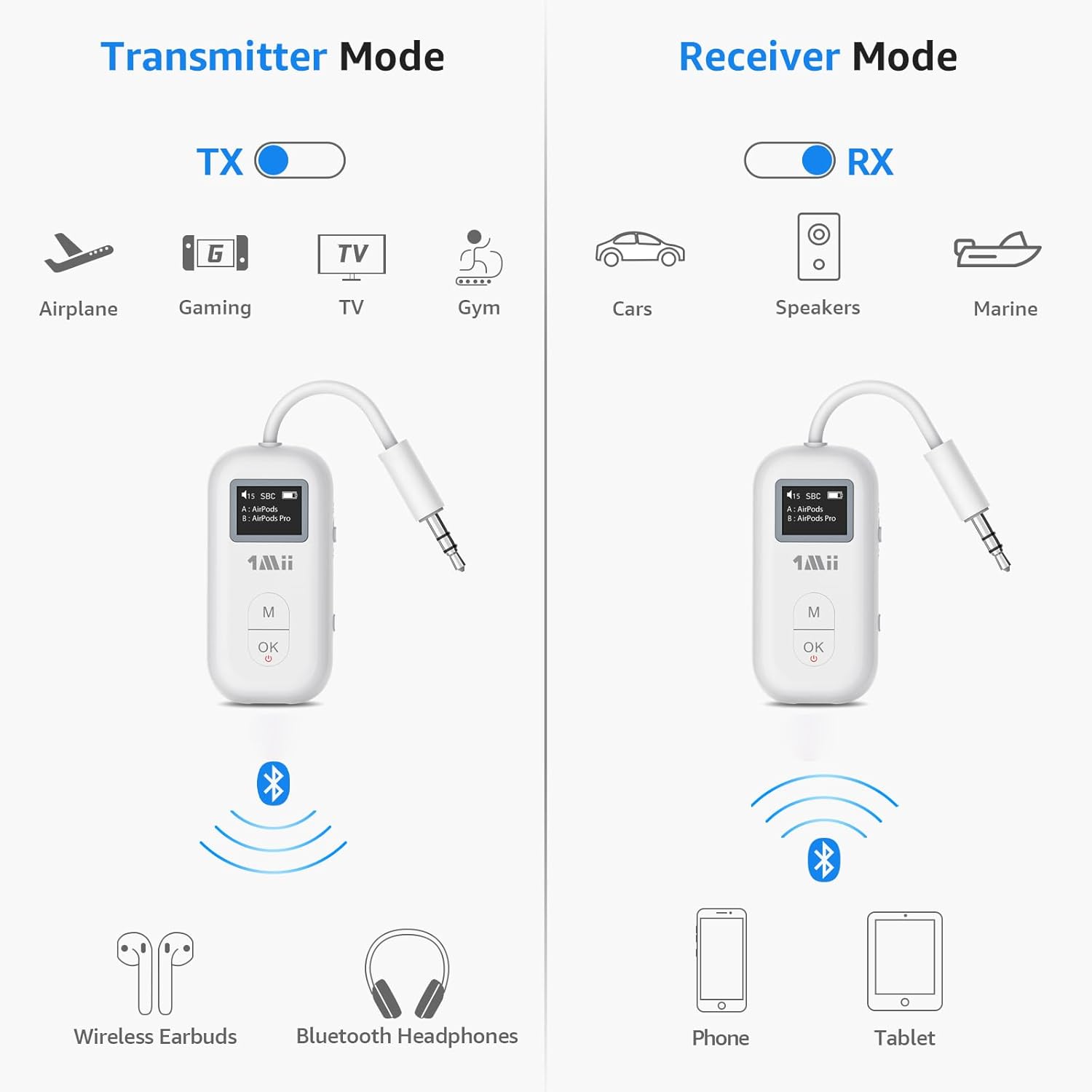
Image: Illustration of the 1Mii SafeFly Pro's dual functionality as a transmitter (TX) and receiver (RX) for various use cases.

Image: The Dual Connection feature in action, allowing two Bluetooth headphones to connect to a single audio source.

Image: Demonstrating how the 1Mii SafeFly Pro can upgrade wired speakers with Bluetooth capability.
Official Product Video
Video: An official product video from 1Mii showcasing the Bluetooth 5.3 Transmitter Receiver for Airplane/TV use.
Setup Guide
- Charge the Device: Before first use, fully charge the SafeFly Pro using the provided USB-C charging cable. The OLED screen will indicate charging status.
- Power On/Off: Press the "OK" button for 2 seconds to power on or off the device.
- Select Mode (TX/RX): Use the TX/RX sliding switch on the side of the device to select the desired mode.
- TX (Transmitter) Mode: To send audio from a non-Bluetooth device (e.g., airplane entertainment, TV) to your Bluetooth headphones.
- RX (Receiver) Mode: To receive audio from a Bluetooth device (e.g., smartphone) to a non-Bluetooth audio system (e.g., wired speakers, car stereo).
Operating Instructions
TX (Transmitter) Mode Operation
- Connect to Audio Source: Plug the 3.5mm audio jack of the SafeFly Pro into the audio output port of your desired device (e.g., airplane seat, TV, gym equipment).
- Enter Pairing Mode: Long press the "OK" button for 2 seconds. The screen will display "Pairing..."
- Pair with Headphones: Put your Bluetooth headphones or earbuds into pairing mode. The SafeFly Pro will search for nearby devices and display them on the OLED screen.
- Select Device: Press the "M" button to cycle through available devices on the screen. Once your device is highlighted, press "OK" to confirm and connect.
- Dual Link Connection (TX Mode): After connecting the first device, long press the "M" button for 2 seconds to enter pairing mode again for the second device. Repeat the pairing steps.
- Adjust Volume: Use the volume controls on your connected headphones or the SafeFly Pro (if available) to adjust audio levels.
- Change Decoding Format: In transmission mode, press the "M" button twice to switch the Bluetooth decoding format (e.g., SBC, aptX LL, aptX HD).

Image: Connecting the 1Mii SafeFly Pro to an airplane's audio jack for wireless transmission.
RX (Receiver) Mode Operation
- Connect to Audio Output: Plug the 3.5mm audio jack of the SafeFly Pro into the audio input port of your non-Bluetooth speaker, car stereo, or wired headphones.
- Enter Pairing Mode: Long press the "OK" button for 2 seconds. The screen will display "Pairing..."
- Pair with Phone/Tablet: On your smartphone or tablet, enable Bluetooth and search for "1Mii SafeFly Pro" in the list of available devices. Select it to connect.
- Dual Link Connection (RX Mode): After connecting the first phone, long press the "M" button for 2 seconds to enter pairing mode again for the second phone. Repeat the pairing steps.
- Play Audio: Once connected, play audio from your phone/tablet. The sound will be transmitted wirelessly to the SafeFly Pro and then output through your connected speaker/headphones.
Maintenance
- Cleaning: Use a soft, dry cloth to clean the device. Do not use liquid cleaners or aerosols.
- Storage: Store the device in a cool, dry place away from direct sunlight and extreme temperatures.
- Battery Care: Fully charge the device before long periods of inactivity. Avoid charging while using the device, as this can damage the battery and affect playtime.
- Resetting the Device: If you encounter issues, you can perform a factory reset. Refer to the troubleshooting section for instructions.
Troubleshooting
| Problem | Solution |
|---|---|
| No audio / Poor audio quality |
|
| Cannot pair devices |
|
| Device not holding a charge / Short battery life |
|
| Factory Reset | To perform a factory reset, long press the "OK" button for 5 seconds while the device is powered on. This will clear all pairing records. |
Note: If you encounter any usage problems not covered here, please do not hesitate to inform us. 1Mii's after-sales team will always be by your side to serve you.
Specifications
| Feature | Value |
|---|---|
| Product Dimensions | 2.16 x 0.39 x 1.1 inches (5.49 x 0.99 x 2.79 cm) |
| Item Weight | 0.64 ounces (18.14 grams) |
| Model Number | SafeFly Pro |
| Batteries | 1 Lithium Metal battery (included) |
| Connectivity Technology | Bluetooth 5.3 |
| Power Source | Battery Powered |
| Special Feature | OLED Screen, 2-in-1 Bluetooth Transmitter Receiver, AptX Adaptive/Low Latency/HD |
| Battery Life | Up to 30 hours |
| Charging Time | Approx. 1.5 hours |
| Bluetooth Range (RX) | Up to 100ft (30m) without obstacles |
| Bluetooth Range (TX) | Up to 50ft (15m) without obstacles |
Warranty and Support
For warranty information and customer support, please refer to the official 1Mii website or contact their customer service team directly. The user manual included in the box may also contain specific warranty details and contact information.
You can typically find support resources, FAQs, and contact options on the 1Mii brand's official website: 1Mii Official Store.

