
1. Introduction
This manual provides essential information for the safe assembly, operation, maintenance, and troubleshooting of your PowerSmart 80V 21-inch Cordless Push Lawn Mower. Please read and understand all instructions before using the product. Retain this manual for future reference.
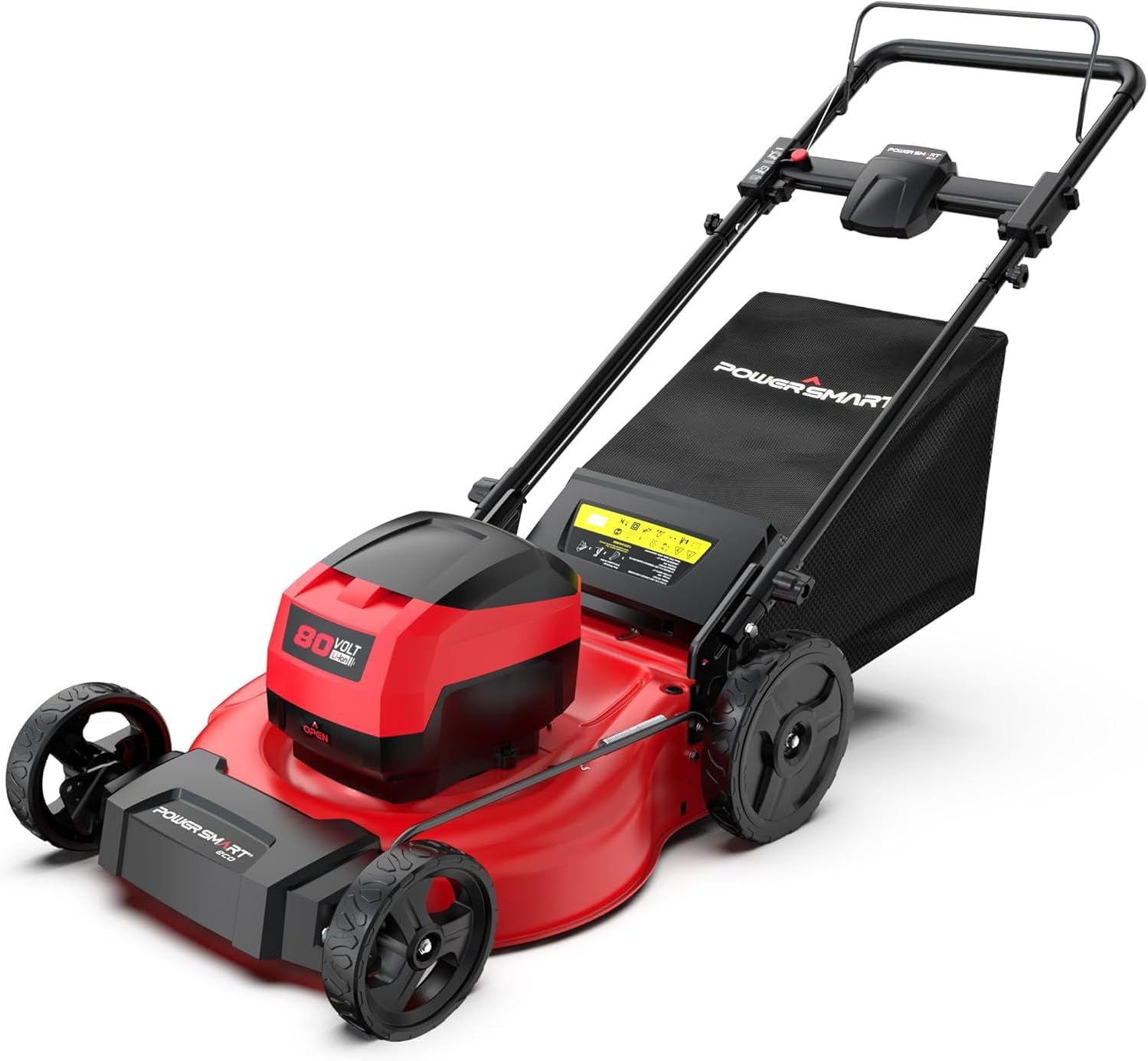
Image 1.1: The PowerSmart 80V 21-inch Cordless Push Lawn Mower.
2. Safety Information
Always prioritize safety when operating power equipment. Failure to follow safety instructions can result in serious injury or property damage.
General Safety Rules:
- Read all instructions carefully before operation.
- Wear appropriate personal protective equipment (PPE), including eye protection, hearing protection, and sturdy footwear.
- Keep children and bystanders away from the operating area.
- Never operate the mower in wet conditions or on steep slopes.
- Inspect the area for objects that could be thrown by the blade before mowing.
- Disconnect the battery before performing any maintenance or clearing blockages.
- Do not modify the mower or its safety features.
3. Package Contents
Verify that all items are present upon unpacking. If any parts are missing or damaged, contact PowerSmart customer service.
- PowerSmart 80V 21-inch Cordless Push Lawn Mower
- 80V MAX 6.0Ah Lithium-Ion Battery
- Battery Charger
- Grass Collection Bag
- Instruction Manual
4. Setup
4.1 Handle Assembly
- Unfold the upper handle and lower handle sections.
- Align the holes and secure the handles using the provided knobs or levers. Ensure they are tightened securely.
4.2 Grass Collection Bag Assembly
- Assemble the grass bag frame and fabric according to the diagrams in the separate assembly guide (if provided).
- Lift the rear discharge flap on the mower and hook the grass bag onto the mower chassis. Ensure it is seated firmly.
4.3 Battery Charging and Installation
- Connect the charger to a standard power outlet.
- Insert the 80V MAX 6.0Ah battery into the charger. The indicator light will show charging status. Allow approximately 1 hour for a full charge.
- Once fully charged, remove the battery from the charger.
- Open the battery compartment cover on the mower.
- Slide the charged battery into the battery slot until it clicks into place. Close the battery compartment cover.
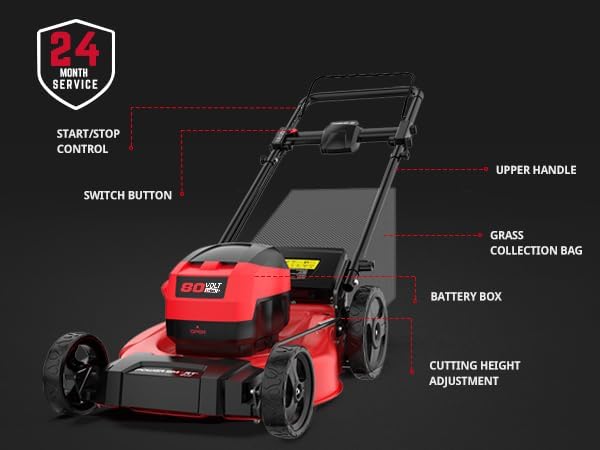
Image 4.1: Key components of the PowerSmart lawn mower, including the battery box and handles.
5. Operating Instructions
5.1 Starting the Mower
- Ensure the battery is fully charged and correctly installed.
- Insert the safety key into its slot.
- Press and hold the safety button, then pull the bail lever towards the handle. The mower will start.
- Release the safety button once the mower is running.

Image 5.1: Easy push button start mechanism on the handle.
5.2 Adjusting Cutting Height
The mower features a 6-position cutting height adjustment, ranging from 1.6 inches to 4 inches.
- Ensure the mower is turned off and the battery is removed before adjusting the height.
- Locate the height adjustment lever on the side of the mower deck.
- Pull the lever outwards and move it to the desired height setting. Ensure it locks firmly into place.

Image 5.2: The 6-position cutting height adjustment mechanism.
5.3 3-in-1 Functionality
This mower offers three grass disposal options: mulching, rear bagging, and back discharge.
- Mulching: For finely cut grass that returns nutrients to the lawn. Ensure the mulching plug is inserted and the rear discharge flap is closed.
- Rear Bagging: For collecting grass clippings. Attach the grass collection bag and ensure the mulching plug is removed.
- Back Discharge: For expelling clippings directly from the rear. Remove the grass bag and mulching plug, allowing clippings to exit from the rear opening.
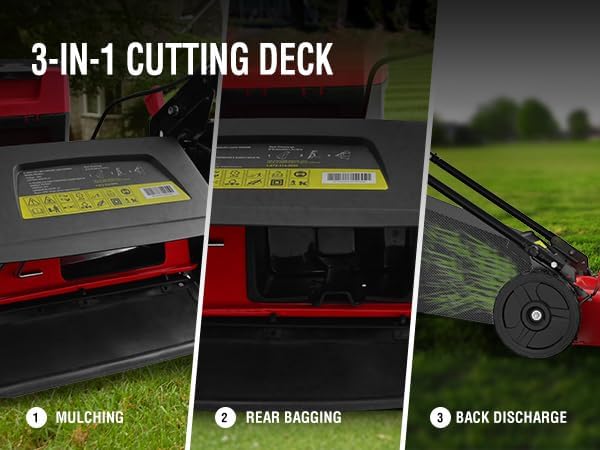
Image 5.3: Illustration of the 3-in-1 cutting deck options.
5.4 Mowing Tips
- For best results, mow when the grass is dry.
- Do not remove more than one-third of the grass blade length at a time.
- Overlap cutting swaths slightly to ensure even coverage.
- The 80V MAX 6.0Ah battery provides up to 40 minutes of run time, suitable for areas up to 1/2 acre.

Image 5.4: The mower's performance capabilities, including runtime and area coverage.
6. Maintenance
Regular maintenance ensures optimal performance and extends the life of your lawn mower. Always disconnect the battery before performing any maintenance.
6.1 Cleaning
- After each use, clean the mower deck and exterior with a damp cloth.
- Remove any grass clippings or debris from the underside of the deck to prevent buildup and ensure proper mulching/bagging.
- Do not use high-pressure water or immerse the mower in water.
6.2 Blade Care
- Inspect the blade regularly for sharpness and damage. A dull blade can tear grass, leading to an unhealthy lawn.
- If the blade is dull, have it sharpened by a qualified service technician or replace it with a genuine PowerSmart replacement blade.
- Ensure the blade is balanced after sharpening to prevent excessive vibration.
6.3 Battery Storage
- Store the battery in a cool, dry place, away from direct sunlight and extreme temperatures.
- For long-term storage, charge the battery to approximately 50% capacity.
6.4 General Storage
- Clean the mower thoroughly before storing.
- Store the mower in a dry, secure location, out of reach of children.
- The mower can be stored vertically to save space.

Image 6.1: The mower designed for convenient vertical storage.
7. Troubleshooting
This section addresses common issues you might encounter. For problems not listed here, contact PowerSmart customer support.
| Problem | Possible Cause | Solution |
|---|---|---|
| Mower does not start | Battery not charged or installed correctly; Safety key not inserted; Bail lever not engaged. | Charge and re-install battery; Insert safety key; Engage bail lever fully. |
| Poor cutting performance | Dull or damaged blade; Mower deck clogged with grass; Cutting height too low for grass conditions. | Sharpen or replace blade; Clean mower deck; Adjust cutting height higher. |
| Short run time | Battery not fully charged; Battery nearing end of life; Mowing thick or wet grass. | Ensure battery is fully charged; Consider battery replacement; Mow dry grass and avoid overloading. |
| Excessive vibration | Damaged or unbalanced blade; Loose components. | Inspect and replace/balance blade; Check all fasteners for tightness. |
8. Specifications
| Feature | Specification |
|---|---|
| Brand | PowerSmart |
| Model Number | HB2821A |
| Power Source | Battery Powered (80V MAX) |
| Battery Type | Lithium Ion (6.0Ah included) |
| Motor Type | Brushless |
| Cutting Width | 21 Inches |
| Cutting Height Adjustment | 6 Positions (1.6" to 4") |
| Functions | 3-in-1 (Mulching, Rear Bagging, Back Discharge) |
| Approximate Run Time | Up to 40 minutes (with 6.0Ah battery) |
| Deck Material | Steel |
| Item Weight | 60 Pounds |
| Product Dimensions | 60"D x 21.65"W x 38.58"H |
| Assembly Required | Yes |

Image 8.1: The brushless motor technology provides efficient and quiet operation.
9. Warranty and Support
9.1 Warranty Information
The PowerSmart 80V 21-inch Cordless Push Lawn Mower comes with a 2-year warranty. This warranty covers parts and includes free lifetime technical support. For warranty claims, you may be required to return the product, transportation prepaid, along with a legible copy of the original receipt showing the date of purchase and the name of the company, Amerisun Inc.
9.2 Customer Support
For any questions, technical assistance, or service inquiries, please contact PowerSmart customer service. They offer 24-hour online service and have over 500 certified repair centers in the U.S. for parts and service.
Refer to the contact information provided on the PowerSmart website or your purchase documentation for the most current support details.


