
Introduction
Thank you for choosing the HOTUT Toilet Night Light. This device is designed to provide convenient and colorful illumination for your toilet bowl, enhancing safety and comfort during nighttime use. Featuring a motion sensor, USB rechargeable battery, 16 color options, and an optional projector light, it offers a practical and enjoyable experience. Please read this manual thoroughly before installation and operation to ensure proper use and longevity of your product.
Safety Information
- Keep the device away from excessive moisture or direct water spray to prevent damage, although it is designed for bathroom use.
- Do not attempt to disassemble or repair the device yourself. Refer to the troubleshooting section or contact support for assistance.
- Ensure the charging cable is handled carefully to avoid damage.
- This product contains a lithium-polymer battery. Do not expose it to extreme temperatures or dispose of it in fire.
- Keep out of reach of small children to prevent choking hazards from small parts.
Package Contents
Please check the package for the following items:
- 1 x HOTUT Toilet Night Light
- 1 x USB Charging Cable
- 1 x User Manual (this document)
Product Overview
Familiarize yourself with the components of your HOTUT Toilet Night Light:
- Human Sensing Head: The motion sensor that detects presence in the dark.
- Flexible Arm: Allows for easy adjustment and secure attachment to the toilet rim.
- LED Light: Illuminates the toilet bowl with 16 color options.
- Projector Light: An additional light feature that projects patterns onto the floor.
- Switch Button: Used for power control, color selection, and projector activation.
- Charging Port: USB port for recharging the internal battery.
- Charging Indicator Light: Displays charging status (red for charging, green for fully charged).

Figure 1: Product Components (Charging Port, Switch Button, Human Sensing Head, Charging Indicator Light)

Figure 2: Product Components and Dimensions
Setup and Installation
The HOTUT Toilet Night Light is designed for easy installation and fits most toilet types.
- Choose Installation Location: Select a suitable spot on the rim of your toilet bowl.
- Bend the Flexible Arm: Gently bend the PVC arm to conform to the shape of your toilet rim. This ensures a snug and secure fit.
- Hang the Light: Place the flexible arm over the toilet rim, ensuring the main unit with the sensor faces outwards and the LED light is positioned inside the bowl.
- Adjust for Stability: Adjust the arm as needed to ensure the light is stable and the sensor has a clear line of sight.

Step 1: Bend the arm

Step 2: Hang on rim

Step 3: Adjust position

Step 4: Final placement
Operating Instructions
Motion Sensor Function
The toilet night light is equipped with a high-quality light and motion sensor. It will automatically activate when motion is detected in a dark environment, illuminating your toilet bowl and the surrounding floor with a soft light. The light will remain on for approximately 90 seconds after motion ceases. The sensor only activates in dark conditions to conserve battery life.
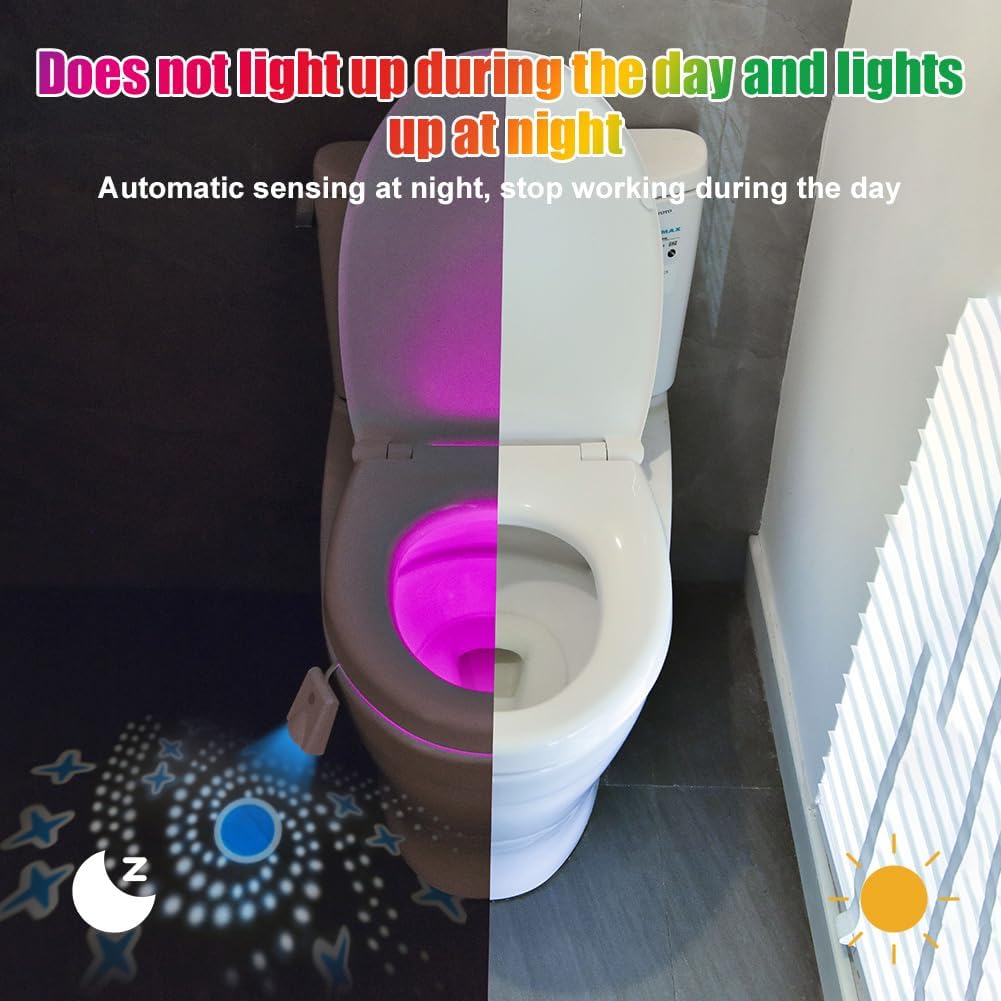
Figure 3: Automatic sensing at night, stops working during the day.
Color Selection and Projector Light
The device offers 16 different colors and a projector light feature:
- Color Gradient Mode: Upon initial activation, the night light will cycle through 16 colors in a gradient mode.
- Fixed Color Mode: To select a specific color, press the switch button briefly while the light is cycling through colors. The light will then remain on that color. Press the button again to cycle to the next color.
- Turn Off Light: To turn off the light, press the switch button three consecutive times.
- Projector Light Control: To turn the projector light on or off, press and hold the switch button for an extended period.

Figure 4: Turn on color light gradient and fixed color options.
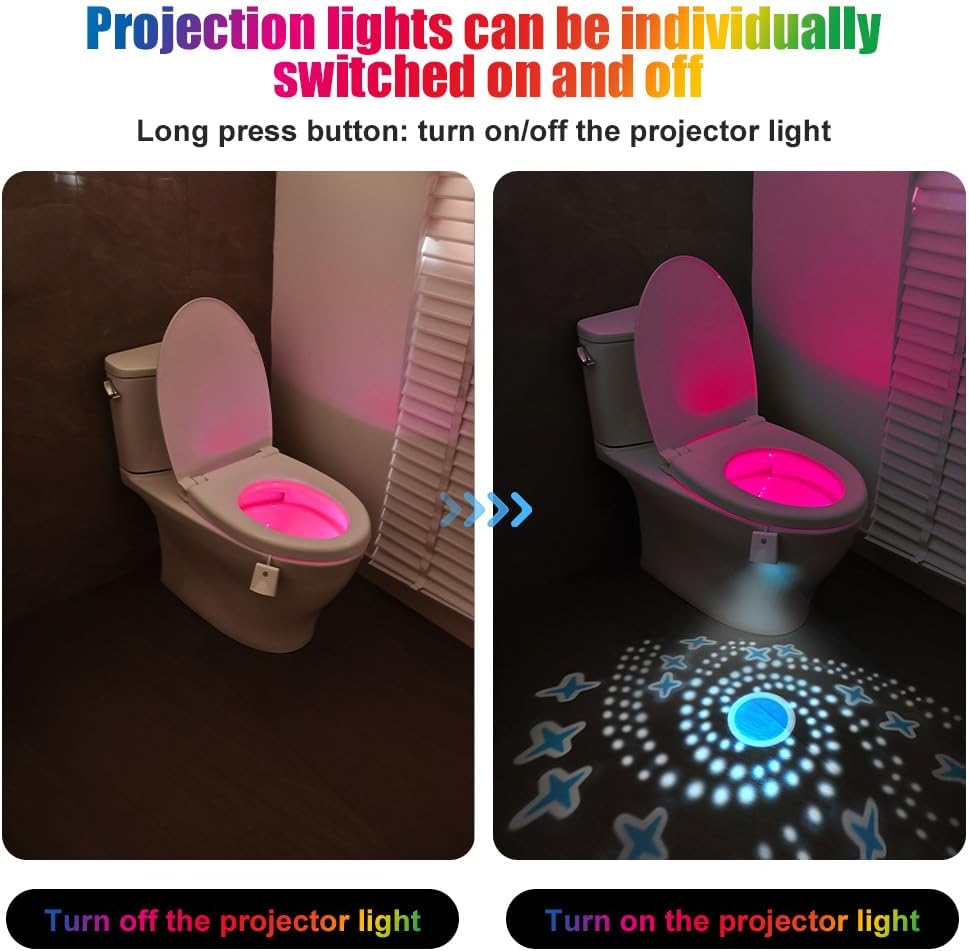
Figure 5: Projector lights can be individually switched on and off.
Charging
The HOTUT Toilet Night Light features a built-in 500 mAh lithium-polymer battery, eliminating the need for disposable batteries. A single charge can provide extended use.
- Connect the provided USB charging cable to the charging port on the device.
- Plug the other end of the USB cable into a standard USB power adapter (not included) or a computer USB port.
- The charging indicator light will glow red while the device is charging.
- Once fully charged, the indicator light will turn green.
- Disconnect the charging cable once charging is complete.
The battery life is approximately 60 days, depending on usage frequency.
Maintenance
To ensure optimal performance and longevity of your toilet night light, follow these maintenance guidelines:
- Cleaning: Wipe the device with a soft, damp cloth. Do not use abrasive cleaners or immerse the unit in water. Ensure the charging port is dry before charging.
- Storage: If not in use for an extended period, store the device in a cool, dry place.
- Battery Care: Recharge the battery regularly, even if not in frequent use, to maintain battery health.
Troubleshooting
| Problem | Possible Cause | Solution |
|---|---|---|
| Light does not turn on. | Battery is depleted. | Charge the device using the USB cable. |
| Light does not turn on in the dark. | Motion sensor is obstructed or faulty. | Ensure the sensor is clean and has a clear line of sight. If the issue persists, contact customer support. |
| Light stays on during the day. | Environment is not dark enough for sensor activation. | The light is designed to only activate in dark conditions. This is normal operation. |
| Colors are not changing or fixed. | Incorrect button press. | Briefly press the switch button to cycle through colors or select a fixed color. |
| Projector light is not working. | Projector light is turned off. | Press and hold the switch button to toggle the projector light on/off. |
Specifications
| Feature | Detail |
|---|---|
| Model Number | V7-230906MDD-FBA |
| Dimensions (L x W x H) | 10 x 6 x 3.6 cm |
| Weight | 56 Grams |
| Battery Type | 1 Lithium-polymer (included) |
| Battery Capacity | 500 mAh |
| Battery Life | Approx. 60 days |
| Material | Polystyrene, Acrylonitrile Butadiene Styrene (ABS), Polyvinyl Chloride (PVC), Polyethylene Terephthalate (PET) |
| Light Source | LED |
| Number of Colors | 16 |
| Special Features | Color Changing, Motion Detector, Projector |
| Power Source | Cable Electric (USB Rechargeable) |
| Voltage | 3.7 Volts |
| Luminosity | 150 lm |
Warranty and Support
This product is covered by a standard manufacturer's warranty. For specific warranty details, please refer to the product packaging or the retailer's policy where you purchased the item. If you encounter any issues or have questions not addressed in this manual, please contact HOTUT customer support through the retailer's platform or the official brand website for assistance.