
Introduction
This manual provides detailed instructions for the assembly, operation, and maintenance of your DICTAC Farmhouse 6-Drawer Dresser. Please read all instructions carefully before assembly and use to ensure safe and proper functionality. Keep this manual for future reference.
Video: Overview of the DICTAC Farmhouse Dresser with LED Light and Charging Station.
Product Features
- Smarter LED Light: Features over 60,000 color options, adjustable brightness, modes, and timing functions via a dedicated app or remote control. Lights flash through the metal mesh for dynamic ambiance.
- Integrated Charging Station: Equipped with 3 standard AC outlets and 2 USB ports, providing convenient power access for electronic devices. One USB port is integrated with the LED lighting system.
- Creative Farmhouse Design: Combines rustic farmhouse aesthetics with practical storage. Includes 2 sliding barn doors and 6 smooth-gliding drawers.
- Sliding Barn Doors: Two space-saving metal mesh doors operate on a smooth metal track, allowing flexible concealment or display of shelved items.
- Durable and Sturdy Construction: Constructed from engineered wood, offering long-term durability, scratch resistance, and stability. Each drawer supports up to 25 lbs, and the tabletop supports up to 100 lbs.
Specifications
- Dimensions: 15.7"D x 47.2"W x 33.8"H
- Number of Drawers: 6
- Material: Engineered Wood
- Color: Rustic Oak
- Weight Capacity (per drawer): 25 lbs
- Weight Capacity (tabletop): 100 lbs
- Assembly Required: Yes
- Product Care: Wipe with Dry Cloth
Package Contents
Please ensure all parts and hardware are present before beginning assembly. Refer to the included assembly diagram for a complete list of components.
Video: Assembly overview for a similar 6-drawer dresser with LED lights.
Assembly Instructions
Assembly is required for this dresser. Follow the steps below carefully. It is recommended to have two people for assembly.
- Prepare the Area: Clear a spacious, clean, and flat surface for assembly. Lay out all components and hardware, ensuring they are easily accessible.
- Assemble the Main Frame: Follow the detailed diagrams in the included paper manual to connect the side panels, bottom panel, and internal dividers using the provided cam locks, dowels, and screws. Ensure all connections are secure.
- Install Drawer Slides: Attach the drawer slides to the internal dividers and side panels of the dresser frame. Pay attention to the 'CL' (Cabinet Left) and 'CR' (Cabinet Right) markings to ensure correct orientation.
- Attach Back Panel: Secure the back panel to the dresser frame using the small nails or screws provided. Ensure the panel is flush with the frame for stability.
- Install LED Light Strip: Carefully peel the adhesive backing from the LED light strip and attach it to the designated area under the top shelf. Use the provided clips and screws to further secure the strip and manage the wiring.
- Install Charging Station: Insert the charging station into the pre-cut opening on the top panel. Secure it with the provided screws. Route the power cord through the designated cable management holes.
- Assemble Drawers: For each of the 6 drawers, assemble the side panels, front panel, and bottom panel. Attach the drawer slides to the sides of each drawer, ensuring correct 'DL' (Drawer Left) and 'DR' (Drawer Right) orientation. Install the drawer handles.
- Insert Drawers: Carefully slide each assembled drawer into its corresponding slot in the dresser frame.
Video: Detailed installation steps for a similar LED dresser.
Operating Instructions
LED Lighting System
- Power On/Off: Use the inline switch on the LED light strip cable or the remote control/app to turn the lights on or off.
- Color Selection: Access the dedicated mobile app or use the remote control to choose from over 60,000 colors.
- Brightness Adjustment: Adjust the light intensity to your preference using the app or remote.
- Mode Selection: Explore various lighting modes, including static colors, dynamic transitions, and music synchronization (if available via app).
- Timing Function: Set timers for the lights to automatically turn on or off at specified times.
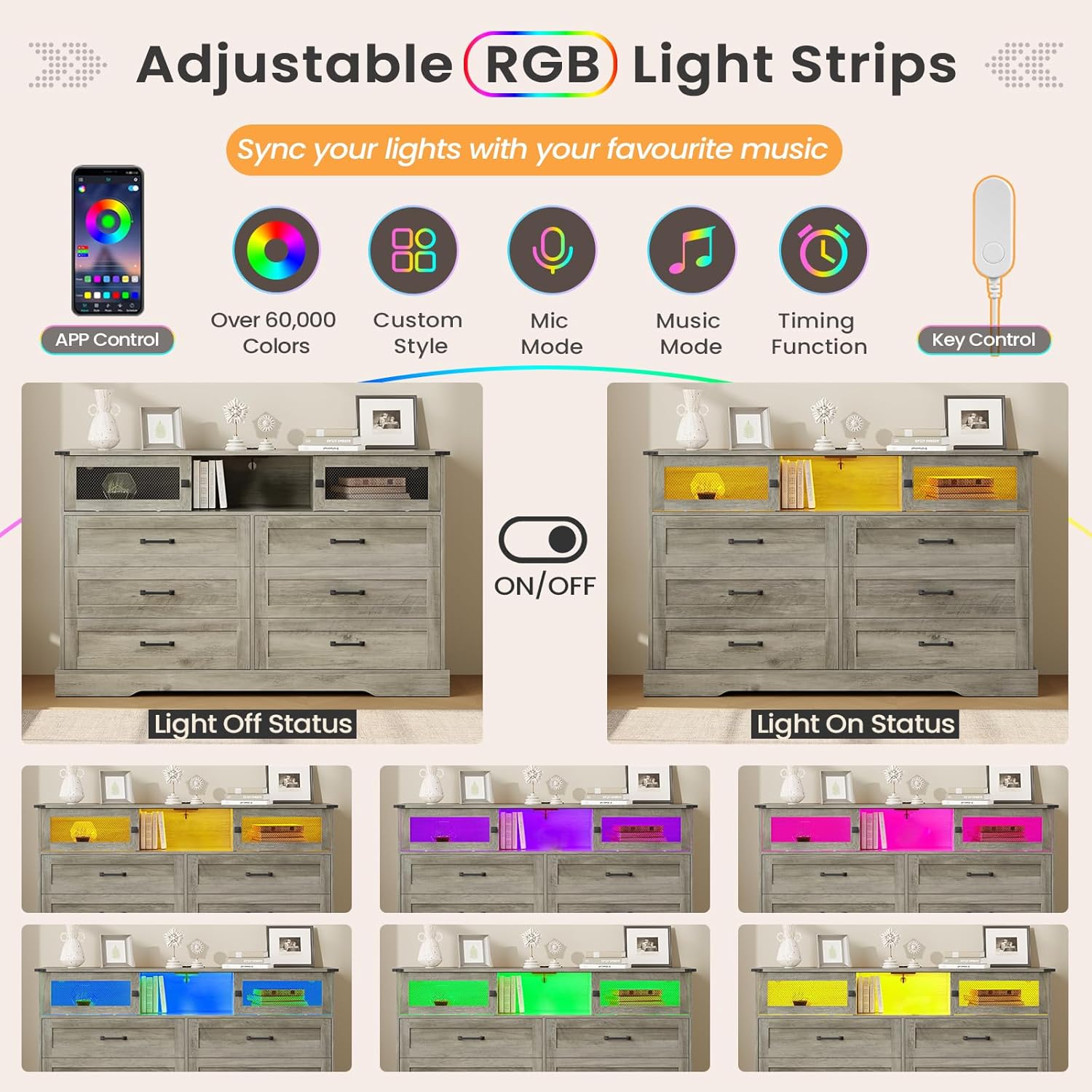
Image: Adjustable RGB light strips with various color options and control features.
Charging Station
- Connecting Devices: Plug your electronic devices into the 3 standard AC outlets or the 2 USB ports located on the top surface of the dresser.
- Power Source: Ensure the dresser's main power cord is securely plugged into a wall outlet to activate the charging station and LED lights.

Image: Built-in charging station with AC outlets and USB ports.
Care and Maintenance
- Cleaning: Wipe the dresser surfaces with a dry, soft cloth. Avoid using harsh chemicals or abrasive cleaners that may damage the finish.
- Spills: Immediately wipe up any spills with a dry cloth to prevent moisture damage.
- Sunlight Exposure: Avoid prolonged exposure to direct sunlight to prevent fading or discoloration of the wood finish.
- Heat and Moisture: Keep the dresser away from direct heat sources and areas of high humidity. Use coasters under hot or wet items placed on the tabletop.
- Drawer Maintenance: Periodically check the drawer slides for smooth operation. If needed, a small amount of silicone lubricant can be applied to the runners.
Troubleshooting
LED Lights Not Working
- Check Power Connection: Ensure the LED light strip's power cable is securely connected to the USB port and the dresser's main power cord is plugged into a functional wall outlet.
- Remote/App Check: Verify that the remote control has working batteries or that the mobile app is correctly paired and updated.
- Reset: Try unplugging the dresser from the wall outlet for a few minutes, then plug it back in to reset the system.
Charging Station Not Functioning
- Verify Power: Confirm the dresser's main power cord is plugged into a live wall outlet.
- Device Compatibility: Ensure your devices are compatible with the charging station's output specifications (e.g., 5V/2A for USB ports).
- Circuit Breaker: Check if the charging station has a built-in circuit breaker (if applicable) and reset it if tripped.
Drawers Stick or Don't Slide Smoothly
- Check Alignment: Ensure the drawer slides are correctly aligned and securely fastened to both the drawer and the dresser frame.
- Obstructions: Look for any objects or debris obstructing the drawer's path or the slides.
- Lubrication: Apply a small amount of silicone-based lubricant to the drawer runners to improve smoothness.
Warranty and Support
For warranty information or technical support, please refer to the contact details provided with your purchase documentation or visit the official DICTAC website. Keep your purchase receipt as proof of purchase.