
1. Introduction
Thank you for choosing the Zoofari ZTSK 800 A1 Cordless Pet Grooming Kit. This manual provides essential information for the safe and effective use, setup, operation, and maintenance of your grooming kit. Please read these instructions carefully before first use and keep them for future reference.
2. Safety Warnings
Please observe the following safety warnings to prevent injury or damage to the device:
- Keep the trimmer away from water sources and do not use it while charging.
- Follow the cleaning and maintenance instructions provided in this manual, using only the supplied cleaning tools and blade oil.
- Do not use the device on humans or non-pet animals. This device is specifically designed for pet grooming.
- Avoid looking directly at the cutting blades during operation to prevent eye injury.
- Ensure the device is switched off before attaching or removing comb attachments or cleaning the blades.
- Keep out of reach of children.
3. Package Contents
Carefully unpack all items and check for completeness. If any parts are missing or damaged, contact customer service.
- 1x Cordless Animal Clipper (Main Unit)
- 1x Paw Trimmer Attachment
- 1x Travel Case / Storage Bag
- 1x Power Adapter (Charger)
- 6x Comb Attachments (3, 6, 9, 12, 15, 18 mm)
- 1x Cleaning Brush
- 1x Scissors (Metal)
- 1x Comb (Metal, long)
- 1x Blade Oil
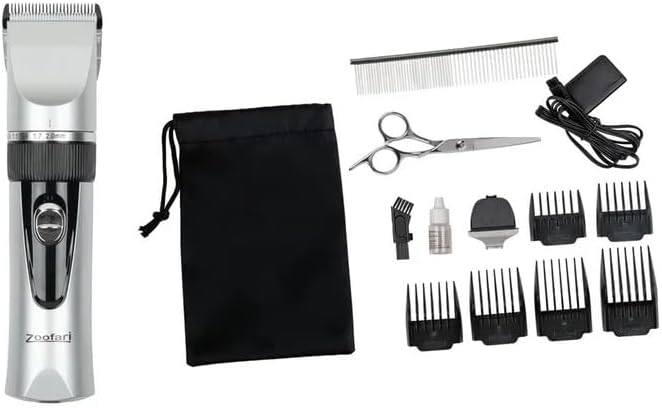
Image 1: Overview of the Zoofari ZTSK 800 A1 Pet Grooming Kit and its included accessories.
4. Product Features
The Zoofari ZTSK 800 A1 grooming kit is designed for efficient and comfortable pet grooming.
- Titanium-Coated Cutting Mechanism: Ensures a uniform cut.
- Ceramic Blades: Durable and sharp for effective grooming.
- 5-Position LED Indicator: Adjustable cutting lengths from 0.8 mm to 2.0 mm directly on the clipper.
- 6 Comb Attachments: Provides versatile cutting lengths of 3, 6, 9, 12, 15, and 18 mm.
- Extra Paw Trimmer: Specifically designed for smaller, delicate areas.
- Cordless Operation: Powered by a rechargeable Li-ion battery (800 mAh, 3.7 V).
- Universal Voltage Adapter: Compatible with 100-240 V~ power sources.
- Quick Charging: Approximately 90 minutes for a full charge.
- Long Operating Time: Up to 60 minutes of cordless operation on a full charge.
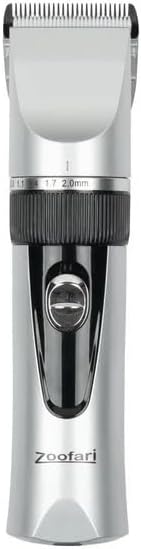
Image 2: Close-up view of the main clipper unit, highlighting the blade adjustment dial and LED indicator.

Image 3: The specialized paw trimmer attachment for precise grooming of small areas.
5. Setup
5.1 Charging the Clipper
- Ensure the clipper is switched off.
- Connect the power adapter to the charging port on the clipper.
- Plug the adapter into a suitable power outlet (100-240 V~).
- The LED indicator will show the charging status. A full charge takes approximately 90 minutes.
- Once fully charged, disconnect the adapter from the clipper and the power outlet.

Image 4: The universal power adapter used for charging the clipper.
5.2 Attaching Comb Attachments
- Ensure the clipper is switched off.
- Select the desired comb attachment (3, 6, 9, 12, 15, or 18 mm) based on the desired hair length.
- Align the comb attachment with the clipper head and slide it on until it clicks securely into place.
- To remove, gently push the comb attachment upwards and off the clipper head.
6. Operating Instructions
6.1 Preparing Your Pet
- Ensure your pet's fur is clean, dry, and free of tangles. Brush thoroughly before grooming.
- Familiarize your pet with the sound and vibration of the clipper before starting.
6.2 Basic Grooming with the Clipper
- Switch on the clipper using the power button.
- Adjust the blade length using the dial on the clipper (0.8 mm to 2.0 mm) if no comb attachment is used, or select the appropriate comb attachment.
- Hold the clipper firmly and move it against the direction of hair growth for an even cut.
- Use smooth, steady strokes. Do not press too hard against the pet's skin.
- Regularly clear accumulated hair from the blades and comb attachment during grooming.
- For sensitive areas, proceed with extra caution.
6.3 Using the Paw Trimmer
The paw trimmer attachment is ideal for delicate areas such as paws, ears, and around the eyes.
- Ensure the main clipper blade is removed and the paw trimmer attachment is securely in place.
- Switch on the clipper.
- Carefully trim the fur in small sections, being mindful of skin folds and sensitive areas.

Image 5: A dog being groomed with the Zoofari ZTSK 800 A1 clipper, demonstrating typical use.
7. Maintenance
Proper maintenance ensures the longevity and performance of your grooming kit.
7.1 Cleaning the Blades
- After each use, switch off the clipper and remove any comb attachment.
- Use the provided cleaning brush to remove loose hair from the blades and the clipper head.
- For thorough cleaning, the blade unit can be carefully detached (refer to specific instructions in the full manual if available).
7.2 Oiling the Blades
- After cleaning and before each use, apply 1-2 drops of the provided blade oil to the cutting blades.
- Switch on the clipper for a few seconds to distribute the oil evenly.
- Wipe off any excess oil with a soft cloth.

Image 6: The cleaning brush, blade oil, and scissors provided for maintenance and additional grooming tasks.
8. Troubleshooting
If you encounter issues with your Zoofari ZTSK 800 A1, refer to the following common solutions:
- Clipper not turning on: Ensure the battery is charged. Connect the charger and try again.
- Poor cutting performance:
- Check if blades are clean and free of hair.
- Apply blade oil as per maintenance instructions.
- Ensure the comb attachment is correctly seated.
- The battery might be low; recharge the clipper.
- Excessive noise or vibration: Ensure blades are clean and oiled. Check for any foreign objects caught in the blades.
If problems persist, contact customer support.
9. Specifications
| Feature | Specification |
|---|---|
| Model Name | Tierpflege-Set ZTSK 800 A1 |
| Operating Voltage | 3.7 V |
| Battery Type | Lithium-ion |
| Battery Capacity | 800 mAh |
| Universal Power Supply | 100-240 V AC |
| Charging Time | Approx. 90 min |
| Operating Time (full charge) | Approx. 60 min |
| Cutting Unit Material | Titanium coating, Steel alloy |
| Blade Material | Ceramic |
| Device Material | Plastic |
| Dimensions (Device) | Approx. 177.5 x 45 x 42 mm |
| Weight (Device with cutting unit) | Approx. 205 g |
10. Warranty and Support
This product comes with a standard manufacturer's warranty. Please refer to the warranty card included in your package for specific terms and conditions. For technical support, spare parts, or warranty claims, please contact the retailer or manufacturer's customer service using the contact information provided with your purchase.