
Introduction
Thank you for purchasing the KOCASO 61-Key Electronic Piano Keyboard, Model T2674. This manual provides essential information for the safe and effective use of your new instrument. Please read it thoroughly before operation and retain it for future reference.
This electronic keyboard is designed for beginners and features 61 keys, multiple tones, rhythms, percussion options, and learning functions. It includes a microphone, music stand, and keyboard stickers to enhance the learning experience.
Important Safety Instructions
- Read all instructions before using the product.
- Do not expose the keyboard to rain or moisture to prevent fire or electric shock.
- Ensure the power adapter voltage matches your local power supply.
- Keep the keyboard away from heat sources such as radiators, heat registers, stoves, or other apparatus (including amplifiers) that produce heat.
- Use only attachments/accessories specified by the manufacturer.
- Unplug the apparatus during lightning storms or when unused for long periods.
- Refer all servicing to qualified service personnel.
- This product is made of non-toxic, environmentally-friendly ABS plastic with smooth edges for safety.
Package Contents
Verify that all items are present in the package:
- KOCASO 61-Key Electronic Piano Keyboard
- Microphone
- Music Stand
- Keyboard Stickers
- USB Power Cable
- 110V Power Adapter
- User Manual (this document)

Image: The KOCASO 61-Key Electronic Piano Keyboard shown with its adjustable stand, included microphone, USB cable, and power adapter.
Setup
1. Power Supply
The keyboard offers multiple power supply methods:
- AC Adapter: Connect the provided 110V power adapter to the DC 9V input jack on the back of the keyboard and plug it into a standard wall outlet.
- USB Power: Connect the provided USB cable to the USB port on the keyboard and to a compatible USB power source (e.g., computer, power bank).
- Batteries: For portable use, the keyboard can be powered by 4 AA batteries (not included). Open the battery compartment on the underside of the keyboard and insert the batteries, observing correct polarity.
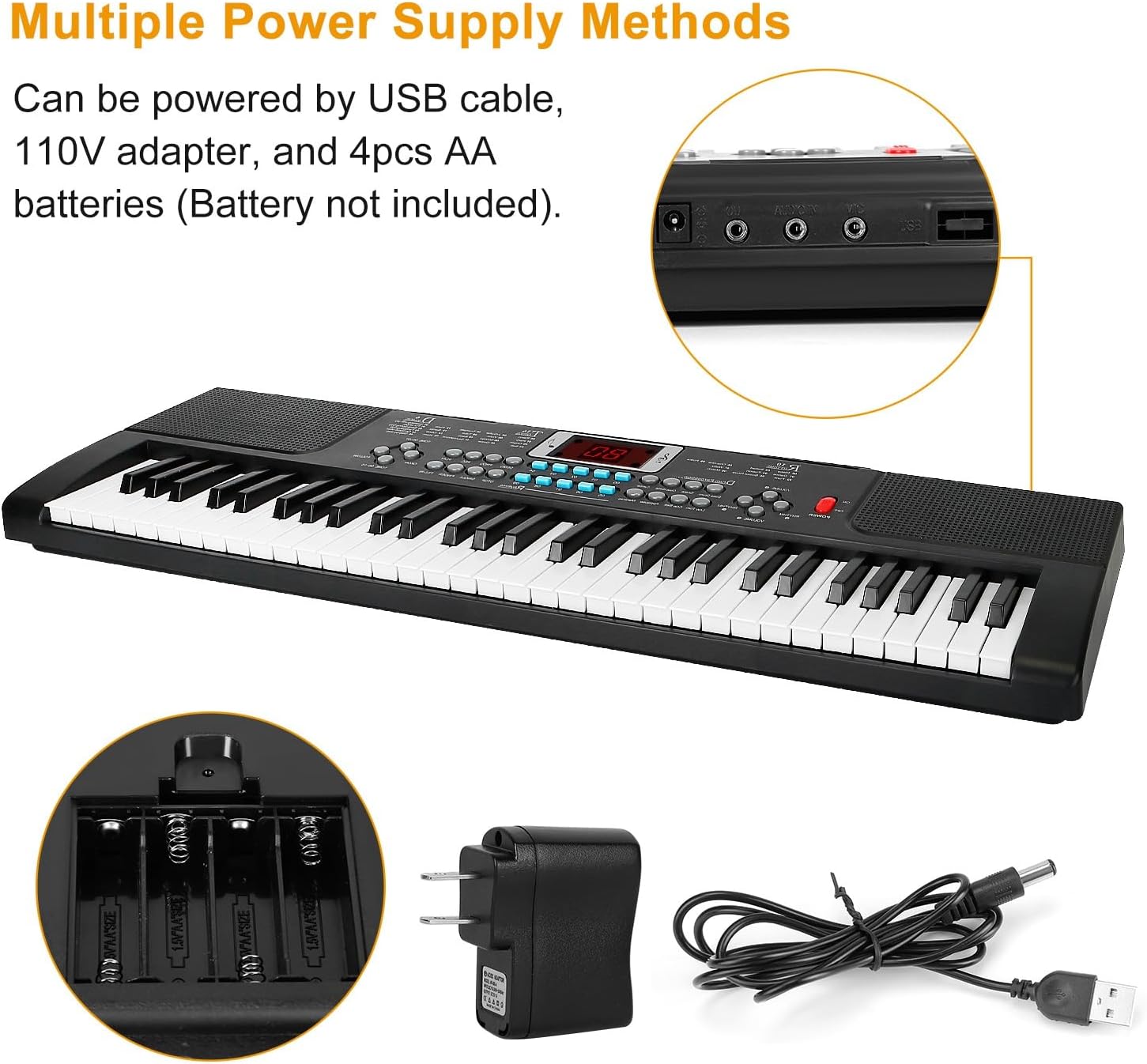
Image: The keyboard's power input options, including the DC 9V adapter port, USB port, and the battery compartment for 4 AA batteries.
2. Music Stand Installation
Insert the music stand into the designated slots on the top panel of the keyboard. This stand is used to hold sheet music or a tablet.
3. Microphone Connection
Plug the microphone into the 'MIC' input jack located on the back or side panel of the keyboard.
4. Keyboard Sticker Application
For beginners, the included keyboard stickers can be applied to the keys to help identify notes. Follow the instructions provided with the stickers for proper placement.
Operating Instructions
Control Panel Overview
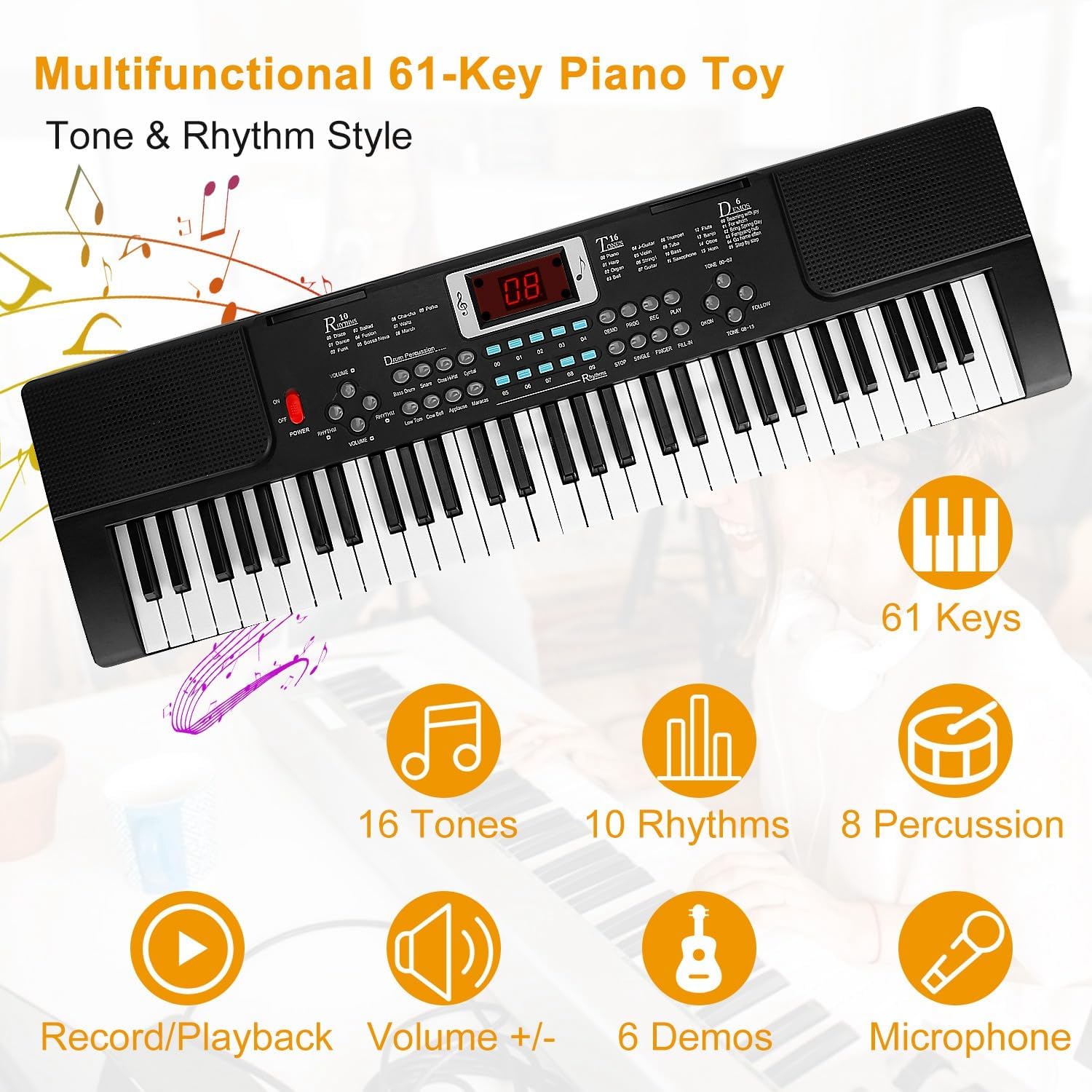
Image: A detailed diagram illustrating the various buttons and controls on the keyboard's main panel, including Power Switch, Volume, Tempo, Tones, Rhythms, Percussion, Demo, Record, Play, Program, Follow, One Key One Note, Insert, Finger, and Single.
Basic Functions
- Power On/Off: Press the POWER button to turn the keyboard on or off.
- Volume Adjustment: Use the VOLUME +/- buttons to increase or decrease the overall sound level.
- Tempo Adjustment: Use the TEMPO +/- buttons to adjust the speed of rhythms and demo songs.
Sound and Rhythm Selection
- Tones (16 options): Press the TONE button and then use the number keys (00-15) to select from 16 different instrument sounds.
- Rhythms (10 options): Press the RHYTHM button and then use the number keys (00-09) to select from 10 different rhythm patterns. Press STOP to end the rhythm.
- Percussion (8 options): Press the PERCUSSION buttons to play 8 different drum sounds directly.
Learning and Performance Features
- Demo Songs (6 options): Press the DEMO button to cycle through 6 pre-recorded demonstration songs.
- Recording and Playback:
- Press RECORD to begin recording your playing.
- Press PLAY to listen to your recorded performance.
- Learning Functions:
- Follow: Engages a mode where the keyboard waits for you to play the correct note in a melody.
- One Key One Note: Allows you to play a melody by pressing any key, focusing on rhythm.
- Microphone Usage: Once connected, the microphone allows you to sing along while playing. Adjust the microphone volume if available, or rely on the main volume control.

Image: A young user enjoying the 'Play & Sing' feature, demonstrating the use of the included microphone with the keyboard.
Maintenance
Cleaning
- Wipe the keyboard surface with a soft, dry cloth.
- For stubborn dirt, slightly dampen the cloth with water and a mild soap solution, then wipe dry immediately.
- Do not use abrasive cleaners, waxes, or solvents as they may damage the finish.
Storage
- Store the keyboard in a cool, dry place away from direct sunlight and extreme temperatures.
- If storing for an extended period, remove the batteries to prevent leakage.
- Keep the keyboard covered to protect it from dust.
Troubleshooting
| Problem | Possible Cause | Solution |
|---|---|---|
| No power | Power adapter not connected or faulty; batteries depleted or incorrectly inserted. | Check power adapter connection and wall outlet. Replace batteries or ensure correct polarity. |
| No sound | Volume too low; headphones connected; internal speaker issue. | Increase volume. Disconnect headphones. If problem persists, contact support. |
| Microphone not working | Microphone not properly connected; microphone faulty. | Ensure microphone is fully plugged into the 'MIC' jack. Test with another microphone if available. |
| Keys not responding | Keyboard mode issue; internal malfunction. | Try turning the keyboard off and on again. If specific keys are affected, contact support. |
Specifications
- Brand: KOCASO
- Model Name: T2674
- Number of Keys: 61
- Tones: 16
- Rhythms: 10
- Percussion: 8 Panel Percussions
- Demo Songs: 6
- Learning Functions: 2 (Follow, One Key One Note)
- Connectivity: USB Type B, Auxiliary (Headphones Jack)
- Power Source: Battery Powered (4x AA, not included), Corded Electric (110V Adapter, USB)
- Special Features: Portable, Recording, Microphone Input
- Dimensions: Approximately 21.26 x 6.69 x 1.97 inches (Keyboard only)
- Item Weight: Approximately 1.27 lbs (Keyboard only)
- UPC: 737547626157
Warranty and Support
For warranty information, please refer to the documentation included with your purchase or contact KOCASO customer service directly. Details regarding warranty periods and coverage are typically provided at the point of sale or on the manufacturer's official website.
If you encounter any issues not covered in the troubleshooting section or require further assistance, please contact KOCASO customer support. Contact information can usually be found on the product packaging or the official KOCASO website.