
Introduction
The Sharp PS-935 Party Speaker System is designed to deliver a rich, powerful audio experience with dynamic bass and vibrant LED lighting. This portable speaker features Bluetooth connectivity, a built-in battery for extended use, and a luggage-style handle with wheels for easy transport. This manual provides essential information for setting up, operating, and maintaining your speaker system.
Product Features
- Portable Design: Features a luggage-style handle and wheels for easy transport.
- Extended Battery Life: Enjoy up to 15 hours of music playback on a single charge.
- Super Bass Effect: Enhance low-frequency bass with the dedicated Super Bass button for a powerful sound.
- Dynamic LED Lights: Flashing LED lights with multiple modes and strobe effects create an engaging party atmosphere.
- Versatile Connectivity: Connect wirelessly via Bluetooth or use auxiliary input, USB, and FM radio options.
- True Wireless Stereo (TWS): Pair two PS-935 units for a wider stereo sound stage.
- Microphone Input: Includes a microphone for karaoke or announcements.
What's in the Box
Upon unpacking, ensure all items listed below are present:
- Sharp PS-935 Portable Speaker
- Microphone
- Power Cord
- User Manual (this document)
Setup
1. Powering On/Off
Locate the power button on the control panel. Press and hold the power button for a few seconds to turn the speaker ON or OFF. The LED display will illuminate upon power-on.
2. Charging the Speaker
Connect the provided power cord to the AC input on the speaker and plug the other end into a wall outlet. The battery indicator on the control panel will show charging status. The speaker can be used while charging.
3. Control Panel Overview
The main controls are located on the top panel of the speaker. Familiarize yourself with the buttons for power, mode selection, volume, bass, and light effects.

Image: Top control panel with various buttons for operation.
4. Input Ports
Various input ports are available for different audio sources and accessories.
- Microphone Input: Connect the included microphone or another compatible microphone.
- AUX Input: Use a 3.5mm audio cable to connect external devices.
- USB Port: Insert a USB drive with MP3 files for direct playback.
- AC Input: For connecting the power cord to charge the speaker.
Operating Instructions
1. Bluetooth Pairing
- Turn on the Sharp PS-935 speaker.
- Press the 'BT' button on the control panel to enter Bluetooth pairing mode. The LED display will show 'BT' and flash.
- Enable Bluetooth on your smartphone, tablet, or other audio device.
- Search for 'Sharp PS-935' in the list of available devices and select it to pair.
- Once successfully paired, the speaker will emit a confirmation tone, and 'BT' on the LED display will stop flashing.
2. Using Auxiliary (AUX) Input
Connect your external audio device (e.g., MP3 player, laptop) to the 'AUX' input port using a 3.5mm audio cable. The speaker will automatically switch to AUX mode, or you may need to select it via the 'Mode' button.
3. USB Playback
Insert a USB flash drive containing MP3 audio files into the 'USB' port. The speaker will automatically detect the USB drive and begin playing the music. Use the track control buttons on the control panel to navigate through songs.
4. FM Radio
Press the 'Mode' button to switch to FM radio mode. Use the track control buttons to scan for radio stations. For better reception, ensure the speaker is in an open area.
5. Microphone Usage
Plug the microphone into the 'MIC' input port. Adjust the microphone volume using the dedicated knob on the control panel. Ensure the microphone is switched ON if it has an independent power switch.
6. TWS (True Wireless Stereo) Mode
To achieve a true wireless stereo experience, you can pair two Sharp PS-935 speakers:
- Ensure both PS-935 speakers are powered ON and not connected to any Bluetooth device.
- On one speaker, press and hold the 'TWS' button until you hear a pairing tone. This speaker will become the primary unit.
- The primary speaker will automatically search for and connect to the secondary speaker. Once connected, you will hear a confirmation tone.
- Now, connect your audio device to the primary speaker via Bluetooth. Audio will play in stereo across both units.
7. LED Light Modes
Press the 'Light' button on the control panel to cycle through different LED light modes and patterns. The lights can flash with the music, display various colors, or be turned off completely.
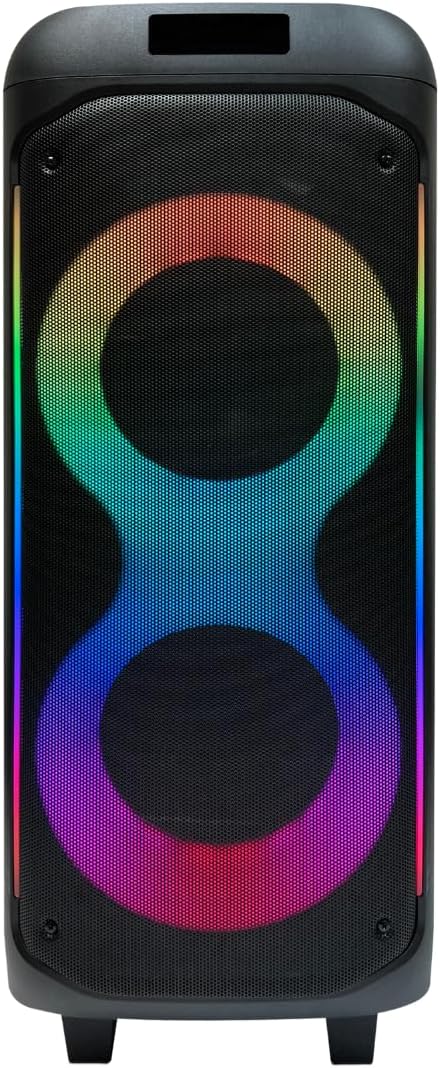
Image: Front view showcasing the vibrant LED light effects.

Image: Side view of the speaker with active LED lights.
Maintenance
1. Cleaning
Wipe the speaker's exterior with a soft, dry cloth. Do not use abrasive cleaners or solvents. Ensure all ports are free from dust and debris.
2. Battery Care
To prolong battery life, avoid fully discharging the speaker frequently. Charge the speaker regularly, even if not in use, to maintain battery health. Store in a cool, dry place.
Troubleshooting
- No Power: Ensure the speaker is fully charged or connected to a power source. Check the power button is pressed correctly.
- No Sound: Check the volume levels on both the speaker and your connected device. Ensure the correct input mode (Bluetooth, AUX, USB) is selected.
- Bluetooth Disconnection/Pairing Issues: Ensure the speaker is within the Bluetooth range (approx. 10 meters). Disconnect and re-pair the device. Turn off other Bluetooth devices to avoid interference.
- TWS Pairing Failure: Ensure both speakers are fully charged and not connected to any other Bluetooth devices before attempting TWS pairing.
- Distorted Sound: Reduce the volume on both the speaker and the connected device. Ensure audio files are not corrupted.
Specifications
| Model Number | PS-935 |
| Brand | Sharp |
| Power Source | Battery Powered (Built-in), AC Supply |
| Battery Life | Up to 15 hours |
| Connectivity | Bluetooth, AUX (3.5mm), USB, FM Radio |
| Microphone Input | Yes |
| Dimensions (L x W x H) | 12 x 10.6 x 27.5 inches |
| Weight | 18.73 pounds |
| Material | Metal, Plastic |

Image: Speaker base with wheels for easy transport.
Warranty and Support
For warranty information, technical support, or service inquiries, please refer to the official Sharp website or contact their customer service department. Keep your purchase receipt as proof of purchase.


