
buywoo BYO-Q20-BLK-01
buywoo Fabric Shaver Model BYO-Q20-BLK-01 Instruction Manual
1. Introduction
Thank you for choosing the buywoo Fabric Shaver. This electric lint remover is designed to efficiently remove lint, pilling, and fuzz from various fabrics, restoring their appearance. This manual provides essential information for the safe and effective use, maintenance, and troubleshooting of your device.

Image 1: The buywoo Fabric Shaver, showcasing its compact design and included extra blades.
2. Important Safety Instructions
- Read all instructions before using the appliance.
- Keep the device out of reach of children.
- Do not use the device on clothing while it is being worn.
- Ensure the fabric is laid flat on a hard, even surface before use.
- Avoid pressing too hard on the fabric to prevent damage.
- Do not immerse the device in water or any other liquid.
- Unplug the device before cleaning or when not in use.
- Do not operate the device if the blade cover is damaged or removed. The device features an automatic safety shut-off if the blade cover is opened.
- Use only the provided USB charging cable.
3. Package Contents
Verify that all items are included in your package:
- buywoo Fabric Shaver (Model BYO-Q20-BLK-01)
- USB Type-C Charging Cable
- Cleaning Brush
- Extra 6-blade cutter (2 units)
- Instruction Manual

Image 2: All items included in the buywoo Fabric Shaver package.
4. Product Overview
Familiarize yourself with the components of your buywoo Fabric Shaver:
- Protective Blade Cover: Ensures safety during storage and operation.
- Stainless Steel Mesh Cover: Protects fabrics while allowing lint to be cut.
- 6-Blade Cutter: Sharp blades for effective lint removal.
- Lint Container: Transparent compartment to collect removed lint.
- Power Button/Speed Control: Turns the device on/off and cycles through 3 speed settings.
- LED Display: Shows battery status and current speed setting.
- USB Type-C Charging Port: For recharging the internal battery.
Image 3: The main unit of the buywoo Fabric Shaver, highlighting key features.
5. Setup
5.1 Charging the Device
Before first use, fully charge your fabric shaver. The device features a built-in 2600mAh lithium battery.
- Connect the provided USB Type-C charging cable to the charging port on the device.
- Plug the other end of the USB cable into a compatible USB power adapter (not included) or a computer USB port.
- The LED display will indicate the charging status. A full charge takes approximately 1.5 hours and provides up to 60 minutes of continuous operation.

Image 4: The fabric shaver connected to a USB-C charging cable, showing the charging indicator on the LED screen.
6. Operating Instructions
6.1 Preparing the Fabric
Lay the garment or fabric flat on a clean, hard, and smooth surface. Ensure there are no wrinkles or folds that could be caught by the blades.
6.2 Powering On and Adjusting Speed
- Remove the protective blade cover.
- Press the power button once to turn on the device at the lowest speed setting. The LED display will show the current speed and battery level.
- Press the power button repeatedly to cycle through the 3 available speed settings (Low, Medium, High). Choose a speed appropriate for the fabric type.
- To turn off the device, press the power button until the display turns off, or hold it down for a few seconds.

Image 5: The fabric shaver's LED screen displaying different speed levels suitable for various fabric types like socks, sweaters, coats, bedding, and cloth furniture.
6.3 Removing Lint and Pilling
Gently glide the stainless steel mesh cover over the affected areas of the fabric. Use light, even pressure and move the device in circular motions or back and forth. Avoid excessive pressure to prevent damage.
Video 1: A short demonstration of the buywoo Fabric Shaver in action, effectively removing lint from fabric.
Video 2: A user demonstrating the effectiveness of the buywoo Fabric Shaver on a garment, highlighting its ease of use.
Video 3: A user showcasing the buywoo Fabric Shaver, demonstrating its ability to refresh fabrics by removing pills and fuzz.
Video 4: A user expressing satisfaction with the buywoo Fabric Shaver, demonstrating its performance on various fabrics.
7. Maintenance
7.1 Cleaning the Lint Container
For optimal performance, empty the lint container regularly, especially when it appears full.
- Ensure the device is turned off.
- Press the release button on the side of the lint container to detach it from the main body.
- Empty the collected lint into a waste bin.
- Reattach the lint container securely until it clicks into place.

Image 6: Instructions on how to remove, empty, and reattach the high-capacity lint container.
7.2 Cleaning the Blades and Mesh Cover
Periodically clean the blades and the inside of the mesh cover to maintain efficiency.
- Turn off the device and remove the lint container.
- Carefully twist the stainless steel mesh cover counter-clockwise to remove it.
- Gently remove the 6-blade cutter.
- Use the provided cleaning brush to remove any trapped lint or debris from the blades, the mesh cover, and the interior of the device.
- Reassemble the blade cutter, mesh cover, and lint container, ensuring all parts are securely fastened.
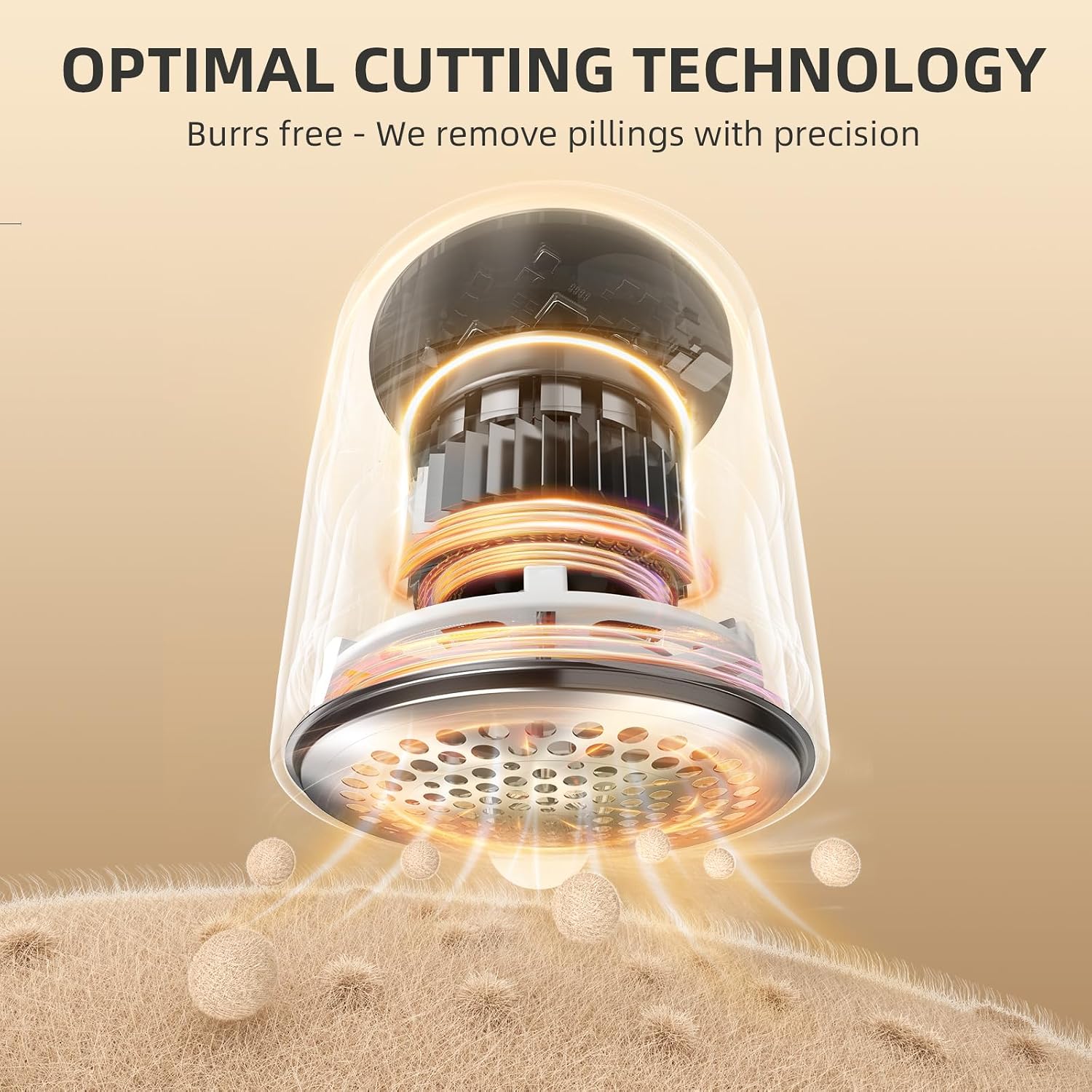
Image 7: An internal view of the buywoo Fabric Shaver, illustrating the 6-blade cutting mechanism and how lint is drawn into the container.
7.3 Replacing the Blades
If the device's performance decreases, the blades may need replacement. Your package includes two extra 6-blade cutters.
- Follow steps 1-3 from "7.2 Cleaning the Blades and Mesh Cover" to access the blade cutter.
- Carefully remove the old blade cutter and replace it with a new one.
- Reassemble the mesh cover and lint container.
8. Troubleshooting
| Problem | Possible Cause | Solution |
|---|---|---|
| Device does not turn on. | Battery is low or depleted. | Charge the device fully. |
| Blade cover or lint container not properly installed. | Ensure all parts are securely attached. The device has a safety lock. | |
| Ineffective lint removal. | Lint container is full. | Empty the lint container. |
| Blades are dull or clogged. | Clean the blades with the brush or replace them if dull. | |
| Mesh cover is clogged. | Remove and clean the mesh cover. | |
| Device stops during use. | Battery is low. | Recharge the device. |
| Lint container is full. | Empty the lint container. |
9. Specifications
- Brand: buywoo
- Model Number: BYO-Q20-BLK-01
- Material: Acrylonitrile Butadiene Styrene, Plastic
- Color: Black
- Product Dimensions: 2.48"D x 2.28"W x 6.06"H
- Item Weight: 8.2 ounces
- Operation Mode: Automatic
- Battery: 1 Lithium Polymer battery (included)
- Charging Time: Approximately 1.5 hours
- Operating Time: Up to 60 minutes continuous operation
- Speed Settings: 3 levels
10. Warranty and Support
For any questions, concerns, or support needs regarding your buywoo Fabric Shaver, please refer to the contact information provided with your purchase or visit the official buywoo store on Amazon. Keep your purchase receipt for warranty claims.
Amazon Store: Visit the buywoo Store
Ask a question about this manual
Ask about setup, troubleshooting, compatibility, parts, safety, or missing instructions. Manuals+ will review the question and use this page’s manual context to help answer it.